Top Use Cases for Integrating Azure DevOps and ServiceNow

A practical playbook for ITSM and DevOps teams on how the two systems work together, before you configure anything.
Before You Configure, Think About What You Actually Need
Integrating Azure DevOps and ServiceNow sounds straightforward until you realize that what your DevOps team calls a "bug" and what your service desk calls an "incident" may not be the same thing, trigger at the same time, or need the same fields synchronized.
Most integration projects run into trouble not because the tools are difficult, but because teams jump to configuration before mapping out how their workflows actually interact. This article walks through the most common real-world use cases for a ServiceNow Azure DevOps integration, so you can figure out which ones apply to your organization before you touch a single setting.
If you are looking for the step-by-step technical setup, visit the ZigiOps Azure DevOps ServiceNow integration page for the full documentation.
Why the Two Systems Need to Talk in the First Place
Development teams and ITSM teams use fundamentally different tools built around different mental models. Azure DevOps is built around delivery: sprints, pipelines, work items, backlogs. ServiceNow is built around service: incidents, problems, changes, SLAs.
In most enterprises, neither team has full visibility into what the other is doing. A developer marks a bug as resolved, but the ServiceNow incident stays open for another two days because no one updated it. An ITSM team creates an urgent incident, but the development team finds out about it through a Slack message, not an automated work item.
According to IT Revolution's expert panel discussion about DevOps and ITSM convergence, organizations that align development and IT operations tooling reduce mean time to resolution significantly and improve service quality metrics across the board. The operational gap between the two teams is not a people problem. It is a data flow problem.
The Three Workflows That Actually Matter
Most organizations benefit from a handful of core integration scenarios. Here is what they look like in practice, and what to think through before setting them up.
Use Case 1: Azure DevOps Issue Triggers a ServiceNow Incident
This is the most common starting point. A critical bug or production defect is identified in Azure DevOps, and the ITSM team needs to know about it immediately to manage customer impact, track SLA timelines, and coordinate the response.
The before state: A developer marks a work item as critical. Someone notices it, posts in a chat channel, and hopes the right service desk agent sees it. The incident gets created manually, often with incomplete information, twenty minutes later.
The after state: ZigiOps detects the new high-priority Azure DevOps work item and automatically creates a corresponding ServiceNow incident, pre-filled with the work item ID, description, severity, and a direct link back to the Azure DevOps record. Comments, status changes, and attachments sync in both directions without manual effort.
What to think through: Which work item types should trigger an incident? Not every bug needs a ServiceNow record. Define trigger conditions by priority, work item type, team, or area path before configuration. A well-scoped trigger is the difference between a useful integration and one that floods the service desk with noise.
Use Case 2: ServiceNow Incident Creates an Azure DevOps Bug
In many environments, the service desk discovers a problem before the development team is even aware of it. A customer reports an issue, an incident is raised in ServiceNow, and someone has to manually create a corresponding Azure DevOps bug and paste in the context.
The before state: A service desk agent writes up an incident. They copy key details into an email, send it to the dev team, and wait. The developer creates a bug with whatever information was included in the email, which is rarely complete.
The after state: When a ServiceNow incident meets defined criteria (priority level, category, assignment group), ZigiOps automatically creates an Azure DevOps bug enriched with the incident number, customer impact details, attachments, and full description. As development works the issue, resolution updates flow back to ServiceNow, keeping the service desk informed without chasing anyone.
What to think through: Not every incident warrants a development work item. Define which incident categories, priorities, or assignment groups should trigger bug creation. Also decide which team owns the master record when the same field is updated in both systems simultaneously.
Use Case 3: Azure DevOps Pipeline Activity Triggers ServiceNow Change Requests
For organizations following ITIL practices, production deployments require formal change management. According to Microsoft's documentation on ServiceNow integration with Azure Pipelines, incorporating ServiceNow change management into Azure Pipelines helps enforce service management methodologies and reduce deployment risk.
The before state: A deployment is ready. Someone manually creates a ServiceNow change request, fills in the deployment details, waits for approval, then manually updates the pipeline. If the change request is not created or updated correctly, the audit trail is incomplete.
The after state: ZigiOps detects deployment activity in Azure DevOps and automatically creates a ServiceNow Change Request with deployment details, risk assessment notes, and planned implementation windows. Approval status updates sync back to Azure DevOps, and deployment outcomes are recorded in the change record automatically.
What to think through: Change management workflows tend to be highly specific to each organization. Map your existing process before configuration. Understand which deployment types require a change request, what approval steps are mandatory, and how urgency affects the process.
Use Case Comparison at a Glance
| Use Case | Trigger System | Target System | Primary Benefit |
|---|---|---|---|
| Dev bug triggers ITSM incident | Azure DevOps | ServiceNow | Faster incident awareness |
| ITSM incident triggers dev bug | ServiceNow | Azure DevOps | Complete dev context from day one |
| Deployment triggers change request | Azure DevOps Pipelines | ServiceNow | ITIL compliance, audit trail |
What to Map Before You Start
Before selecting a tool or starting configuration, align with both your DevOps and ITSM leads on the following:
• Which workflows cross team boundaries most often, and which cause the most manual work?
• What are the trigger conditions for each scenario? Priority threshold, work item type, category, assignment group?
• Which team's system is the authoritative record for each data type?
• How should conflicts be handled when the same field is updated in both systems?
• What data should not be synchronized? Sensitive fields, internal notes, test records.
• What does success look like at 30, 60, and 90 days post-deployment?
Getting alignment on these questions costs an hour of planning and saves weeks of troubleshooting later.
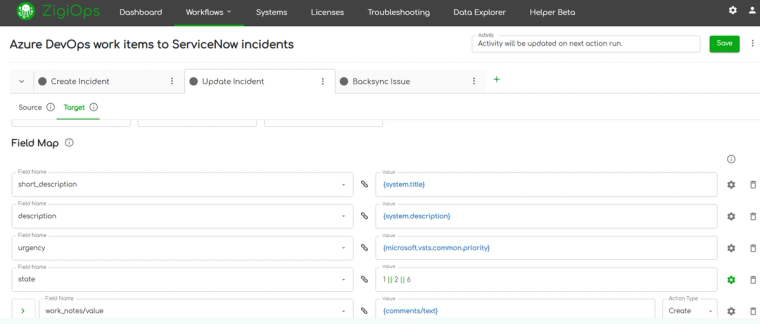
How ZigiOps Supports These Use Cases Without Code
ZigiOps is a 100% code-free, standalone integration platform built for enterprise environments. It is not a plugin, which means no changes are required inside ServiceNow or Azure DevOps. It connects to both systems via secure APIs and manages all data transformation, field mapping, and correlation logic through a guided UI.
Key capabilities relevant to the use cases above:
• Two-way sync: Comments, attachments, status updates, and custom fields flow in both directions in real time.
• Trigger conditions: You define exactly which records trigger integration actions, so only the right data moves between systems.
• No data storage: ZigiOps processes data in memory and never stores customer data on its servers.
• ISO 27001 certified: Enterprise-grade security compliance built into the platform architecture.
• Unlimited transactions: No per-transaction pricing or caps that penalize high-volume environments.
The platform includes pre-built templates for all three use cases described above. Templates serve as a starting point that can be tailored to your specific field mappings, workflow states, and organizational naming conventions. You can explore all available options on the Azure DevOps integrations page and the ServiceNow integrations page.
Ready to See How It Works?
Once you have mapped your workflows and decided which use cases to start with, setup in ZigiOps typically takes under an hour. The full technical configuration guide is available in the ZigiOps documentation.
For a full overview of integration capabilities, visit the ServiceNow Azure DevOps integration page. Or book a demo and we will walk through your specific scenario together.
Frequently asked questions
What are the most common Azure DevOps ServiceNow integration use cases?
The three most common use cases are: automatically creating a ServiceNow incident when a critical Azure DevOps bug is identified, automatically creating an Azure DevOps work item when a ServiceNow incident meets defined criteria, and triggering ServiceNow change requests from Azure DevOps pipeline activity. Each addresses a specific cross-team workflow gap between DevOps and ITSM operations.
Do I need to define workflows before setting up an Azure DevOps ServiceNow integration?
Yes. Understanding which workflows cross team boundaries, what trigger conditions apply, and which system holds the authoritative record for each data type will directly determine how you configure the integration. Skipping this step is one of the most common reasons integration projects require rework after deployment.
Is ZigiOps suitable for enterprise-scale ServiceNow Azure DevOps integration?
ZigiOps is designed for enterprise environments. It supports unlimited transactions, two-way sync, custom field mapping, and ISO 27001 certified security with a zero-data-storage architecture. It operates as a standalone platform, meaning no changes are required inside either ServiceNow or Azure DevOps.