Best Salesforce Integration Tools for ITSM Teams 2026
Salesforce integration tools for ITSM teams
Best Salesforce Integration Tools for ITSM Teams 2026
For ITSM teams, the relationship between customer relationship management and IT service delivery has never been more critical. Salesforce sits at the heart of customer data for thousands of enterprises worldwide, while ITSM platforms like ServiceNow, Jira, and BMC Remedy manage the operational backbone of IT service delivery. When these systems operate in silos, the consequences are significant: duplicated data, slow incident response, misaligned priorities, and frustrated customers.
The right Salesforce integration tools eliminate these silos by creating seamless, automated data flows between Salesforce and your ITSM stack. In 2026, the market for these tools has matured considerably, with no-code platforms, AI-assisted mapping, and real-time bidirectional sync now becoming table stakes rather than premium features.
This guide evaluates the leading Salesforce integration tools available to ITSM teams, breaks down key use cases, and provides a clear framework for selecting the platform that best fits your organization's complexity, budget, and technical resources.
"Integrating CRM and IT infrastructure optimizes customer interactions and internal standardization."
— ResearchGate, Integrating IT Service Management and Customer Relationship Management Systems
Why ITSM Teams Need Salesforce Integration Tools
ITSM teams are under constant pressure to reduce resolution times, improve SLA compliance, and maintain clear communication with business stakeholders. Salesforce holds a wealth of customer context — account history, open cases, contract details, and escalation records — that ITSM platforms desperately need to prioritize and route work correctly.
Without proper Salesforce integration tools, IT engineers are forced to manually look up customer records, switch between systems dozens of times per shift, and risk acting on outdated information. This operational friction drives up costs and degrades service quality at exactly the moment customers need reliable support.
The business case for integration is clear and measurable. Organizations that implement robust Salesforce integration tools for their ITSM workflows report:
— Reduction in manual data entry by up to 70%
— Faster incident triage through automatic case context enrichment
— Improved SLA compliance through real-time status synchronization
— Elimination of duplicate records across CRM and ITSM systems
— Greater alignment between sales, support, and IT operations teams
You can explore a full library of documented outcomes in the ZigiWave Salesforce integration use cases resource center, which covers scenarios ranging from incident management synchronization to change request automation.
What to Look for in Salesforce Integration Tools in 2026
The market for Salesforce integration tools spans everything from lightweight point-to-point connectors to enterprise-grade integration platforms as a service (iPaaS). For ITSM teams specifically, several capabilities separate adequate tools from excellent ones.
Bidirectional Data Synchronization
One-way data pushes are insufficient for most ITSM workflows. When a technician updates an incident status in ServiceNow or Jira, that change must be reflected immediately in Salesforce — and vice versa. Look for Salesforce integration tools that support fully configurable bidirectional sync with conflict resolution logic built in.
No-Code or Low-Code Configuration
IT teams rarely have dedicated integration developers on staff. The best Salesforce integration tools in 2026 offer visual configuration interfaces that allow administrators — not just developers — to map fields, define triggers, and manage workflows without writing custom code. This dramatically reduces time-to-value and lowers the total cost of ownership.
Real-Time Sync vs. Scheduled Batch Processing
For incident management and SLA-sensitive workflows, real-time synchronization is non-negotiable. Batch-based processing introduces latency that can cause SLA breaches and leave agents working from stale data. Evaluate whether the integration tool supports event-driven triggers or relies solely on polling intervals.
Pre-Built Connectors and Customization Depth
Pre-built connectors accelerate deployment, but ITSM environments are rarely standard. The best Salesforce integration tools offer pre-configured templates for common ITSM platforms while also exposing enough configuration depth to handle custom fields, non-standard workflows, and organization-specific data models.
Security, Compliance, and Data Residency
Enterprise ITSM teams operate in regulated environments. Any Salesforce integration tool under consideration must support OAuth 2.0 authentication, encrypted data in transit and at rest, role-based access controls, and audit logging. Data residency requirements are increasingly important for organizations operating under GDPR, HIPAA, or SOC 2 frameworks.
Monitoring, Alerting, and Error Handling
Integration pipelines will encounter errors. The question is how quickly you detect and resolve them. Leading Salesforce integration tools include built-in dashboards for monitoring sync activity, configurable alerting for failed records, and automatic retry logic to prevent data loss when downstream systems are temporarily unavailable.
Top Salesforce Integration Tools for ITSM Teams in 2026
The following platforms represent the most widely adopted and capable Salesforce integration tools evaluated specifically for ITSM use cases. Each has distinct strengths, and the right choice depends on your existing toolchain, internal technical resources, and integration complexity.
1. ZigiOps by ZigiWave
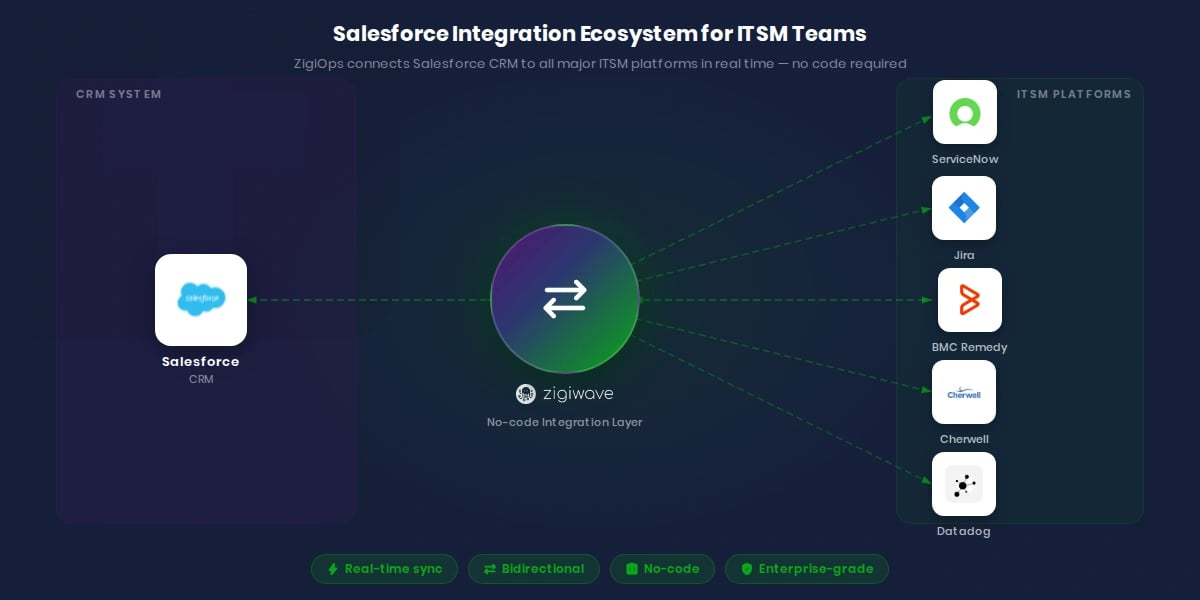
ZigiOps is a no-code enterprise integration platform purpose-built for IT operations teams. It specializes in connecting Salesforce with ITSM platforms including ServiceNow, Jira, BMC Remedy, Cherwell, and more — without requiring custom development or middleware. You can review the full connector catalog on the ZigiWave Salesforce integrations page.
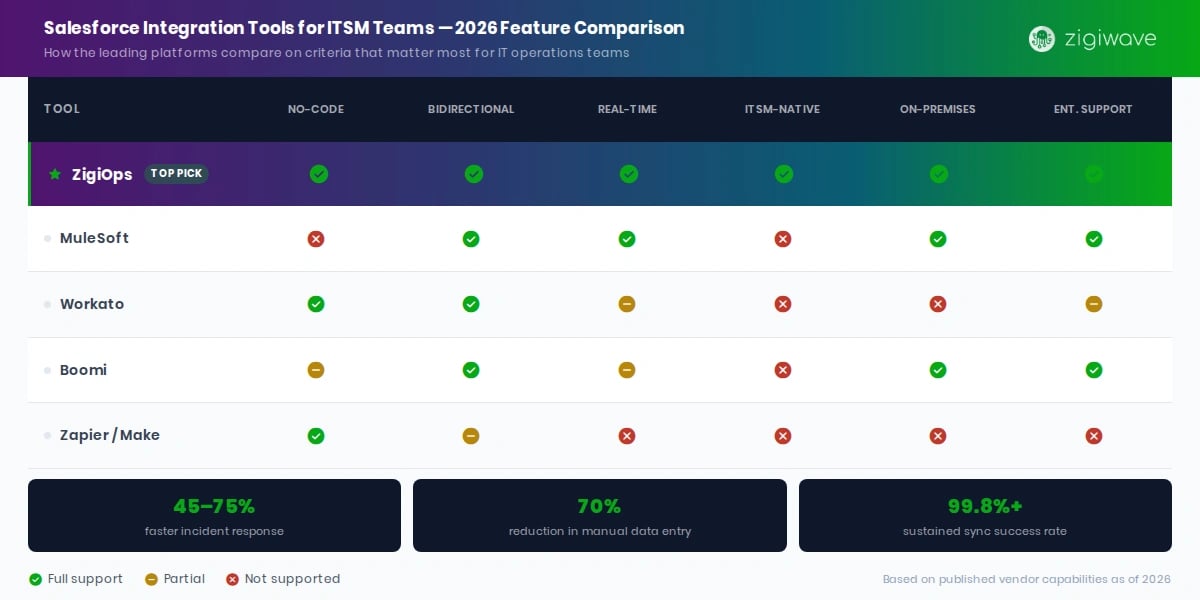
ZigiOps operates on a fully configurable, bidirectional sync model with real-time event-driven triggers. IT administrators can configure complex field mappings, conditional logic, and data transformation rules through a visual interface — no API coding required. This makes it one of the few genuinely no-code Salesforce integration tools capable of handling enterprise-scale ITSM workflows.
Key capabilities relevant to ITSM teams include:
— Bidirectional incident and case synchronization between Salesforce and ServiceNow
— Real-time ticket creation in Jira from Salesforce cases, with full field mapping
— Automated priority escalation based on Salesforce account tier or contract value
— Custom webhook support for event-driven workflows
— On-premises and cloud deployment options for regulated industries
— Comprehensive audit logs for compliance and change tracking
ZigiOps is particularly well-suited for organizations that need deep customization without dedicated integration development resources. Its template library covers the most common ITSM-CRM integration patterns, and its support team provides hands-on onboarding assistance.
2. MuleSoft Anypoint Platform
MuleSoft, now part of the Salesforce ecosystem, is one of the most powerful iPaaS platforms available. It offers extensive connectivity options and a rich developer toolset for building complex integration flows. For ITSM teams with dedicated integration architects or development resources, MuleSoft provides unmatched flexibility.
The tradeoff is complexity and cost. MuleSoft requires significant expertise to configure and maintain, and its licensing structure places it firmly in the enterprise budget tier. It functions well as one of several Salesforce integration tools in large organizations where integration is managed by a dedicated platform engineering team.
3. Workato
Workato positions itself as an enterprise automation platform with strong pre-built recipe libraries for Salesforce and common ITSM platforms. Its low-code interface appeals to operations teams and business analysts who need to build integration workflows without deep technical expertise.
Workato's strength is in automating multi-step processes that span several systems simultaneously. However, its depth of customization for ITSM-specific field mappings and real-time sync performance can be limiting for organizations with complex data models or high-volume incident processing requirements.
4. Boomi
Boomi by Dell Technologies is a mature iPaaS platform with broad connector support and a strong presence in regulated industries. Its Salesforce connector supports both REST and SOAP APIs, and its low-code flow designer enables moderately complex integration scenarios without full development cycles.
For ITSM teams already invested in the Boomi ecosystem for other integrations, it is a practical option for Salesforce connectivity. Organizations starting from scratch, however, may find ZigiOps or similar ITSM-focused platforms faster to deploy and easier to maintain.
5. Zapier and Make (Formerly Integromat)
Zapier and Make serve smaller ITSM environments with straightforward integration needs. Both platforms offer Salesforce connectors and support basic triggers and actions across popular ITSM tools. They are suitable for teams managing low volumes of incidents and cases where real-time sync is less critical.
Neither platform is recommended for enterprise ITSM environments where data volume, latency requirements, security controls, and custom field complexity exceed what consumer-grade automation tools can reliably handle.
"Integration complexity remains the primary roadblock to digital initiative acceleration, affecting nearly 60% of modern enterprise architectures. By pivoting toward low-code and no-code integration architectures, forward-looking IT organizations are shrinking deployment timelines from months to weeks."
— Gartner, Research on Enterprise Integration
Salesforce ServiceNow Integration: The Most Critical ITSM Connection
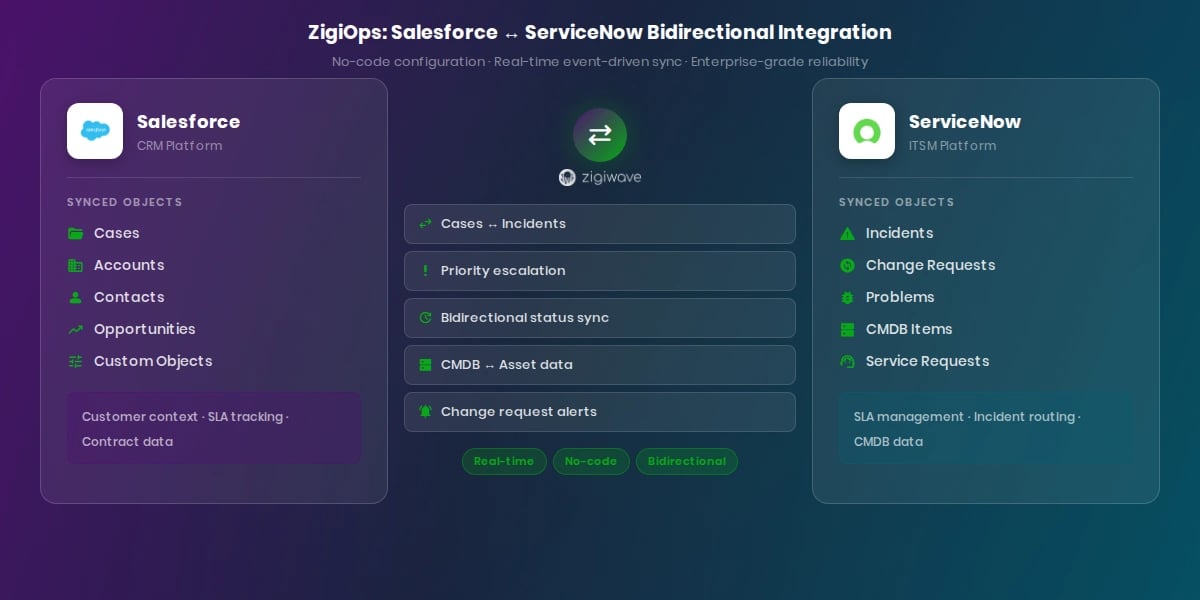
Of all the Salesforce integration tools use cases in the ITSM space, Salesforce ServiceNow integration is consistently the highest priority. ServiceNow dominates the enterprise ITSM market, and Salesforce dominates enterprise CRM. When these two platforms share data in real time, the operational benefits for IT support, incident management, and customer service teams are immediate and measurable.
The core challenge of Salesforce ServiceNow integration is reconciling fundamentally different data models. ServiceNow structures data around configuration items (CIs), incident tables, and change records. Salesforce structures data around accounts, contacts, cases, and opportunities. An effective integration layer must translate between these models dynamically, without manual intervention.
Key Use Cases for Salesforce ServiceNow Integration
The most commonly implemented Salesforce ServiceNow integration workflows include:
— Incident-to-case synchronization: When a ServiceNow incident is raised, a corresponding Salesforce case is created automatically with full customer context pulled from the CRM.
— Priority escalation automation: High-value accounts in Salesforce trigger automatic priority escalation in ServiceNow incidents, ensuring SLA commitments for premium customers are met without manual intervention.
— Status updates across systems: When an incident is resolved in ServiceNow, the linked Salesforce case is updated automatically, and account managers receive instant notification without logging into ServiceNow.
— Change request awareness: Planned changes in ServiceNow are surfaced in Salesforce so that account managers can proactively inform customers before maintenance windows occur.
— CMDB-to-asset visibility: ServiceNow CMDB records for customer-owned assets are linked to Salesforce account records, giving support agents full infrastructure context during case handling.
ZigiOps provides one of the most configurable and reliable Salesforce ServiceNow integration solutions available without requiring custom API development. You can explore the full capabilities on the ZigiWave Salesforce ServiceNow integration page.
The ServiceNow Integration Hub documentation outlines the platform's native integration capabilities, which ZigiOps extends and simplifies significantly for organizations that lack dedicated ServiceNow developers.
Salesforce Jira Integration: Connecting CRM to Dev and IT Ops
While Salesforce ServiceNow integration addresses classic ITSM workflows, Salesforce Jira integration has become equally important as DevOps and IT operations teams converge. Jira Software and Jira Service Management are used by millions of IT teams to track incidents, manage change requests, and coordinate software delivery. Connecting these workflows to Salesforce customer data creates a powerful feedback loop between customer impact and operational response.
What Salesforce Jira Integration Enables for ITSM Teams
A well-configured Salesforce Jira integration unlocks several high-value workflows for ITSM teams:
— Customer-linked bug tracking: When a Salesforce case identifies a product defect, a Jira issue is automatically created and linked to the originating account, keeping developers informed of customer impact without manual handoffs.
— SLA-aware ticket prioritization: Jira tickets linked to high-SLA Salesforce accounts are automatically flagged for priority handling, ensuring that customer commitments drive operational prioritization.
— Bidirectional status updates: Development progress in Jira is reflected in real time on Salesforce cases, allowing support agents to give customers accurate resolution timelines without chasing engineers for updates.
— Escalation path automation: When a Salesforce case meets defined escalation criteria — such as breach of SLA or high account value — a Jira incident is automatically generated and assigned to the appropriate IT operations team.
The Atlassian integration documentation outlines Jira's native connectivity options, but most enterprise ITSM teams require more robust bidirectional sync and custom field mapping than native options provide.
ZigiOps offers a purpose-built Salesforce Jira integration that handles complex bidirectional workflows with no custom development. Review the specific capabilities and configuration options on the ZigiWave Jira Salesforce integration page.
"Organizations using Jira Service Management alongside a CRM integration layer resolve customer-impacting incidents 40% faster than those managing the two systems independently."
— Atlassian, ITSM and Service Request Management Research
ZigiOps Deep Dive: The No-Code Advantage for ITSM Teams
Among all available Salesforce integration tools, ZigiOps occupies a unique position: it is one of the few platforms that combines enterprise-grade integration depth with genuine no-code accessibility. This distinction matters enormously for ITSM teams that cannot afford to wait months for integration development cycles or pay for dedicated iPaaS engineers.
How ZigiOps Works
ZigiOps operates on a connector-based architecture. Each connector wraps the APIs of a target system — Salesforce, ServiceNow, Jira, BMC, and others — and exposes its data objects, fields, and events through a unified visual interface. Integration administrators select the source system, choose the trigger event (such as a new Salesforce case or an updated ServiceNow incident), and define the field mapping to the destination system.
Conditional logic, data transformation, and filtering rules are configured through a point-and-click interface rather than code. The result is an integration pipeline that can be deployed in hours rather than weeks, with full auditability and the ability to modify configurations as business requirements evolve.
Why ITSM Teams Choose ZigiOps Over Generic iPaaS Platforms
Generic iPaaS platforms like MuleSoft or Boomi are powerful, but they are designed for use by integration specialists. ZigiOps is designed specifically for IT operations environments, where the people configuring integrations are ITSM administrators, not software engineers.
The ITSM-specific design manifests in several practical ways:
— Pre-built integration templates for the most common Salesforce-to-ITSM workflows reduce configuration time to hours, not weeks
— Native understanding of ITSM data objects such as incidents, change requests, problems, and CIs
— On-premises deployment option for organizations with strict data residency or security requirements
— Dedicated onboarding and support from integration specialists familiar with both Salesforce and ITSM platforms
— Scalable architecture capable of handling high-volume data sync without performance degradation
For a broader view of all available integration options, visit the ZigiWave integrations catalog, which covers dozens of ITSM, DevOps, and monitoring platform connections.
How to Evaluate Salesforce Integration Tools for Your ITSM Environment
Selecting the right Salesforce integration tools requires a structured evaluation process. The following framework helps ITSM leaders assess candidates against their specific operational requirements.
Step 1: Define Your Integration Scope
Before evaluating tools, document exactly what you need to integrate. Which Salesforce objects — cases, accounts, contacts, custom objects — need to sync with which ITSM platform objects? What are your volume requirements? How many records per hour do you expect to process? What is your acceptable latency threshold for incident synchronization?
Step 2: Assess Your Internal Technical Resources
Be honest about who will configure and maintain your integrations. If you have dedicated integration engineers, a platform like MuleSoft may offer the flexibility you need. If your team consists of ITSM administrators without development backgrounds, a no-code platform like ZigiOps will deliver faster time-to-value and lower long-term maintenance burden.
Step 3: Evaluate Security and Compliance Fit
Request detailed documentation on data handling, encryption standards, authentication mechanisms, and audit log capabilities from any vendor under consideration. Verify that the platform's deployment model — cloud, on-premises, or hybrid — matches your organization's compliance requirements.
Step 4: Test with Real ITSM Workflows
Do not evaluate Salesforce integration tools using demo data alone. Request a proof of concept with your actual Salesforce environment and your live ITSM platform. Test edge cases: custom fields, conditional logic, high-volume record processing, and error recovery behavior. The performance difference between tools becomes most visible under realistic operating conditions.
Step 5: Calculate Total Cost of Ownership
The licensing cost of Salesforce integration tools is rarely the largest component of total cost. Factor in implementation time, internal resource requirements, ongoing maintenance, vendor support quality, and the cost of integration failures. A lower-priced platform that requires significant internal development effort may cost substantially more over three years than a higher-priced no-code alternative.
Step 6: Evaluate Vendor Support and Roadmap
ITSM environments evolve constantly. Salesforce releases major updates three times per year, and ITSM platforms like ServiceNow and Jira follow similar release cadences. Your integration vendor must have a demonstrated track record of keeping connectors current with platform updates and a clear roadmap for supporting future capabilities.
"Organizations that treat integration as a strategic capability rather than a one-time project achieve 2.5x better ROI from their ITSM investments over a five-year horizon."
— Gartner, Integration Strategy and Technology Insights
Common Pitfalls When Implementing Salesforce Integration Tools
Even well-planned implementations of Salesforce integration tools can fail if common pitfalls are not anticipated and addressed during the project planning phase.
Underestimating Data Quality Issues
Integration surfaces data quality problems that were previously hidden in siloed systems. Duplicate records, inconsistent naming conventions, and missing required fields in Salesforce or your ITSM platform will cause sync failures from day one. Conduct a data quality audit before beginning any integration project, not after.
Over-Engineering the Initial Scope
The temptation to integrate everything at once leads to delayed deployments and complex configurations that are difficult to troubleshoot. Start with the highest-value workflow — typically incident-to-case synchronization — validate it thoroughly, and then expand scope incrementally. This approach delivers faster business value and builds team confidence in the integration platform.
Neglecting Change Management
Technical integration success does not guarantee business adoption. Service desk agents, account managers, and IT engineers need to understand how their workflows have changed and what new information is now available to them. Invest in training, documentation, and clear communication about what the integration does and does not automate.
Failing to Monitor Integration Health
Integration pipelines require ongoing monitoring. Failed syncs, API rate limit breaches, and authentication token expiration can silently disrupt data flows without obvious user-facing symptoms until significant damage to data consistency has occurred. Implement automated monitoring and alerting from day one of go-live.
Salesforce Integration Tools: The 2026 Outlook
The trajectory for Salesforce integration tools in 2026 and beyond points clearly toward greater intelligence, greater accessibility, and deeper ITSM-specific functionality. Several trends are reshaping what ITSM teams should expect from integration platforms in the near term.
AI-assisted field mapping is moving from experimental to production-ready, with several platforms now offering machine learning recommendations for field mappings based on historical sync patterns and data type analysis. This reduces the expertise required to configure complex integrations and dramatically cuts setup time.
Observability integration is expanding the definition of ITSM integration beyond ticketing platforms. Leading Salesforce integration tools are increasingly connecting Salesforce customer data to monitoring platforms like Datadog, Dynatrace, and PagerDuty — enabling automatic incident creation and customer notification based on infrastructure events.
Agentic automation represents the next frontier. As AI agents become embedded in both Salesforce (through Agentforce) and ITSM platforms (through ServiceNow AI and Atlassian Intelligence), integration layers will need to support not just data sync but the orchestration of AI-driven actions across systems.
Organizations that invest in flexible, well-architected Salesforce integration tools today will be positioned to extend those platforms to support agentic workflows as the technology matures. Choosing a rigid, hard-coded integration solution now risks significant re-investment within 24 months as the ITSM technology landscape continues to evolve rapidly.
You can explore the full range of integration scenarios that ZigiOps supports today — and how they map to future ITSM requirements — in the ZigiWave Salesforce integration use cases library.
Conclusion: Choosing the Right Salesforce Integration Tools for Your ITSM Team
The best Salesforce integration tools for your ITSM team in 2026 are the ones that match your operational complexity, your internal technical capabilities, your security requirements, and your budget — not simply the ones with the most features on a spec sheet.
For enterprise ITSM teams that need deep, bidirectional integration between Salesforce and platforms like ServiceNow and Jira without relying on dedicated integration developers, ZigiOps by ZigiWave consistently delivers the most direct path from integration requirement to production deployment. Its no-code approach, ITSM-native design, and flexible deployment options make it one of the most practical Salesforce integration tools available to IT operations teams at scale.
Whether your priority is Salesforce ServiceNow integration to synchronize incidents and cases, Salesforce Jira integration to connect customer impact to engineering response, or a broader multi-platform integration strategy, the fundamentals remain consistent: choose a platform that your team can own and operate, ensure it meets your security standards, and validate it against your real data before committing at enterprise scale.
To see how ZigiOps handles your specific ITSM integration scenarios, visit the ZigiWave Salesforce integrations overview and request a personalized demonstration with your actual ITSM environment.