Field Mapping and Error Handling for Jira–ServiceNow Sync: Real Expressions
Real ZigiOps expressions for fixing Jira-ServiceNow field mapping errors
Getting Jira ServiceNow field mapping right is one of the most technically demanding aspects of any enterprise IT integration project. When development teams log bugs in Jira and ITSM teams manage incidents in ServiceNow, the data flowing between those two systems must be precise, consistent, and resilient. A single misconfigured field mapping can cascade into missed SLAs, duplicated tickets, or lost incident context — costing hours of manual remediation.
This guide goes beyond the basics. You will find real conditional mapping expressions, practical error handling patterns, and production-tested strategies for building a Jira ServiceNow field mapping configuration that survives real-world edge cases. Whether you are an IT Manager evaluating integration platforms or a system administrator responsible for keeping the sync healthy, this article gives you the technical depth you need.
Why Jira ServiceNow Field Mapping Is Harder Than It Looks
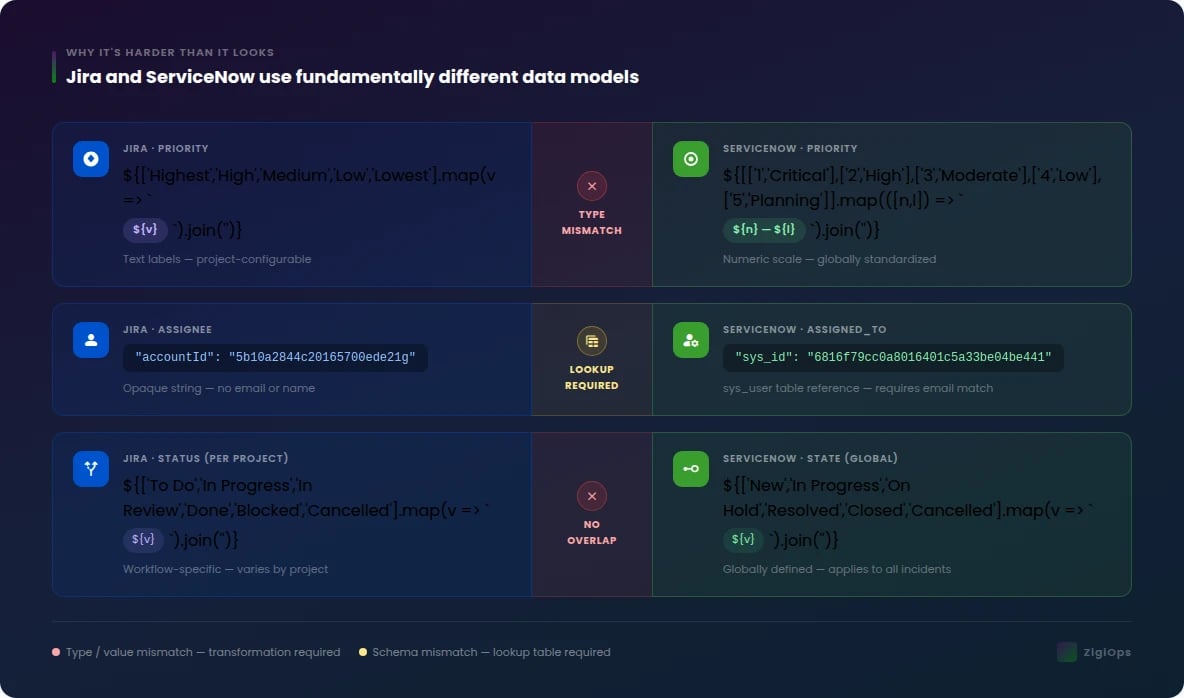
On the surface, connecting Jira and ServiceNow seems straightforward: map a Jira issue type to a ServiceNow incident category, sync the status fields, and you are done. In practice, the two platforms use fundamentally different data models, terminology, and field structures. Jira organizes work around projects, issue types, and components. ServiceNow organizes ITSM work around tables, categories, assignment groups, and configuration items (CIs).
The misalignment runs deep. A Jira Priority field uses values like "Highest," "High," "Medium," "Low," and "Lowest." ServiceNow's Priority field uses a numeric scale from 1 (Critical) to 5 (Planning). Without a conditional mapping expression that translates between these two vocabularies, your integration will either fail silently or inject invalid values into ServiceNow records. According to ServiceNow's official Incident Management documentation, incident priority is calculated from impact and urgency values — a calculation Jira has no native equivalent for, making direct field-to-field mapping impossible without transformation logic.
Beyond priority, teams regularly encounter problems with:
- User identity fields — Jira stores assignees as account IDs; ServiceNow stores them as sys_user references
- Multi-select custom fields — array handling differs between the two platforms
- Date and timestamp formats — ISO 8601 vs. ServiceNow's glide date format
- Nested objects — Jira's linked issues vs. ServiceNow's related records
- Status lifecycle mismatches — Jira workflows are project-specific; ServiceNow states are globally defined
Understanding these structural differences is the prerequisite for building Jira ServiceNow field mapping rules that actually hold up under production load. For a deeper look at common pitfalls teams encounter, see ZigiWave's resource on data sync field mapping pitfalls and fixes.
Core Concepts: What a Field Mapping Configuration Actually Contains
Before writing a single expression, it helps to understand what a complete Jira ServiceNow field mapping configuration looks like structurally. Most integration platforms — including ZigiOps — represent field mappings as a set of rules applied at the point of data transfer. Each rule defines a source field, a target field, a direction (unidirectional or bidirectional), and optionally a transformation expression.
Mapping Directions
Not every field should sync in both directions. Status fields, for example, are often managed in one system and pushed to the other. Defining direction explicitly prevents feedback loops where an update in ServiceNow triggers an update back to Jira, which triggers another update to ServiceNow — an infinite loop that can saturate your API rate limits within minutes.
- Unidirectional (Jira → ServiceNow): Useful for fields that Jira owns, such as sprint assignments or story points
- Unidirectional (ServiceNow → Jira): Useful for fields ServiceNow owns, such as assignment group or change advisory board (CAB) approval status
- Bidirectional: Appropriate for shared fields like summary, description, and comments — but requires conflict resolution logic
Field Types and Their Mapping Complexity
For a practical walkthrough of how ZigiOps handles each of these field types visually, the ZigiOps field mapping video tutorial demonstrates the configuration interface in detail.
Real Conditional Mapping Expressions: Jira ServiceNow Field Mapping in Practice
Conditional mapping expressions are the engine of any robust Jira ServiceNow field mapping setup. They allow you to apply transformation logic based on the actual value of a field, rather than assuming a one-to-one correspondence. The following examples are drawn from real integration configurations and represent the types of expressions you will encounter in production environments.
Expression 1: Priority Translation (Jira → ServiceNow)
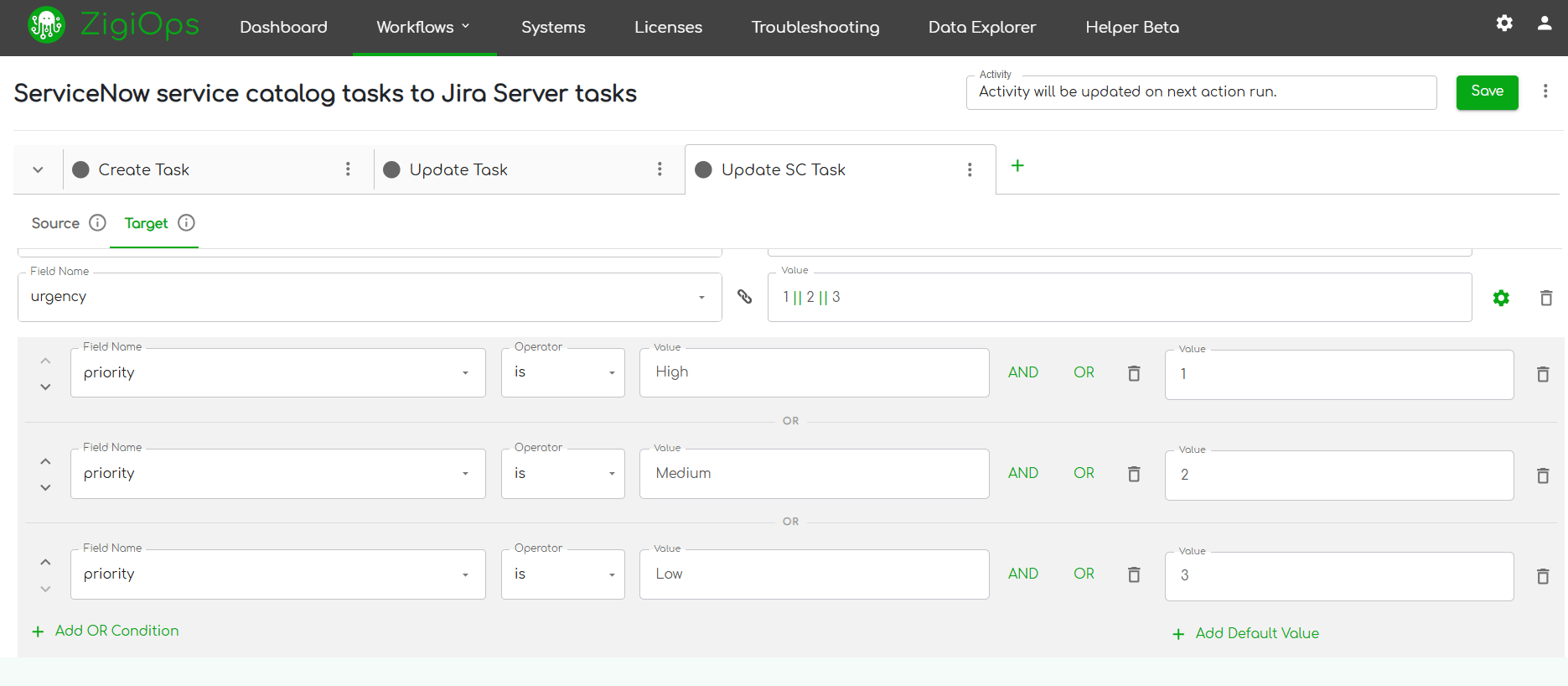
This is the most common transformation requirement. Jira's text-based priority must be converted to ServiceNow's numeric scale. A conditional expression handles this cleanly:
IF source.priority == "Highest" THEN "1"
ELSE IF source.priority == "High" THEN "2"
ELSE IF source.priority == "Medium" THEN "3"
ELSE IF source.priority == "Low" THEN "4"
ELSE IF source.priority == "Lowest" THEN "5"
ELSE "3"
The final ELSE "3" clause is a deliberate default — if a Jira issue arrives with a custom or null priority value, it maps to Medium in ServiceNow rather than failing. This is a fundamental principle of defensive Jira ServiceNow field mapping: always define a fallback value for every conditional expression.
Expression 2: Reverse Priority Translation (ServiceNow → Jira)
When ServiceNow updates flow back to Jira, the reverse translation must be equally explicit:
IF source.priority == "1" THEN "Highest"
ELSE IF source.priority == "2" THEN "High"
ELSE IF source.priority == "3" THEN "Medium"
ELSE IF source.priority == "4" THEN "Low"
ELSE IF source.priority == "5" THEN "Lowest"
ELSE "Medium"
Expression 3: Status Lifecycle Mapping
Status mapping is where most integrations break. Jira statuses are workflow-specific — a "In Review" status in one project may not exist in another. ServiceNow states are globally standardized. A robust conditional mapping expression must account for this:
IF source.status.name == "To Do" THEN "New"
ELSE IF source.status.name == "In Progress" THEN "In Progress"
ELSE IF source.status.name == "In Review" THEN "In Progress"
ELSE IF source.status.name == "Done" THEN "Resolved"
ELSE IF source.status.name == "Closed" THEN "Closed"
ELSE IF source.status.name == "Cancelled" THEN "Cancelled"
ELSE "New"
Notice that "In Review" maps to "In Progress" in ServiceNow — a deliberate business rule decision. These kinds of decisions must be documented and agreed upon by both the development and ITSM teams before the integration goes live. The Jira–ServiceNow integration use cases resource from ZigiWave provides real-world examples of how different teams have resolved these workflow alignment challenges.
Expression 4: Issue Type to Incident Category
Mapping Jira issue types to ServiceNow categories requires both a conditional expression and an understanding of your organization's ServiceNow category taxonomy:
IF source.issuetype.name == "Bug" THEN "Software"
ELSE IF source.issuetype.name == "Incident" THEN "Hardware"
ELSE IF source.issuetype.name == "Service Request" THEN "Request"
ELSE IF source.issuetype.name == "Change" THEN "Change Management"
ELSE "Inquiry / Help"
Expression 5: Computed Fields Using Multiple Sources
Some conditional mapping expressions need to combine values from multiple source fields. For example, constructing a ServiceNow short description from a Jira issue key and summary:
CONCAT("[", source.key, "] ", source.summary)
This produces a ServiceNow short description like [PROJ-1234] Login page returns 500 error on mobile — immediately identifiable as originating from Jira without needing to open the full record.
ServiceNow Jira Integration Error Handling: Patterns That Work
Even a perfectly designed Jira ServiceNow field mapping configuration will encounter errors in production. APIs return unexpected responses. Fields are deleted by administrators. Users enter values that violate validation rules. ServiceNow Jira integration error handling is not an afterthought — it is a core design requirement.
The Three Categories of Integration Errors
Understanding error categories helps you design the right response for each. Not all errors should be treated the same way:
- Transient errors — Temporary API unavailability, rate limiting (HTTP 429), or network timeouts. These should trigger automatic retry with exponential backoff.
- Validation errors — The target system rejects the payload because a field value is invalid, a required field is missing, or a reference field points to a non-existent record. These require field-level error handling and potentially a dead-letter queue.
- Mapping errors — The source field contains a value that no conditional expression handles, resulting in a null or empty target value. These require default value logic and alerting.
Retry Logic and Exponential Backoff
For transient errors, the industry standard approach is exponential backoff with jitter. The ServiceNow REST API documentation specifies rate limiting behavior that your retry logic must respect. A well-configured retry policy for ServiceNow Jira integration error handling looks like this:
- First retry: 30 seconds after failure
- Second retry: 2 minutes after first retry
- Third retry: 8 minutes after second retry
- After three failed retries: move to dead-letter queue and alert the integration owner
Dead-Letter Queues and Failed Record Management
A dead-letter queue (DLQ) is a holding area for records that could not be synced after all retry attempts. Without a DLQ, failed records are silently lost — one of the most dangerous failure modes in any integration. With a DLQ, failed records are preserved for manual review, correction, and reprocessing.
Effective ServiceNow Jira integration error handling requires that each DLQ entry captures:
- The full source payload at the time of failure
- The exact error message returned by the target API
- The field mapping rule that was being applied
- A timestamp and retry count
- The integration pipeline and direction (Jira → ServiceNow or reverse)
Validation Error Handling at the Field Level
Validation errors are the most common form of ServiceNow Jira integration error handling challenge. ServiceNow's table API returns detailed error messages when a field value is rejected. Your integration platform must parse these error messages and route them to the correct remediation path.
For example, if ServiceNow rejects a record because the assignment_group field references a group that does not exist, the error handler should:
- Log the specific field name and rejected value
- Apply a fallback value (e.g., a default "Unassigned" group sys_id)
- Reattempt the sync with the fallback value
- Flag the record for human review so the mapping can be corrected
ZigiOps handles this natively through its built-in error logging and alert system, which surfaces field-level validation failures directly in the integration dashboard without requiring custom error handling code. Learn more about how ZigiWave approaches field mapping for integrations across different platform combinations.
Idempotency: Preventing Duplicate Records
One of the most insidious consequences of poor ServiceNow Jira integration error handling is duplicate record creation. When a sync operation fails mid-way — after the record is created in ServiceNow but before the confirmation is received by Jira — a naive retry will create a second ServiceNow incident for the same Jira issue.
Preventing this requires idempotency keys: unique identifiers stored in both systems that allow the integration to detect whether a record has already been created. In practice, this means:
- Storing the Jira issue key in a ServiceNow custom field (e.g., u_jira_key) at creation time
- Checking for the existence of that key before creating a new record
- Updating the existing record instead of creating a duplicate if the key is found
Advanced Jira ServiceNow Field Mapping: Custom Fields and Lookup Tables
Standard fields are the easy part of Jira ServiceNow field mapping. The real complexity emerges when organizations need to sync custom fields — fields that exist in one system but have no native equivalent in the other, or fields that require a lookup against a reference table to resolve correctly.
Syncing Jira Custom Fields to ServiceNow
Jira custom fields are identified by a field ID (e.g., customfield_10014 for Epic Link). When mapping these to ServiceNow, you must first identify the correct ServiceNow target field — which may itself be a custom field added by your ServiceNow administrator. The mapping rule must reference the Jira field ID explicitly, not the display name, because display names can change without notice.
A practical approach for managing custom field mappings at scale:
- Maintain a field registry document listing every Jira custom field ID, its display name, its data type, and its ServiceNow target field
- Review the registry quarterly — Jira field IDs are stable, but ServiceNow custom fields are frequently modified by administrators
- Use ZigiOps' field discovery feature to auto-detect available fields from both APIs, reducing manual registry maintenance
User Lookup Tables
User identity is one of the hardest problems in Jira ServiceNow field mapping. Jira identifies users by an opaque accountId string. ServiceNow identifies users by a sys_id value in the sys_user table. There is no automatic correlation between these two identifiers.
The solution is a lookup table — a maintained mapping of Jira account IDs to ServiceNow sys_ids, typically keyed on email address as the common identifier. When the integration encounters an assignee field, it queries the lookup table to find the corresponding ServiceNow user reference. If no match is found, the conditional mapping expression falls back to a default service account.
Handling Null and Empty Values
Every Jira ServiceNow field mapping configuration must explicitly handle null and empty values. ServiceNow fields often have mandatory validation rules that reject null values. Jira fields may be optional and frequently left blank by users. A null-safe expression pattern looks like this:
IF source.assignee IS NULL THEN "default_service_account_sys_id"
ELSE lookup_table.get(source.assignee.accountId)
This pattern ensures that every synced record has a valid assignee in ServiceNow, even when the Jira issue is unassigned — preventing validation failures that would otherwise block the entire sync operation.
"Integration is no longer just a technical issue. It is a strategic decision. Today, connecting systems stops being an IT project and becomes a competitive advantage."
— Avvale Tech-Consulting Framework
Testing and Validating Your Jira ServiceNow Field Mapping Configuration
A Jira ServiceNow field mapping configuration that has not been systematically tested is a liability. Testing must cover not just the happy path — where all fields contain valid, expected values — but also the edge cases that will inevitably appear in production.
Test Case Categories
- Happy path tests: All fields populated with valid values; verify that target records are created correctly in both systems
- Null field tests: Remove optional fields one at a time; verify fallback values are applied correctly
- Invalid value tests: Inject values that no conditional expression handles; verify that error handling triggers correctly
- Large payload tests: Sync issues with very long descriptions, many comments, or large attachments; verify that field truncation rules are applied where needed
- Bidirectional conflict tests: Update the same field in both systems simultaneously; verify that your conflict resolution logic determines the correct winner
- Rate limit tests: Simulate API throttling; verify that retry logic and backoff are functioning correctly
Using a Staging Environment
Always validate your Jira ServiceNow field mapping configuration in a staging environment before promoting to production. Both Jira Cloud and ServiceNow support sandbox/developer instances specifically for this purpose. Atlassian's Jira Cloud REST API documentation provides guidance on setting up a developer environment with full API access for integration testing.
How ZigiOps Simplifies Jira ServiceNow Field Mapping at Scale
Building and maintaining Jira ServiceNow field mapping configurations manually — through custom scripts, middleware, or point-to-point API calls — is expensive, fragile, and difficult to audit. ZigiOps is a no-code integration platform purpose-built for IT Operations that addresses every challenge described in this article without requiring custom development work.
No-Code Conditional Expressions
ZigiOps provides a visual expression builder that supports all the conditional mapping expressions described in this article — priority translation, status lifecycle mapping, null-safe user lookups, and computed fields — through a point-and-click interface. Integration engineers can build and modify expressions without writing or deploying code, reducing the time to configure a new mapping from days to hours.
Built-In Error Handling and Alerting
ZigiOps includes native ServiceNow Jira integration error handling capabilities: automatic retry with configurable backoff, dead-letter queue management, field-level error logging, and real-time alerting when sync failures occur. These capabilities are available out of the box, without requiring custom error handling logic to be written and maintained.
Bidirectional Sync with Conflict Resolution
ZigiOps supports fully bidirectional Jira ServiceNow field mapping with configurable conflict resolution rules. When the same field is updated in both systems, ZigiOps applies the resolution rule you define — last-write-wins, source-system-wins, or custom priority logic — ensuring data consistency without manual intervention.
Pre-Built Templates for Common Mappings
Rather than starting from scratch, ZigiOps provides pre-built Jira ServiceNow field mapping templates for the most common integration scenarios: incident-to-bug sync, change request propagation, and service request fulfillment. These templates include the standard field mappings, conditional expressions, and error handling rules described in this article — ready to customize for your specific environment. Explore the full range of ZigiOps integration capabilities to see which templates apply to your use case.
The ZigiWave team has documented the full breadth of Jira ServiceNow field mapping approaches in their field mapping integrations resource hub, which covers mapping strategies across dozens of platform combinations beyond just Jira and ServiceNow.
Governance and Maintenance: Keeping Field Mappings Accurate Over Time
A Jira ServiceNow field mapping configuration is not a one-time project. Both Jira and ServiceNow evolve continuously — new fields are added, workflows are modified, custom fields are renamed or deleted, and new issue types are introduced. Without an active governance process, even a well-designed mapping will drift out of alignment within months.
Change Management for Field Mappings
Treat your field mapping configuration as infrastructure code. Apply the same change management discipline you use for production systems:
- Version-control your mapping configuration files
- Require peer review for any mapping changes before they are applied to production
- Maintain a changelog documenting what was changed, why, and who approved the change
- Run the full test suite against every mapping change before promotion
Monitoring Field Mapping Health
Establish ongoing monitoring for your Jira ServiceNow field mapping health. Key metrics to track include:
- Sync success rate: Percentage of sync operations that complete without error
- Dead-letter queue depth: Number of records awaiting manual review
- Mapping fallback rate: How often conditional expressions fall back to default values (a high rate may indicate that source data quality has degraded)
- API latency trends: Increasing latency can indicate that one system is approaching capacity limits
According to Atlassian's ITSM guidance, effective IT operations integration requires continuous monitoring and feedback loops — not just initial configuration. The same principle applies directly to maintaining the health of your Jira–ServiceNow field mapping over time.
Common Jira ServiceNow Field Mapping Mistakes and How to Avoid Them
Even experienced integration engineers make predictable mistakes when configuring Jira ServiceNow field mapping. Knowing these pitfalls in advance allows you to design them out of your configuration from the start.
Mistake 1: Mapping Display Names Instead of System IDs
Jira field display names are user-configurable and can change without notice. Always reference fields by their system ID (customfield_10014, not "Epic Link") in your mapping configuration. The same principle applies in ServiceNow — reference fields by their column name (assignment_group), not their label ("Assignment Group").
Mistake 2: Ignoring Bidirectional Loop Prevention
Without loop prevention logic, a status update in Jira triggers a sync to ServiceNow, which triggers a sync back to Jira, which triggers another sync to ServiceNow. This creates an infinite loop that consumes API rate limits and can corrupt record history. ZigiOps includes built-in loop detection, but if you are building a custom integration, you must implement this logic explicitly — typically by checking whether the incoming update was itself triggered by the integration before processing it.
Mistake 3: Not Accounting for ServiceNow's Mandatory Fields
ServiceNow incident records have several mandatory fields that Jira has no equivalent for — particularly caller_id (the user reporting the incident) and category. If your Jira ServiceNow field mapping does not provide values for these fields, every sync operation from Jira to ServiceNow will fail with a validation error. Always map mandatory target fields, even if it means using a static default value.
Mistake 4: Skipping the Reverse Mapping
Teams often configure the Jira → ServiceNow direction thoroughly and then treat the ServiceNow → Jira direction as an afterthought. This results in ServiceNow updates being lost — ITSM teams update incident details that never propagate back to the Jira issues the development team is working from. Every field that syncs in one direction should be evaluated for whether it also needs to sync in the other direction.
For a comprehensive guide to avoiding these and other common pitfalls, ZigiWave's data sync field mapping pitfalls and fixes resource covers the most frequent failure patterns and their solutions in detail.
Conclusion: Building Field Mappings That Last
Effective Jira ServiceNow field mapping is a discipline that combines technical precision with cross-functional collaboration. The conditional mapping expressions, error handling patterns, and governance practices described in this article represent the production-tested approaches that distinguish reliable integrations from fragile ones.
The key principles to carry forward are:
- Always define fallback values in every conditional mapping expression — never assume source data will be clean
- Design ServiceNow Jira integration error handling as a first-class requirement, not an afterthought
- Use system IDs, not display names, for all field references
- Implement idempotency to prevent duplicate record creation
- Test every edge case before promoting to production
- Treat your mapping configuration as living infrastructure that requires ongoing governance
ZigiOps eliminates the need to build and maintain these capabilities from scratch. With native support for Jira ServiceNow field mapping, built-in ServiceNow Jira integration error handling, and a no-code interface for building conditional mapping expressions, ZigiOps gives IT Operations teams the reliability and control they need — without the development overhead of custom integration code.
Ready to see how ZigiOps handles your specific Jira ServiceNow field mapping requirements? Explore the Jira–ServiceNow integration use cases to find scenarios that match your environment, or watch the field mapping video tutorial to see the ZigiOps configuration interface in action.