15 Ways Teams Use Jira and ServiceNow Together | ZigiOps

Implementing effective Jira ServiceNow integration use cases has become critical for modern enterprises seeking to bridge the gap between development agility and enterprise IT governance. Jira and ServiceNow are two of the most capable platforms in the enterprise IT stack, yet they operate in fundamentally different paradigms. Jira keeps development and agile teams moving fast with flexible workflows and code-linked task management. ServiceNow keeps the rest of the enterprise running on structured, governed, ITIL-aligned workflows that prioritize compliance and audit trails.
Both platforms excel within their domains, but the challenge emerges when organizations need them to work together seamlessly. The most effective Jira ServiceNow integration use cases require more than basic data movement—they demand two-way synchronization that respects workflow logic, handles complex field mapping, and operates without storing sensitive data in transit.
Explore our dedicated Jira ServiceNow Integration Page
When these systems operate in isolation, the consequences are familiar to every IT leader: duplicate tickets scattered across platforms, stale status fields that mislead stakeholders, engineers waiting on context that exists in another tool, and service managers chasing updates that developers already posted elsewhere. The integration gap isn't merely a technical inconvenience—it costs real hours every week and slows incident resolution precisely when speed matters most.
A properly implemented no-code Jira ServiceNow integration means two-way, real-time sync that respects the workflow logic of both platforms, handles complex field mapping without breaking when schemas change, operates without storing sensitive enterprise data anywhere in transit, and accomplishes all of this without requiring a developer to write or maintain a single line of code.
This comprehensive guide explores 15 real-world Jira ServiceNow integration use cases, demonstrating exactly how organizations can achieve seamless connectivity using ZigiWave's no-code integration platform. Each use case follows a structured approach: the business challenge, the integration methodology, and concrete scenarios from enterprise environments.

What Makes Jira ServiceNow Integration Use Cases Successful?
Before examining specific Jira ServiceNow integration use cases, it's essential to understand what distinguishes effective integrations from those that create more problems than they solve. Not all integration approaches deliver equal results, and the architectural decisions made during initial setup determine how well the integration performs under increasing ticket volumes, schema changes, and evolving organizational requirements.
"The most successful enterprise integrations are those that become invisible to end users while providing maximum visibility to stakeholders. When teams stop thinking about the integration and start focusing on their work, you know you've achieved the right balance."
Sarah Chen, VP of IT Operations at Global Tech Solutions
A properly configured no-code Jira ServiceNow integration should synchronize the following data reliably in both directions:
- Core ticket fields: summary, description, priority, status, category, and severity with intelligent mapping
- Communication threads: comments and internal notes, with granular control over which communications cross platform boundaries
- File attachments: embedded files and documentation that maintain context across systems
- Custom field mappings: organization-specific fields mapped between the different data models of each platform
- Workflow transitions: status changes that respect each platform's business logic, not just raw state values
- Ownership data: assignee and team ownership information with proper role translation
- Relationship mapping: linked records, parent-child relationships, and related items that preserve hierarchical structure
Beyond comprehensive data coverage, three architectural principles separate integrations that deliver long-term value from those requiring constant maintenance and troubleshooting.
First, zero data storage: The integration platform should function as a real-time conduit, never as a data warehouse. When your integration tool stores copies of enterprise ticket data, it creates compliance exposure, data residency risks, and introduces additional attack surfaces requiring security management. NIST Cybersecurity Framework guidelines emphasize minimizing data exposure points in enterprise architectures.
Second, no-code configuration: If adjusting a field mapping or adding a new sync condition requires developer intervention, the integration will lag behind every workflow change, creating bottlenecks that defeat the purpose of automation.
Third, workflow awareness: Status values in ServiceNow are numeric state codes with specific transition rules. Status values in Jira are human-readable labels with different workflow logic. A platform that blindly maps one to the other will produce broken transitions and invalid state changes. The integration layer must understand and translate between these models intelligently.
ZigiWave's platform is architected on all three principles. It processes data in real time with zero storage, configures entirely through a guided UI with no scripting required, and applies intelligent field mapping that handles the structural differences between Jira and ServiceNow at the granular level of individual field values.
As a standalone application rather than a plugin layered on either platform, ZigiWave operates independently of Jira and ServiceNow release cycles, ensuring integration stability across platform upgrades.

15 Essential Jira ServiceNow Integration Use Cases
The following comprehensive collection of Jira ServiceNow integration use cases represents real implementations across diverse enterprise environments. These use cases are organized into four strategic clusters based on the workflow patterns and business objectives they address, providing a structured approach to understanding how no-code Jira ServiceNow integration transforms organizational efficiency.
Cluster A: Incident and Escalation Management Integration Use Cases
Use Case 1: Critical Incident Escalation for SLA Compliance
The Challenge: Support organizations utilizing Jira as their primary ticketing platform often face contractual obligations to log critical incidents in ServiceNow for SLA tracking, audit compliance, and governance reporting. Requiring support agents to manually duplicate work across both platforms creates operational inefficiencies, particularly when managing teams of hundreds of agents who need to maintain focus on resolution rather than administrative overhead.
The No-Code Integration Approach: Trigger-based automation creates ServiceNow incidents automatically when Jira issues receive critical or escalation labels, or when they exceed defined severity thresholds. This two-way sync Jira ServiceNow ensures all subsequent updates, comments, and resolution steps synchronize in real time, allowing agents to work entirely within their preferred Jira environment while ServiceNow records satisfy compliance requirements. The integration includes response field mapping that writes ServiceNow incident numbers back into originating Jira issues, creating complete audit traceability.
Real-World Scenario: A managed services provider supporting enterprise clients with contractual ServiceNow SLA reporting implemented this pattern to avoid retraining their 300-person support team. Critical Jira issues are automatically tagged and mirrored to ServiceNow with full audit context, then resolved in parallel. The ServiceNow record meets compliance requirements while the Jira workflow continues uninterrupted, resulting in 40% faster resolution times for critical incidents.
Use Case 2: L1/L2 Support Split Across Platforms
The Challenge: Many organizations structure support tiers across different platforms to optimize each team's workflow. L1 service desk agents work in ServiceNow, which excels at structured ticket intake, SLA tracking, and ITIL-aligned workflows. L2 technical teams and developers work in Jira, which is optimized for task management, sprint planning, and code-linked workflows. Without proper integration, escalated tickets disappear into a visibility gap between systems, creating delays and context loss.
The Integration Approach: When L1 agents escalate ServiceNow incidents, ZigiWave automatically creates linked Jira issues in appropriate projects with complete incident context: customer details, reproduction steps, screenshots, and priority classifications. This two-way sync Jira ServiceNow ensures all subsequent comments, status updates, and attachments synchronize in real time. L1 agents maintain visibility into developer progress within their ServiceNow environment without requiring Jira access, while developers see incoming escalations in their Jira backlog without logging into ServiceNow.
Real-World Scenario: A financial services firm with a 50-person ServiceNow service desk and 120-person Jira engineering organization eliminated escalation visibility gaps entirely. Before implementing this no-code Jira ServiceNow integration, escalated incidents arrived in Jira with minimal context, and L1 agents had no visibility into engineering progress. After integration, both teams work in their native platforms with complete, real-time shared context, reducing resolution time for escalated tickets by 35%.
Use Case 3: Incident-to-Bug and Problem Management Workflow Integration
The Challenge: ServiceNow handles incident management and pattern identification through Problem records, while Jira manages bug tracking and code-level resolution. When these workflows operate independently, the chain from customer-facing incident through engineering fix to problem closure contains multiple manual handoff points, each representing potential delays and context loss that impact overall service quality.
The Integration Approach: When problem management teams identify recurring incident patterns in ServiceNow and create Problem records, ZigiWave automatically generates linked Jira bugs in appropriate engineering team backlogs. These bugs inherit incident count data, affected customer context, and root cause hypotheses from ServiceNow Problems. Developer progress notes in Jira sync back to ServiceNow Problems automatically. When Jira bugs are resolved and fixes deployed, ServiceNow Problem states update automatically, triggering associated incident closures through the established workflow.
"The integration between our ServiceNow problem management and Jira development workflows has transformed how we handle recurring issues. What used to take weeks of back-and-forth communication now happens automatically, and our mean time to resolution has improved by 50% for problem-related incidents."
Michael Rodriguez, IT Operations Manager at TechCorp Industries
Real-World Scenario: A SaaS platform provider tracking all customer-facing incidents in ServiceNow uses this pattern to close the loop between operations and engineering. The problem management team no longer relies on email to create engineering bugs, and development teams no longer leave ServiceNow Problems in ambiguous states after deploying fixes. The complete audit trail from incident detection through root cause analysis to fix deployment is automated and traceable.
Use Case 4: Security Operations and Client-Facing Incident Sync
The Challenge: Managed security services providers operating centralized SOCs in Jira Service Management while serving enterprise clients who track security posture in ServiceNow face a complex challenge. Providers must share security alerts and remediation progress with clients without exposing internal SOC workflows or granting clients direct access to provider systems, while maintaining strict security and compliance requirements.
The Integration Approach: ZigiWave establishes selective two-way sync between MSSP JSM instances and client ServiceNow environments through individual integration workflows. When security alerts are created in JSM, corresponding incidents appear in client ServiceNow within seconds, including threat classifications, initial triage notes, and recommended containment steps. As SOC analysts investigate, updates sync in real time. Clients can add business context in ServiceNow—such as affected processes and stakeholder notifications—and those notes sync back to SOC JSM instances. Each party controls exactly what data it shares and receives, with no internal SOC data exposed to clients.
Real-World Scenario: An MSSP monitoring 40+ client environments from a centralized JSM-based SOC implemented this pattern for a large enterprise client with internal security governance requirements. The client receives complete incident views in ServiceNow in near real time, while the SOC operates without any changes to internal workflows. Because ZigiWave stores no data in transit and maintains ISO 27001 certification, both organizations meet compliance requirements through a single integration layer.
Cluster B: Change, Release, and Catalog Management Integration Use Cases
Use Case 5: Change and Release Coordination Between Development and Operations
The Challenge: Development teams track releases in Jira with detailed sprint planning and feature tracking, while Enterprise Change Management operates in ServiceNow for audit, approval, and governance oversight. Manual coordination between these systems introduces administrative overhead that scales poorly with organizational complexity, creating bottlenecks in release cycles and increasing the risk of missed approvals or inadequate documentation.
The No-Code Integration Approach: When Jira release versions reach defined statuses (such as "Ready for CAB Review"), ZigiWave automatically generates ServiceNow Change Requests with complete release scope, lists of included issues, risk assessments, and test results pulled from Jira custom fields. CAB approval status in ServiceNow syncs back to Jira automatically, updating release status and providing release managers with a single source of truth. Teams no longer need to toggle between platforms to track approval states or manually transcribe release information.
Real-World Scenario: A software company with bi-weekly release cycles previously spent 4-6 hours per release manually creating and updating Change Requests in ServiceNow. With this no-code Jira ServiceNow integration in place, every Jira release version triggers complete Change Request creation automatically. Release teams check Jira for approval status while the CAB works in ServiceNow without requiring Jira access, reducing release administrative overhead by 85% and eliminating missed approval steps.
Use Case 6: Change Management Workflow and CAB Approvals for Regulated Environments
The Challenge: Healthcare technology companies and other regulated organizations operate under strict change governance requirements mandated by compliance frameworks. Development teams plan and track work in Jira for optimal agility, but all production changes must pass through formal approval workflows in ServiceNow before deployment can proceed, creating potential conflicts between development velocity and compliance requirements.
The Integration Approach: ZigiWave maps Jira release states to ServiceNow Change Request stages using conditional field mapping that ensures all mandatory ServiceNow fields are populated correctly at each workflow stage. Sprint assignments, risk classifications, and test result attachments from Jira flow automatically into Change Requests. Approval decisions in ServiceNow update Jira release records immediately, so development teams always have current approval status without manual status requests or lengthy approval cycles.
Real-World Scenario: A healthcare technology company operating under regulatory change requirements uses this pattern to maintain full governance over production deployments without slowing development velocity. The integration handles translation between Jira's sprint-based release model and ServiceNow's ITIL-aligned Change Management lifecycle automatically. Compliance teams audit changes in ServiceNow while development teams work in Jira, with neither team adapting their core processes to accommodate the other.
Use Case 7: Service Catalog (RITM) to Development Task Flow
The Challenge: Business users submit enhancement requests and service requests through the ServiceNow Service Catalog, which provides structured intake and approval workflows. IT teams evaluate these Requested Items (RITMs) and determine which require custom development. Before integration, approved requests moved to Jira through manual handoffs that were slow, inconsistently executed, and frequently lost attached context during transition.
The Two-way Sync Jira ServiceNow Approach: When ServiceNow RITMs or Catalog Tasks meet defined approval criteria, ZigiWave automatically creates Jira stories in appropriate projects with all attached requirements, mockups, and business justifications intact. Developer comments and status updates in Jira sync back to ServiceNow requests automatically, so business users see development progress without requiring Jira access or understanding of agile terminology. Priority changes and requirement updates flow in both directions to maintain alignment.
Real-World Scenario: A retail company processing 200+ monthly catalog requests, with approximately one-third requiring development, uses this integration to eliminate the shared spreadsheet that previously tracked approved requests awaiting Jira story creation. Approved RITMs now flow directly into development backlogs with full context preserved. Business stakeholders track progress in ServiceNow while developers work in Jira, with the only remaining manual step being actual development work.
Use Case 8: Problem and Catalog Task Selective Sync for Optimized Workflows
The Challenge: Not every ServiceNow record type requires engineering involvement, creating potential noise when all records sync indiscriminately. Problems requiring root cause analysis need engineering attention. Catalog Tasks tagged for development require developer input. Standard incidents resolvable by L1 support should remain entirely within ServiceNow operations. When all record types sync without filtering, Jira becomes cluttered with irrelevant items, reducing signal-to-noise ratio for development teams.
The Integration Approach: ZigiWave applies sophisticated selective sync rules based on ServiceNow record types and field criteria. Problems matching root cause analysis templates create Jira investigation tasks assigned to platform engineering teams. Catalog Tasks tagged with development-required markers become Jira stories in correct sprint backlogs. Standard incidents remain entirely within ServiceNow operations. Filtering logic is configured through ZigiWave's UI without scripting, and rules can be adjusted as team structures and processes evolve.
Real-World Scenario: An enterprise IT organization managing 15+ ServiceNow record types uses selective sync to ensure only three record types requiring engineering input reach Jira. Development backlogs stay clean and focused while engineers receive items with complete context and correct prioritization. ServiceNow continues handling full operational record volumes without any of that volume creating noise in development workflows.
Cluster C: Agile Development Meets Enterprise ITSM Use Cases
Use Case 9: Agile Development with ITSM Oversight Integration
The Challenge: Smaller agile development teams optimize their workflows using Jira for backlog management, sprint planning, and task tracking, while broader organizations standardize on ServiceNow for all IT service tracking, including enhancement requests and project oversight. Business stakeholders need visibility into development progress without acquiring Jira licenses, learning agile terminology, or disrupting established reporting structures.
The No-Code Integration Approach: ServiceNow tracks incoming enhancement requests through established governance processes. When items receive development approval, they sync to Jira as backlog stories with priority, business value context, and acceptance criteria preserved. Development teams work entirely within Jira through normal sprint workflows without additional reporting overhead. Story status changes, sprint assignments, and completion updates sync back to ServiceNow automatically, providing stakeholders with progress visibility in their familiar platform.
Real-World Scenario: A mid-sized insurance company with enterprise-wide ServiceNow deployment and a 15-person agile development team uses this integration to bridge expectation gaps between business stakeholders and engineering. Stakeholders track enhancement requests in ServiceNow using the same processes they use for service requests, while the development team runs sprints in Jira without additional reporting overhead. Both sides receive necessary visibility through their preferred platforms.
Use Case 10: CMDB and Business Application Sync for Impact Analysis
The Challenge: ServiceNow CMDB contains authoritative records for business applications, services, and infrastructure components. Development teams working in Jira need to associate every issue with affected applications for accurate impact analysis and release planning. Without integration, developers reference stale exports or spreadsheets, leading to incorrect impact assessments and missed dependency analysis.
The Integration Approach: Business application records from ServiceNow CMDB sync to Jira as custom objects with full relationship mapping. CMDB updates, including ownership changes, dependency modifications, and lifecycle status changes, flow to Jira automatically. Developers select affected applications from always-current lists when creating Jira issues. Impact analysis and release planning reflect real infrastructure state without requiring direct ServiceNow access or maintaining separate documentation.
Real-World Scenario: A global logistics company managing 800+ business applications in ServiceNow CMDB uses this sync to provide development teams with accurate infrastructure context in Jira. The spreadsheet export that previously served as reference documentation is eliminated. When CMDB records change, Jira reflects updates within minutes. Every Jira issue carries current, accurate links to affected applications in the CMDB, improving release planning accuracy and reducing deployment risks.
Use Case 11: Sprint Progress Reporting Back to ServiceNow Stakeholders
The Challenge: Organizations where engineering teams use Jira for sprint management while leadership tracks progress through ServiceNow dashboards often experience gaps between sprint board reality and executive reporting. Manual reporting bridges this gap poorly, introducing lag and potential inaccuracies that affect decision-making and stakeholder confidence.
The Integration Approach: Sprint progress data, including story status, completion rates, and sprint phase transitions, syncs from Jira to ServiceNow on configurable schedules. Leadership dashboards in ServiceNow reflect current sprint state automatically. Business units that submitted enhancement requests can see where their stories sit in development queues without requesting status updates from engineering teams or learning Jira navigation.
Real-World Scenario: A healthcare technology company uses this integration pattern to feed ServiceNow governance dashboards with real sprint data. Engineering runs two-week sprints in Jira without additional reporting burden, while operations and leadership teams view sprint progress in ServiceNow alongside their ITSM metrics. The integration eliminates an entire category of status meetings that previously existed solely to transfer information already available in Jira.
Cluster D: Multi-Instance, Multi-Company, and Complex Environment Use Cases
Use Case 12: External Partner and Vendor Collaboration
The Challenge: When one organization uses ServiceNow while their partner or vendor uses Jira, both need visibility into shared work without granting direct system access. Different data governance requirements, privacy policies, and workflow structures make shared instances impractical, yet collaboration requires real-time information sharing and coordinated workflow management.
The Integration Approach: ZigiWave establishes selective two-way sync Jira ServiceNow between organizations' instances with granular control over shared data. Only project-relevant information syncs based on defined criteria. Each organization defines independent outgoing and incoming field mappings. Organization A controls exactly what it sends; Organization B controls exactly how it receives and maps that data. Neither organization needs to conform to the other's data model or understand the other's internal configuration.
Real-World Scenario: A telecommunications company outsourcing network infrastructure maintenance to a Jira-using vendor implements this pattern to share fault data without exposing internal customer or financial information. When network faults are detected, ServiceNow incidents sync to the vendor's Jira project with only technical details relevant to repair work. Vendor progress updates sync back to ServiceNow automatically. Both organizations work independently in their preferred tools while maintaining necessary collaboration visibility.
"The ability to collaborate seamlessly with external partners while maintaining strict data governance has been transformative for our operations. We share exactly what needs to be shared, nothing more, and both sides get the visibility they need to work effectively together."
Jennifer Park, Director of IT Operations at Metro Telecommunications
Use Case 13: Multi-Instance ITSM Operations
The Challenge: Large enterprises sometimes operate multiple ServiceNow instances by region, business unit, or acquisition legacy, alongside Jira for specific teams or functions. Routing tickets correctly across these instances while respecting regional compliance requirements and different field structures becomes difficult to manage manually and even more challenging to maintain as organizational structures evolve.
The Integration Approach: ZigiWave connects multiple ServiceNow instances or multiple Jira projects through independent integration workflows, each configured separately with its own routing logic. Tickets route automatically based on content, category, or affected service criteria. Each workflow operates with independent field mappings and conditions, so changes to APAC configuration don't affect EMEA routing rules. Regional compliance requirements are handled at individual integration levels without affecting global operations.
Real-World Scenario: A multinational manufacturing company running three regional ServiceNow instances alongside a global Jira instance for product engineering uses ZigiWave to route production defects from any regional ServiceNow to correct Jira projects based on product lines. Engineering teams see all defects in consolidated views regardless of region, while fixes sync back to originating ServiceNow instances with region-specific field mappings. Each regional integration is managed independently without affecting others.
Use Case 14: MSP Multi-Client ITSM Coordination
The Challenge: Managed service providers supporting multiple enterprise clients face this challenge at scale. Different clients use different ITSM platforms—ServiceNow, Jira, Freshdesk, or other tools. MSPs need unified operational views of all client work without maintaining accounts and workflows across every client system, while preserving client-specific requirements and maintaining data isolation.
The Integration Approach: ZigiWave connects each client's ITSM platform to the MSP's central instance through individual integration workflows. Each workflow is scoped to share only data relevant to that client relationship, with field mappings tailored per client requirements. Incoming tickets from all client systems arrive in the MSP's central platform with standardized priority mappings and consistent structure. Engineers resolve tickets in their central tool, and resolutions sync back to client platforms automatically with client-specific formatting and field requirements.
Real-World Scenario: An MSP supporting 12 enterprise clients previously maintained dedicated accounts across five different ITSM platforms, with engineers toggling between browser tabs and manually copying updates. After implementing per-client integrations through ZigiWave, all client work arrives in the MSP's central Jira instance with consistent structure. Client-specific SLA timers remain accurate because status transitions sync in real time. Engineers handle ServiceNow-originated and Freshdesk-originated tickets using identical workflows in the same tool.
Use Case 15: Post-Acquisition System Consolidation
The Challenge: After acquisitions, parent companies may run ServiceNow while acquired companies operate on Jira. Full platform migration is typically impractical short-term due to cost, risk, and complexity of migrating customized workflows built over years. Both teams need immediate collaboration capability on shared projects while operating separate systems during transition planning.
The Integration Approach: ZigiWave bridges platforms with two-way sync scoped to shared projects and workstreams. Each organization retains existing workflows, custom fields, and processes. Only overlapping project data syncs, with each side mapping incoming data to fit its own data model. ServiceNow categories map to Jira labels; ServiceNow assignment groups map to Jira teams. Integration operates without either organization changing internal work patterns.
Real-World Scenario: A private equity-backed healthcare company that acquired a digital health startup with a 60-person Jira-based engineering team used this pattern to start shared product work immediately without waiting 12-18 months for platform migration. Parent company product managers create requirements in ServiceNow that appear as Jira stories for startup developers. Sprint updates flow back to ServiceNow for leadership reporting. The integration runs collaboration while migration timeline is planned at sustainable pace.
How to Set Up No-Code Jira ServiceNow Integration in ZigiWave
Setting up effective Jira ServiceNow integration use cases in ZigiWave follows a consistent, streamlined process regardless of which specific use case you're implementing. The entire configuration happens within ZigiWave's intuitive UI—no API knowledge, no scripting, and no developer time required. This no-code approach ensures that business analysts and IT operations teams can configure, maintain, and modify integrations without depending on development resources.
Step 1: Connect Your Systems
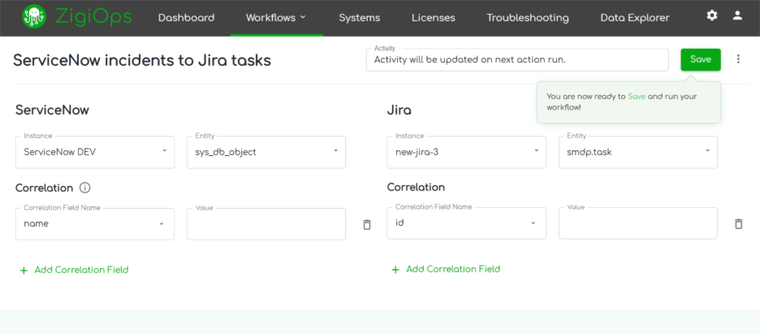
Log into your ZigiWave instance and navigate to Connected Systems. Add Jira by entering your server URL, username, and API token—ZigiWave supports both Jira Cloud and Jira Server/Data Center instances. Add ServiceNow by entering your instance URL, username, and password or OAuth credentials. ZigiWave validates both connections immediately and surfaces any credential issues with specific troubleshooting guidance. Both systems become available as endpoints for any integration workflow you configure, and connection status is monitored continuously.
Step 2: Select or Create an Integration Template
Navigate to Workflows and select Add Workflow. ZigiWave offers pre-built templates for the most common Jira ServiceNow integration use cases, including ServiceNow incidents to Jira tasks, ServiceNow problems to Jira bugs, ServiceNow service catalog tasks to Jira stories, and two-way sync configurations. Select the template that matches your specific use case and load it. Templates arrive pre-populated with standard field mappings and sync logic that you can customize without touching any code.
Step 3: Configure Field Mapping and Conditions
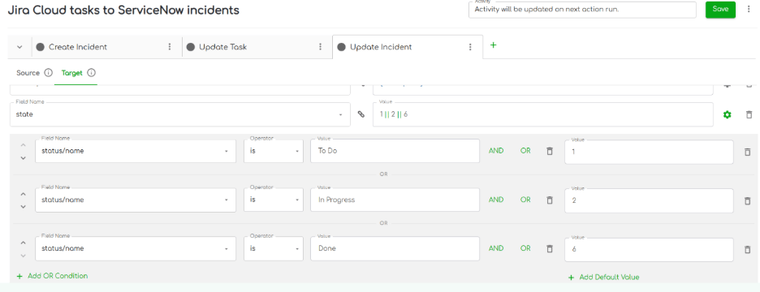
The field mapping editor displays source fields from one system and target fields in the other with an intuitive drag-and-drop interface. You can add, remove, or adjust mappings using dropdown menus. For status fields, ZigiWave uses conditional mapping to translate between ServiceNow's numeric state codes and Jira's human-readable status labels intelligently. You define conditions in plain language: "if ServiceNow state equals 2, set Jira status to In Progress." Unlimited conditions can be stacked per field, and complex mapping scenarios are supported through ZigiWave's expression builder.
Step 4: Set Sync Direction and Triggers
Choose whether the integration runs in both directions or in one direction. Set the trigger: polling interval for scheduled sync, or event-based for near real-time updates. Define which records qualify for sync using filter conditions: for example, only sync ServiceNow incidents with priority 1 or 2, or only sync Jira issues in a specific project with a specific label.
Step 5: Test and Go Live
ZigiOps includes a built-in testing environment where you can validate field mappings and trigger conditions against live data before activating the integration. Once validated, activate the workflow. Monitoring dashboards in the ZigiOps UI show sync status, error logs, and retry queues in real time.
Why "No Code, No Data Stored" Is Not Just a Tagline
The phrasing is deliberate. Every integration platform claims to be easy. ZigiOps' specific combination of zero data storage, fully code-free configuration, and ISO 27001 certification carries consequences that matter in enterprise environments.
| ZigiOps Capability | What It Means in Practice | Why It Matters for Enterprise IT |
|---|---|---|
| 100% No-Code Configuration | All field mappings, conditions, and triggers are set through the UI. No Groovy scripts, no Python, no custom code of any kind. | Integration changes can be made by a service operations manager without a development ticket. Workflows stay current as processes evolve. |
| Zero Data Storage | Data moves through ZigiOps in real time. Nothing is written to ZigiOps storage at any point in transit. | Eliminates a compliance exposure category. No third-party data store means no data residency risk and no additional attack surface. |
| ISO 27001 Certified | ZigiOps is certified to the ISO 27001 information security management standard. | Relevant for regulated industries including finance, healthcare, and government. Passes most enterprise security review requirements without additional documentation. |
| Standalone Application | ZigiOps is not a plugin for Jira or ServiceNow. It runs independently. | Platform upgrades on either end do not break the integration. ZigiOps release cycles are independent of Jira and ServiceNow schedules. |
| Unlimited Transactions | No throttling, no transaction caps, no pricing model tied to volume. | Integration performance does not degrade as ticket volumes grow. High-throughput environments are supported without architecture changes. |
| Guided UI | The interface presents only the options relevant to each step of the configuration. No documentation archaeology required. | Non-technical users can manage and adjust integrations. IT teams are not dependent on a specialist to maintain the integration over time. |
Common Integration Pitfalls and How to Avoid Them
Status vs. State: The Most Common Breaking Point
Jira statuses communicate progress to humans: To Do, In Progress, Done. ServiceNow states control system behavior using numeric codes: 1 for New, 2 for In Progress, 6 for Resolved. An integration that maps these values directly without translation will produce invalid transitions and broken workflows. ZigiOps handles this through its conditional mapping layer, where you define explicit rules: if ServiceNow state equals 1, set Jira status to To Do. The mapping is visible, auditable, and adjustable from the UI without any code.
Conditional Mapping for Jira-ServiceNow Integrations
Mandatory Field Violations on ServiceNow Close
ServiceNow requires a Resolution Code and Resolution Note before an incident can be resolved. Jira's Done status has no equivalent mandatory fields. An integration that tries to close a ServiceNow incident based on a Jira Done transition will fail unless it also supplies these values. ZigiOps addresses this with conditional field mapping: when Jira status equals Done, also send a hardcoded or field-derived Resolution Code and Resolution Note to ServiceNow. This condition is configured in the mapping editor, not in code.
Sync Loops
A common concern with two-way integrations is the possibility of update loops, where a change in Jira triggers a sync to ServiceNow, which triggers a sync back to Jira, which triggers another sync, and so on. ZigiOps distinguishes between user-initiated changes and sync-initiated changes at the platform level. Only user-initiated changes trigger outbound sync events. Changes written by ZigiOps to the target system are not re-synced back to the source. Loop prevention is built into the architecture and does not require any configuration.
Schema Changes Breaking Integrations
Enterprise platforms evolve. Fields get renamed, new mandatory fields are introduced, and custom fields change type. ZigiOps uses dynamic schema detection that identifies field changes automatically. When a field changes in either Jira or ServiceNow, ZigiOps surfaces the change in its monitoring dashboard rather than silently failing. This allows the integration owner to review and update the mapping before it causes data loss.
Ready to Get Your Jira-ServiceNow Integration Done Right?
The 15 use cases in this guide share a common thread: they all become significantly easier when the integration layer does not require code to configure, does not store data in transit, and understands the structural differences between Jira and ServiceNow well enough to translate between them correctly.
ZigiOps handles all of this from a guided UI. Setup takes minutes, not months. The integration stays current as your workflows evolve because your team can adjust field mappings and conditions without filing a development request. And because ZigiOps stores nothing in transit and is ISO 27001 certified, the integration passes enterprise security review without additional compliance work.
If you are evaluating integration options for Jira and ServiceNow, or if you have an integration in place that is not performing the way you need it to, the next step is straightforward.
For the full ServiceNow ↔ Jira two-way sync overview, see our integration page.
Frequently asked questions
Is ZigiOps suitable for regulated industries like healthcare or finance?
Yes. ZigiOps is ISO 27001 certified, stores no customer data in transit, and supports FIPS 140-2 compliant encryption and external Hardware Security Module integration for organizations with strict cryptographic requirements. It also supports high availability deployment and audit logging, which satisfies most enterprise security review requirements in regulated industries.
Can one ZigiOps instance handle multiple ServiceNow environments?
Yes. ZigiOps supports multiple integration workflows from a single instance, each configured independently. An organization running three regional ServiceNow instances alongside a central Jira instance can manage all three integrations from one ZigiOps deployment. Each workflow has its own field mappings, conditions, and error handling, so changes to one do not affect others.
How does ZigiOps handle high-volume environments?
ZigiOps processes sync events through an asynchronous queue architecture designed for high-throughput environments. The platform handles concurrent updates across multiple integration workflows without performance degradation. For organizations processing thousands of daily updates, the queue-based model ensures ordered, reliable delivery and includes automatic retry logic for transient failures.
What other systems can ZigiOps connect alongside Jira and ServiceNow?
ZigiOps supports integrations with over 60 enterprise platforms, including Azure DevOps, Salesforce, Zendesk, Freshdesk, Freshservice, PagerDuty, SolarWinds, Dynatrace, Datadog, and many others. MSPs and organizations with complex multi-system environments can manage all their integrations from a single ZigiOps instance.