Ivanti Jira Integration Made Simple with ZigiOps
Nowadays, organizations are constantly seeking ways to enhance productivity and streamline workflows. A popular combination that has gained significant attention is the Jira Ivanti integration via ZigiOps. This powerful integration allows businesses to leverage the benefits of both platforms, ultimately making their operations more efficient and effective. In this blog post, we will explore the advantages of integrating Jira Ivanti with ZigiOps, highlighting the key features and explaining how this integration can revolutionize your workflow management.
Benefits of Jira Ivanti Integration
- Centralized Incident Management
Integrating Jira and Ivanti with ZigiOps enables real-time incident creation and updates across both systems. All critical Ivanti metadata, including CI relationships, SLAs, priorities, and service categories, is transferred via API without loss of context. This results in faster resolution times, reduced downtime, and higher service quality.
- Better Cross-Team Collaboration
ZigiOps synchronizes Jira and Ivanti in real time, keeping IT operations and development teams aligned. Status changes, comments, and updates are instantly shared, eliminating communication gaps and accelerating issue resolution across teams.
- Automated and Faster Workflows
The Jira Ivanti integration with ZigiOps removes manual ticket handling by automating incident creation, routing, and updates based on configurable triggers. This improves response times, reduces human error, and increases operational efficiency.
- Accurate Two-way Data Synchronization
With two-way synchronization, changes made in Jira or Ivanti are automatically reflected in the other system. This prevents duplicate work, ensures data consistency, and maintains a reliable single source of truth even during high ticket volumes.
- Improved Visibility and Reporting
ZigiOps provides centralized dashboards and reporting across Jira and Ivanti workflows. Teams gain clear visibility into performance metrics, bottlenecks, and workload trends while eliminating data drift through continuous synchronization.
The right tool for the Jira Ivanti integration
When selecting a Jira Ivanti integration solution, it is essential to prioritize features such as real-time synchronization, flexible data mapping, and reliable error handling to ensure a stable and efficient connection between both systems. These capabilities help maintain data accuracy and prevent disruptions across Jira and Ivanti workflows.
Choosing a no-code integration platform further accelerates deployment and reduces reliance on development resources. With a no-code approach, teams can easily design, test, and adjust Jira Ivanti workflows without complexity. ZigiOps fits this need by providing a scalable, agile, and easy-to-use platform that handles Jira Ivanti integrations efficiently and securely.
Because ZigiOps does not store customer data, reporting remains native in Jira and Ivanti — meeting strict governance, compliance, and audit requirements for enterprises subject policies.
A strong Ivanti Jira integration tool must also:
- Support Ivanti REST APIs including authentication via API Keys and OAuth models
- Honor Jira's rate limits and pagination to avoid throttling
- Support nested objects like Ivanti Worknotes and Jira Comments
- Provide correlation logic using unique identifiers (e.g., Jira issue key, Ivanti RecID)
- Handle attachments, custom fields, CI references, and parent/child relationships properly
ZigiOps meets all these criteria with enterprise-grade execution.
Jira Ivanti No-Code Integration (with ZigiOps)
The Ivanti Jira integration with ZigiOps enables a fully no-code, two-way data sync between Jira and Ivanti, ensuring real-time visibility, consistency, and accuracy across both platforms. Any updates made in Jira or Ivanti are automatically reflected in the other system, eliminating manual work and reducing the risk of data mismatches.
The integration supports full synchronization of core Ivanti objects, including Service Requests, Incidents, Changes, Configuration Items (CIs), Service Catalog Items, and Work Notes or journal updates. On the Jira side, it covers Tasks, Bugs, Stories, Epics, and Subtasks, allowing teams to maintain complete alignment between ITSM and project or development workflows.
Beyond data synchronization, the Jira Ivanti integration enables workflow automation that helps organizations respond faster to operational and development events. Using ZigiOps, teams can automatically create or update Jira or Ivanti records based on predefined triggers and conditions, ensuring that critical issues are handled promptly and consistently across systems.
The integration also offers advanced, fully customizable mappings, allowing organizations to control exactly how data flows between Jira and Ivanti. Administrators can align the integration with their business processes using conditional logic, value transformations, regex normalization, dynamic assignments, and cross-field dependencies. These enterprise-grade capabilities provide deep flexibility without requiring any custom code.
Together, these features make the Ivanti Jira integration a powerful solution for organizations that use Ivanti Service Manager to handle service requests and Jira to manage tasks and projects. By synchronizing Ivanti Service Requests with Jira Tasks, teams can streamline workflows, improve collaboration between ITSM and development teams, and significantly increase overall efficiency.
But now let’s investigate the details of the integration. Consider the following use case scenario where an organization uses Ivanti Service Manager for handling service requests and Jira for managing tasks and projects. In this scenario, integrating Ivanti Service Requests with Jira Tasks can streamline the workflow and improve overall efficiency.
Use Case: Ivanti Service Requests to Jira Tasks
Scenario:
An enterprise utilizes Ivanti Service Manager to handle internal service requests and incidents, such as IT support, facilities management, and employee onboarding. Simultaneously, they use Jira as their project management tool for tracking tasks, development projects, and other work items.
The IT and project management teams at enterprise are facing challenges in managing and tracking tasks efficiently. Service requests are often related to specific tasks or projects that need to be carried out in Jira. Manually transferring information between Ivanti and Jira results in duplicated efforts, delays, and potential errors.
The best solution:
Establishing a smooth and automatic Jira Ivanti data transfer, using an advanced no-code integration solution like the ZigiOps no-code data integration platform. ZigiOps allows the teams using the two systems to continue their work with the system of their choice, without interrupting the exchange of critical information. In fact, the no-code solution helps them speed up the process, eliminating any possibility of bottlenecks and enhancing their overall performance. The transfer of Ivanti service requests and transforming them into Jira tasks is easy and fast.
This use case becomes even more critical when:
- Ivanti SRs require development fixes (Jira DevOps teams)
- Multiple Jira projects need to receive SRs automatically
- Assignment groups differ between Ivanti and Jira and must be reconciled
- SLA breaches must trigger workflow escalations in Jira
ZigiOps handles all these scenarios out of the box.
Jira Ivanti Integration – Set up process
Step 1: Installation
The initial phase of integrating Jira with Ivanti involves the deployment of the ZigiOps system. ZigiOps provides comprehensive documentation outlining its prerequisites and installation procedures for added clarity. Accessible on both iPaaS (Integration Platform as a Service) and on-premises environments, ZigiOps boasts a user-friendly installation process that only requires a few clicks to set up and initiate.
For on-premises installations, the entire process typically takes no more than five minutes to complete. Notably, ZigiOps is designed as a no-code solution, eliminating the need for additional coding efforts. Furthermore, its integration does not necessitate alterations in other applications. Thanks to its robust security protocols, ZigiOps adheres to strict policies and does not retain any of your information.
Accessing ZigiOps is a swift and straightforward process. The integration platform only necessitates the input of a username and password for login, ensuring a quick and user-friendly authentication experience.
The sign-up process is simple and easy. It requires just a username and password. After that, we’re immediately taken inside the ZigiOps no-code integration tool.
Administrators can deploy ZigiOps in:
- Air-gapped environments (fully offline)
- Hardened OS environments for regulated industries
- Cloud-native scenarios for iPaaS agility
- ZigiOps supports Java 17, encrypted keystores, trusted certificates, and full API security compliance.
Step 2: ZigiOps Dashboard
ZigiOps seamlessly directs users to the main Dashboard. Here, we’re provided with key information, including the number of current system integrations, active licenses, and the status of connected systems, the amount of extracted records for a pre-defined period of time, some vital statistics and also the health status of both the systems and the integration platform.
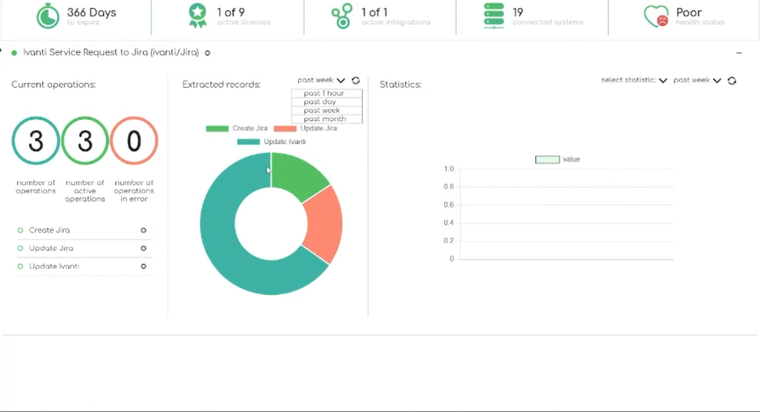
The Dashboard is especially useful for Jira/Ivanti experts because it displays:
- System health checks
- Polling cycles
- Failed/ignored records
- Runtime log extracts
This makes troubleshooting far more efficient compared to native tools.
Step 3: Connecting the systems in ZigiOps
ZigiOps simple UI makes it easy for the users to swiftly initiate a connection between different systems. This is possible from the Connected Systems Menu.
If we click on the Add a new system, ZigiOps will display a long list of systems that are currently available for integration.
Connecting ZigiOps to Jira
Connecting with the Atlassian Jira is fast and easy. It takes just a few clicks and requires:
- Instance URL
- User
- Password
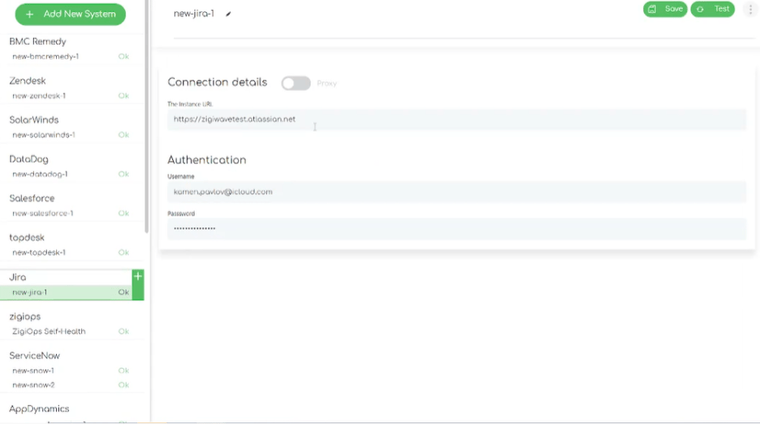
We can also login through a proxy, if needed.
Connecting ZigiOps to Ivanti
Establishing a successful connection with Ivanti also does not take much time. The information that is required is:
- Server URL → Input the URL of your instance. For example, https://example.vantosi.com/HEAT.
- API Key → Input the API Key required for authentication.
- Proxy Settings → Enables the usage of a proxy server.
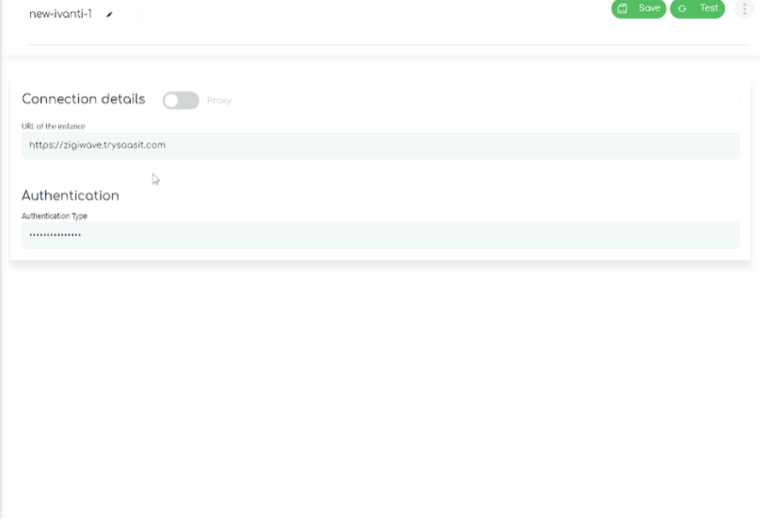
After establishing a connection with each of the desired systems we‘d like to integrate, we can click on the SAVE and TEST options ZigiOps displays in the upper right corner. This will allow the integration platform to save and test the connection, plus – will initiate the collection of some metadata which will, later on, be used for the Jira Ivanti integration configuration.
Additionally:
- Ivanti API communication uses TLS 1.2+ encrypted sessions
- ZigiOps auto-discovers Jira schemas (projects, issue types, custom fields)
- All credentials stored are AES-256 encrypted
This ensures your integration remains compliant with enterprise IT security guidelines.
Step 4: ZigiOps Integrations Template gallery
Next, we can move forward with the Jira Ivanti integration and go to the Add a new system option. It allows us to choose one of many ZigiOps’ pre-defined templates.
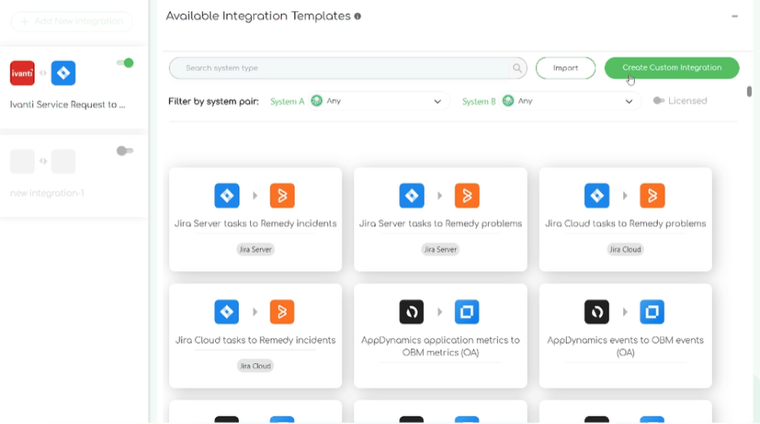
One of the perks of using ZigiOps is that if the occasion calls for specific actions, the data integration platform will also allow us to import our own custom template to fit the integration use case criteria.
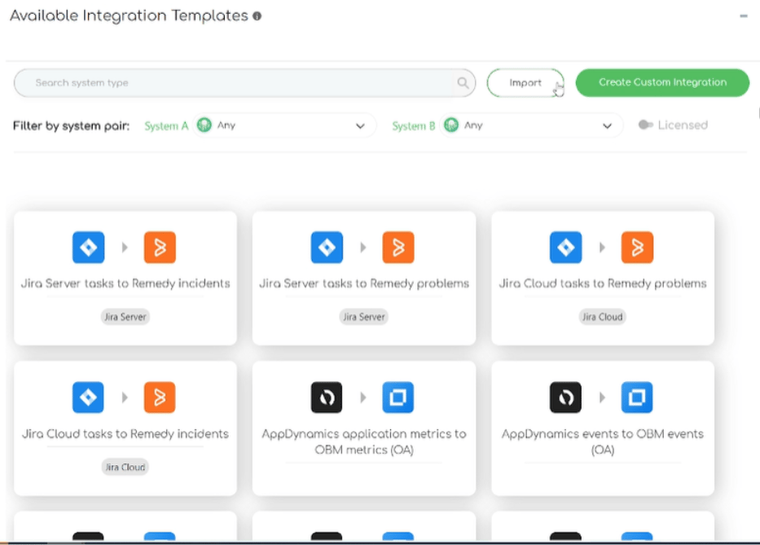
NB! ZigiOps Jira Ivanti Integration templates also include:
- Retry logic
- Correlation preconfigured rules
- Sample field mappings
- Default conditions for real-world Ivanti–Jira flows
Step 5: Jira Ivanti integration template
ZigiOps’ main integration section displays the exact systems we’d like to integrate, the data types we plan to transfer and synchronize, plus the correlation logic ZigiOps will use to perform the integration.
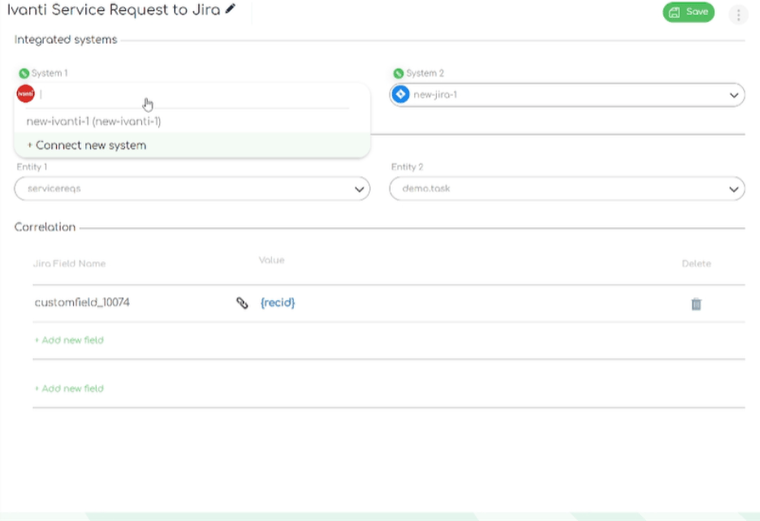
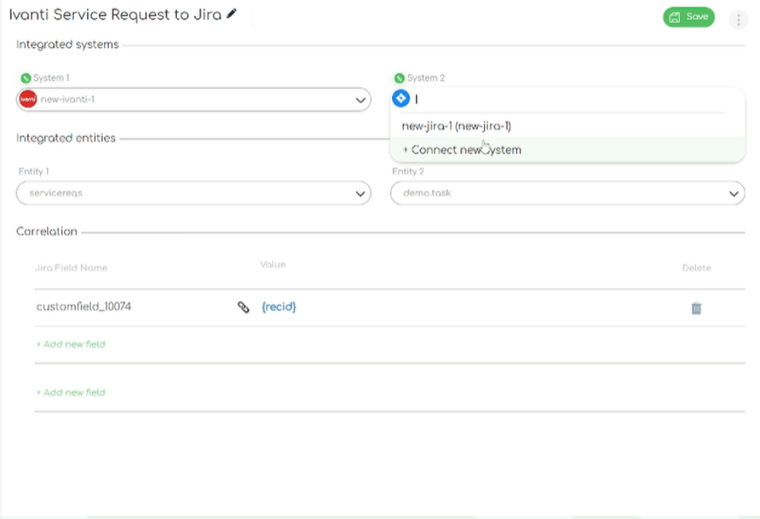
A comprehensive integration platform like ZigiOps allows users to easily pick the exact data they want to send from one system to another during the integration process.
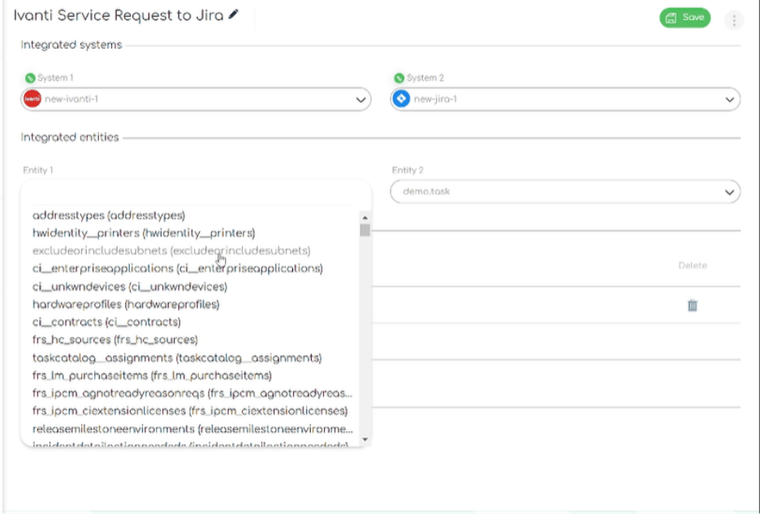
As you can see here, ZigiOps allows us to specify what data will be transferred from Ivanti to Jira’s instance such as:
- Address types
- Hwintentity_printers
- Excludeorincludesubnets
- Ci_enterpriseapplications
- Ci_unkwndevices
- Hardwareprofiles
- Ci_contracts
And more.
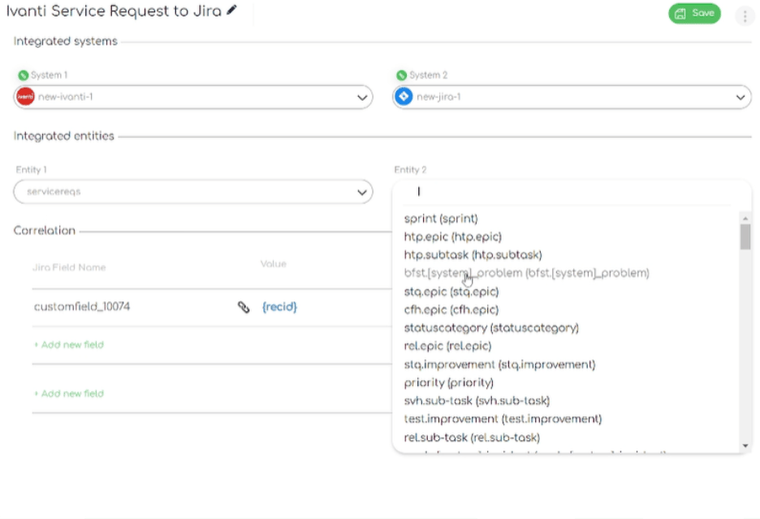
The same is valid for our Jira instance. We can easily pick between:
- Sprint
- Htp. epic
- Htp. subtask
- Stq. epic
- Cfh. Epic
- Rel.epic
- Priority
- Svh.sub-task
- Test.improvement
- Statuspagecategory
- Re.sub-task
- And more.
Once we pick the systems we’re sure we want to integrate (in our case Ivanti and Jira), we must click on the Save option that’s available in the upper right corner of the integration template. This way, ZigiOps will connect Ivanti to Jira, and we can safely proceed with the integration steps.
Additionally:
- ZigiOps reads Ivanti metadata through the /api/odata endpoints
- ZigiOps scans Jira metadata through /rest/api/2/ and /rest/api/3/
- Multi-level object relationships (hierarchy, dependencies) are preserved
Step 6: Setting up the Ivanti Service Requests to Jira tasks integration
ZigiOps offers 3 action levels for this integration (he number can vary, depending on the use case). For the Jira Ivanti integration, ZigiOps offers the following:
- Create Jira Task
- Update Jira Task
- Update Ivanti Service Requests
Create Jira Task
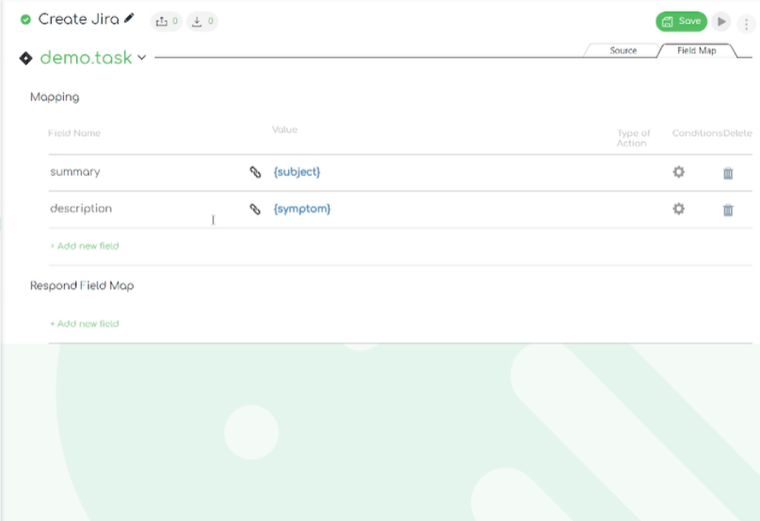
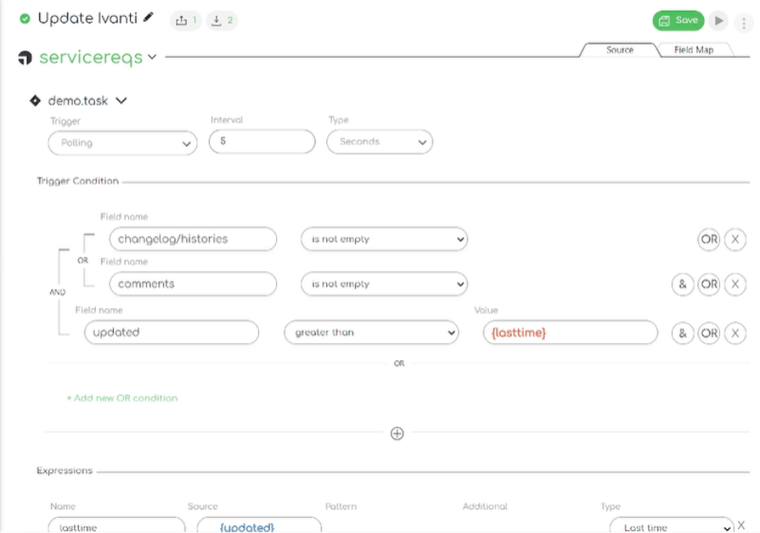
ZigiOps allows us to tailor the integration so that it fits the current needs. We can easily pick the trigger, trigger conditions and expressions.
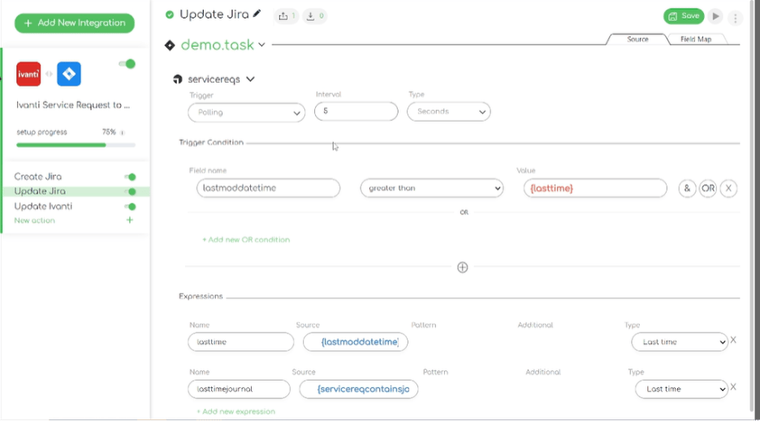
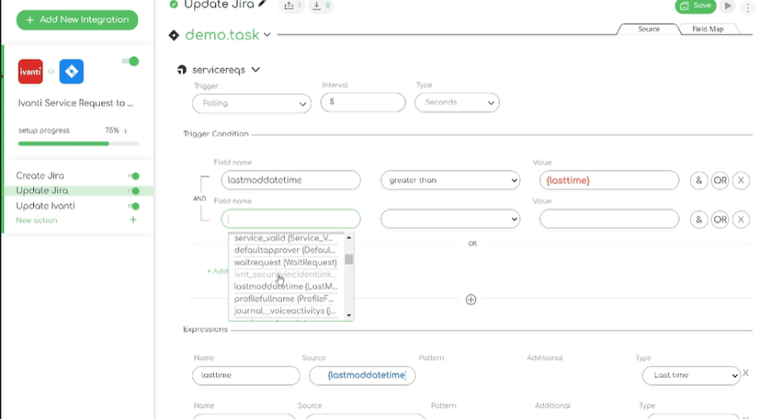
Effective trigger conditions are pivotal in achieving a successful integration between Jira and Ivanti in ZigiOps. Utilizing polling as a trigger action, ZigiOps actively searches for newly created service requests in Ivanti, allowing customization of scanning intervals—whether in minutes, seconds, or days. Additionally, a mandatory trigger condition involves specifying a field name and value, ensuring ZigiOps performs scans only when the required criteria are met.
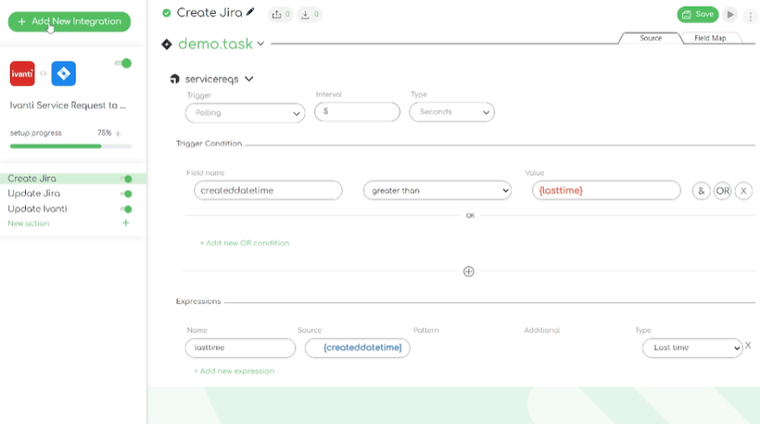
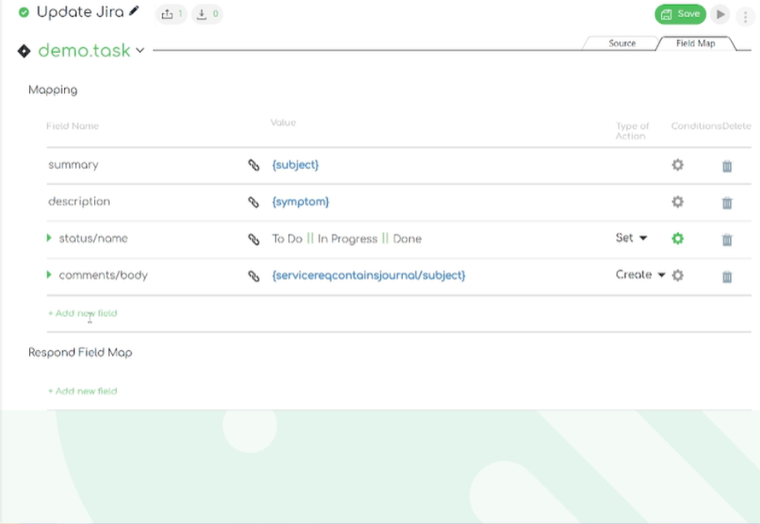
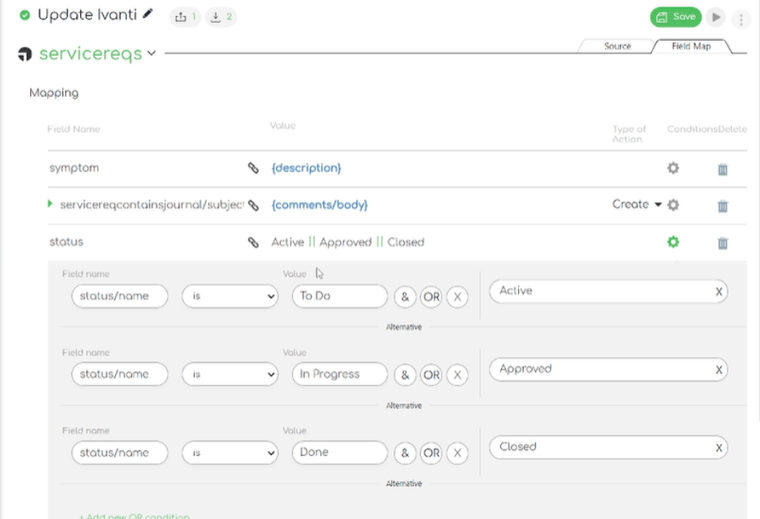
ZigiOps' advanced field mapping functionality provides enhanced control over the specific information details that the connector can retrieve and transfer, offering a more tailored integration experience.
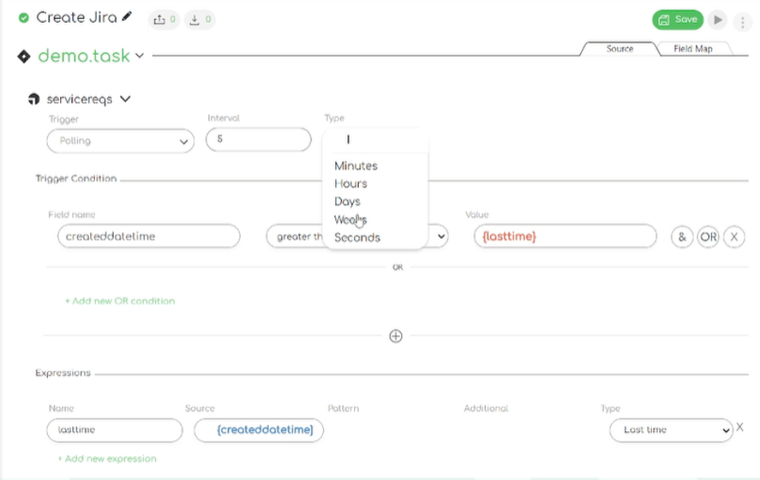
Update Jira task
ZigiOps' two-way integration capabilities enable swift and automatic real-time updates to tasks in Jira, ensuring seamless and efficient workflow management.
Update Ivanti
Additionally, ZigiOps allows users to have their Ivanti instance updated whenever there are changes on Jira task’s side.
ZigiOps supports idempotent data operations, preventing duplicates even during rapid update cycles — a common problem in DIY integrations.
You can also configure:
- Field-level filters (priority > 2, category = hardware, etc.)
- Time-based expressions (only sync items updated since last run)
- Multiple child objects such as attachments, links, subtasks, approvals
In summary
Integrating Jira Ivanti with ZigiOps delivers a streamlined, enterprise-grade workflow management solution that improves incident handling, accelerates processes, and enhances cross-team collaboration. With seamless data synchronization and increased visibility into key performance metrics, teams can operate more efficiently and with greater confidence.
The no-code approach empowers organizations to tailor the integration to their specific needs without relying on custom development, reducing complexity while maintaining flexibility and control. As integration automation becomes a critical differentiator for high-performing IT organizations, ZigiOps provides a secure, scalable, and highly customizable Ivanti to Jira integration designed to support enterprise demands and drive lasting operational efficiency.
Need help integrating your systems? Book a demo with our tech experts and see ZigiOps in action.
Frequently asked questions
How do you integrate Ivanti with Jira without coding?
The most efficient way to integrate Ivanti and Jira without writing custom scripts is by using a no-code connector like ZigiOps. ZigiOps automatically connects to both platforms through their native REST APIs, discovers available entities (such as Ivanti Incidents, Service Requests, CIs, Worknotes, and Jira Tasks, Stories, Bugs), and allows users to configure triggers, mappings, and correlation rules through a guided UI. No custom development, middleware coding, or API scripting is required. A no-code approach is especially important for enterprise environments where development teams do not want to maintain brittle, custom-built API scripts that break after every product update. ZigiOps uses stable, version-aware API communication to ensure uninterrupted syncing between Ivanti and Jira.
What data can sync between Ivanti and Jira in a two-way integration?
A Jira–Ivanti integration can synchronize almost every key record type depending on use case. Commonly synced objects include: Ivanti Incidents → Jira Issues (Tasks, Bugs, Stories, Epics) Ivanti Service Requests → Jira Tasks or Subtasks Ivanti Change Requests → Jira Change-related Issues Status, priority, category, SLA states, and assignment groups Worknotes (Ivanti) ↔ Comments (Jira) Attachments and links Configuration Items (CIs) and related metadata Approvals, owner groups, and custom fields ZigiOps maintains the relationships between parent and child objects, ensures no duplicates are created, and uses correlation IDs to keep both sides synchronized even during rapid update cycles.
Is Jira Ivanti integration secure and suitable for enterprise environments?
Yes. ZigiOps is built specifically for enterprise-grade security and is widely used in regulated industries. It does not store customer data, uses encrypted communication (TLS 1.2+), supports Java Keystore (JKS) certificates, and adheres to ISO 27001-grade standards. All authentication details such as API Keys, OAuth tokens, and passwords are encrypted using AES-256. Because ZigiOps operates with a zero-data-storage architecture, it does not retain or replicate Ivanti or Jira data at any stage. This makes it suitable for organizations with strict security, compliance, and governance requirements such as financial institutions, healthcare, and public sector organizations.