Ensuring Seamless ServiceNow to Jira Incident Mapping
Integrating ServiceNow and Jira for incident-to-issue synchronization often begins with the belief that the process should be simple. After all, both platforms offer well-documented APIs and predictable authentication methods.
To many teams, the assumption seems reasonable: “We just need to sync incidents from ServiceNow into Jira and keep everything updated.” Yet anyone who has managed these platforms in real enterprise environments knows the deeper truth. The API connection is never the real challenge. The difficult part — the part that determines whether an integration becomes a reliable operational bridge or a silent liability — is mapping.
Mapping dictates how two very different systems exchange meaning. When mapping is vague, imprecise, or incomplete, the integration does not fail loudly. It fails quietly. States appear wrong. Priorities no longer reflect urgency. Assignments fall through the cracks. Context disappears. Both ITSM and DevOps teams lose trust in the integration long before anything breaks technically. Eventually, they revert to manual updating — a far more painful, expensive outcome than not integrating at all.
A seamless ServiceNow Incident to Jira Issue Mapping strategy requires far more than field-to-field pairing. It requires a working understanding of the operational models behind both systems, the lifecycle expectations of ITSM and DevOps teams, and the discipline to keep mapping aligned as systems evolve.
Why Mapping — Not REST APIs — Determines Integration Success
REST communication between ServiceNow and Jira is straightforward: mature endpoints, structured payloads, OAuth 2.0, and predictable triggers. The difficulty comes not from the technology, but from the semantics — the meaning behind the fields.
Atlassian describes the issue perfectly:
“Integration is only valuable when the context moves with the data, not when systems merely exchange fields.” - Atlassian ITSM Guide
When only fields are synced but context is ignored, the integration produces Jira issues that look like incidents but behave incorrectly. Examples include:
- Syncing “State” without mapping the logic governing transitions
- Syncing “Priority” without translating the impact and urgency formula
- Syncing “Assigned To” without reconciling identity models
- Syncing “Description” while dropping Business Service, CI, environment, or compliance data
The result is a Jira issue that resembles an incident visually but loses its operational meaning.
This is why most integration failures are semantic, not technical. REST doesn’t fail — meaning does.
ServiceNow and Jira Speak Different Operational Languages
ServiceNow and Jira were not designed to think about work the same way. Understanding this is essential for proper mapping.
ServiceNow’s Operational Model includes:
- An ITIL-driven design
- A numeric state-machine approach
- Mandatory field validation
- SLA timers tied to transitions
- Deep CMDB relationships
- Deterministic process flow
Jira’s Operational Model includes:
- A workflow-driven architecture
- Team-defined transitions that rely on IDs
- Validators and post-functions
- Minimal mandatory structure unless enforced
- Project-level autonomy
These differences mean the two systems fundamentally disagree on:
- What a “state” represents
- How ownership should be assigned
- How priority should be interpreted
- What context belongs to a ticket
When mapping does not account for these differences, tickets in Jira become inaccurate representations of ServiceNow incidents. Over time, dashboards, reports, SLA metrics, and escalations begin to drift.
Lifecycle Translation: The Most Important Mapping You Will Ever Define
Lifecycle alignment determines whether the integration remains stable over time. If the lifecycle mapping is wrong, every downstream process — including SLA computation, escalation rules, change planning, and compliance reporting — becomes unreliable.
The State Mismatch Problem
ServiceNow uses numeric states such as New, In Progress, On Hold, Resolved, and Closed.
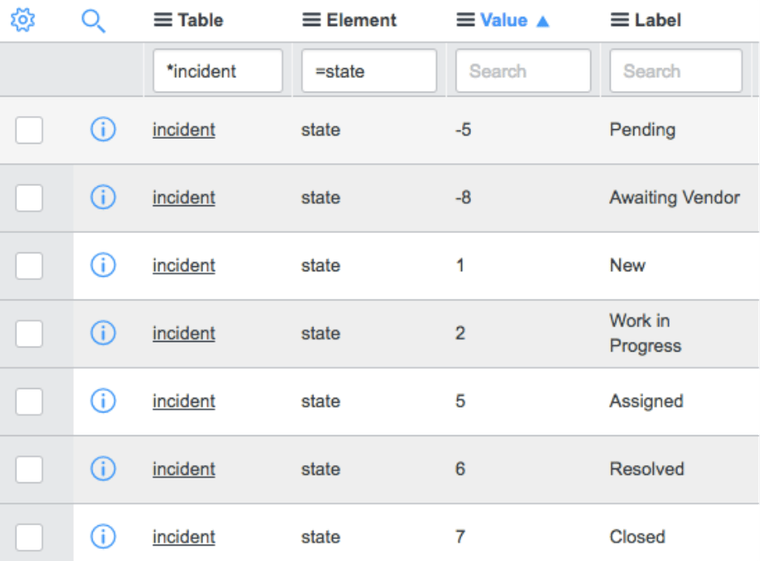
Jira uses named statuses governed by transitions. This means:
- A ServiceNow “Resolved” state cannot be pushed directly into a Jira “Done” field.
- Jira will reject or ignore the update unless the correct transition is triggered.
- Jira requires the Resolution field to be populated during a transition to Done.
A Proper Lifecycle Mapping Example
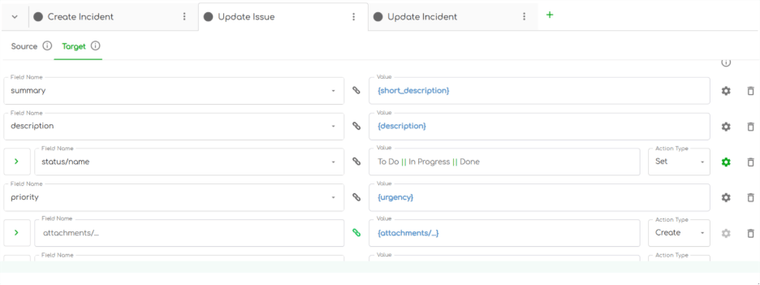
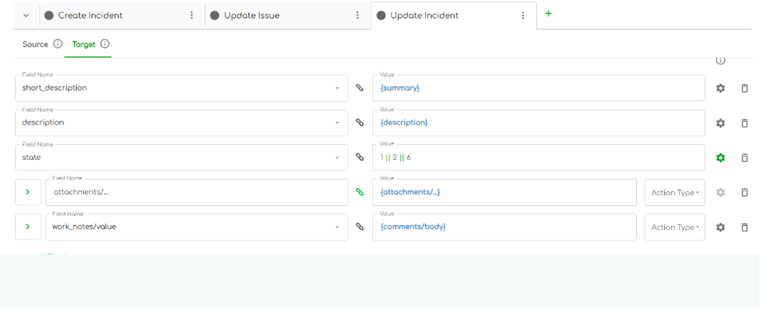
When a ServiceNow incident moves from New to In Progress, Jira should also transition to its first actionable state. When ServiceNow moves an incident to Resolved, Jira must transition to Done with the correct Resolution value.
Check out the following example video tutorial to see how to handle incident lifecycle in ServiceNow)
video source: TechTalk with Bill
The mapping must also work in the opposite direction:
- When Jira transitions from In Progress to Done, ServiceNow should move from In Progress to Resolved.
- This should only occur if the resolution code and resolution notes exist.
- The mapping must also avoid overwriting updates if the ServiceNow ticket was updated later.
Real Example: Multi-step Transition Failure
A major fintech company discovered that Jira’s “Done” state was automatically closing ServiceNow incidents — skipping the “Resolved” state required for customer confirmation. SLA reports became unreliable. By adjusting the mapping so that Jira Done mapped only to ServiceNow Resolved, lifecycle accuracy returned immediately.
Lifecycle mapping is not a configuration detail. It is the backbone of the integration.
Priority Mapping: Translating Business Impact into Actionable Jira Values
Priority mapping appears simple until you realize the systems interpret priority differently. ServiceNow calculates priority using Impact multiplied by Urgency. Jira treats priority as a flat list of values. PagerDuty explains this distinction well:
“Severity is about customer and business impact, not numbers on a screen.” - PagerDuty Incident Response Guide
Because of this difference, numeric translation fails. Instead, mapping must consider contextual information. Examples of scenario-driven mapping include:
- If Business Service = Payments and Environment = Production → Jira Priority = Highest
- If Category = Security and Urgency = High → Add a “security-incident” label and elevate priority
- If Priority = P3 and Customer = VIP → Update watchers and escalate the component
This ensures Jira reflects the operational urgency ITSM teams experience.
Numeric mapping hides business behavior. Context-driven mapping preserves it.
Assignment & Ownership: The Quietest but Most Dangerous Failure
Assignment discrepancies rarely raise visible errors but quietly create operational failures. ServiceNow identifies users through sys_ids tied to directory services. Jira uses Atlassian account IDs or emails. An Assignment Group does not map directly to a Jira Assignee.
This leads to Jira issues that end up assigned to:
- Placeholder system accounts
- The wrong team
- No one at all
The only scalable approach is domain-level mapping. For example:
- ServiceNow Group “Network Operations” → Jira Component “Infra Engineering”
- ServiceNow Group “DB Admins” → Jira Assignee group: jane.doe@example.com
- ServiceNow Group “Security Ops” → Jira Security queue
This approach remains resilient even as people leave or teams reorganize.
Custom Fields: Preserving Context Developers Need
Custom fields often carry critical context that development teams rely on. ServiceNow incidents frequently include:
- Business Service
- CI (Configuration Item)
- Affected environment
- Subcategory
- Regulatory flags
- Impacted region
- Related Change Request
Jira may represent these as components, custom fields, labels, or deployment environments. ServiceNow emphasizes this principle clearly:
“Relationships between data elements matter more than fields themselves.” - ServiceNow Community
Mapping must preserve context — not just text — to ensure Jira developers can act immediately.
Comments & Attachments: Managing the Human Communication Layer
ServiceNow distinguishes between:
- Work Notes (internal use)
- Additional Comments (customer-visible)
Jira does not. Syncing everything presents a compliance risk. A European bank accidentally synced internal ServiceNow work notes — including sensitive audit and HR details — into Jira. The issue was corrected, but not before triggering an internal security inquiry.
Best practice mapping includes:
- Syncing only public ServiceNow comments
- Syncing Jira comments back to ServiceNow only when operationally necessary
- Syncing attachments only during actionable stages
- Filtering out system messages entirely
Why ZigiOps Makes Mapping Stable and Future-Proof?
ZigiOps solves these mapping challenges because it is built to understand both systems’ internal logic. It is schema-aware, workflow-aware, and driven by conditional mapping. This allows ZigiOps to detect field changes automatically — including new fields, renamed fields, type changes, and new mandatory values — without breaking the integration.
ZigiOps respects Jira transitions fully. It triggers transitions using the correct transition IDs and adheres to validators, post-functions, and required fields. It follows ServiceNow’s mandatory field logic, ITIL-driven state machines, and SLA dependencies. This ensures behavior-aligned updates across both systems.
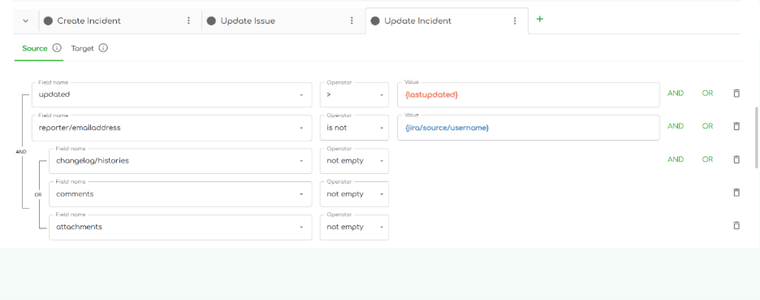
ZigiOps enables conditional mapping such as:
- Updating resolution notes only when Jira transitions to Done
- Syncing attachments only for P1 or P2 incidents
- Suppressing updates when a target record was modified more recently
Its enterprise-grade observability includes audit trails, retry mechanisms, monitoring dashboards, and compliance visibility. ZigiOps stores no customer data, processes everything in real-time, and meets ISO 27001 standards — making it suitable for regulated industries like finance, healthcare, and government.
Because it supports unlimited transactions and dynamic schema detection, ZigiOps delivers stable ServiceNow Incident Jira Issue Mapping even as workflows, fields, and teams evolve.
| Mapping Category | Common Failure | How ZigiOps Solves It |
|---|---|---|
| Lifecycle State Mapping | Incorrect transitions, skipped ITIL steps | Workflow-aware transitions that respect Jira rules |
| Priority Mapping | Flat values that ignore business context | Conditional mapping using CI, Service, and Environment |
| Assignment & Ownership | Incorrect or missing assignees | Domain-based team mapping |
| Custom Fields | Missing Business Service or CI info | Schema-aware custom field mapping |
| Comments & Attachments | Sensitive internal notes synced unintentionally | Granular filtering and secure syncing rules |
Final Thoughts
Stable ServiceNow-to-Jira integrations are not created by default connectors or simple field mapping. They are the result of disciplined lifecycle translation, context preservation, domain-based assignment, intelligent priority handling, controlled communication syncing, and a workflow-aware integration platform that adapts to evolving systems.
When mapping is done correctly, the integration becomes invisible — not because it is simplistic, but because it behaves predictably. That is the hallmark of a mature, reliable ServiceNow Incident Jira Issue Mapping strategy.
Need help ensuring seamless ServiceNow incident to Jira issue integration? Book a demo with the ZigiOps team and see why so many enterprises rely on it for successful integrations.
FAQs section
1. What’s the most important mapping in a ServiceNow-to-Jira integration?
Lifecycle (state/status) mapping. If ServiceNow states don’t translate to the correct Jira transitions, SLAs, workflows and reports drift out of sync.
2. Why do priority mismatches happen between ServiceNow and Jira?
ServiceNow calculates priority (Impact × Urgency), while Jira uses flat values. Reliable mapping requires context (Business Service, environment, CI), not simple numeric translation.
3. How do I prevent ServiceNow work notes from syncing into Jira?
Filter ServiceNow Work Notes from the integration and sync only customer-facing comments. Jira doesn’t separate internal vs external notes, so proper filtering prevents sensitive data exposure.
See the complete picture of this integration on our ServiceNow ↔ Jira integration page.
Frequently asked questions
What’s the most important mapping in a ServiceNow to Jira integration?
Lifecycle (state/status) mapping. If ServiceNow states don’t translate to the correct Jira transitions, SLAs, workflows and reports drift out of sync.
Why do priority mismatches happen between ServiceNow and Jira?
ServiceNow calculates priority (Impact × Urgency), while Jira uses flat values. Reliable mapping requires context (Business Service, environment, CI), not simple numeric translation.
How do I prevent ServiceNow work notes from syncing into Jira?
Filter ServiceNow Work Notes from the integration and sync only customer-facing comments. Jira doesn’t separate internal vs external notes, so proper filtering prevents sensitive data exposure.