Managing Every Jira Issue Efficiently: A Complete Guide for IT Teams - From Creation to Resolution
A complete guide to Jira issue management and how integrations improve work
Managing a Jira issue is at the core of how countless IT teams plan, build, support, and deliver work. Whether you are handling bug fixes, feature requests, incidents, or operational tasks, Jira issues shape the day-to-day workflow of DevOps engineers, service managers, and product teams across the enterprise.
Yet as projects scale and more tools enter the environment, the way you manage a Jira issue starts to matter more than ever. Issues need to be created accurately, enriched with the right context, moved across workflows without friction, and synchronized with other systems if your teams rely on multiple tools. When this does not happen, bottlenecks appear, collaboration slows down, and teams lose visibility.
This guide walks through everything you need to know about managing a Jira issue from creation to resolution, why proper organization of Jira issues improves team performance, and how modern no-code integrations like ZigiOps make cross-system issue management easier, faster, and more secure.
Understanding the Jira Issue: The Core Unit of Work
A Jira issue represents any piece of work that needs to be tracked. It can be a bug, a story, a task, a service request, a problem record, or even a major Epic. Everything revolves around issues, which is why understanding them deeply helps teams stay aligned and productive.
What a Jira Issue Represents
A Jira issue is more than a ticket. It acts as a shared source of truth that contains:
- The problem or requirement
- Ownership
- Status and lifecycle
- Priority
- Attached files
- Comments and activity history
This helps every contributor get the full story instantly, without relying on side conversations, emails, or manual spreadsheets.
Why Jira Issues Matter for IT and DevOps Teams
Teams rely on Jira issues for:
- Task management for small and large projects
- Progress tracking through customizable workflows
- Cross-functional collaboration across Dev, QA, operations, and business teams
- Reporting and analytics that drive sprint planning and resource allocation
In short, Jira issues keep work discoverable, measurable, and accountable.
Jira Issue Types Explained
Jira supports several issue types that help teams categorize work clearly:
- Epic: A large body of work that groups multiple issues.
- Story: A user-centered feature or requirement.
- Task: Standard work item.
- Bug: A defect that requires fixing.
- Sub-task: A smaller piece of work within a Story or Task.
These categories allow teams to break down work logically and maintain visibility.
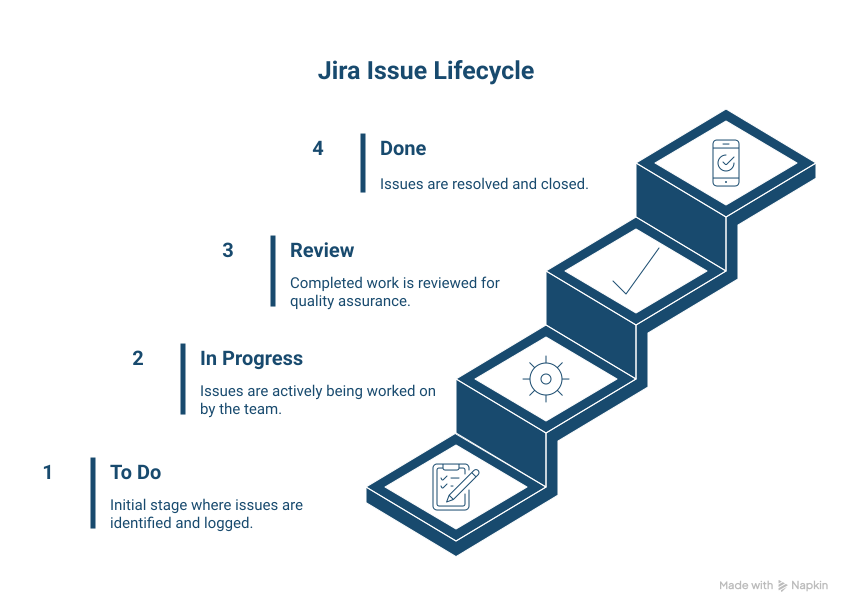
The Lifecycle of a Jira Issue
While workflows differ by team, the typical structure looks like this:
- To Do: Issue is created and ready to be worked on.
- In Progress: Active work is happening.
- Review or QA: Work is done and needs verification.
- Done: No further action is required.
The workflow defines how work moves, while the issue contains the details. Both must be configured thoughtfully.
Why Integrations Matter for Every Jira Issue
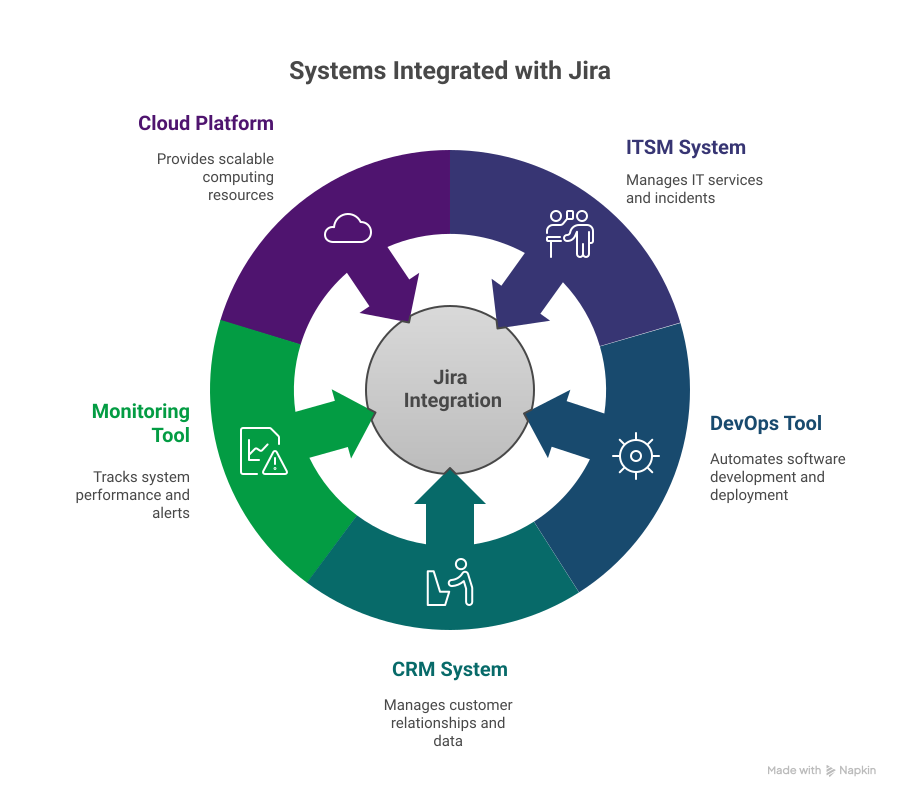
Many organizations rely on multiple tools. Development teams use Jira, while ITSM teams use ServiceNow or BMC. Sales teams may use Salesforce. Operations might rely on monitoring tools like Dynatrace, Zabbix, or Prometheus.
When these systems do not talk to each other, Jira issues quickly become siloed. A bug discovered in a monitoring tool may never reach Jira. A ServiceNow incident may not generate a corresponding Jira issue, leaving developers unaware. Updates become inconsistent and duplicated.
The Result
- Manual ticket creation
- Delays in incident resolution
- Incomplete data
- Misalignment between teams
- Rework and communication gaps
This is where enterprise-grade, no-code integrations like ZigiOps become essential.
Best Practices for Managing and Organizing Jira Issues
Below are the most valuable strategies teams use to optimize how they create, enrich, and resolve Jira issues.
1. Write Clear, Descriptive Summaries
Your summary is the first thing a team member sees. Make it short, precise, and descriptive.
Why it matters:
Quick comprehension reduces confusion and speeds up daily standups and triage.
2. Use Detailed Descriptions
Include:
- Steps to reproduce
- Expected vs actual behavior
- Relevant logs or screenshots
- Acceptance criteria
Why it matters:
Well-written issues reduce back-and-forth and prevent blockers.
3. Prioritize Every Jira Issue
Use priority levels like Critical, High, Medium, or Low.
Why it matters:
Teams can focus on the most impactful work.
4. Organize Work with Epics and Stories
Break large initiatives into smaller, structured tasks.
Why it matters:
This helps both high-level planning and granular tracking.
5. Leverage Labels and Components
These are powerful for grouping similar issues by:
- Feature
- System area
- Team
- Platform
Why it matters:
Labels and components improve searchability and reporting.
6. Use Custom Fields When Needed
When default fields are not enough, custom fields provide additional data context.
Why it matters:
They help capture data specific to your processes or business needs.
7. Regularly Groom the Backlog
Archive what no longer matters. Refresh what does.
Why it matters:
A clean backlog keeps teams focused and prevents clutter.
8. Use Automation to Simplify Routine Work
Automation rules can move issues to Done, assign owners, or add labels.
Why it matters:
Teams save time and avoid human error.
9. Link Related Jira Issues
Link issues such as:
- Bug to the Story it blocks
- Support ticket to the feature request it relates to
- Incident to the root problem
Why it matters:
Dependencies become visible instantly.
10. Monitor Work with Boards and Dashboards
Use Kanban or Scrum boards plus key dashboard gadgets.
Why it matters:
Teams can visualize progress and identify bottlenecks.
11. Build Custom Filters
Filters streamline navigation and reporting across the issue list.
Why it matters:
Predictable filtering helps daily operations run smoother.
12. Create Workflows that Match How Teams Work
Custom workflows keep Jira aligned to your real processes instead of forcing work into unnatural steps.
13. Maintain Strong Communication Inside the Issue
Use comments and mentions to keep discussions centralized.
14. Close Issues Promptly
Clear, closed issues prevent confusion and ensure your reporting is accurate.
15. Track Time Spent on Every Jira Issue
Time tracking supports better estimation and resource planning.
Examples of Jira Issue Management Challenges vs Outcomes With Integration
Below is a table summarizing how Jira issues behave with and without proper integrations.
How ZigiOps Improves Jira Issue Management
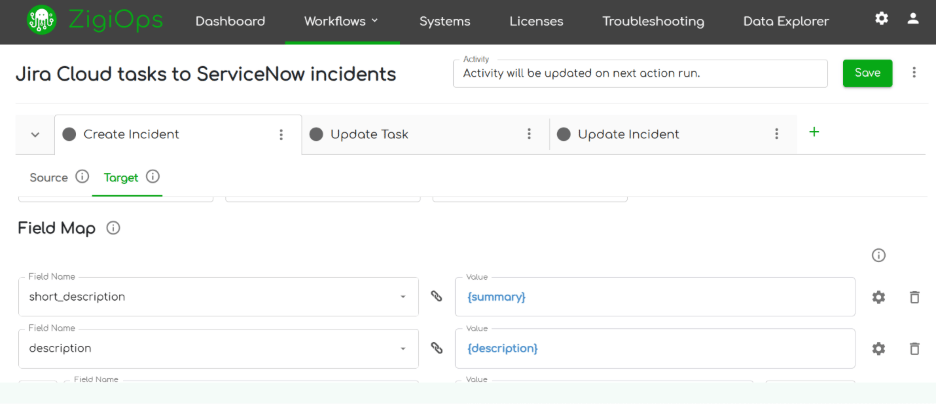
ZigiOps is a 100 percent no-code integration platform that synchronizes Jira issues with systems like ServiceNow, Azure DevOps, Salesforce, Dynatrace, Zabbix, and many more.
The platform provides:
1.Bi-directional data synchronization
Every update in Jira flows to the connected system and back.
2.Preserved data integrity
Fields like summary, description, priority, state, comments, attachments, and custom fields stay aligned.
3.Unlimited transactions
Ideal for enterprises with heavy issue traffic.
4.Enterprise-grade security
No data storage, ISO 27001 certification, encrypted credentials, SSL, IP whitelisting.
5.Complete no-code configuration
Users configure integration flows in a guided UI without touching APIs.
6.Customizable workflows
Trigger conditions, filters, transformations, and correlation logic allow precision control.
7.Pre-built templates
Users launch integrations quickly and modify them as needed.
Together, these capabilities eliminate manual work and ensure every Jira issue stays consistent across tools.
How Jira Issue Management Is Changing With AI and Atlassian Licensing
Atlassian is increasingly packaging powerful AI features into Jira Cloud plans, including natural language summaries, automated backlog suggestions, and AI-assisted issue creation. Understanding your licensing tier matters because many organizations are already paying for AI features they are underusing.
You can explore this topic further in the article Unlock the AI You're Already Paying For: Transform Your Atlassian Investment.
Conclusion: Managing Every Jira Issue With Clarity and Speed
A well-managed Jira issue keeps your workflows clean, your teams aligned, and your projects predictable. But as more tools enter the environment, Jira cannot operate in isolation. Integrations ensure that issues stay accurate, synchronized, and visible across ITSM, DevOps, monitoring, CRM, and cloud systems.
Platforms like ZigiOps give enterprises a secure, no-code way to automate Jira issue creation, synchronization, and updates across the ecosystem without writing scripts or modifying APIs.
If your teams want to streamline Jira issue management and eliminate manual work between systems, a quick look at how ZigiOps handles your use cases can be incredibly valuable.
Book a Demo to see how seamless Jira integrations work in action.