Choosing the Right Jira Integrator: Requirements & Pitfalls

Jira’s evolution inside enterprises has been both predictable and profound. What began as an issue-tracking tool has grown into a central operational platform that anchors engineering, ITSM, DevOps, product delivery, and cross-team collaboration. Jira is where incidents are escalated, changes approved, deployment work tracked, and customer issues dissected. When so many mission-critical workflows converge on a single system, the need for a reliable and scalable integration layer becomes structural, not optional. To reinforce this point, industry analysts highlight just how foundational modern integration layers have become.
“Application-centric integration connects a variety of applications and data sources, allowing application and integration architects to juggle multiple protocols and data models, while successfully routing data and handling errors.” - source Gartner
Most organizations only realize this when their integration falls apart — out of the blue. The underlying truth is simple: Jira does not operate in isolation, and the systems connected to it rarely share the same assumptions, schemas, or pace of change. Choosing the right Jira integrator therefore becomes an architectural decision, one that affects everything from incident resolution to audit trails.
Why Jira Integrations Are Harder Than They Look?
Integrating Jira with other systems isn’t just a matter of connecting APIs. Enterprises quickly discover that Jira’s flexibility — its greatest strength — introduces significant complexity.
Most Jira instances inside large organizations contain hundreds of custom fields, dozens of project-specific workflows, branching transition logic, and permissions that vary by role, team, and business function. What appears as a single “Status” field in one project may be an entirely different workflow state in another. This alone makes naive integrations brittle.
Now add external systems: an ITSM platform generating incidents, a monitoring tool pushing alert data, an APM platform streaming performance anomalies, or a DevOps pipeline reporting failed deployments. Each system has its own schema, rate limits, authentication model, and field semantics.
The real source of integration failures is rarely the API call itself, but the differences in how each system interprets and structures its data. For example, a “Critical” alert in a monitoring tool may not map cleanly to your Jira priority scheme. A “Resolved” status in ITSM may not represent the same lifecycle state as a “Done” transition in Jira. These mismatches manifest as lost updates, incorrect incident states, or conflicting records across platforms.
This is why the integrator itself matters. The right one doesn’t just shuttle data between tools — it harmonizes how those tools interpret information, keeps context intact, adapts as environments evolve, and handles load without losing accuracy.
Where Integrations Go Wrong: The Common Pitfalls?
Teams often start with the simplest path: a marketplace plugin, a custom script, or an iPaaS workflow that “does the job.” These solutions can work for small deployments or isolated use cases, but they break down as Jira becomes central to enterprise workflows.
1. The Fragility of Custom Scripts
Custom integrations are deceptively attractive: full control, no licensing cost, and tailored logic. But they age poorly. One Jira upgrade, one API deprecation, or one workflow change can break the integration silently. In many organizations, scripts become orphaned—original authors leave, documentation is incomplete, and error handling is minimal. A script that fails quietly for a week can create operational inconsistencies that take months to unwind.
2. Lightweight Plugins and Connectors
Marketplace plugins often shine for single-team workflows or small instances. But in enterprises with dozens of Jira projects and heterogeneous data requirements, plugins struggle with:
- field-level inconsistencies
- custom workflow transitions
- concurrency under high load
- cross-system enrichment
- advanced mapping logic
Without architectural isolation from Jira internals, plugins become brittle during upgrades.
3. iPaaS Platforms and the Depth Problem
General-purpose iPaaS platforms offer breadth — integrations across many systems — but not depth. Jira’s complexity almost always pushes iPaaS users into writing expressions, scripts, or chained flows that mimic proper normalization. This adds operational overhead and creates maintenance liabilities.
4. Overlooking Security and Data Storage
Many integration platforms temporarily store or log operational data. In regulated environments, this becomes a liability. Sensitive fields, customer data, or incident metadata can’t be allowed to sit in external services without strict governance. This makes zero-storage architectures, like the one used by ZigiOps, increasingly relevant.
What an Enterprise-Grade Jira Integrator Must Provide?
A reliable Jira integrator isn’t defined by its ability to connect systems; it’s defined by its ability to handle everything around those connections — the changes, the volume, the irregularities, and the inconsistencies that enterprises face daily. As defined in enterprise architecture theory, “Enterprise application integration is the process of linking such applications within a single organization together … in order to simplify and automate business processes … while … avoiding having to make sweeping changes to the existing applications or data structures.”
Handling Customization as the Default, Not an Exception
A proper integrator must treat custom fields, project-specific workflows, and schema variations as normal. This means dynamic field discovery, adaptive mappings, and tolerance for workflow evolution. Tools that assume a uniform Jira instance inevitably break as complexity grows.
Transformations Without Code
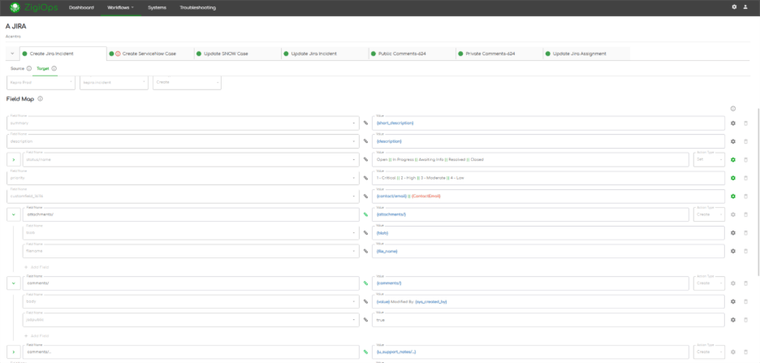
In real-world scenarios, integrations almost never map field-to-field. They require conditional logic, value normalization, routing rules, and enrichment from external systems. A no-code interface for defining these transformations is essential — not for simplicity, but for maintainability. ZigiOps, for example, takes this approach by exposing complex logic visually, reducing reliance on scripts or expressions that only a subset of engineers can maintain.
Zero Data Storage by Design
For enterprises with strict governance, integrators must avoid storing operational data altogether. Real-time pass-through, rather than staged processing, reduces risk exposure and simplifies audits.
High-Volume Stability During Incident Load
Consider a major incident where hundreds of alerts escalate across monitoring and observability platforms. A Jira integrator must sustain high-volume synchronization without creating duplicates, dropping updates, or choking under burst load. Tools designed with throttling or heavy polling will falter here.
Consistency Across Cross-Team Workflows
A Jira integrator must enforce consistency across ITSM, DevOps, and engineering workflows. When ServiceNow closes an incident, Jira must reflect that change immediately. When a deployment fails in Azure DevOps, Jira must surface the event with full context. When a monitoring alert enriches a Jira issue, it must not overwrite unrelated fields. Precision matters.
| Common Pitfall | Why It Happens | Enterprise-Grade Requirement |
|---|---|---|
| Fragile Custom Scripts | Break during Jira upgrades, workflow changes, or API shifts; lack documentation and ownership. | No-code transformations, upgrade-resilient architecture, adaptive mappings. |
| Lightweight Plugins Don’t Scale | Can’t handle heterogeneous workflows, custom fields, or high-volume environments. | Support for complex Jira schemas, custom fields, and high-volume loads. |
| iPaaS Depth Limitations | Forced scripting, expressions, or chained flows to mimic true normalization. | Native deep support for Jira workflow logic, transitions, and field semantics. |
| Data Storage & Compliance Risks | Platforms temporarily store sensitive fields, violating governance rules. | Zero-data-storage architecture; real-time pass-through only. |
| Breakdowns During Incident Spikes | Tools choke under burst loads, losing updates or creating duplicates. | High-volume stability, clean deduplication, concurrency-safe sync engine. |
| Cross-Team Workflow Drift | Different systems interpret statuses, priorities, and lifecycle states differently. | Semantic consistency, two-way sync, and precise field/state normalization. |
A Quick Example: When an MSP, ITSM, and Jira Must Align
In many enterprises, especially those working with a Managed Service Provider (MSP), a single ticket often crosses multiple organizational and technical boundaries before it reaches resolution. The MSP may operate on a centralized ServiceNow instance, while the customer works in Jira, Zendesk, Freshservice, or even another ServiceNow environment. What begins as a simple support issue quickly becomes a multi-system workflow that depends on precision and real-time synchronization.
Imagine a customer raising an issue in their internal ITSM tool. The ticket escalates to the MSP, landing in the MSP’s ServiceNow queue. Engineering teams then pull the work into Jira for deeper analysis. At every step, the ticket gathers context—priority adjustments, comments, attachments, business impact, environment details. And every team involved expects the same source of truth to be reflected everywhere.
This is exactly where brittle integrations collapse. Updates drift. Fields don’t map cleanly. Comments appear in one system but not another. Tickets bounce between queues without carrying the full operational history. Teams resort to screenshots, side-channel messages, and manual re-entry to keep the story straight. By the time the issue is resolved, three different versions of the same ticket may exist, none of them fully accurate.
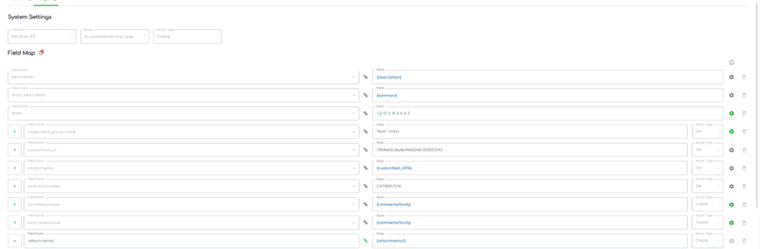
A dedicated Jira integrator eliminates this uncertainty. In architectures built for co-managed environments, the moment a case transitions into a specific ServiceNow queue, the integrator automatically creates the corresponding Jira issue in the customer’s project. Field-level mappings ensure that priority, description, category, contact details, and custom metadata align correctly. Status transitions stay synchronized. Comments flow in both directions with author attribution intact. Even de-escalations—where a Jira update downgrades or resolves the issue—push cleanly back into ServiceNow without breaking SLA logic or overwriting unrelated fields.
Every team sees one consistent timeline. No duplicates. No manual linking. No guesswork. And no race conditions caused by asynchronous or partial updates.
Not because the workflow is simple, but because the integrator is intentionally designed to absorb process complexity rather than expose it to the teams who rely on it.

Let’s see some examples of how this transform through ZigiOps’ prism.
Evaluating a Jira Integrator: What IT Teams Should Look For?
When choosing a Jira integrator, enterprise teams should focus on architectural fit rather than features. Key considerations include:
How does the integrator behave when APIs or workflows change?
A well-architected integrator isolates transformation logic from system internals. If a Jira workflow changes, the integrator should adapt without scripting or re-engineering.
Can it handle heterogeneity across Jira projects?
In most enterprises, Jira is not a monolith. Different teams design workflows differently. The integrator must support non-uniform structures gracefully.
Does it require storing data?
For many organizations, the answer must be “no.” Zero-storage architectures reduce attack surface and simplify compliance.
What happens during a high-volume surge?
Incident spikes and monitoring bursts are the real test. Integrators designed for low-volume syncs often fail silently under pressure.
Can non-developers maintain the integration?
If sustaining the integration requires reading scripts, writing expressions, or understanding API edge cases, the solution will not scale operationally.
This is where dedicated platforms like ZigiOps differ from generic connectors or scripts: they are built with long-term maintainability and cross-team operability in mind.
Recognizing When It’s Time to Upgrade Your Integration Approach
Many organizations discover they’ve outgrown their integration tooling when:
- updates start failing regularly
- duplicate tickets or missing comments become recurring issues
- Jira changes require manual updates to scripts
- alerts fail to create enriched issues
- audit teams flag data flow concerns
- the integration becomes “too fragile to touch”
These symptoms indicate not just technical debt, but structural misalignment between Jira’s role and the integration mechanism supporting it.
What Modern Jira Integrators Represent in Today’s Enterprise Architecture?
A modern Jira integrator is not a connector. It is a resilience layer.
The best integrators act as a buffer between rapidly evolving systems. They do not store data, they do not rely on brittle assumptions, and they do not impose their own workflow constraints. Instead, they adapt to the enterprise as it is, not as the tool designer imagined it would be.
ZigiOps exemplifies this category. It treats integrations as dynamic systems that must evolve alongside Jira, ITSM, DevOps, and monitoring environments. It prioritizes resilience, zero storage, schema awareness, and real-time synchronization.
That is what separates a tool that “moves data” from one that supports enterprise operations.
Conclusion
Choosing the right Jira integrator is ultimately about stability, predictability, and architectural resilience. Jira sits at the center of modern IT operations, and the systems surrounding it depend on synchronized, semantically accurate data. A proper integrator respects this complexity, adapts to it, and ensures workflows remain aligned even as environments shift.
For IT teams, Jira admins, DevOps engineers, and operations managers, the selection process must focus on long-term adaptability rather than short-term convenience. Platforms designed with enterprise realities in mind — such as ZigiOps — reflect the shift toward integrators that handle complexity without adding fragility. A Jira integrator does more than connect systems.