Freshdesk Jira Integration: Why It Matters for Modern Organizations?
Implementing a robust Freshdesk Jira integration has becomeessential for organizations seeking to deliver consistent, high-qualitycustomer experiences in today's fast-paced digital landscape. As productsevolve rapidly and user expectations continue to rise, service desk teams musthandle an ever-growing volume of issues, questions, and requests withunprecedented speed and accuracy. This challenge depends not only on skilledteams but also on tools that enable seamless collaboration between customersupport and engineering departments through effective integration solutions.
Freshdesk and Jira are widely recognized as leading platforms in theirrespective domains. Freshdesk empowers organizations to manage customer supporttickets across multiple channels efficiently, while Jira supports developmentand DevOps teams in tracking bugs, incidents, features, and project work withprecision. However, when these powerful tools operate in isolation,organizations face significant operational challenges that a well-implemented FreshdeskJira integration can solve.
When these critical business systems operate in isolation, common problemsarise—duplicate effort, inconsistent data, slow escalations, and limitedvisibility across teams. The result is delayed resolutions, frustratedcustomers, and a disjointed customer experience that can damage brandreputation and customer loyalty. This is precisely why organizations areincreasingly turning to comprehensive Jira Freshdesk integrationsolutions to bridge these operational gaps.
Freshdesk: The Foundation of Effective Customer Support
Freshdesk provides customer service teams with a unified environment to manage interactions across multiple channels such as chat, email, phone, and social media platforms. Its design prioritizes usability and flexibility, allowing teams to implement structured support workflows while maintaining a comprehensive view of the entire customer journey from initial contact to resolution.
Freshdesk significantly improves ticket handling capabilities by automating repetitive tasks, organizing conversations logically, and centralizing communication channels. This comprehensive approach ensures that support agents can work more efficiently and focus their valuable time and expertise where it matters most—solving customer problems and building relationships.
Freshdesk Benefits That Enhance Jira Freshdesk Integration Strategy
• Unified service desk environment: Centralizes all customer communication channels and tools in a single, intuitive interface for efficient support operations and seamless workflow management.
• Rapid adoption and deployment: An intuitive user interface and simple configuration options enable quick onboarding without requiring extensive technical expertise or lengthy training periods.
• Accelerated issue resolution: Advanced automated workflows streamline ticket assignment, categorization, and escalation processes to reduce response times significantly.
• Dramatically reduced manual effort: Powerful automation features like intelligent rules, customizable canned responses, and smart auto-assignment minimize repetitive tasks and human errors.
• Enhanced cross-team collaboration: Shared tickets, detailed notes, and comprehensive context improve communication between support teams and other departments, making Freshdesk Jira integration more effective.
• Complete end-to-end visibility: Full ticket history and detailed activity tracking support better insights, analytics, and continuous improvement initiatives.
• Measurably higher customer satisfaction: Faster response times and clearer, more consistent communication drive improved CSAT scores and customer loyalty.
• Enterprise-grade cloud performance: Consistent uptime, stable performance, and robust infrastructure ensure dependable service delivery around the clock.

Jira: The Engine of Development Excellence
Jira stands as the preferred platform for teams that need to manage development and DevOps workflows with precision and reliability. From comprehensive bug tracking and incident management to detailed sprint planning and release coordination, Jira provides the robust structure and flexibility required to organize even the most complex technical work efficiently.
While Jira is specifically designed to support Agile methodologies, it remains flexible enough to adapt to virtually any workflow or organizational structure. This adaptability makes it an ideal foundation for organizations looking to streamline communication between support and engineering teams through a comprehensive Jira Freshdesk integration.
Jira Capabilities That Strengthen Your Freshdesk Jira Integration
• Granular permission controls: Administrators can precisely control who can view, create, edit, or transition issues, ensuring sensitive data protection and maintaining security compliance standards.
• Enterprise-grade data security: Advanced encryption protocols and secure access controls support regulatory compliance requirements and safeguard critical project information.
• Comprehensive Agile methodology support: Scrum and Kanban boards offer real-time visibility into work progress, enabling teams to manage development cycles efficiently and effectively.
• Advanced reporting and analytics: Comprehensive analysis capabilities for incident trends, cycle times, backlog health, sprint performance, and team productivity metrics.
• Extensive customization flexibility: Tailor fields, workflows, screens, and issue types to fit specific project needs and organizational requirements seamlessly.
• Full mobile accessibility: Track and update work progress anytime, anywhere with feature-rich mobile applications for iOS and Android platforms.
• Strategic roadmapping capabilities: Visualize timelines, dependencies, and priorities for effective long-term planning and resource allocation.

Challenges Teams Face Without a Jira Freshdesk Integration
Even when both Freshdesk and Jira are present in an organization's technology ecosystem, their potential benefits remain severely limited if they operate as disconnected, independent systems. Support agents must manually create Jira issues to escalate bugs or customer requests, copying details from Freshdesk into Jira—often with incomplete, outdated, or inaccurate information that can lead to delays and frustration.
Without a proper Jira Freshdesk integration, organizations struggle with fragmented workflows that create significant operational inefficiencies and negatively impact both team productivity and customer satisfaction.
This manual workflow creates several critical operational problems:
• Significantly slower inter-team communication: Support teams must notify engineering teams manually through emails, messages, or meetings, causing substantial delays in issue resolution and customer response times.
• Frequent errors and data inconsistencies: Manual copying of descriptions, logs, attachments, and technical details introduces human errors that can misdirect engineering efforts and waste valuable resources.
• Severe lack of shared visibility: Freshdesk agents cannot easily monitor the progress of escalated issues in Jira, while developers lack full context from Freshdesk conversations, leading to duplicated efforts and miscommunication.
• Inadequate customer communication: Without real-time synchronization capabilities, customers experience frustrating delays in receiving status updates, progress reports, or final resolutions.
• Exponentially increased administrative workload: Over time, manual duplication and data entry impose an enormous administrative burden on teams, reducing time available for actual problem-solving and innovation.
"According to industry research, organizations without integrated support and development workflows experience up to 40% longer resolution times and 25% lower customer satisfaction scores compared to those with automated integrations." - TechTarget Research on Enterprise Integration Benefits
These significant challenges clearly demonstrate why implementing an automated, comprehensive Freshdesk Jira integration is essential for reducing operational friction, eliminating waste, and aligning work processes across the entire organization.
Jira and Freshdesk Integration: What It Delivers
Once Freshdesk and Jira are properly connected through a robust integration platform like ZigiOps, the entire communication flow transforms dramatically, becoming faster, cleaner, more predictable, and significantly more efficient. Organizations immediately experience improved collaboration, reduced manual work, and enhanced visibility across all teams.
When you successfully connect Jira and Freshdesk, the integration delivers transformational benefits that impact every aspect of your support and development operations.
What a properly implemented integration achieves:
• Fully automated ticket-to-issue creation: Freshdesk tickets are automatically converted into corresponding Jira issues with complete data mapping, eliminating manual effort and reducing processing time from hours to seconds.
• Real-time two-way synchronization: Comments, attachments, logs, status updates, and priority changes sync instantly between systems, ensuring all team members work with current, accurate information.
• Flexible synchronization direction control: Supports one-way or two-way data flow configurations to match specific team workflows, business requirements, and security policies.
• Dramatically improved cross-team transparency: Support teams can track engineering progress directly within Freshdesk, while developers access full ticket context and customer communication history within Jira.
• Significantly faster issue resolution: Early, automated escalation enables engineers to diagnose problems, access relevant information, and implement solutions much sooner in the process.
• Enhanced data accuracy and consistency: Automated synchronization eliminates human errors in data entry and ensures consistent information across all systems and teams.
This comprehensive integration approach transforms previously isolated systems into a coordinated, efficient workflow engine that drives measurable improvements in team productivity, customer satisfaction, and operational efficiency.
Choosing the Best Platform for the Jira Freshdesk Integration
Implementing a reliable, scalable Freshdesk Jira integration requires much more than basic connectivity or simple data transfer capabilities. The integration platform must support advanced configuration options, enterprise-grade security protocols, minimal maintenance overhead, and the flexibility to adapt to diverse use cases, evolving business requirements, and complex organizational workflows.
Critical considerations for platform selection include:
• Does the integration platform require extensive coding or complex scripting knowledge?
• Can it handle custom fields, file attachments, and complex multi-step workflows effectively?
• Does it provide comprehensive support for both cloud and on-premises environments?
• How robust and secure is the communication protocol between integrated systems?
• Does the platform scale efficiently with increasing ticket volume, issue complexity, and user growth?
• What level of ongoing maintenance and technical support is required?
ZigiOps comprehensively addresses these critical requirements through its innovative no-code configuration model, extensive pre-built template library, enterprise-grade security architecture, and proven ability to execute millions of transactions reliably without storing any sensitive customer data locally.
"DevOps augments ITSM by instilling a culture of collaboration, enabling faster incident resolution, and improving service delivery through integrated workflows and automated processes." -ManageEngine on ITSM & DevOps Integration
Why ZigiOps Is a Preferred Jira Freshdesk Integration Solution?
ZigiOps effectively eliminates the numerous complexities that organizations typically face when attempting to build, deploy, or maintain their own custom integration solutions. While internal integration development may seem cost-effective and appealing initially, these projects often encounter significant challenges and limitations.
Common problems with internal integration development:
• Require substantial engineering effort and specialized technical expertise
• Demand ongoing maintenance, updates, and troubleshooting resources
• Lack flexibility to adapt to changing business requirements quickly
• Frequently break or fail during routine product updates and system changes
• Cannot handle increased workload or scaling requirements effectively
• Do not support advanced data mapping, complex logic, or custom transformations
• Often lack proper error handling, monitoring, and recovery capabilities
ZigiOps delivers a stable, scalable alternative that provides:
• 100% no-code configuration approach: Intuitive visual workflow setup requiring no scripting knowledge, making it accessible to support managers, DevOps engineers, system administrators, and business users.
• Highly flexible synchronization options: Comprehensive support for one-way or two-way data flow configurations based on specific business needs, compliance requirements, and organizational policies.
• Advanced data mapping and transformation: Built-in transformation engines and intelligent filtering capabilities ensure only relevant, properly formatted data synchronizes between systems.
• Zero local data storage architecture: No sensitive data is stored locally within the integration platform, maintaining complete data security and keeping all information within your existing secure systems.
• Enterprise-grade security and compliance: ISO 27001-certified infrastructure designed to meet strict regulatory compliance requirements and industry security standards.
• Rapid deployment and implementation: Comprehensive library of prebuilt templates enables complete integrations to be configured, tested, and deployed within minutes rather than weeks or months.
• Comprehensive monitoring and alerting: Real-time monitoring, detailed logging, and proactive alerting ensure optimal performance and quick issue resolution.
With ZigiOps powering your integration strategy, the Jira Freshdesk integration becomes reliable, highly configurable, easily maintainable, and capable of evolving with your organization's changing needs.
Real-World Freshdesk Jira Integration Use Cases
ZigiOps supports an extensive range of real-world scenarios involving Freshdesk tickets and Jira issues, from simple escalations to complex multi-team workflows. To provide a clearer understanding of integration capabilities, let's examine a comprehensive use case from one of ZigiOps' recent enterprise clients that demonstrates the platform's full potential.
A growing SaaS company manages all customer support operations in Freshdesk while coordinating engineering work in Jira. When a critical production issue occurs, it triggers a sophisticated multi-stage workflow that utilizes all core ZigiOps integration capabilities in one unified, automated scenario.
"Companies that implement automated support-to-development workflows see an average 60% reduction in time-to-resolution and 45% improvement in customer satisfaction scores within the first quarter of deployment." - Forrester Research on Integration ROI
Step 1: Critical Customer Ticket Enters Freshdesk System
A high-value customer reports a critical production problem affecting their business operations, including detailed logs, diagnostic screenshots, environment specifications, and impact assessment. ZigiOps immediately detects this incident based on predefined trigger conditions (priority level, keywords, customer tier) and automatically creates a corresponding Jira Bug issue (not a generic Task), with intelligent field mapping that includes:
• Freshdesk ticket subject → Jira issue summary with proper formatting
• Complete ticket description → Jira detailed description with context preservation
• All attachments and diagnostic logs → Jira attachments with proper categorization
• Environment details, software version, and customer ID → corresponding Jira custom fields
• Priority and severity levels → properly mapped Jira priority and severity fields
• Customer contact information → Jira reporter and stakeholder fields
The engineering team receives a complete, properly categorized defect package instantly, with all necessary context and information required to begin immediate investigation and resolution efforts.
Step 2: Seamless Cross-Team Collaboration Begins
Engineering teams begin their technical investigation within Jira while support agents continue customer communication within Freshdesk, with both teams remaining fully synchronized through the Freshdesk Jira integration.
ZigiOps automatically synchronizes all relevant communication:
• Technical Jira comments from developers → Freshdesk internal notes for support team visibility
• Customer-facing Freshdesk agent replies → Jira comments for engineering context
• Engineering progress updates → Support team notifications
• Customer feedback and additional information → Engineering team updates
Intelligent status synchronization maintains proper workflow progression:
• Jira "In Progress" status → Freshdesk "Being Investigated by Engineering" status
• Jira "QA Review" status → Freshdesk "Pending Engineering Validation" status
• Freshdesk "Awaiting Customer Information" status → Jira "Blocked - Customer Response Needed" status
• Jira "Ready for Deployment" status → Freshdesk "Solution Ready - Pending Release" status
This sophisticated mapping maintains complete shared visibility while protecting internal engineering workflow complexity from customer-facing communications.
Step 3: Complex Multi-Team Engineering Workflow Management
As the investigation progresses, engineers create multiple subtasks, link related issues, and coordinate across development, QA, and DevOps teams. The Jira Freshdesk integration powered by ZigiOps maintains proper correlation and context so that all updates, comments, clarifications, and progress reports reach the support team through the original Freshdesk ticket.
Importantly, support agents never need to access Jira's complex interface, and engineering teams never need to log into Freshdesk—yet both teams remain completely aligned with current, accurate information and can collaborate effectively across different platforms and workflows.
Step 4: Resolution, Testing, and Customer Communication
Once the engineering team successfully resolves the Bug issue and completes all testing procedures:
• Jira resolution status automatically syncs to update the Freshdesk ticket to "Resolved" status
• Detailed resolution notes and technical explanations sync back to support team
• All relevant attachments (patch notes, validation logs, testing results) sync automatically if configured
• Customer notification triggers are activated for immediate communication
If the customer subsequently reports that the issue persists or identifies related problems, a Freshdesk "Reopened" transition automatically syncs back to reopen the corresponding Jira issue, maintaining complete lifecycle continuity and ensuring no information is lost in the process.
Measurable outcomes achieved through this integrated workflow:
• Completely automated escalations eliminate manual handoffs and reduce errors
• Continuous, seamless cross-team communication without tool switching
• Accurate two-way or configured one-way lifecycle synchronization
• Zero manual data copying or duplicate entry requirements
• Dramatically faster Mean Time to Resolution (MTTR) and improved customer satisfaction scores
• Enhanced visibility and accountability across all teams and stakeholders
Set Up Your Jira Freshdesk Integration in ZigiOps
ZigiOps provides comprehensive support for both cloud-based and on-premises deployment configurations, ensuring compatibility with diverse IT environments and security requirements. The installation process is streamlined and typically completed within minutes, featuring an intuitive no-code interface, guided onboarding experience, and extensive configuration flexibility.
Essential Characteristics of ZigiOps Setup and Configuration:
• 100% zero coding requirement: All integrations are configured using intuitive dropdown menus, schema-driven field mapping, and visual workflow builders accessible to non-technical users.
• Strict enterprise security protocols: ZigiOps operates with a zero-storage architecture, processing and transferring data in real time without retaining sensitive information locally.
• Rapid onboarding and deployment: Teams can configure, test, and deploy their first production-ready integration quickly using comprehensive libraries of predefined templates and best practices.
• Highly scalable architecture design: ZigiOps efficiently handles large transaction volumes, complex data transformations, and high-frequency synchronization without performance degradation or system impact.

Freshdesk Jira Integration: Dashboard and Monitoring
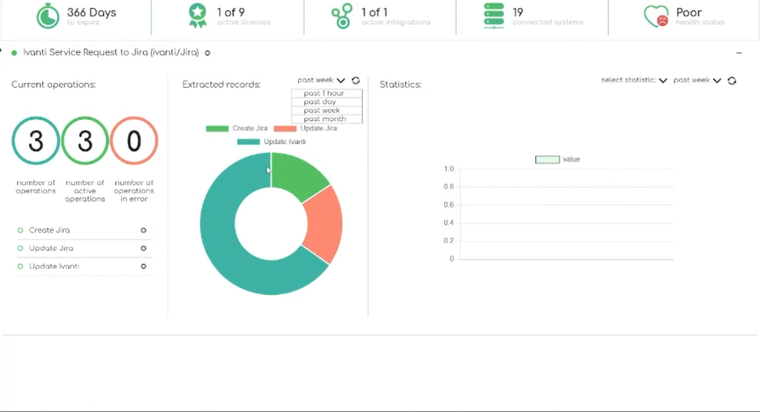
Upon successful login, users are automatically directed to the comprehensive ZigiOps Dashboard, which provides real-time visibility into all critical integration metrics and operational data, including:
• Real-time system connection health monitoring and status indicators
• Current license status, usage metrics, and renewal information
• All running integrations with performance statistics and health indicators
• Total number of executed transactions with detailed success/failure rates
• Comprehensive error logs, alerts, and diagnostic information
• Integration performance metrics, throughput statistics, and trend analysis
• System resource utilization and capacity planning information
This centralized dashboard provides immediate, comprehensive visibility into the operational status, performance characteristics, and health metrics of your entire integration environment, enabling proactive monitoring and rapid issue resolution.
Connecting Freshdesk to ZigiOps: Secure System Integration
When adding Freshdesk as a connected system within ZigiOps, users need to provide several key configuration parameters to establish secure, reliable connectivity:
• Freshdesk Instance URL: Complete URL including protocol (e.g., https://yourcompany.freshdesk.com)
• Valid API Key: Securely retrieved from your Freshdesk user profile settings with appropriate permissions
• Proxy Configuration (optional): For organizations requiring secure tunneling, VPN access, or specific network routing requirements
• Connection timeout settings: Configurable parameters for optimal performance and reliability
What ZigiOps Accomplishes During Freshdesk Connection Setup:
• ZigiOps immediately validates the provided connection credentials and tests system connectivity to ensure proper authentication.
• The platform automatically retrieves and loads the complete Freshdesk schema, including:
• All standard ticket fields and their data types, validation rules, and constraints
• Custom fields created for your specific organizational requirements
• Attachment metadata, file type restrictions, and size limitations
• Internal and public note structures, comment threading, and communication history
• User roles, permissions, and access control configurations
• The comprehensive schema information is cached locally for efficient field mapping but can be refreshed automatically or manually as needed.
Upon successful validation and schema loading, ZigiOps displays a clear success confirmation message, indicating that your Freshdesk system is properly connected and ready for integration configuration.
Connecting Jira to ZigiOps for Comprehensive Freshdesk Jira Integration
Establishing a secure connection between Jira and ZigiOps requires several essential configuration parameters to ensure proper authentication and optimal performance:
• Complete Jira instance URL including protocol and port if necessary
• Valid username with appropriate system access permissions
• Secure password or API token (recommended for enhanced security)
• Optional proxy configuration for secure network environments
• Connection pooling and timeout optimization settings
Required Jira User Permissions for Optimal Integration Function:
• Create Issues across relevant projects and issue types
• Edit Issues including all fields that will be synchronized
• Transition Issues through all relevant workflow states
• Resolve Issues and manage resolution workflows
• Add Comments and manage comment visibility settings
• Browse Projects and access project metadata
• Create and Manage Attachments including file uploads and downloads
• View User information for proper assignment and notification
ZigiOps Automatic Schema Discovery and Configuration:
• ZigiOps automatically retrieves and analyzes Jira's complete field schema for all selected project(s) and issue types.
• This comprehensive discovery process includes:
• All standard Jira issue fields with data types and validation rules
• Custom fields created for specific organizational workflows and requirements
• Available workflow transitions and their associated conditions and validators
• Attachment handling capabilities and file type restrictions
• Comment and work log structures with proper permission handling
• User and group information for proper assignment and notification workflows
This thorough schema discovery ensures that all available Jira data points, workflow options, and configuration possibilities are visible and accessible during the mapping and configuration process, enabling sophisticated Freshdesk Jira integration scenarios.
Jira Freshdesk Integration: Entities, Mapping, and Sync Rules
Once both systems are successfully connected and validated, users proceed to the comprehensive integration configuration phase, which involves defining the complete workflow logic and data transformation rules.
The detailed configuration workflow includes:
1. Selecting Freshdesk as the primary source system for ticket data
2. Selecting Jira as the target system for issue creation and management
3. Choosing the appropriate source entity (Ticket) and all relevant related objects
4. Selecting the target entity (Issue, Task, Bug, Story) based on your workflow requirements
5. Loading an existing workflow template or creating a completely custom workflow configuration
6. Defining trigger conditions, data filters, and processing rules
7. Configuring field mappings, transformations, and validation logic
ZigiOps provides both comprehensive predefined templates for rapid deployment scenarios and fully customizable workflow options for advanced, complex organizational requirements that may involve multiple teams, custom processes, or specialized compliance needs.
Integration Configuration: Mapping, Correlation, and Update Logic
During this critical configuration phase, users define sophisticated integration behavior through multiple interconnected components:
• Detailed field mapping logic with data type validation and transformation rules
• Comprehensive trigger conditions that determine when integrations execute
• Correlation field definitions that maintain relationships between records across systems
• Two-way synchronization direction configuration and conflict resolution
• Advanced update rules that control how changes propagate between systems
• Complex field transformations including data formatting, concatenation, and calculation
• Error handling, retry logic, and failure notification configurations

The ZigiOps platform automatically loads complete schemas from both connected systems, making field mapping intuitive, accurate, and error-free by providing real-time validation and compatibility checking throughout the configuration process.

Users can create sophisticated mappings for diverse data types and complex transformations including:
• Text fields with formatting, length validation, and encoding support
• Dropdown and multi-select fields with value translation and validation
• File attachments with type filtering, size limits, and security scanning
• Status and priority fields with intelligent mapping and workflow integration
• Custom attributes and calculated fields with expression-based logic
• Comments and notes with proper threading, visibility, and notification handling
• Date and time fields with timezone conversion and formatting
Advanced mapping capabilities also support complex expressions for conditional logic, calculated values, data concatenation, and sophisticated transformation rules that enable even the most complex organizational workflows.
Jira Freshdesk Integration Actions in ZigiOps: Workflow Control
Actions represent the core logic that ZigiOps executes during synchronization processes, defining precisely how data flows between systems and what operations are performed. Each action operates independently with full configurability and can be executed in multiple directions based on specific trigger conditions and business rules.
Flexible action execution options include:
• Unidirectional synchronization (one-way data flow from source to target)
• Two-way synchronization (two-way data flow with conflict resolution)
• Conditional execution based on field values, user roles, or complex business logic
• Scheduled execution at specific times or intervals
• Event-driven execution triggered by system changes or external events

Common action types for Jira Freshdesk integration scenarios include:
• Create Jira Task/Bug/Story from Freshdesk Ticket with complete data mapping and validation
• Update Jira Issues based on changes in corresponding Freshdesk tickets
• Update Freshdesk Tickets when related Jira issues are modified
• Synchronize Comments and Attachments in both directions with proper formatting
• Handle Status Transitions with workflow validation and notification
Depending on specific organizational requirements and workflow complexity, actions can be extensively customized, extended with additional logic, or combined to create sophisticated multi-step integration processes.
Automating Freshdesk Ticket to Jira Issue Creation: Complete Workflow Implementation
This foundational action serves as the primary entry point for most comprehensive Jira Freshdesk integration scenarios. ZigiOps utilizes an intelligent Polling Trigger mechanism that continuously monitors Freshdesk for new tickets or updated items that meet a carefully configured set of conditions and business rules.
Advanced Polling Trigger Mechanics and Optimization:
• Configurable polling intervals can be set in seconds, minutes, or hours depending on organizational workload, urgency requirements, and system performance considerations.
• Each polling cycle intelligently retrieves only items that precisely match the defined trigger criteria, optimizing API usage and system performance.
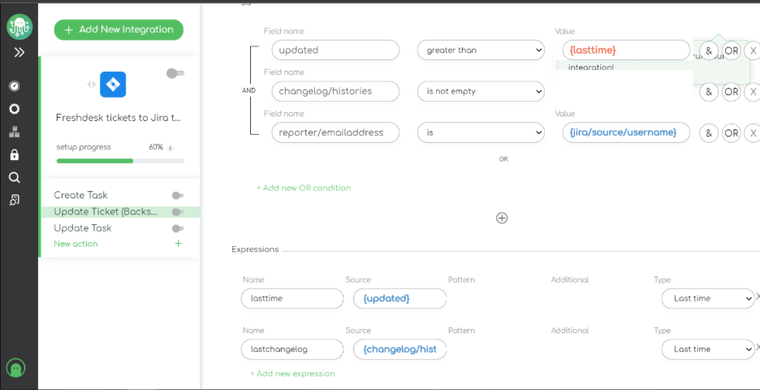
• Sophisticated expression logic (including "last modified time" filters) ensures ZigiOps processes only genuinely new or modified tickets, preventing duplicate processing.
• Advanced filtering capabilities support complex conditions involving multiple fields, user roles, customer tiers, and business logic.
Detailed Processing Flow Within ZigiOps Platform:
1. ZigiOps reads the qualifying Freshdesk ticket with all associated data and metadata
2. The platform evaluates whether the ticket satisfies all configured trigger conditions and business rules
3. If validation passes, ZigiOps executes sophisticated mapping logic from Freshdesk fields to corresponding Jira issue fields
4. A properly formatted Jira Task, Bug, or Story is created with complete metadata, attachments, and context
5. Correlation values are securely stored on both sides to enable reliable future updates and synchronization
6. Notifications and logging are generated for monitoring and audit purposes
This automated process immediately eliminates the need for manual ticket escalation procedures and dramatically reduces the time between initial customer reporting and engineering team response, often from hours or days to seconds or minutes.
Syncing Jira Updates Back to Freshdesk Tickets: Comprehensive Two-way Communication
This critical synchronization action ensures that updates originating from Jira development work are automatically reflected back in corresponding Freshdesk tickets. This closes the communication loop between support and development teams while ensuring customers always receive accurate, timely information about their issues.

Essential elements of comprehensive backsync action configuration:
• Intelligent polling triggers to detect relevant changes in Jira issues with configurable sensitivity
• Sophisticated conditions that determine which specific updates should be synchronized back to Freshdesk
• Advanced expression logic to exclude irrelevant updates, prevent synchronization loops, and avoid duplicate notifications
• Configurable filtering based on user roles, issue types, project settings, and organizational policies
Typical update types synchronized from Jira to Freshdesk include:
• Status transitions with intelligent mapping (configured for one-way or two-way synchronization)
• Developer comments, progress updates, and clarification questions with proper formatting
• Resolution notes, root cause analysis, and final state changes
• New attachments, documentation, and supporting files added by engineering teams
• Changes to custom fields including severity assessments, root cause categories, affected environments, and estimated timelines
• Work log entries and time tracking information where appropriate
How this comprehensive synchronization dramatically improves support workflows:
• Support agents can provide real-time, accurate updates to customers without manually checking Jira or contacting engineering teams
• Customers receive faster, more detailed communication about issue progress, resolution timelines, and technical details
• Engineering work becomes immediately visible to customer-facing teams, enabling proactive communication and expectation management
• Complete audit trails are maintained across both systems for compliance and quality assurance purposes
Advanced Field Mapping: Schema-Driven Configuration
ZigiOps provides a comprehensive, schema-driven mapping interface that automatically loads and validates field structures from both connected systems. This advanced approach prevents mapping errors, ensures data type compatibility, and provides real-time validation throughout the configuration process.
This sophisticated mapping capability enables ZigiOps to support both simple, straightforward workflows and highly complex, multi-team integration scenarios with equal effectiveness and reliability.

Connect Jira and Freshdesk: Syncing Updates In both directions
This essential synchronization action ensures that changes originating in Freshdesk tickets are accurately reflected back to corresponding Jira issues, maintaining data consistency and ensuring that engineering teams always work with current, complete ticket information and customer context.
Examples of updates synced Freshdesk to Jira:
- Ticket priority changes
- New customer comments
- New attachments
- Reclassification of the ticket (e.g., from Incident to Problem)
- Escalation flag changes
How ZigiOps ensures data consistency:
- Correlation logic ensures ZigiOps updates the correct Jira issue.
- Expressions ensure only relevant updates trigger actions.
- Trigger conditions prevent loops or redundant updates.
- Two-way sync is controlled to avoid overwrite conflicts.
- Resolution notes and final state changes. New attachments added by engineering teams. Changes to custom fields (severity, root cause category, environment, etc.)How this improves support workflows: Support agents can give real-time updates without manually checking Jira. Customers receive faster communication on issue progress.
- Engineering work becomes visible to customer-facing teams immediately.
Syncing Freshdesk Updates to Jira Issues
This action synchronizes changes that originate in Freshdesk back to Jira. It ensures that engineering teams always work with current ticket data.
Examples of updates synced Freshdesk to Jira:
- Ticket priority changes New customer comments New attachments Reclassification of the ticket (e.g., from Incident to Problem) Escalation flag changes
How ZigiOps ensures data consistency:
- Correlation logic ensures ZigiOps updates the correct Jira issue.
- Expressions ensure only relevant updates trigger actions.
- Trigger conditions prevent loops or redundant updates.
- Two-way sync is controlled to avoid overwrite conflicts.

Once all settings are finalized, clicking Save activates the live integration and begins syncing data between the systems.
| ZigiOps Feature Category | Summary |
|---|---|
| Trigger Mechanics | Controls when integrations run using polling or event-based triggers. Supports configurable intervals, field-based conditions, and expressions to prevent duplicate processing and guide execution flow. |
| Correlation Logic | Links related records across systems using unique identifiers. Prevents duplicate issues and enables reliable two-way updates between matching tickets. |
| Mapping Engine | Aligns and maps fields between systems with full schema loading, nested field support, compatibility checks, and built-in data transformation options. |
| Expressions & Data Transformation | Applies logic to filter, format, and transform data during synchronization, including status mapping, priority conversion, ID extraction, and timestamp formatting. |
| Handling Updates | Ensures stable synchronization with directional control, condition-based updates, and safeguards that prevent update loops and unintended changes. |
| Troubleshooting | Provides detailed logs and validation to quickly identify authentication issues, permission errors, schema mismatches, workflow conflicts, and API rate limits. |
Wrapping this all up
Connecting support and engineering workflows is key to fast, transparent, high-quality service. When Freshdesk and Jira operate separately, process gaps emerge that slow teams and impact customer satisfaction.
A Jira–Freshdesk integration closes these gaps by automating data synchronization and enabling seamless collaboration. With a 100% no-code approach, ZigiOps allows organizations to implement flexible, secure integrations—from simple escalations to complex enterprise workflows - quickly and reliable.
Choose smart integration — book a demo with the ZigiOps team today and see how easily you can streamline your workflows.
Start your free trial and test ZigiOps right away!
For mapping and setup specifics, see our integration page.
Frequently asked questions
What is a Jira Freshdesk integration?
A Jira Freshdesk integration connects your Freshdesk support tickets with your Jira issues, allowing both systems to exchange information automatically. This eliminates manual copying, reduces miscommunication, and accelerates incident resolution across support and development teams.
Is the Jira Freshdesk integration two-way?
Yes. ZigiOps supports two-way or one-directional synchronization depending on your use case. You can sync updates only from Freshdesk to Jira, only from Jira to Freshdesk, or in both directions at once. This includes comments, status changes, attachments, and custom fields.
Do I need to write code to set up a Jira to Freshdesk integration?
No. ZigiOps is a 100 percent no-code integration platform. You configure mappings, triggers, and update rules through a guided UI without writing scripts or modifying systems.