ESM Integration: Field Mappings, Architecture, and a Real Flow Example
No-code ESM integration, mapped step by step, no workflow breakage.
Enterprise Service Management integration is no longer a luxury reserved for Fortune 500 IT departments with armies of developers. As organizations expand service delivery beyond IT — into HR, Finance, Legal, and Facilities — the ability to connect those service domains through a coherent, automated data layer has become a baseline operational requirement.
Yet most organizations still struggle with fragmented toolchains, manual ticket hand-offs, and brittle point-to-point integrations that break every time a vendor pushes an update. This article cuts through the noise. We will walk you through the architecture of a production-grade ESM integration, explain field mapping logic in technical detail, and trace a real end-to-end flow from an HR system through ServiceNow and into Jira — the kind of flow that IT Managers and CTOs actually need to implement and defend to their stakeholders.
What Is ESM Integration and Why Does It Matter
Enterprise Service Management extends ITSM principles — structured request management, SLA enforcement, workflow automation — to every business function that delivers services to employees or customers. ESM integration is the technical discipline of connecting those service domains so that data, context, and work items flow automatically across systems without human relay.
According to ServiceNow's ESM documentation, the goal of ESM is to give every department the same structured, measurable service delivery capabilities that IT has refined over decades. But that goal is only achievable when the underlying systems can actually talk to each other.
Without ESM integration, a new employee onboarding request in Workday or SAP SuccessFactors triggers a chain of manual emails to IT, Facilities, and Security. With proper integration, that same request automatically creates provisioning tickets in ServiceNow, spawns development environment setup tasks in Jira, and notifies the hiring manager — all within seconds of the HR record being created.
"Enterprise service management extends service management capabilities beyond IT to deliver value across the entire enterprise. It’s no longer an IT-only discussion; it's about business velocity, employee experience, and digital transformation."
— Forrester Wave: Enterprise Service Management
The business case is straightforward. ESM integration platforms reduce mean time to resolution (MTTR), eliminate duplicate data entry, enforce consistent SLAs across departments, and provide a single source of truth for audit and compliance purposes. For IT Managers and CTOs, the integration layer is the connective tissue that makes ESM promises real.
Core Architecture of an ESM Integration Platform
Understanding the architecture is essential before you configure a single field mapping. A well-designed ESM integration architecture has four distinct layers, each with specific responsibilities.
Layer 1: Connectivity and Protocol Handling
This layer manages authentication, transport protocols, and API communication with each connected system. Modern ESM integration platforms support REST APIs, SOAP, webhooks, database connectors, and message queue protocols (AMQP, Kafka). Every enterprise system — ServiceNow, Jira, Workday, SAP, Zendesk, Microsoft Teams — exposes data through one or more of these mechanisms.
The connectivity layer must handle OAuth 2.0, API key authentication, and certificate-based auth, often simultaneously across different connected systems. It must also manage rate limiting, retry logic, and connection pooling to ensure reliability at enterprise scale. For a deeper look at how modern SaaS connectivity patterns work at scale, see our guide on scalable enterprise SaaS integration.
Layer 2: Data Transformation and Field Mapping Engine
This is the most technically complex layer and the one most often underestimated during planning. The transformation engine takes a data object from the source system, applies mapping rules, executes conditional logic, and produces a correctly structured payload for the target system.
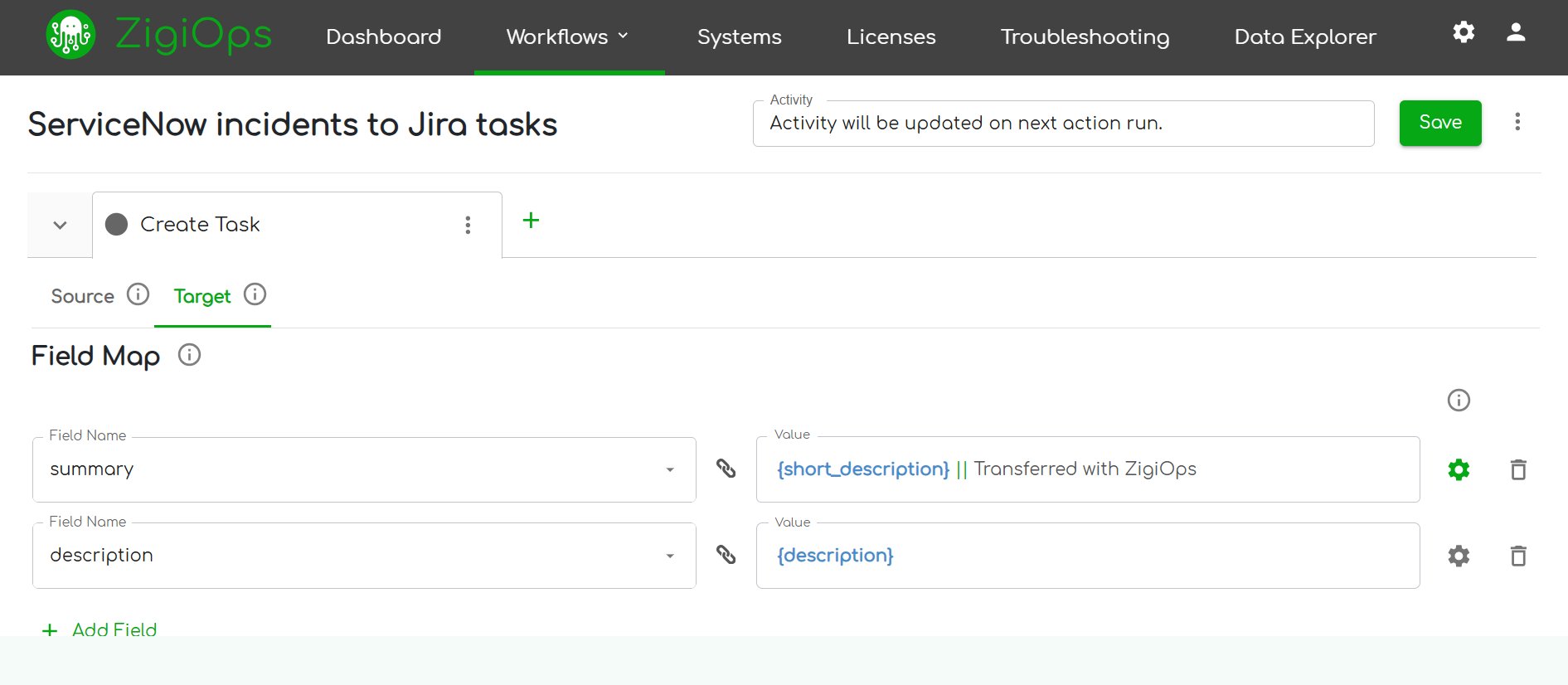
Field mapping is not simply renaming fields. It involves data type coercion, value translation (mapping ServiceNow priority codes to Jira priority labels), conditional field population, and handling of null or missing values. We will cover this in explicit technical detail in the next section.
Layer 3: Orchestration and Workflow Logic
The orchestration layer determines when data moves, in what sequence, and under what conditions. It handles trigger management (event-driven vs. polling), deduplication, loop prevention in bidirectional syncs, and error routing. In a multi-system ESM integration like the HR-to-ServiceNow-to-Jira flow we will examine, orchestration is what prevents a ticket update in Jira from bouncing back to ServiceNow and triggering an infinite update loop.
Layer 4: Monitoring, Logging, and Governance
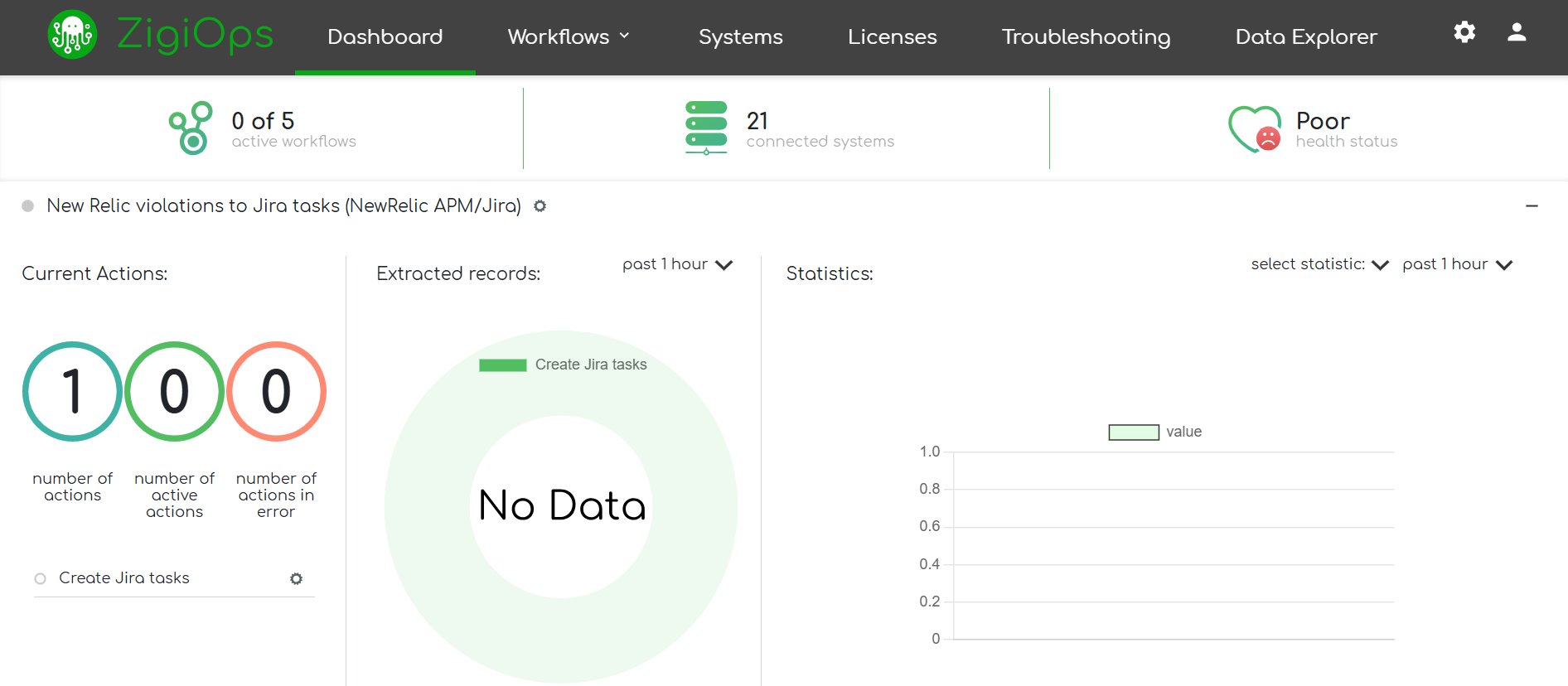
Enterprise operations require full auditability. This layer captures every data transaction, transformation result, error, and retry attempt. It provides the dashboards that IT Managers need to demonstrate SLA compliance and the logs that security teams need for compliance audits. The future of enterprise application integration increasingly demands that this layer also surface AI-driven anomaly detection and predictive failure alerts.
Field Mapping Deep Dive: The Technical Reality of ESM Integration
Field mapping is where Enterprise Service Management integration projects most often fail or succeed. A superficial mapping — connecting fields with the same name — will break within weeks of going live. Production-grade mapping requires understanding the semantic differences between how each system models the same business concept.
Data Type Mapping
ServiceNow represents priority as an integer (1 = Critical, 2 = High, 3 = Moderate, 4 = Low, 5 = Planning). Jira represents priority as a named string ("Highest", "High", "Medium", "Low", "Lowest"). A direct field connection without a translation table will either fail validation or populate the wrong value. Your ESM integration transformation engine must maintain an explicit lookup table for every enumerated field across every connected system.
Date and timestamp handling is equally treacherous. ServiceNow stores timestamps in UTC with a specific ISO 8601 format. Jira's REST API returns timestamps in a different format and may apply user timezone offsets. If your integration does not normalize timestamps at the transformation layer, SLA calculations and audit logs will contain phantom time discrepancies.
Conditional Field Population
Not every field in the target system has a direct source equivalent. Consider a ServiceNow incident being created from an HR system record. The HR system knows the employee's department, cost center, and manager. ServiceNow needs an assignment group. Your mapping logic must translate the HR department value into the correct ServiceNow assignment group using a lookup, a static mapping table, or a dynamic query against ServiceNow's group API.
This is where no-code ESM integration platforms like ZigiOps provide significant value. Instead of writing and maintaining custom transformation scripts, administrators configure conditional mapping rules in a visual interface. If HR.Department = "Engineering", then ServiceNow.AssignmentGroup = "IT-Engineering-Support". These rules are version-controlled, auditable, and modifiable without a deployment cycle.
Bidirectional Sync and Conflict Resolution
When both systems can update the same logical record, you need explicit conflict resolution rules. Which system wins when a ServiceNow agent updates the ticket description at the same moment a Jira developer adds a comment? Best practice is to designate one system as the system of record for each field or field group, and configure the integration to enforce that hierarchy. For instance, ServiceNow owns priority and SLA fields; Jira owns development status and sprint assignment.
For a comprehensive treatment of ITSM integration patterns including bidirectional sync architecture, see the ZigiWave ITSM Integration Playbook.
A Real HR-to-ServiceNow-to-Jira ESM Integration Flow
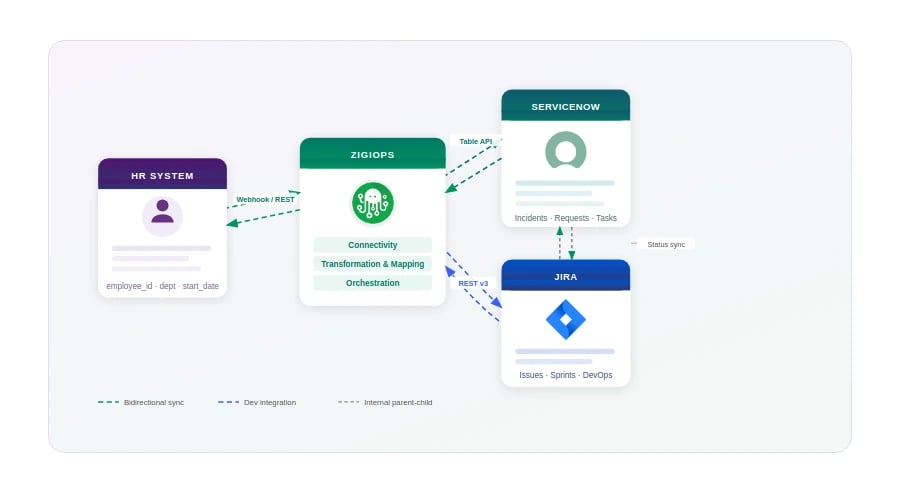
Theory is useful. A working example is better. The following flow represents a production-pattern ESM integration for employee onboarding — one of the highest-volume, highest-visibility use cases in Enterprise Service Management. It involves three systems: an HR platform (connected through ZigiOps' generic Web Listener in this example), ServiceNow as the ITSM and ESM hub, and Jira as the DevOps and IT provisioning task tracker.
Step 1: Trigger — New Hire Record Created in the HR System
When an HR administrator finalizes a new hire record in the HR platform and sets the worker status to "Active - Pre-Hire," the HR system fires a webhook event to ZigiOps' Web Listener, the same event-driven trigger ZigiOps uses to accept real-time pushes from any external system that supports outbound webhooks. The payload includes the employee's name, employee ID, department, job title, start date, manager, and location.
ZigiOps authenticates the incoming webhook, validates the payload schema against the configured JSON structure, and routes it to the HR-to-ServiceNow mapping configuration. This is the event-driven trigger model — no polling, no delay, no manual intervention.
Step 2: Transformation — HR Payload to ServiceNow Request
The transformation engine applies the field mapping rules. The employee's department is looked up against a static mapping table to resolve the correct ServiceNow assignment group. The start date is converted to UTC ISO 8601 format. The job title is used in a conditional rule: if the job title contains "Developer" or "Engineer", an additional flag is set to trigger a development environment provisioning sub-flow in the next step.
The engine constructs a ServiceNow Service Request payload with the following key fields populated:
- short_description: "New Employee Onboarding - [Employee Name] - Start Date [Date]"
- category: "HR Services"
- subcategory: "New Hire Onboarding"
- assignment_group: Resolved from department lookup
- requested_for: Pre-created user record or placeholder
- due_date: Employee start date minus 2 business days (calculated field)
- priority: 2 (High) — default for all onboarding requests
- u_employee_id: HR system employee ID stored in custom field
Step 3: Creation — ServiceNow Service Request and Child Tasks
ZigiOps submits the payload to the ServiceNow Table API, creating the parent Service Request. ServiceNow's native workflow then fires its onboarding catalog item flow, creating child tasks for IT provisioning, badge access, and equipment procurement. The ServiceNow sys_id of the created request is captured by ZigiOps and stored as a correlation key for subsequent sync operations.
At this point, the integration platform evaluates the conditional flag set in Step 2. Because the new hire is an engineer, the orchestration layer triggers the second integration leg: ServiceNow to Jira.
Step 4: Transformation — ServiceNow Task to Jira Issue
The orchestration layer extracts the IT provisioning child task from ServiceNow (task type: "sc_task") and maps it to a Jira issue in the IT Operations project. The transformation applies a second field mapping configuration:
- Jira Summary: Derived from ServiceNow short_description + employee ID
- Jira Issue Type: "Task" (mapped from ServiceNow task_type)
- Jira Priority: "High" (translated from ServiceNow priority integer 2)
- Jira Assignee: Resolved from ServiceNow assignment_group to Jira team mapping
- Jira Due Date: Inherited from ServiceNow due_date, format-normalized
- Jira Labels: ["onboarding", "new-hire", department-slug]
- Jira Custom Field - SN Reference: ServiceNow sys_id stored for bidirectional link
Step 5: Bidirectional Sync — Status and Comments
Once both records exist, ZigiOps maintains a bidirectional sync on a defined set of fields. When the Jira developer marks the issue "In Progress", the ServiceNow child task status updates to "Work in Progress". When the Jira issue is resolved and closed, ServiceNow closes the child task and, if all sibling tasks are complete, triggers closure of the parent Service Request.
Comments and work notes sync in one direction only: Jira comments flow to ServiceNow work notes (visible to IT staff), but ServiceNow work notes do not flow back to Jira to avoid information overload for developers. This is a deliberate, configurable design choice — not a platform limitation.
Step 6: Notification and Closure
When the parent ServiceNow Service Request closes, ZigiOps fires a notification event. In this architecture, that event triggers a Microsoft Teams message to the hiring manager confirming that all onboarding tasks are complete. The ServiceNow request number is stored alongside the original HR payload in ZigiOps' correlation log, so the full onboarding trail — from the initial webhook through Jira closure — remains auditable in one place.
The entire flow — from the HR system's webhook to ServiceNow request creation to Jira issue creation — executes in under 30 seconds. The bidirectional sync thereafter operates on a configurable interval or event-driven basis, with no human relay required at any step.
Common ESM Integration Challenges and How to Address Them
Even well-designed Enterprise Service Management integration projects encounter predictable failure modes. Understanding them in advance is the difference between a stable production integration and a fragile one that requires constant firefighting.
Schema Drift
SaaS vendors update their APIs continuously. Jira's REST API, for example, has undergone multiple breaking changes as Atlassian migrated from server to cloud. When a vendor renames a field, changes a data type, or deprecates an endpoint, integrations built on brittle point-to-point connections break silently. ESM integration platforms with managed connectors — where the vendor maintains API compatibility — significantly reduce this risk.
Identity Resolution Across Systems
Every system has its own user identity model. Workday uses an employee ID. ServiceNow uses a sys_id and a user name. Jira Cloud uses an accountId (an opaque string). Mapping a person across three systems requires either a shared identity provider (Microsoft Entra ID / Azure AD is the most common) or an explicit cross-reference table maintained in the integration platform. Without reliable identity resolution, tickets get assigned to the wrong people or fail validation entirely.
Microsoft's hybrid identity documentation provides a solid foundation for understanding how enterprise identity can be centralized to support multi-system integrations of this kind.
Handling Failures and Partial Completions
In a multi-step flow like the one described above, what happens if ServiceNow accepts the request but the Jira API is temporarily unavailable? A naive integration will either drop the Jira issue silently or fail the entire transaction. Production-grade ESM integration requires a dead-letter queue or retry mechanism for each integration leg, with alerting when retries are exhausted. Every failed transaction must be logged with enough context to replay it manually or automatically once the downstream system recovers.
Governance and Access Control
When data flows automatically between HR systems, ITSM platforms, and DevOps tools, the integration layer itself becomes a security surface. The principle of least privilege must apply to integration service accounts: the Workday-to-ZigiOps connection should have read-only access to onboarding records, not write access to payroll data. Every connected system should have a dedicated integration service account with scoped permissions, and those credentials should be rotated on a defined schedule.
Choosing the Right ESM Integration Platform
Not all ESM integration platforms are built for enterprise operational requirements. When evaluating options, IT Managers and CTOs should assess against the following criteria:
- Connector library depth: Does the platform offer pre-built, maintained connectors for your specific systems — not just generic REST adapters? Pre-built connectors for ServiceNow, Jira, Workday, SAP, and Microsoft 365 dramatically reduce implementation time and ongoing maintenance burden.
- No-code configuration: Can business-side administrators modify field mappings and workflow logic without developer involvement? This is critical for operational agility — when ServiceNow adds a new field, you should not need a sprint cycle to update your integration.
- Bidirectional sync with conflict resolution: Many platforms offer one-way data push. True ESM integration requires bidirectional sync with configurable conflict resolution rules and loop prevention.
- Enterprise-grade reliability: Look for SLA guarantees, retry logic, dead-letter queues, and transparent uptime reporting. An integration platform that goes down silently is worse than no integration at all.
- Auditability and compliance: Every data transaction should be logged with timestamps, transformation results, and error details. This is non-negotiable for organizations subject to SOC 2, ISO 27001, GDPR, or HIPAA requirements.
- Scalability: The platform must handle peak load without degradation. An onboarding surge at the start of a fiscal year, a major incident creating thousands of linked tickets — these scenarios must not overwhelm the integration layer.
ZigiOps is purpose-built for these requirements. It provides pre-built connectors for over 20 enterprise systems, a no-code field mapping and workflow configuration interface, bidirectional sync with loop prevention, and full transaction logging. You can explore the full connector library at ZigiWave Integrations.
Enterprise Service Management Integration: Measuring Success
Deploying an ESM integration is not the finish line — it is the starting point for continuous measurement and improvement. The metrics that matter most to IT Operations leaders are:
- Integration latency: Time from trigger event to record creation in the target system. For the HR-to-ServiceNow flow described above, sub-60-second latency is achievable and should be the baseline SLA.
- Error rate: Percentage of integration transactions that fail or require manual intervention. A well-configured production integration should sustain error rates below 0.5%.
- Data fidelity: Spot-check audits comparing source and target records to verify that field mapping is producing correct values. Run these checks after every system update from any connected vendor.
- Business outcome metrics: Mean time to provision new employee access. Number of onboarding tickets requiring manual escalation. These downstream metrics are the ones that resonate with CFOs and CHROs and justify the investment in Enterprise Service Management integration.
For organizations building a broader integration strategy, the principles in our resource on the future of enterprise application integration provide the strategic framing to position ESM integration as part of a company-wide data connectivity initiative rather than a one-off IT project.
ESM Integration Best Practices: A Summary Checklist
Before you go live with any ESM integration, validate your implementation against this checklist:
- Field mapping documentation: Every mapped field is documented with source field name, target field name, data type, transformation logic, and system of record designation.
- Identity resolution tested: User lookup has been validated across all connected systems with edge cases (users with special characters in names, users present in one system but not another).
- Bidirectional loop prevention verified: A test update in System B does not trigger an update back to System A that then re-triggers System B.
- Failure scenarios tested: Simulate API unavailability in each connected system and confirm that retry logic, dead-letter queuing, and alerting function as designed.
- Service account permissions scoped: Each integration service account has only the permissions required for its specific data access pattern.
- Monitoring dashboards configured: Operations team has visibility into integration health, error rates, and transaction volumes without needing to query logs manually.
- Rollback plan documented: If the integration produces incorrect data, there is a documented procedure to pause the integration and correct affected records.
The ZigiWave ITSM Integration Playbook contains extended checklists and architecture decision trees for teams building production integrations across ITSM and ESM platforms.
Conclusion: ESM Integration as Operational Infrastructure
The organizations that treat ESM integration as a strategic infrastructure investment — not a one-time project — are the ones that scale service delivery without scaling headcount. When your HR system, ITSM platform, and DevOps toolchain operate as a unified data ecosystem, the operational leverage is compounding: every new service added to the ESM framework benefits from the integration foundation already in place.
The HR-to-ServiceNow-to-Jira flow described in this article is not a theoretical exercise. It is a pattern that ZigiOps customers implement and operate in production, processing thousands of transactions daily with sub-minute latency and audit-ready logging. The field mapping logic, the orchestration rules, and the bidirectional sync configuration are all managed through ZigiOps' no-code interface — no custom code, no developer dependency for day-to-day changes.
If your organization is ready to move from fragmented service delivery to a genuinely integrated Enterprise Service Management architecture, the technical foundation described in this article gives you the blueprint. The next step is evaluating which ESM integration platforms can deliver it at the reliability, scale, and governance level your enterprise demands.
Explore how ZigiOps connects your enterprise systems at zigiwave.com/integrations, or review the scalable enterprise SaaS integration guide to understand how to architect your integration layer for long-term growth.