Attachment Sync Across ITSM & DevOps Platforms
Attachment Synchronization for ITSM and DevOps Platforms
When IT Operations and development teams work in separate platforms, critical context gets lost in translation. Log files, screenshots, configuration exports, and error reports are created in one system and needed urgently in another — yet they rarely travel automatically. Attachment synchronization is the practice of automatically mirroring file attachments across integrated platforms so that every team works from a complete, unified record.
For organizations running parallel ITSM and DevOps workflows, the absence of reliable attachment synchronization creates bottlenecks that inflate resolution times, generate redundant work, and introduce compliance risk. This article explains what attachment synchronization is, why it is difficult to achieve, what the enterprise cost of ignoring it looks like, and how modern no-code integration platforms like ZigiOps make it operationally straightforward.
What Is Attachment Synchronization in ITSM and DevOps Contexts?
Attachment synchronization refers to the automated, bidirectional transfer of file attachments — such as screenshots, logs, configuration files, certificates, and diagnostic reports — between two or more connected platforms whenever a parent record (a ticket, incident, story, or change request) is created or updated. In a mature integration, this process is triggered in real time without manual intervention from either team.
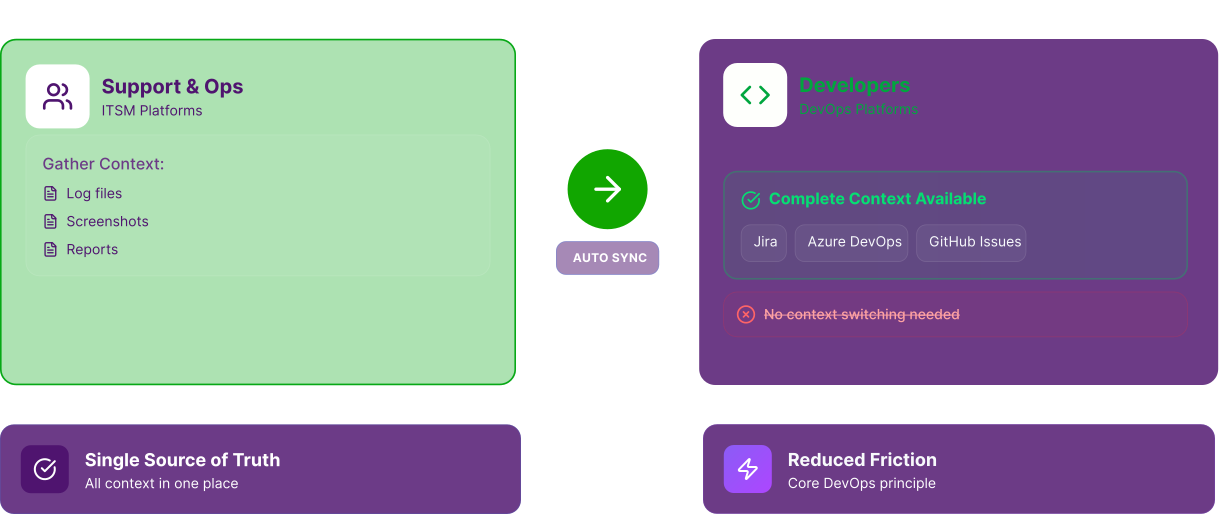
In practical terms, when a support engineer attaches a server log to a ServiceNow incident, that same log file should appear automatically on the linked Jira issue that the development team is managing. When a developer attaches a code diff or deployment report to a DevOps platform task, the ITSM ticket should reflect that file instantly. This two-way flow is what distinguishes true attachment synchronization from simple one-time data exports.
Understanding the distinction between field-level data sync and attachment sync is important. Most basic integrations handle structured data — status, priority, assignee, description text. Attachments are binary objects that require separate API handling, file transfer logic, size validation, and format preservation. This is why attachment synchronization is often the last capability organizations implement and the first one they miss when it is absent.
Why ITSM Integration Without Attachment Sync Is Incomplete
Deploying an ITSM integration without including attachment synchronization is like building a bridge that handles foot traffic but blocks vehicle transit. The core connection exists, but a critical category of payload never makes it across. For IT Managers and CTOs evaluating integration platforms, this gap frequently surfaces in post-implementation reviews as the primary unresolved pain point.
Consider a P1 incident. A system administrator opens a ticket in ServiceNow and attaches a 4MB memory dump and two screenshots illustrating the failure state. The linked Jira Epic visible to the engineering team shows the incident metadata — priority, description, timestamps — but not the attachments. Developers request the files via Slack or email, someone manually re-uploads them, and twenty minutes of resolution time evaporates before any diagnosis has begun.
At scale, this friction compounds dramatically. Organizations managing hundreds of incidents per week, each potentially carrying multiple attachments, accumulate thousands of manual file transfer events per month. The operational overhead is measurable, and the risk of version mismatch — where a team acts on an outdated file because the latest version was never propagated — introduces quality and compliance exposure.
For deeper context on why bidirectional data flow — including attachments — is foundational to a healthy ITSM integration, see ZigiWave's analysis of bidirectional ITSM integration challenges.
%20(1).svg)
Common Challenges in Implementing Attachment Synchronization
1. API Complexity and File Size Constraints: Every major ITSM and DevOps platform exposes a different API surface for handling attachments. ServiceNow uses its Attachment API under /api/now/attachment, Jira exposes attachment operations via its REST API, and Azure DevOps manages work item attachments through a separate endpoint from standard field updates. Each API has distinct authentication requirements, payload structures, and file size limits.
These differences mean that a generic integration middleware that synchronizes text fields often fails silently when it encounters attachments — either ignoring them entirely or throwing errors that are never surfaced to the user. Building a robust attachment synchronization layer requires handling multipart file uploads, MIME type detection, base64 encoding in some contexts, and chunked transfer for large files.
2. Bidirectional Conflict and Loop Prevention: Bidirectional attachment synchronization introduces the risk of infinite sync loops. If Platform A sends an attachment to Platform B, and Platform B's receipt of that attachment triggers an update event, that event can instruct the integration to send the file back to Platform A — creating a recursive cycle that floods both systems with duplicate files and consumes API rate limits.
Preventing this requires stateful tracking of attachment origin: each file transferred must be tagged with its source platform identifier so that downstream update events from the receiving platform do not trigger a return transfer. This logic is non-trivial to implement in custom-coded integrations and is a primary reason organizations turn to purpose-built ITSM integration platforms.
3. Format Compatibility and Metadata Preservation: Different platforms store and render attachments differently. A file uploaded to Azure DevOps may carry metadata — uploader identity, timestamp, linked work item ID — that ServiceNow's attachment schema does not accommodate by default. If that metadata is stripped during transfer, audit trails become incomplete, which is a direct compliance risk in regulated industries such as financial services, healthcare, and government IT.
True attachment synchronization preserves the original filename, MIME type, upload timestamp, and where possible, the uploader's identity as a metadata field on the receiving platform. Platforms that do not support identity mapping should at minimum log the transfer event with sufficient detail to reconstruct the provenance chain.
4. Handling Attachments on Historical Records: When organizations first deploy an integration, they often focus on forward-looking synchronization — new records created after the integration goes live. Attachments on historical tickets and stories are frequently excluded from the initial scope. This creates a two-tier record system where newer tickets have complete attachment context and older ones remain partial. Backfill strategies for historical attachment synchronization require careful batching to avoid API throttling and should be planned as a dedicated migration phase.
Attachment Synchronization Across Major Platform Pairs
1. ServiceNow and Jira
The ServiceNow–Jira integration is the most common enterprise pairing in organizations that run ITSM on ServiceNow and software development on Jira. Both platforms have mature REST APIs for attachments, but the integration between them is not native — it requires middleware. ServiceNow's Attachment API allows GET and POST operations, while Jira's attachment API requires a multipart/form-data upload. Any integration handling attachment synchronization between these two platforms must translate between these conventions reliably.
Jira imposes a configurable maximum attachment size (defaulting to 10MB for Jira Cloud), while ServiceNow's limit depends on instance configuration. An integration platform must validate file sizes against the destination's constraints before initiating the transfer, and surface meaningful errors when a file exceeds limits rather than failing silently.
2. ServiceNow and Azure DevOps
Organizations running Microsoft-stack DevOps alongside ServiceNow face additional complexity because Azure DevOps uses a different attachment model. Attachments in Azure DevOps are linked to work items via a separate API call after initial work item creation, meaning the synchronization logic must handle two-step write operations: create the attachment resource, then associate it with the correct work item.
The Microsoft Azure DevOps REST API documentation for work item attachments outlines the two-step upload and reference process, which integration developers must replicate precisely to achieve reliable attachment synchronization.
3. Jira and PagerDuty or Zendesk
In organizations that use PagerDuty or Zendesk for incident management alongside Jira for engineering work, attachment synchronization paths extend beyond classic ITSM pairs. Zendesk, for example, uses a token-based attachment system where files are first uploaded to obtain a token, and that token is then referenced in the ticket update payload. Integrations that are unaware of this pattern will fail to attach files correctly even when all other fields synchronize perfectly.
For a broader view of how ITSM and DevOps toolchains can be bridged effectively, see ZigiWave's guide to bridging the ITSM–DevOps gap.
The Business Impact of Reliable Attachment Synchronization
Reduced Mean Time to Resolution
When development teams receive complete incident context — including attached logs, stack traces, and screenshots — they can begin diagnosis immediately rather than spending time requesting files through secondary channels. Organizations that implement full attachment synchronization as part of their ITSM integration consistently report reductions in mean time to resolution (MTTR) for cross-team incidents. The elimination of the "attachment request" step alone removes a communication cycle that typically takes 15 to 45 minutes per incident.
At an organization handling 500 cross-team incidents per month, eliminating even 20 minutes of file-retrieval overhead per incident recovers over 160 person-hours monthly — time that can be redirected toward actual resolution and improvement work.
Compliance and Audit Integrity
In regulated industries, the completeness of incident records is not a convenience — it is a requirement. ITIL guidance emphasizes that incident records must contain sufficient information to enable review and learning. When attachments are missing from either the ITSM or DevOps side of a linked record, audit reviews produce incomplete pictures that can trigger findings during compliance assessments.
Automated attachment synchronization ensures that both the ITSM record and the linked DevOps task carry the same evidentiary file set, reducing the risk of compliance gaps during audits. This is particularly relevant for SOC 2, ISO 27001, and HIPAA compliance programs where incident documentation standards are explicit.
Improved Developer Experience on DevOps Platforms
Developers working in Jira, Azure DevOps, or GitHub Issues should not need to context-switch to an ITSM platform to access supporting files. When attachment synchronization is functioning correctly, the DevOps platform becomes the single source of truth for engineering work — complete with all the context the support and operations teams have gathered. This aligns with the DevOps principle of reducing friction in the developer workflow.
Research consistently shows that developer productivity is heavily influenced by the quality of tooling and the availability of context. For more on how DevOps team effectiveness is shaped by integration quality, see ZigiWave's resource on what makes DevOps teams great.
Elimination of Shadow Processes
When attachment synchronization is absent, teams develop informal workarounds: shared folders, Slack channels used as file repositories, email threads carrying sensitive log files. These shadow processes introduce security risks, version control failures, and knowledge fragmentation. Formalizing attachment transfer through an integration platform eliminates these workarounds and restores data governance to the organization's defined systems of record.
Key Capabilities to Evaluate in an Attachment Synchronization Solution
When evaluating integration platforms for attachment synchronization capability, IT Managers and architects should assess the following dimensions:
- Bidirectional transfer support — The platform must handle attachments flowing in both directions between ITSM and DevOps systems, not just a one-way push.
- Loop prevention logic — The solution must track attachment origin to prevent recursive sync cycles that duplicate files and exhaust API rate limits.
- File size and format handling — The platform should validate against destination size limits, preserve MIME types, and surface clear errors when constraints are exceeded.
- Metadata preservation — At minimum, the original filename, upload timestamp, and file type must be preserved on the receiving platform to maintain record integrity.
- Real-time trigger support — Attachments should synchronize on event trigger (when a file is added), not only on scheduled polling cycles, to minimize the window during which records are out of sync.
- Historical record backfill capability — For existing records predating the integration, the platform should support batched backfill operations with throttle controls to avoid API overload.
- No-code configuration — For organizations without dedicated integration engineering resources, a no-code interface dramatically reduces the time to deployment and the ongoing maintenance burden.
- Error logging and alerting — When an attachment transfer fails — due to size limits, network timeouts, or API errors — the platform must log the failure with enough context to enable manual remediation.
For organizations comparing different ITSM frameworks and their integration ecosystems, ZigiWave's ITSM framework comparison provides a useful reference point for understanding how platform choice affects integration options.
How ZigiOps Handles Attachment Synchronization
ZigiOps, ZigiWave's no-code ITSM integration platform, is built to handle the full complexity of attachment synchronization across the most widely used ITSM and DevOps platforms — including ServiceNow, Jira, Azure DevOps, Zendesk, PagerDuty, Freshservice, and others.
ZigiOps connects directly to each platform's native attachment API, handles multipart uploads, applies format-specific encoding where required, and manages bidirectional sync with built-in loop prevention. Configuration is handled through a visual, no-code interface — IT Operations teams can define which attachment types to synchronize, which record types trigger a sync, and what happens when a transfer fails, all without writing a line of code.
Explore the full range of platforms ZigiOps integrates with at zigiwave.com/integrations.
Implementation Best Practices for Attachment Synchronization Projects
- Start with a Clear Attachment Taxonomy: Before configuring any integration, document what types of attachments are created in each platform, what their typical sizes are, and which ones carry operationally critical information. This taxonomy will inform your filtering rules and help you prioritize which attachment categories to include in the initial deployment scope.
- Validate API Limits on Both Sides Before Go-Live: Both the source and destination platforms impose limits on attachment size, upload frequency, and total storage. Review the ServiceNow attachment configuration documentation and the equivalent documentation for your DevOps platform before deployment. Configure your integration platform to enforce these limits proactively rather than discovering them through failed transfers in production.
- Run a Controlled Pilot on Non-Critical Records: Deploy attachment synchronization in a test environment using a representative sample of real record types and file categories. Validate that files arrive intact on the destination platform, that metadata is preserved correctly, and that bidirectional sync does not produce duplicate attachments. A controlled pilot prevents production incidents caused by integration misconfiguration.
- Plan a Phased Rollout by Platform Pair: If your organization uses multiple ITSM and DevOps platform pairings, implement attachment synchronization one pair at a time. This approach isolates issues to a specific integration path and makes troubleshooting significantly more tractable than a simultaneous multi-platform rollout.
- Establish Monitoring Baselines Post-Launch: After go-live, establish baseline metrics for attachment transfer volume, average transfer latency, and failure rate. Monitor these metrics weekly during the first month and establish alerting thresholds that surface anomalies — such as a spike in failed transfers — before they affect operational workflows. The Atlassian Jira administration documentation provides guidance on audit log access that complements integration-level monitoring for Jira environments.
The Broader Role of Attachment Synchronization in ITSM Integration Maturity
Attachment synchronization is not an isolated capability — it is a marker of integration maturity. Organizations that have achieved reliable, bidirectional attachment synchronization across their ITSM and DevOps platforms have typically also solved the foundational challenges of field mapping, status synchronization, and relationship linking. The presence or absence of attachment sync is a reliable diagnostic indicator of how deeply an ITSM integration has been built out.
ITSM maturity models consistently identify data completeness as a prerequisite for process improvement. An incident management process cannot be effectively analyzed or improved if the records used for post-incident review are incomplete. Attachments — logs, screenshots, configuration snapshots — are often the most informative artifacts in an incident record. Their absence from synchronized records undermines the value of every other integration capability that has been deployed.
As organizations mature their DevOps platform practices and adopt more sophisticated ITSM frameworks, the expectation from both IT Operations and engineering teams is that all relevant context travels with the record — automatically, instantly, and without manual intervention. Attachment synchronization is the capability that fulfills that expectation for binary content.
For organizations evaluating their current ITSM integration architecture and looking to identify gaps, the ZigiWave ITSM–DevOps gap analysis resource provides a structured framework for assessment.
Making Attachment Synchronization a First-Class Integration Requirement
Attachment synchronization between ITSM and DevOps platforms is not a secondary feature to be addressed after the initial integration goes live. It is a foundational capability that determines whether integrated teams operate from complete, shared context or continue to manage information gaps through informal workarounds.
For IT Managers, system administrators, and CTOs responsible for the quality of IT Operations tooling, the decision to include robust attachment synchronization in the integration architecture is a decision to invest in resolution speed, compliance integrity, and developer productivity simultaneously. The cost of not implementing it — in manual overhead, audit risk, and MTTR inflation — consistently exceeds the cost of implementation.
ZigiOps is built to make this capability accessible without custom development. Its no-code configuration, event-driven architecture, and comprehensive support for major ITSM and DevOps platform attachment APIs provide organizations with a production-ready path to full attachment synchronization — deployed in days rather than months.
To learn more about how ZigiOps handles attachment synchronization and the full scope of its ITSM integration capabilities across leading DevOps platforms, visit zigiwave.com/integrations or explore the bidirectional ITSM integration challenges resource to understand the technical depth behind a complete integration deployment.