Salesforce Service Cloud - ServiceNow Integration guide

In today's competitive business landscape, organizations must leverage advanced technology to meet evolving customer expectations. Salesforce ServiceNow integration has emerged as a critical component for enterprises seeking to streamline their service operations and enhance customer satisfaction. The strategic implementation of this integration bridges the gap between customer service management (CRM) and IT service management (ITSM),creating a unified ecosystem that accelerates resolution times and eliminates the manual handoffs that slow down your teams.
Salesforce Service Cloud, a cornerstone of the Salesforce Platform, provides an all-encompassing solution for managing customer interactions, ensuring efficient case resolution, and enhancing agent productivity. When connected to ServiceNow through a robust Salesforce ServiceNow two-way sync, organizations unlock a service delivery engine where customer-facing teams and IT operations work in perfect lockstep.
The complexity of modern enterprise environments demands sophisticated integration strategies that enable real-time data synchronization and automated workflow management. This guide walks through everything you need to know: the capabilities of Salesforce Service Cloud, the mechanics of integrating it with ServiceNow, and how ZigiOps makes the whole process 100% code-free.
What is Salesforce Service Cloud and Why Does It Matter for ServiceNow Integration?
Salesforce Service Cloud is a comprehensive customer service platform built on the Salesforce ecosystem. It enables organizations to efficiently manage customer inquiries, track case progress, and provide omnichannel support. Its robust case management system forms the foundation for effective Salesforce case to ServiceNow incident workflows, enabling teams to automatically escalate complex technical issues from CRM to ITSM without manual intervention.
Service Cloud provides agents with complete case histories, customer profiles, and relevant documentation. When a customer reports an issue that requires IT action, the integration ensures that data flows directly to ServiceNow as a structured incident, eliminating re-keying, reducing errors, and accelerating resolution.

Core Service Cloud Capabilities Relevant to Integration
1. Case Management and Automated Escalation
Service Cloud's case management system supports complex business rules and automation that can trigger Salesforce ServiceNow integration workflows based on factors such as case priority, customer SLA requirements, or issue categorization. Advanced field mapping ensures that all relevant case information is accurately transferred during Salesforce case to ServiceNow incident creation, including subject, description, priority, account details, and attachments.
Technical Insight: Service Cloud's automation rules can be configured to trigger integration workflows the moment a case meets defined criteria, such as Priority = Critical or Category = Infrastructure. ZigiOps picks up these cases in real time and creates corresponding ServiceNow incidents, fully mapped and ready for your IT team.
2. Omnichannel Support with Integrated Service Management
In today's world, customers expect to contact businesses on their terms, whether by phone, email, chat, or social media. Service Cloud's omnichannel routing ensures every interaction is captured as a structured case. When those cases involve IT infrastructure or application issues, Salesforce ServiceNow two-way sync ensures the IT team is informed immediately and updates flow back to the customer-facing agent as the incident progresses.
3. AI-Powered Automation and Einstein Intelligence
Salesforce Einstein adds predictive intelligence to case management, including automatic case classification, suggested knowledge articles, and next-best-action recommendations. When combined with ServiceNow's IT Service Management capabilities, the integration enables an end-to-end intelligent service loop where customer data informs IT priorities and IT resolution data feeds back to CX dashboards.
4. Knowledge Management and Self-Service
Service Cloud's Knowledge module empowers agents with curated articles for faster resolution. Through integration with ServiceNow, resolved incidents can automatically trigger knowledge article creation, closing the loop between IT operations and customer support documentation.
5. Reporting, Analytics, and SLA Management
Service Cloud provides rich reporting on case volumes, resolution times, customer satisfaction, and SLA performance. When integrated with ServiceNow, organizations get a unified view of service delivery that spans both CRM and ITSM, enabling data-driven decisions that improve performance across both functions.
Why Salesforce ServiceNow Integration Is a Business Priority
According to Gartner, organizations that align customer service and IT operations reduce incident resolution times by up to 30% and improve customer satisfaction scores significantly. Yet most enterprises still operate these two functions in silos, relying on manual handoffs, email threads, and spreadsheets to coordinate between Salesforce and ServiceNow.
The consequences are predictable: duplicated work, missed SLAs, frustrated customers, and IT teams that lack the context they need to resolve issues quickly. The solution is a properly architected integration that makes data flow automatically, accurately, and in both directions.
Common pain points that Salesforce ServiceNow integration solves:
- Customer-facing agents manually re-entering case data into ServiceNow incidents
- IT teams resolving incidents without visibility into the customer impact or CX context
- Delays in status updates between CX and IT, leading to duplicate customer contacts
- Inconsistent priority mapping between Salesforce cases and ServiceNow incidents
- Audit trail gaps when cases escalate across systems
How Salesforce ServiceNow Two-way Sync Works with ZigiOps
ZigiOps is a standalone, 100% code-free integration platform that connects Salesforce and ServiceNow without requiring plugins, custom development, or complex middleware. As an ISO 27001 certified platform, ZigiOps handles enterprise-grade integrations with no data storage, ensuring that your sensitive customer and IT data never sits in a third-party database.
The integration is configured entirely through ZigiOps' intuitive guided UI. You define which Salesforce entities to monitor, map fields to their ServiceNow counterparts, set conditional logic, and activate. That's it. No scripting, no API development, no maintenance overhead.

The Four Integration Operations: A Technical Breakdown
A complete Salesforce ServiceNow two-way sync typically consists of four operations:
Operation 1: Salesforce Case to ServiceNow Incident (Create)
ZigiOps monitors Salesforce for new cases meeting your defined criteria, such as cases with Priority = High or cases in a specific queue. Whena qualifying case is detected, ZigiOps automatically creates a corresponding incident in ServiceNow, mapping all configured fields in real time.
Key fields mapped in this operation:
• Salesforce Subject mapped to ServiceNow Short Description
• Salesforce Description mapped to ServiceNow Description
• Salesforce Priority mapped to ServiceNow Priority (with conditional logic for value translation)
• Salesforce Account Name mapped to ServiceNow Caller ID
• Salesforce Case Number stored in ServiceNow Correlation ID for traceability
Operation 2: ServiceNow Incident to Salesforce Case (Update)
As the ServiceNow incident progresses, ZigiOps monitors for updates and syncs them back to the Salesforce case. This keeps the CX agent fully informed without requiring them to switch systems or make manual inquiries to the IT team.
Key fields synced back to Salesforce:
• ServiceNow State mapped to Salesforce Case Status
• ServiceNow Work Notes mapped to Salesforce Case Comments
• ServiceNow Resolution Notes mapped to Salesforce Case Resolution
• ServiceNow Assignment Group mapped to Salesforce Case Owner (optional)
Operation 3: Salesforce Case Update to ServiceNow Incident (Update)
When a Salesforce agent updates a case, for example adding a comment from the customer or escalating the priority, ZigiOps detects the change and updates the corresponding ServiceNow incident. This ensures the ITteam always has the latest customer context.
Operation 4: ServiceNow Incident Closure to Salesforce Case Closure
When an IT engineer resolves and closes the ServiceNow incident, ZigiOps maps the resolution state back to Salesforce, triggering case closure workflows and customer notifications. The feedback loop is complete, and both systems reflect the same final state.
Table 1: Standard Field Mapping for Salesforce ServiceNow Integration
| Salesforce Case Field | ServiceNow Incident Field | Sync Direction |
|---|---|---|
| Subject | Short Description | Two-way |
| Description | Description | Two-way |
| Priority | Priority | Two-way |
| Status | State | Two-way |
| Account Name | Caller ID | Salesforce to ServiceNow |
| Case Number | Correlation ID | Salesforce to ServiceNow |
| Comments | Work Notes | Two-way |
| Attachments | Attachments | Two-way |
All field mappings are configured through ZigiOps' visual field mapping interface, with no coding required.
Connecting Salesforce and ServiceNow in ZigiOps: Step-by-Step
Step 1: ZigiOps installation
ZigiOps is a flexible integration solution available in both iPaaS and on-premises options, allowing users to select the deployment method that best suits their requirements for Salesforce ServiceNow integration. With its no-code interface, ZigiOps simplifies the integration process, making it accessible without the need for technical expertise while supporting complex Salesforce ServiceNow two-way sync scenarios.
Login screen of ZigiOps
The platform also prioritizes robust security, adhering to strict data protection standards essential for enterprise Salesforce ServiceNow integration implementations. Easy to get started with, ZigiOps only requires a username and password for seamless connectivity and setup, while providing enterprise-grade security features that protect sensitive data during Salesforce ServiceNow two-way sync operations.
The platform provides enterprise-grade capabilities for implementing sophisticated Salesforce case to ServiceNow incident workflows through an intuitive visual interface
Step 2. ZigiOps dashboard
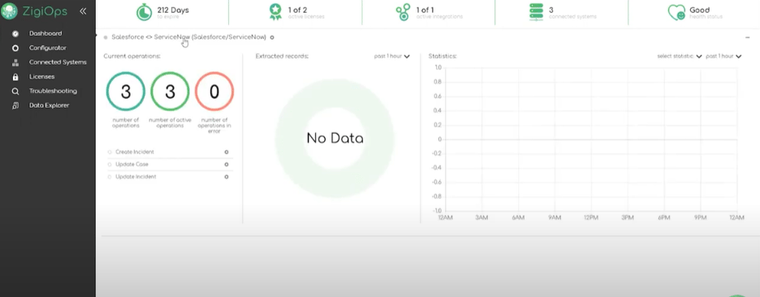
Upon logging into ZigiOps, users are greeted with the main Dashboard, which provides a comprehensive overview of key integration metrics for Salesforce ServiceNow integration implementations. The Dashboard displays essential information such as the number of active integration licenses, the systems currently connected, and the health status of both the integrated systems and the ZigiOps platform itself. This centralized view ensures that users can easily monitor the performance and status of their Salesforce ServiceNow two-way sync operations and Salesforce case to ServiceNow incident workflows in real time.
Step 3. Connecting to Salesforce and ServiceNow
Before proceeding with the integration of Salesforce and ServiceNow, it is essential to first establish a connection with each of the systems individually within ZigiOps. This step ensures that both platforms are properly configured and ready for seamless communication through Salesforce ServiceNow integration. By linking Salesforce and ServiceNow separately to the ZigiOps platform, users can manage and monitor each connection independently before setting up the comprehensive Salesforce ServiceNow two-way sync and automated Salesforce case to ServiceNow incident workflows.
Connecting to Salesforce
To start the Salesforce ServiceNow integration process, head over to the Connected Systems menu located on the left sidebar of ZigiOps. From there, select the systems you wish to integrate, in this case, Salesforce and ServiceNow. Let's begin with Salesforce to establish the foundation for robust Salesforce ServiceNow two-way sync capabilities.
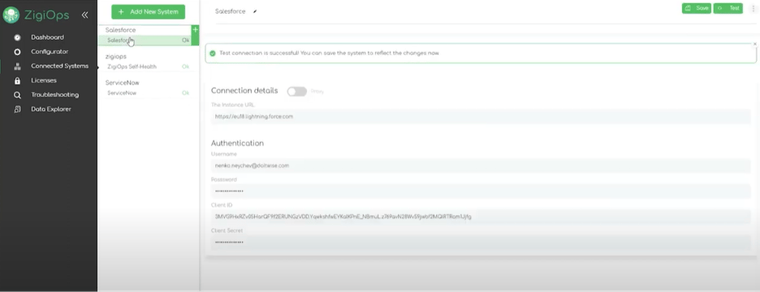
ZigiOps connects to your systems through APIs, which makes the Salesforce ServiceNow integration process smooth and efficient. To link your Salesforce instance to ZigiOps for comprehensive Salesforce case to ServiceNow incident workflows, you will need the following information:
- Salesforce Instance URL: This is the URL you typically use to log in to Salesforce.
- Username: The username associated with your Salesforce account.
- Password: The password tied to the above username.
- Client ID: The unique identifier for your Salesforce application.
- Client Secret: A key that works with the Client ID for authentication.
If you're unsure how to find your Client ID and Client Secret, you can refer to the detailed instructions provided by Salesforce documentation for API integration setup.
It's important to note that to establish this connection for effective Salesforce ServiceNow integration, you must have an administrator account or an account with Modify All Data permissions within Salesforce. This ensures that ZigiOps can fully access and integrate with the necessary data and settings required for Salesforce ServiceNow two-way sync operations.
Once you've filled in the required fields, ZigiOps will automatically validate the connection. If successful, the system will notify you, and behind the scenes, ZigiOps will begin collecting critical Salesforce data, including metadata and schema details. This process ensures that all available fields are loaded and ready for use when setting up the two-way integration between Salesforce and ServiceNow, including automated Salesforce case to ServiceNow incident workflows.
Connecting to ServiceNow
To add your ServiceNow instance as a connected system in ZigiOps for comprehensive Salesforce ServiceNow integration, follow these simple steps:
- Log into ZigiOps: Begin by logging into your ZigiOps instance where you'll be managing your Salesforce ServiceNow two-way sync integrations.
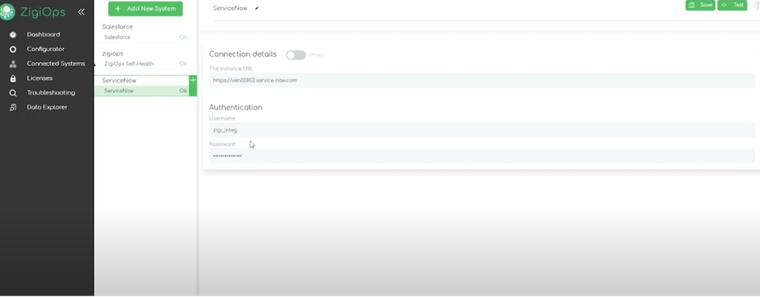
- Navigate to Connected Systems: From the left sidebar, go to Connected Systems and then click Add New System.
- Select ServiceNow: In the list of available systems, choose ServiceNow to establish connectivity for Salesforce case to ServiceNow incident workflows.
- Configure the Parameters: Fill in the following details to establish the connection:
- Server URL: Enter the URL of your ServiceNow instance (e.g., https://example.service-now.com).
- Username: Input the username for the ServiceNow account you're using for the connection.
- Password: Provide the corresponding password for the ServiceNow user.
- Proxy Settings (optional): If your network requires a proxy server, enable and configure the necessary proxy settings.
- Verify the Settings: Double-check the entered parameters to ensure they are correct and complete for proper Salesforce ServiceNow integration.
- Save the Configuration: Once you've confirmed the settings, click the Save button to finalize adding ServiceNow as a connected system.
This process will integrate your ServiceNow instance with ZigiOps, allowing the platform to automatically fetch data and prepare for comprehensive Salesforce ServiceNow integration with Salesforce or any other systems you wish to connect through sophisticated Salesforce ServiceNow two-way sync capabilities.
ZigiOps Integration Templates Gallery
ZigiOps provides an extensive library of pre-defined integration templates that serve as the foundation for quick and seamless Salesforce ServiceNow integration implementations. This library is designed to help users bypass the complex and time-consuming process of creating integrations from scratch, enabling businesses to quickly connect their systems and start automating workflows for Salesforce ServiceNow two-way sync and Salesforce case to ServiceNow incident scenarios.
These templates are carefully crafted to cover a wide variety of use cases, providing out-of-the-box solutions for popular applications like Salesforce, ServiceNow, and other major platforms. With these ready-to-use templates, organizations can significantly reduce their implementation time and avoid unnecessary overhead while implementing comprehensive Salesforce ServiceNow integration solutions.
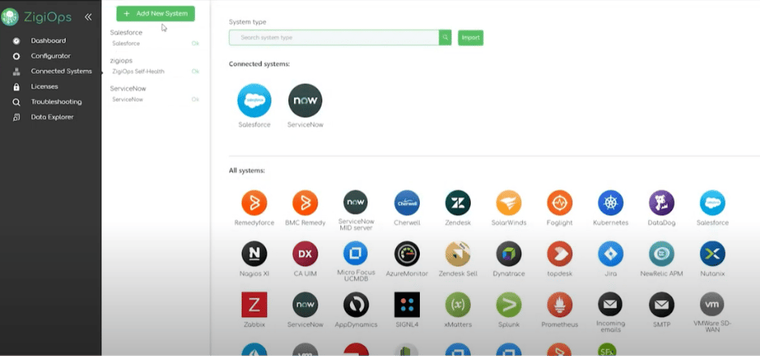
Key Benefits of ZigiOps Integration Templates:
- Quick Deployment: Templates come pre-configured for common business processes, allowing for quick setup without the need for custom development.
- Customizable: While the templates are pre-built, they are highly customizable to fit specific business requirements, offering the flexibility to add or adjust fields, triggers, and mappings.
- Scalable: The library is continually updated and expanded, supporting additional systems and more complex use cases as the business grows.
- Ease of Use: Templates come with an intuitive interface, allowing users—even without coding experience—to implement integrations in minutes.
For businesses with specific integration needs or highly customized workflows, ZigiOps also offers the option to import additional templates. This feature is particularly useful for organizations with unique system configurations or those requiring more advanced integrations. The import option ensures that ZigiOps remains flexible and adaptable to the needs of any organization, no matter how complex their IT landscape.
With the ability to leverage these pre-built templates or import new ones, ZigiOps helps businesses accelerate their digital transformation and make the most of their existing technology stack.
ServiceNow to Salesforce Integration Templates
Once you've successfully connected your ServiceNow and Salesforce systems to ZigiOps, you're ready to begin configuring the integration between them. ZigiOps streamlines the process with pre-configured, ready-to-use integration templates that significantly reduce setup time and effort.
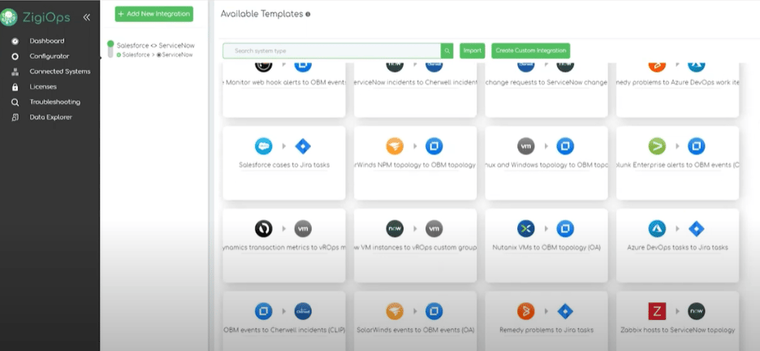
ZigiOps offers out-of-the-box templates designed to handle the most common use cases, such as transferring Salesforce Cases to ServiceNow incidents. These templates serve as starting points, and you can easily load them with just a few clicks. From there, you can fully customize the integration based on your unique business needs, adding or modifying fields, triggers, and other configurations as required.
How to Access and Use ServiceNow to Salesforce Templates:
- Log into ZigiOps: Once logged in, navigate to the Configurator menu.
- Click on Add New Integration: This option will take you to the available templates.
- Search for Salesforce to ServiceNow Templates: ZigiOps provides a search functionality, making it easy to find the specific template you need.
- Load the Desired Template: Select the Salesforce to ServiceNow integration template (in this example, we will use the Salesforce Cases to ServiceNow Incidents template) and click to load it.
Once the template is loaded, you will see a pre-configured integration with default field mappings and transfer settings. However, you don't have to settle for the default setup. ZigiOps offers the flexibility to customize the template to ensure it aligns with your specific business processes and integration requirements.
Key Features of ServiceNow to Salesforce Integration Templates:
- Ease of Setup: With just a couple of clicks, you can load the template and get started.
- Customizable: Adjust the template to meet your organization's specific needs, such as field mappings, data filtering, and integration rules.
- Scalable: As your business grows, ZigiOps templates can be scaled to accommodate new systems, use cases, and more complex workflows.
- Out-of-the-Box Functionality: Quickly connect Salesforce and ServiceNow for real-time data syncing, such as automatic case transfers and incident creation.
Import Your Own Templates or Start from Scratch: For those with unique integration needs or advanced use cases, ZigiOps provides the ability to import custom templates or create integrations from scratch. This option is ideal for businesses that require highly tailored workflows or have niche requirements not covered by the existing templates.
Whether using the pre-defined templates or creating your own from the ground up, ZigiOps ensures that setting up a Salesforce-ServiceNow integration is both fast and flexible, helping you streamline your operations and ensure a seamless flow of data between these critical systems.
Two-way ServiceNow Salesforce integration configuration
In ZigiOps' primary integration section, users are provided with a comprehensive overview of the integration process. This area offers visibility into key components, including:
- Targeted Systems: Here, users can see the systems being integrated, such as Salesforce, ServiceNow, or any other connected applications. This section helps users ensure that the correct systems are linked and configured for integration.
- Designated Data Categories: ZigiOps provides clarity on the specific data categories that are scheduled for transfer and synchronization. Whether it's cases, incidents, comments, attachments, or custom fields, users can confirm which data elements will flow between the systems. This ensures that critical information is captured and transferred accurately.
- Correlation Logic: ZigiOps uses powerful correlation logic to match and sync data from one system to another. For instance, when a Salesforce case is created, the logic ensures that a corresponding ServiceNow incident is generated with the appropriate mappings, fields, and metadata. The integration platform uses rules such as field mapping, filters, and conditions to ensure data flows smoothly, preventing errors and data mismatches during the synchronization process.
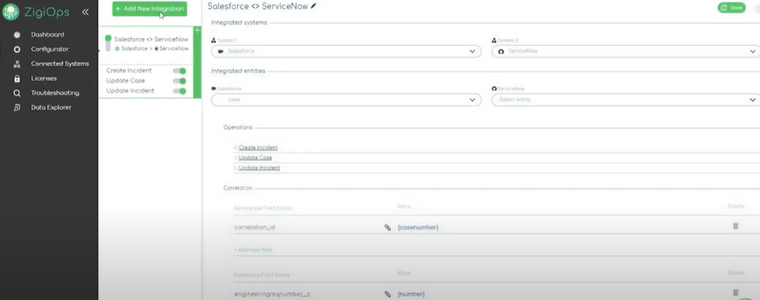
By gaining visibility into these critical areas, users can easily monitor, adjust, and troubleshoot integrations as needed, ensuring that the systems are perfectly aligned and data is transferred without disruption. This level of transparency is key for maintaining accurate, real-time synchronization and optimizing overall workflow automation.
ZigiOps’ ServiceNow to Salesforce integration: Action Levels
1.1Create ServiceNow incident
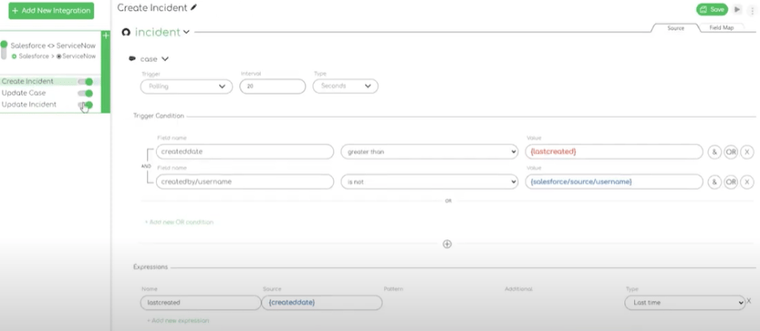
The first action is Create an incident in our ServiceNow instance. As seen, ZigiOps allows us to tailor the extracted and transferred data in accordance with our integration needs – as a result we can pick a specific trigger condition and its value. The Expression section also plays a critical role during integration. ZigiOps offers a variety of expression options that enhance data handling and transformation.
With these expressions, users can manipulate text in multiple ways — such as replacing or extracting specific portions, scanning the first n characters, formatting dates and times, and more.
These powerful capabilities are categorized into different types of expressions available within the ZigiOps platform. This approach allows us to quickly configure and deploy even the most complex integration use cases within minutes. With ZigiOps, intricate data dependencies and specialized field mappings are handled effortlessly through an intuitive and user-friendly interface.
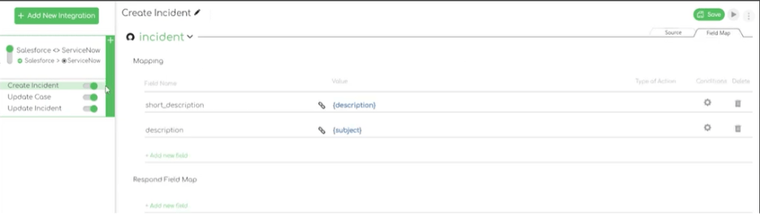
Also, data field mapping is fully controllable to define how ZigiOps reports data to ServiceNow.
1.2 Update Salesforce case
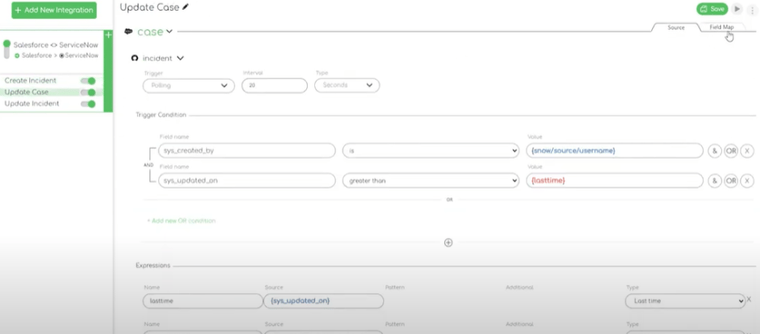
The second action that can be performed is the Update Salesforce case. Again, users have full control over over each field, meaning that IT teams can tailor each of the panel segment’s to fit in the ServiceNow to Salesforce integration requirements.
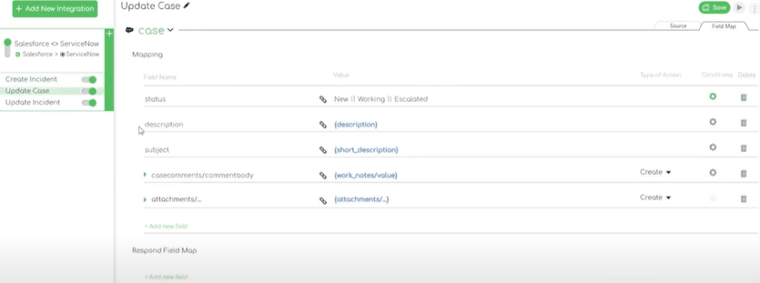
1.3 Update incident
The last, and 3rd, action that can be executed is Update Incident. Since the integration is a two-way one, this action is straightforward and aims to keep both ServiceNow and Salesforce IT teams on the same page – allowing them to share data in real time.
Advanced Configuration Options for Salesforce ServiceNow Two-way Sync
Beyond the basic configuration, ZigiOps provides advanced capabilities for implementing sophisticated Salesforce ServiceNow two-way sync scenarios. These features enable highly customized integration workflows that address specific business requirements and complex data relationships.
Advanced Field Mapping for Salesforce Case to ServiceNow Incident Workflows
The platform's advanced field mapping capabilities enable complex transformations during Salesforce case to ServiceNow incident creation. You can map a single Salesforce field to multiple ServiceNow fields, combine multiple source field values into a single target field, include static text alongside dynamic field values, and use ZigiOps expressions to format or transform data before it reaches the target system.
For example, you could configure ZigiOps to map Salesforce Account Name combined with Case Number and a static prefix such as 'SFDC-' into the ServiceNow Correlation ID field, giving IT engineers an immediately recognizable reference back to the source case.
Conditional Mapping for Intelligent Data Routing
Conditional mapping is one of ZigiOps' most powerful features for Salesforce ServiceNow integration. Rather than applying a single fixed mapping to every record, you can define conditions that change the mapping behavior based on field values in the source record.
Practical conditional mapping examples for Salesforce ServiceNow integration:
• Priority escalation: If Salesforce Priority = 'Critical', set ServiceNow Impact = '1 - High' and Urgency = '1 - High'.
• Category routing: If Salesforce Case Type = 'Infrastructure', set ServiceNow Category = 'Network'. If Case Type = 'Application', set Category = 'Software'.
• Assignment routing: If Salesforce Product = 'Enterprise Suite', assign ServiceNow incident to the Enterprise Support group.
• Selective attachment sync: Sync attachments only when Salesforce Priority is P1 or P2 to manage bandwidth for high-priority cases.
• Suppression logic: Suppress updates to ServiceNow when the record was last modified by the integration user, preventing infinite update loops.
Related Records and Comment Synchronization
For many organizations, comment and notes synchronization is the most operationally valuable aspect of the integration. ZigiOps handles this through its Related Records mapping, which maps nested data structures between systems.
Salesforce Case Comments are mapped to ServiceNow Work Notes in the two-way sync, ensuring that every customer update and IT response is visible in both systems. ZigiOps uses last-time expressions to ensure only new comments are collected per polling cycle, preventing duplicate note creation.
Important: Always configure a condition to exclude comments created by the integration user itself. Without this filter, ZigiOps could collect comments it has already written to the target system, creating duplicate entries. This is a standard best-practice configuration in ZigiOps and is easily set in the Related Records condition section.
Table 2: ZigiOps vs. Native Integration for Salesforce ServiceNow Use Cases
| Feature | Native Integration | ZigiOps |
|---|---|---|
| Setup Required | Heavy developer effort | 100% code-free, guided UI |
| Two-way Sync | Limited or manual | Full two-way, real-time |
| Field Customization | Fixed schema | Unlimited custom field mapping |
| Conditional Logic | Complex scripting | Point-and-click conditions |
| Data Storage | Platform-dependent | No data stored - ever |
| Security Certification | Varies | ISO 27001 certified |
| Transaction Limits | Often capped | Unlimited transactions |
| Deployment Model | Plugin/connector | Standalone application |
ZigiOps is a standalone application, not a plugin, meaning it operates independently of both Salesforce and ServiceNow release cycles.
Why ZigiOps for Salesforce ServiceNow Integration
There are several ways to integrate Salesforce and ServiceNow, from custom API development to point-to-point connectors. ZigiOps stands apart for organizations that need enterprise reliability without enterprise implementation complexity.
100% Code-Free: Every aspect of the integration is configured through ZigiOps' guided visual interface. No scripting, no API calls to write, no developer handoffs. Your integration team can build, modify, and maintain integrations independently.
No Data Storage: ZigiOps does not store any of the data it transfers between Salesforce and ServiceNow. Records flow in real time from source to target and are never held in a ZigiOps database. This is a fundamental architectural choice that reduces your data exposure surface and simplifies compliance.
ISO 27001 Certified: ZigiOps has achieved ISO 27001 certification, the international standard for information security management. For organizations in regulated industries, healthcare, financial services, or government, this certification matters.
Unlimited Transactions: ZigiOps places no limits on the number of records transferred. Whether you process 100 cases per day or100,000, your integration performs the same.
Standalone Application: ZigiOps is not a plugin or add-on to Salesforce or ServiceNow. It operates as an independent application, meaning Salesforce and ServiceNow upgrades do not break your integration.
Guided UI: The ZigiOps interface walks you through each configuration step with field suggestions, connection testing, and validation built in. Even complex integrations with conditional mapping and related records can be configured without external help.
Learn more about how ZigiOps connects enterprise systems on the ZigiWave Salesforce ServiceNow integration page, or explore the full range of supported systems in the ZigiWave integrations catalog.
Real-World Use Cases: Salesforce ServiceNow Integration in Action
Use Case 1: IT Incident Creation from Customer Cases
A global financial services firm uses Salesforce Service Cloud to handle client-reported issues with their trading platform. When a Salesforce case is created with Priority = Critical and Category = Platform, ZigiOps automatically creates a P1 incident in ServiceNow, assigns it to the Platform Engineering group, and populates all relevant customer and case context. The ITteam has everything they need without a single phone call between departments.
Use Case 2: Status Loop-Back to CX Agents
A SaaS company's IT team resolves incidents in ServiceNow. Each time an incident state changes, ZigiOps syncs the update back to the corresponding Salesforce case as a comment. CX agents see live progress without chasing the IT team for status updates, and customer communications are accurate and timely.
Use Case 3: Infrastructure Alert Escalation
An enterprise retailer's monitoring system triggers ServiceNow incidents when infrastructure alerts fire. If the alert correlates with a Salesforce case, ZigiOps links the systems, ensuring the customer service team knows an IT incident is already in progress for the affected customer, preventing redundant escalations.
Conclusion: Build the Integration Your Teams Actually Need
The gap between Salesforce and ServiceNow is one of the most common and most costly inefficiencies in enterprise IT and customer service operations. Cases that should escalate in minutes take hours. Resolutions that should update automatically require manual follow-up. Customer satisfaction suffers because two systems that should work together are effectively strangers.
Salesforce ServiceNow integration with ZigiOps closes that gap permanently. It is 100% code-free, ISO 27001 certified, stores no data, supports unlimited transactions, and runs as a standalone application independent of both platforms. The guided UI means your team can configure, test, and activate the integration without external help, and the flexible field mapping means you are never constrained by a one-size-fits-all schema.
Whether you need a simple case-to-incident sync or a sophisticated two-way workflow with conditional routing, comment sync, and attachment handling, ZigiOps gives you the control to build exactly what your teams need.
See the complete setup details on our integration overview.
Frequently asked questions
What is the best way to integrate Salesforce and ServiceNow?
The most effective approach is to use a dedicated, code-free integration platform like ZigiOps. It handles two-way sync, real-time data transfer, conditional field mapping, and comment synchronization without requiring developer resources or custom API work. Native connectors exist but often lack the flexibility needed for enterprise field mapping and conditional logic.
Does Salesforce ServiceNow integration support two-way sync?
Yes. ZigiOps supports full two-way sync, meaning changes in Salesforce update ServiceNow and changes in ServiceNow update Salesforce. This includes field updates, status changes, comments, and attachments.
How long does it take to set up a Salesforce ServiceNow integration with ZigiOps?
Most integrations can be configured and activated within a few hours using ZigiOps' pre-built templates and guided UI. Complex scenarios with advanced conditional mapping and multiple related entities may take longer, but the code-free approach means no developer sprints or lengthy deployment cycles.
Is ZigiOps secure for enterprise Salesforce ServiceNow integration?
Yes. ZigiOps is ISO 27001 certified and does not store any data transferred between systems. It operates as a standalone application with enterprise-grade security, making it suitable for regulated industries including healthcare, financial services, and government.
Can ZigiOps handle custom fields in Salesforce and ServiceNow?
Yes. ZigiOps performs live schema detection, meaning it reads current field definitions from both Salesforce and ServiceNow at configuration time. Custom fields, custom objects, and custom entities are all supported without any additional configuration.