Opsgenie End of Life: Best Alternatives and How to Keep Your ITSM Integrations Intact
Opsgenie is shutting down. Here's how to migrate without losing a beat.
The announcement of Opsgenie end of life has sent a clear signal across the IT operations community: the clock is ticking. If your organization relies on Opsgenie for incident alerting, on-call scheduling, or ITSM integrations, you are now facing a hard deadline that demands a structured, strategic response.
This guide covers everything IT managers, system administrators, and CTOs need to know about the Opsgenie end of life transition — what it means in practice, which alternatives are worth evaluating, how to execute a clean opsgenie migration, and critically, how to ensure your existing ITSM integrations continue working without disruption.
What Does Opsgenie End of Life Mean for Your IT Operations?
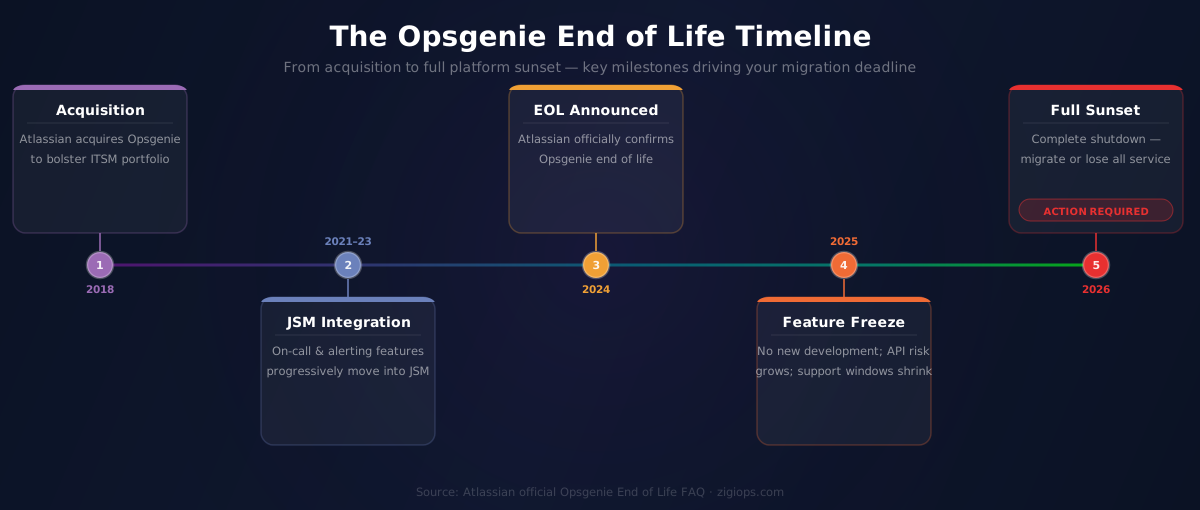
Atlassian has been consolidating its IT operations portfolio. As part of this strategy, Opsgenie end of life refers to Atlassian's decision to sunset Opsgenie as a standalone product and migrate its core functionality into Jira Service Management (JSM). Atlassian has been progressively moving on-call and alerting capabilities into JSM, effectively making Opsgenie redundant as an independent platform.
For organizations that have built workflows, escalation policies, and ITSM integrations around Opsgenie, this is not a minor inconvenience — it is a platform-level disruption. The Opsgenie end of life decision forces teams to re-architect their alerting infrastructure, renegotiate vendor contracts, and re-map integrations that may have taken months to build.
The core implications of the Opsgenie end of life are:
- No new feature development will be invested in the standalone Opsgenie product.
- Support windows will shrink, increasing operational risk for teams that delay migration.
- API compatibility with third-party tools cannot be guaranteed beyond announced dates.
- Teams still relying on Opsgenie-specific webhook and REST API integrations face potential breakage.
- Licensing costs for legacy Opsgenie users may increase as Atlassian pushes towards JSM pricing tiers.
"By 2026, organizations that fail to consolidate their IT operations toolchains will face 30% higher incident resolution times due to integration debt and tool sprawl."
—
This is precisely the risk that the Opsgenie end of life creates when teams delay action. Integration debt accumulates fast, and every week of inaction is a week closer to a broken alerting pipeline.
Why Atlassian Is Retiring Opsgenie
To understand the strategic context behind Opsgenie end of life, it helps to look at Atlassian's broader product direction. Atlassian acquired Opsgenie in 2018 to bolster its ITSM capabilities. Over the following years, Atlassian steadily embedded Opsgenie's on-call management and alerting features directly into Jira Service Management.
According to Atlassian's official Opsgenie End of Life FAQ, the company confirmed that it is discontinuing Opsgenie as a standalone product, with migration paths available to Jira Service Management. Atlassian has positioned JSM as the unified destination for IT service management, incident management, and on-call alerting.
For many organizations, this means the familiar Opsgenie interface, API endpoints, and integration patterns they have relied upon are going away. Understanding the Opsgenie end of life timeline is essential for planning your opsgenie migration without operational gaps.
The Real Cost of Delayed Opsgenie Migration
Delaying your opsgenie migration is not a neutral decision. Every month you remain on a sunset platform introduces compounding risk. Support quality degrades, third-party integration vendors stop certifying their connectors against Opsgenie APIs, and your incident response capability becomes increasingly fragile.
The hidden costs of delayed opsgenie migration include:
— Integration breakage risk: Third-party monitoring and ITSM tools may deprecate their Opsgenie connectors, leaving your alert pipeline broken.
— Security exposure: End-of-life platforms stop receiving security patches, creating compliance and audit risks.
— Engineering overhead: Keeping custom Opsgenie integrations alive on a sunset platform requires ongoing maintenance with zero return.
— Vendor lock-in amplification: The longer you wait, the harder it becomes to extract your alerting configuration, escalation rules, and on-call schedules cleanly.
— Team productivity loss: Uncertainty about platform future distracts SRE and IT ops teams from higher-value work.
"Incident management tooling that lacks integration with broader ITSM workflows creates silos that directly increase mean time to resolution (MTTR) and reduce service reliability."
—
The message is clear: proactive opsgenie migration is significantly less costly than reactive firefighting after service disruptions begin.
Best Opsgenie Alternatives for IT Operations Teams
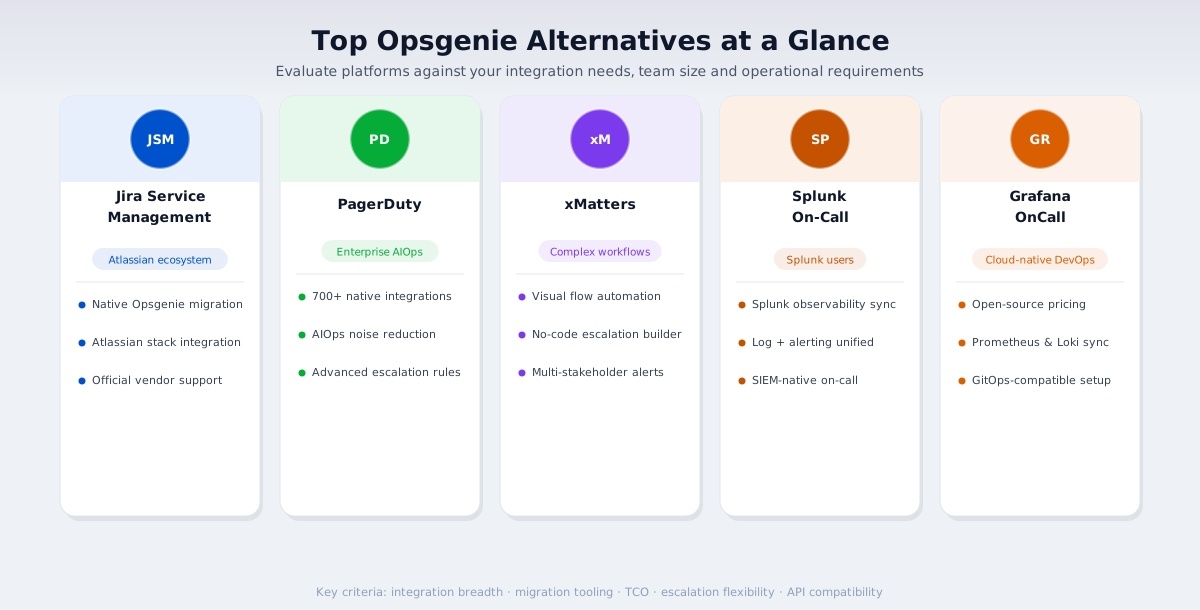
With Opsgenie end of life confirmed, the market for opsgenie alternatives has matured. There are several strong contenders, each with distinct strengths depending on your organization's size, existing toolchain, and operational model. Below is an authoritative evaluation of the leading opsgenie alternatives.
1. Jira Service Management (Atlassian)
The most obvious migration path is Atlassian's own Jira Service Management, which now includes native on-call management, alerting, and incident response capabilities built directly from Opsgenie's DNA. For organizations already in the Atlassian ecosystem, this is the lowest-friction opsgenie migration path.
JSM offers deep integration with Jira Software, Confluence, and Atlassian's broader collaboration stack. On-call schedules, escalation policies, and alert routing rules from Opsgenie can be migrated using Atlassian's official tooling. However, JSM's pricing at higher tiers can be substantially more expensive than standalone Opsgenie licenses.
Best for: Organizations already using Jira Software, Confluence, or other Atlassian products.
2. PagerDuty
PagerDuty is the market leader in digital operations management and one of the most mature opsgenie alternatives available. It offers sophisticated on-call scheduling, AIOps-powered noise reduction, runbook automation, and an extensive integration ecosystem with over 700 native integrations.
PagerDuty is particularly strong for enterprise organizations with complex escalation requirements, multi-team coordination needs, and demanding SLA commitments. Its Event Intelligence and AIOps capabilities go significantly beyond what Opsgenie offered, making it a genuine upgrade rather than a lateral move for many teams.
Best for: Enterprise organizations requiring advanced AIOps, automation, and compliance-grade incident management.
3. xMatters
xMatters is a flow-based incident management and alerting platform that distinguishes itself through its visual workflow automation capabilities. It offers deep integration with ServiceNow, Jira, Slack, and major monitoring platforms, with strong support for complex, multi-stakeholder notification workflows.
For organizations that need highly customized escalation logic or cross-functional incident coordination, xMatters is one of the more flexible opsgenie alternatives on the market. Its Flow Designer allows IT teams to build sophisticated automated responses without requiring custom code.
Best for: Organizations needing complex, multi-stakeholder notification and escalation workflows.
4. VictorOps (Splunk On-Call)
Now rebranded as Splunk On-Call, VictorOps offers tight integration with Splunk's observability and monitoring stack. For organizations already invested in Splunk for log management or infrastructure monitoring, Splunk On-Call provides a natural consolidation point for alerting and on-call management.
Best for: Organizations using Splunk for monitoring, observability, or SIEM.
5. Grafana OnCall
Grafana OnCall is an open-source-friendly, cloud-native on-call management solution deeply integrated with the Grafana observability stack. It is particularly attractive for DevOps and SRE teams already using Grafana, Prometheus, or Loki for monitoring.
Grafana OnCall offers a generous open-source tier and competitive cloud pricing, making it one of the more cost-effective opsgenie alternatives for cloud-native organizations operating lean IT budgets.
Best for: Cloud-native, DevOps-oriented teams using the Grafana observability ecosystem.
Comparing Opsgenie Alternatives at a Glance
When evaluating Opsgenie alternatives, your final decision should be driven by five key criteria:
— Integration breadth: How many of your existing monitoring, ITSM, and communication tools does the platform natively support?
— Migration tooling: Does the vendor provide structured opsgenie migration support, including configuration export and import?
— Total cost of ownership: Account for licensing, implementation, training, and ongoing integration maintenance costs.
— Escalation flexibility: Can the platform replicate your existing Opsgenie escalation policies without significant re-architecture?
— API and webhook compatibility: Will your existing custom integrations require rewriting, or can they be re-pointed to new endpoints?
"When selecting an IT incident management platform, organizations should prioritize vendors that offer pre-built integrations, documented migration paths, and transparent API documentation to reduce total cost of migration."
—
How to Keep Your ITSM Integrations Intact During Opsgenie Migration
This is the dimension of the Opsgenie end of life challenge that most migration guides underestimate. Choosing an opsgenie alternative is only half the battle. The harder problem is ensuring that every ITSM integration, monitoring connector, ticketing workflow, and bidirectional data sync that currently flows through Opsgenie continues to function reliably on your new platform.
For many organizations, Opsgenie sits at the center of a complex integration web: monitoring tools trigger alerts in Opsgenie, Opsgenie creates incidents in your ITSM platform, status updates sync back to your service desk, and resolution data flows into your reporting dashboards. Severing any link in this chain during opsgenie migration creates operational blind spots and incident response failures.
Mapping Your Current Integration Architecture
Before you begin any opsgenie migration, conduct a comprehensive integration audit. Document every tool that sends data to or receives data from Opsgenie. This should include:
— Infrastructure and application monitoring tools (Datadog, Prometheus, Nagios, New Relic, Dynatrace)
— ITSM platforms (ServiceNow, Jira Service Management, BMC Remedy, Freshservice)
— Communication and collaboration tools (Slack, Microsoft Teams, Zoom)
— CI/CD and DevOps platforms (Jenkins, GitLab, GitHub Actions)
— Custom webhook consumers and REST API integrations built in-house
— Reporting and analytics platforms ingesting incident data from Opsgenie
Each of these integration points must have a verified, tested equivalent on your destination platform before you decommission Opsgenie. Leaving any integration gap open during cutover is a direct incident risk.
Using a No-Code Integration Platform to Bridge the Gap
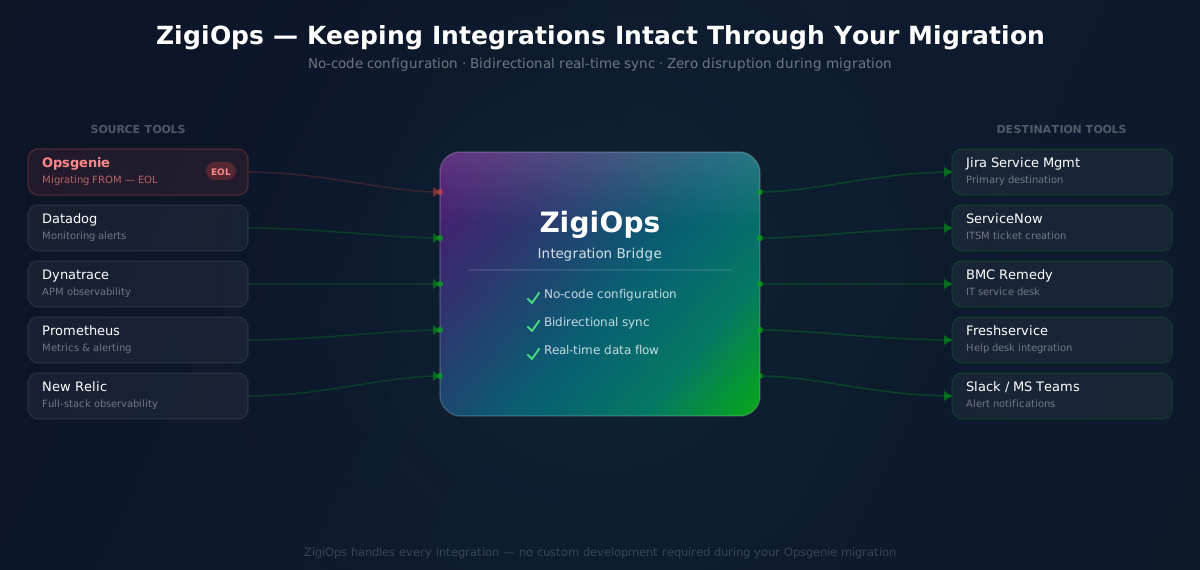
One of the most practical strategies for maintaining integration continuity during and after opsgenie migration is deploying a dedicated no-code integration platform like ZigiOps. Rather than rebuilding every integration from scratch on your new alerting platform, ZigiOps acts as a central integration layer that connects your ITSM tools, monitoring systems, and communication platforms regardless of which alerting backend you are using.
ZigiOps supports deep, bidirectional integrations with platforms including Jira Service Management, ServiceNow, Datadog, Dynatrace, Splunk, BMC Remedy, Freshservice, and more — making it an ideal bridge during complex opsgenie migration scenarios. With ZigiOps, you can stand up new integrations in hours rather than weeks, without writing a single line of code.
For organizations migrating to Jira Service Management in particular, ZigiOps offers a proven integration layer that ensures your ITSM data flows remain intact throughout the transition. Explore the full range of Jira Service Management integrations available through ZigiOps to understand how your existing tool connections can be preserved or enhanced during migration.
Key Integration Scenarios to Protect During Opsgenie Migration
When planning your opsgenie migration, these are the integration scenarios that most frequently cause post-migration incidents if not properly addressed:
— Monitoring-to-alerting pipelines: Ensure your monitoring tools have validated connectors to your new platform. Test alert routing, deduplication, and suppression rules in a staging environment before go-live.
— Bidirectional ITSM ticket sync: If incidents in Opsgenie automatically create or update tickets in your ITSM platform, this bidirectional sync must be replicated exactly on the new platform. ZigiOps specializes in precisely this type of complex, stateful bidirectional integration.
— On-call schedule continuity: Export and validate your on-call schedules, escalation policies, and override rules before the cutover date. A broken escalation chain during a P1 incident post-migration is a critical failure mode.
— Notification channel integrations: Slack, Teams, and email notification workflows tied to Opsgenie alert rules must be rebuilt and tested on your new platform before decommissioning Opsgenie.
— Custom webhook endpoints: Any internal tools or scripts that call Opsgenie's REST API must be updated to call the new platform's API. Document all custom API consumers and assign owners for each migration task.
ZigiOps and Jira Service Management: Keeping Integrations Running Post-Migration
For organizations choosing Jira Service Management as their Opsgenie replacement — which Atlassian actively encourages as part of the Opsgenie end of life transition — maintaining integration continuity with the broader ITSM ecosystem is a common challenge. JSM's native integrations are strong within the Atlassian ecosystem but can require significant custom development to connect with non-Atlassian tools.
This is where ZigiOps delivers immediate, measurable value. ZigiOps provides no-code, bidirectional integrations between Jira Service Management and the full spectrum of enterprise ITSM, monitoring, and DevOps tools. Whether you need to sync incidents between JSM and ServiceNow, push Datadog alerts into JSM tickets, or create automated escalation workflows between monitoring tools and your ITSM platform, ZigiOps handles it without custom development overhead.
The ZigiOps platform is built specifically for IT operations integration complexity. Its visual, no-code interface allows system administrators and IT managers to configure, test, and deploy integrations rapidly — a critical capability when working against the Opsgenie end of life migration deadline. You can explore the full catalog of Jira Service Management integrations powered by ZigiOps to see exactly which tool combinations are supported.
Beyond Jira Service Management, ZigiOps supports a broad library of ITSM and IT operations integrations — making it a future-proof investment that extends well beyond the immediate opsgenie migration project.
Opsgenie End of Life Migration Checklist
Use this structured checklist to guide your Opsgenie end of life response. This framework covers the key milestones that IT managers and CTOs should track throughout the migration process.
Phase 1: Assessment (Weeks 1–2)
— Confirm your Opsgenie contract end date and any Atlassian-communicated end of support milestones.
— Inventory all integrations currently flowing through Opsgenie (inbound and outbound).
— Document all on-call schedules, escalation policies, and alert routing rules.
— Identify all teams and stakeholders dependent on Opsgenie-driven notifications.
— Evaluate opsgenie alternatives against your organization's requirements.
Phase 2: Platform Selection and Design (Weeks 3–5)
— Select your target alerting and incident management platform.
— Design the new integration architecture, mapping each current Opsgenie integration to its replacement.
— Identify integration gaps where no native connector exists on the new platform.
— Evaluate ZigiOps or equivalent integration middleware for gap coverage.
— Obtain budget approval and initiate vendor contracts.
Phase 3: Build and Test (Weeks 6–10)
— Configure the new platform with on-call schedules, escalation policies, and alert routing rules.
— Deploy and test each integration in a staging environment.
— Conduct parallel-run testing: run Opsgenie and the new platform simultaneously for at least two weeks.
— Validate bidirectional ITSM integrations with representative incident data.
— Train on-call staff and incident managers on the new platform interface.
Phase 4: Cutover and Decommission (Weeks 11–12)
— Execute production cutover during a low-risk maintenance window.
— Monitor all integrations intensively for the first 72 hours post-cutover.
— Decommission Opsgenie only after confirming all integrations are stable.
— Document the new architecture and update your runbooks accordingly.
— Conduct a post-migration retrospective to capture lessons learned.
"Successful IT platform migrations require a documented rollback plan, parallel-run validation, and clear ownership of each integration dependency before cutover is attempted."
—
Common Opsgenie Migration Mistakes to Avoid
Having guided numerous organizations through platform migrations, the following mistakes are the most common — and most costly — failures observed during opsgenie migration projects:
— Migrating without an integration audit: Skipping the integration inventory step leads to broken pipelines discovered only after production cutover. This is the single most common cause of post-migration incidents.
— Underestimating custom API dependencies: Internal scripts and tools that call Opsgenie's API directly are frequently overlooked. Scan your codebase and infrastructure automation scripts for any Opsgenie API calls before migrating.
— Not testing escalation policies under realistic conditions: On-call schedule and escalation policy testing is often done superficially. Simulate real P1 incident conditions in staging to validate the full escalation chain.
— Rushing the cutover to meet a deadline: The Opsgenie end of life deadline creates pressure, but rushing a poorly tested cutover will cause more disruption than briefly extending the parallel-run period.
— Neglecting change management: On-call engineers and incident commanders who are not trained on the new platform before cutover will struggle during high-stress incidents. Allocate sufficient training time before go-live.
— Failing to update external vendor integrations: If third-party vendors send webhooks to your Opsgenie endpoint, they need to be notified and given updated endpoint URLs before Opsgenie end of life takes full effect.
The Strategic Opportunity Within the Opsgenie End of Life Challenge
While the Opsgenie end of life announcement creates short-term disruption, it also presents a genuine strategic opportunity. Platform migrations force organizations to audit their tool sprawl, rationalize their integration architecture, and make deliberate choices about their IT operations stack — work that often gets deferred indefinitely when no external forcing function exists.
Organizations that approach their opsgenie migration strategically — rather than reactively — frequently emerge with a leaner, better-integrated IT operations toolchain than they had before. The key is to treat the migration not as a feature-for-feature replacement exercise, but as an opportunity to modernize your incident management and ITSM integration architecture holistically.
Deploying an integration platform like ZigiOps as part of your opsgenie migration strategy gives your organization a durable, vendor-agnostic integration layer that will continue delivering value long after the migration is complete. When the next platform change occurs — and in IT operations, it will — your integration layer will already be in place, dramatically reducing future migration complexity.
Conclusion: Act Now on Opsgenie End of Life
The Opsgenie end of life is not a distant threat. For IT managers and CTOs who have built operational processes and ITSM integrations around Opsgenie, the time to act is now. Waiting for service degradation to force your hand will result in higher costs, greater operational risk, and a more chaotic migration experience.
The strategic path forward involves three parallel workstreams: selecting the right opsgenie alternative for your organization's needs, executing a disciplined opsgenie migration against a structured checklist, and deploying a robust integration layer — like ZigiOps — to ensure your ITSM integrations remain intact throughout the transition and beyond.
ZigiOps is purpose-built for exactly this kind of IT operations integration challenge. With no-code configuration, bidirectional sync capabilities, and deep support for enterprise ITSM and monitoring platforms, ZigiOps gives your team the tools to navigate the Opsgenie end of life without sacrificing service reliability.
Start your opsgenie migration planning today. Explore how ZigiOps can protect and modernize your ITSM integrations with the full range of Jira Service Management integrations and the broader ZigiOps integration library.