Integrations During System Migration
Learn how to keep integrations running during system migration
System migration is one of the most complex and high-stakes operations an IT organization can undertake. Whether you are moving from a legacy ITSM platform to ServiceNow, transitioning your infrastructure to the cloud, or consolidating tools after a merger, the core challenge remains the same: keeping your integrations alive, accurate, and operational while the underlying systems change around them.
Most organizations focus heavily on the data movement itself and underestimate what happens to the integrations that depend on that data. The result is often unplanned downtime, broken workflows, duplicated records, and frustrated teams — all of which can be avoided with the right approach.
This guide walks IT managers, system administrators, and CTOs through a practical, proven framework for running integrations during system migration — with minimal disruption, zero data loss, and full operational continuity.
Why Integrations Break During System Migration
Integrations are built on assumptions: specific API endpoints, field mappings, authentication schemes, and data schemas. When you perform a system migration, many of these assumptions are invalidated simultaneously. A new platform may use different field names, different authentication protocols, or a completely different data model.
The most common reasons integrations fail during system migration include:
- Schema changes: Fields that existed in the source system may be renamed, restructured, or removed in the target system.
- API endpoint changes: New platforms expose different REST or SOAP endpoints, breaking hard-coded connections.
- Authentication drift: OAuth tokens, API keys, and service account credentials often need to be reissued for the new environment.
- Timing mismatches: During a phased migration, some records exist in both systems simultaneously, causing sync conflicts and duplicate entries.
- Missing historical data context: Integrations that rely on record history or audit trails may fail if that context is not fully migrated.
- Network and firewall changes: Moving to a new environment often changes IP ranges, hostname resolvers, and routing rules that integrations depend on.
- Understanding these failure points is the first step to designing an integration strategy that survives the migration process intact.
"Through 2025, 80% of organizations migrating to new platforms will experience integration failures that delay go-live timelines by at least four weeks, primarily due to undocumented dependencies and hard-coded integration logic."
— Gartner, Cloud Migration Insights
The Core Principle: Decouple Integrations from System State
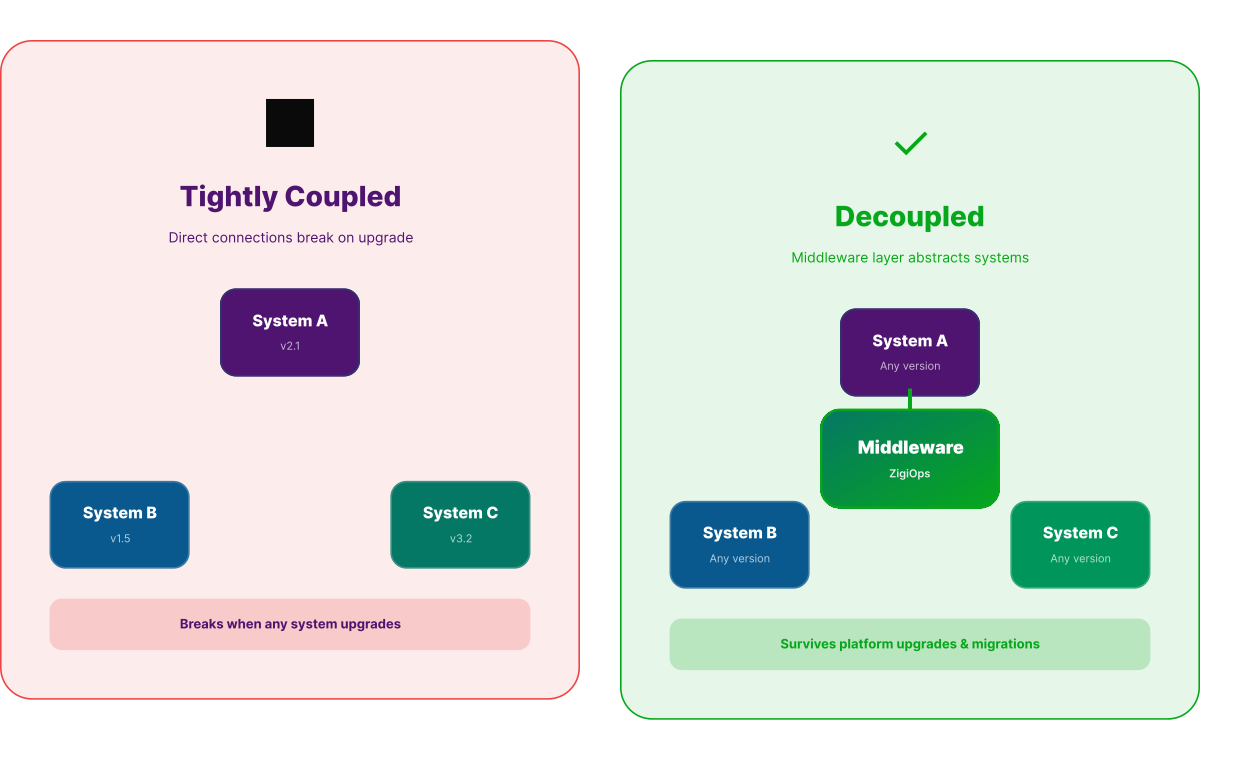
The most resilient approach to integration during migration is to decouple your integration logic from the specific state of either the source or target system. Rather than building point-to-point connections that are tightly bound to a particular platform version, you should use a middleware or integration platform that abstracts the underlying system details.
This principle is central to how modern no-code integration platforms like ZigiOps operate. Instead of encoding field mappings and API logic directly into custom scripts or platform-specific connectors, ZigiOps maintains a flexible integration layer that can be reconfigured as systems change — without touching a single line of code.
Decoupled integrations allow you to:
- Update field mappings on the fly as new schemas are introduced
- Redirect data flows from the old system to the new one during parallel operation
- Apply transformation rules that normalize data across both environments
- Monitor sync status in real time without relying on either system's native reporting
- This decoupling is what makes it possible to run integrations during system migration without forcing a complete cutover on day one.
Planning Your Integration Strategy Before System Migration Begins
Successful integration during migration does not happen by accident. It requires deliberate planning before the first record is moved. The planning phase should begin at least six to eight weeks before the migration start date and should involve both the technical team and the business stakeholders who depend on the integrated workflows.
Step 1: Inventory All Active Integrations
Before you can protect your integrations, you need to know exactly what you have. Conduct a full audit of every integration currently in production. Document the source system, target system, data objects being synced, sync frequency, field mappings, authentication method, and the business process each integration supports.
This inventory will become your migration checklist. Every item on it needs a corresponding plan for how it will be handled during the system migration.
Step 2: Classify Integrations by Criticality
Not all integrations carry the same risk. Some connect mission-critical ITSM workflows — such as incident-to-alert syncing between your monitoring tool and your service desk. Others may support lower-priority reporting pipelines that can tolerate brief interruptions.
Classify each integration into one of three tiers:
- Tier 1 (Mission Critical): Must remain operational throughout the migration. Any downtime directly impacts service delivery.
- Tier 2 (Business Important): Brief, planned outages are acceptable if communicated in advance. Must be restored within hours of cutover.
- Tier 3 (Non-Critical): Can be temporarily suspended and rebuilt on the new platform post-migration.
Step 3: Map Dependencies Across Systems
Many integrations are not isolated — they form chains. An alert from a monitoring tool triggers an incident in your ITSM, which creates a change request, which triggers a notification in a collaboration platform. Migrating any one of these systems can cascade across the entire chain.
Map these dependency chains before migration begins. Identify which integrations in the chain are most vulnerable to the planned changes, and prioritize those for early stabilization.
"Data migration projects that fail to account for integration dependencies are three times more likely to exceed their original budget and timeline than those that include a formal integration impact assessment."
— Forrester Research, Data Integration Platforms Report
Running Integrations During a Phased System Migration
The most common approach to system migration in enterprise IT is the phased migration — where users, data, and workflows are moved in controlled batches over a period of weeks or months. This reduces risk but introduces a period of dual-system operation that is particularly challenging for integrations.
During a phased system migration, you will have some data in the old system and some in the new system simultaneously. Integrations need to route data correctly to and from both environments without creating duplicates or missing updates.
The Dual-Write Strategy
The dual-write strategy involves configuring integrations to write updates to both the source and target systems simultaneously during the migration window. This ensures that both systems remain consistent regardless of which platform a given user or process is currently operating on.
Implementing dual-write requires:
- A middleware layer capable of broadcasting writes to multiple endpoints (ZigiOps supports this natively)
- Conflict resolution logic to handle cases where updates arrive simultaneously from both systems
- Deduplication rules to prevent the same record from being created twice
- An audit log that tracks every write to both systems for post-migration reconciliation
The Read-From-Source, Write-To-Target Strategy
An alternative approach is to configure integrations to continue reading from the legacy system while writing exclusively to the new platform. This is appropriate when the migration is primarily one-directional — moving operations forward to the new environment — and when users are expected to be fully cut over within a defined window.
This strategy works well for Jira data migration scenarios, for example, where project data is moved to a new Jira instance and integrations need to continue feeding updates into the new environment while the legacy instance is wound down.
Handling Rollbacks
Every phased system migration plan must include a rollback path. If a critical failure occurs in the new environment, you need to be able to revert to the source system quickly — and your integrations must follow. Design your integration configurations so that switching between source and target environments is a matter of updating a connection parameter, not rebuilding the entire integration from scratch.
Data Migration and Integration: Two Sides of the Same Coin
It is a common mistake to treat data migration and integration management as separate workstreams. In practice, they are deeply intertwined. Every data migration decision has integration implications, and every integration configuration decision affects data migration outcomes.
For example, when you perform a data migration and clean or transform data in the process — normalizing field values, merging duplicate records, or updating naming conventions — those same transformations need to be applied to live integration flows. Otherwise, your integrations will start pushing data in the old format into a new system that expects the new format, causing sync errors and data corruption.
This is why ZigiWave's approach to enterprise data migration treats integration configuration as a core component of the migration plan, not an afterthought. The integration layer is updated in lockstep with the data migration, ensuring that field mappings, transformation rules, and routing logic are always aligned with the current state of both systems.
To understand the full landscape of risks and opportunities in data migration, the ZigiWave resource on data migration benefits and pitfalls is an essential reference for any IT team planning a major system transition.
"Organizations that align their integration strategy with their data migration roadmap reduce post-migration incident rates by up to 60% compared to those that manage the two workstreams independently."
— TechTarget, Data Migration Best Practices
.svg)
How ZigiOps Keeps Integrations Running During System Migration
ZigiOps is purpose-built for the complexity of enterprise IT Operations, and its architecture makes it exceptionally well-suited to managing integration during migration scenarios. Unlike traditional ETL tools or custom-coded connectors, ZigiOps operates as a fully no-code, bidirectional integration platform that sits between your systems and abstracts the technical details of each connection.
No-Code Reconfiguration
When a system migration changes field names, API endpoints, or data schemas, ZigiOps users can update their integration configurations directly in the UI — without writing a single line of code. This means your team can respond to changes in the migration plan in real time, rather than waiting days or weeks for a developer to update a custom script.
Bidirectional Sync with Conflict Resolution
ZigiOps supports true bidirectional data sync, which is essential for phased system migration scenarios. It includes built-in conflict resolution logic that ensures updates from both systems are handled correctly and that no data is lost or overwritten inadvertently.
Real-Time Monitoring and Alerting
During a system migration, visibility is everything. ZigiOps provides real-time monitoring dashboards that show the status of every active integration, including sync success rates, error counts, and data throughput. If an integration starts failing due to a migration-related change, your team is alerted immediately — before business processes are impacted.
Pre-Built Connectors for Major ITSM and DevOps Platforms
ZigiOps includes pre-built, maintained connectors for the platforms most commonly involved in enterprise system migrations, including ServiceNow, Jira, BMC Remedy, Dynatrace, Splunk, PagerDuty, and many others. These connectors are updated whenever a supported platform releases API changes, which dramatically reduces the maintenance burden during and after migration.
Flexible Deployment Options
ZigiOps can be deployed on-premises, in the cloud, or in a hybrid configuration — matching whatever deployment model your system migration is targeting. This flexibility means the integration platform itself does not need to change even if the underlying systems move from on-premises to cloud.
Step-by-Step Integration Strategy for System Migration
The following framework provides a structured approach to managing integration during migration across all phases of a typical enterprise system migration project.
Phase 1: Pre-Migration Preparation (6-8 Weeks Before)
- Complete the integration inventory and dependency mapping described in the planning section above
- Classify all integrations by criticality tier
- Deploy ZigiOps (or your chosen integration platform) in the target environment and validate connectivity
- Configure integration templates for the new system alongside existing live configurations
- Test all new integration configurations against a staging instance of the target system
- Define rollback procedures for each Tier 1 integration
Phase 2: Parallel Operation (During Migration Window)
- Activate dual-write or read-source/write-target strategy based on your migration approach
- Monitor all active integrations continuously for errors, latency increases, and data inconsistencies
- Run daily reconciliation reports comparing record counts and field values between source and target systems
- Update integration field mappings in real time as data migration decisions are finalized
- Maintain a change log of every integration configuration update made during the migration window
Phase 3: Cutover
- Switch all Tier 1 integrations to target-only mode at the designated cutover time
- Validate each integration with a functional test before decommissioning source connections
- Run a final reconciliation check to confirm data integrity across all integrated systems
- Archive source system integration configurations for reference
- Brief the service desk and operations team on the new integration topology
Phase 4: Post-Migration Stabilization (2-4 Weeks After)
- Monitor all integrations at elevated frequency for the first two weeks post-migration
- Address any issues surfaced by users or automated monitoring as high priority
- Decommission Tier 3 integration placeholders and rebuild them natively on the new platform if required
- Document the final integration configuration for each workflow
- Conduct a post-migration integration review to identify lessons learned and process improvements
Common Mistakes to Avoid During System Migration
Even well-planned system migrations encounter integration problems. The following are the most frequent mistakes organizations make — and how to avoid them.
Assuming the New System Works Like the Old One
Every platform has its own data model, API behavior, and field conventions. Never assume that a field called "Priority" in your old ITSM maps directly to a field of the same name in the new one — the underlying values and logic may be entirely different. Always validate field mappings explicitly, even for fields that appear identical.
Skipping Staging Environment Testing
Testing integrations directly in production during a system migration is a critical risk. Always validate new integration configurations in a staging environment that mirrors the production target system as closely as possible. This includes using realistic data volumes and realistic API call frequencies.
Neglecting API Rate Limits
During a system migration, data volumes spiking through integrations can trigger API rate limits on the target platform. This is especially common with cloud-hosted SaaS platforms like Jira Cloud or ServiceNow. Ensure your integration platform includes rate-limit-aware throttling and retry logic — ZigiOps handles this automatically.
Forgetting Service Account Permissions
New environments require new service account setup. A surprisingly common failure mode in system migration is launching a new integration configuration only to find that the service account used by the integration platform lacks the necessary permissions in the new system. Validate permissions explicitly as part of your pre-migration checklist.
Lack of Communication with Business Stakeholders
Integrations support business processes. When those integrations are modified during system migration, the people who depend on those processes need to know what is changing, when, and what they should do if something does not look right. Proactive communication reduces the volume of support tickets and accelerates problem identification.
"Migrating to a new platform without a formal communication plan for integration changes results in a 45% increase in end-user reported incidents in the 30 days following cutover."
— TechTarget, IT Migration Best Practices
.svg)
Tools and Resources for Managing Integration During Migration
Beyond ZigiOps, IT teams undertaking a system migration should be familiar with the following official resources and standards that inform best practices for integration management:
- ServiceNow IntegrationHub Documentation — Official guidance on managing integrations within the ServiceNow ecosystem during platform upgrades and migrations.
- Atlassian Migration Support Hub — Official resources for planning and executing Jira and Confluence migrations, including integration considerations.
- BMC IT Migration Blog — Practitioner-level guidance on managing ITSM tool migrations, including integration dependencies.
- ITIL 4 Foundation — AXELOS — The ITIL 4 framework provides governance principles for managing transitions and migrations within IT service management contexts.
Combining these authoritative resources with a capable integration platform like ZigiOps gives IT teams the knowledge and tooling needed to execute system migration projects with confidence.
Why No-Code Integration Platforms Are the Right Choice for System Migration
Traditional approaches to managing integration during migration — custom scripts, point-to-point connectors built by developers, or native platform integrations — all share a common weakness: they are brittle. They break when systems change, and changing them requires specialized technical knowledge and significant lead time.
No-code integration platforms eliminate this brittleness by design. When your system migration introduces a schema change, you update the mapping in the UI in minutes, not days. When a new API endpoint is available, you update the connection URL without writing code. When you need to add a new data object to the integration during the migration window, you do it without opening a developer ticket.
This agility is not just convenient — it is strategically important. System migrations rarely go exactly to plan. Field names change at the last minute. Cutover dates are pushed. New requirements emerge from the business. A no-code integration platform allows your team to respond to these changes in real time, keeping integrations healthy and business processes operational throughout the entire migration lifecycle.
Organizations looking to understand the full business case for this approach can explore ZigiWave's detailed coverage of data migration benefits and common pitfalls, which addresses both the strategic and tactical dimensions of modern data migration projects.
Conclusion: Make Integration a First-Class Citizen in Your System Migration Plan
System migration is not just a data movement exercise. It is a fundamental transformation of the operational backbone that your IT organization depends on every day. Integrations are the connective tissue that holds that backbone together — and treating them as an afterthought is one of the most expensive mistakes an IT organization can make.
The organizations that execute system migration most successfully are those that plan their integration strategy with the same rigor as their data migration strategy. They inventory their integrations early, classify them by criticality, design for dual-system operation, test thoroughly in staging, monitor continuously during the migration window, and use tooling that allows them to adapt in real time.
ZigiOps is built specifically for this challenge. It gives IT Operations teams the flexibility, visibility, and control they need to keep integrations running throughout every phase of system migration — without writing code, without downtime, and without compromise.
If your organization is planning a system migration, the time to address your integration strategy is now — not after the cutover date is set. Explore how ZigiWave supports enterprise data migration with a fully integrated approach, or review the Jira data migration with ZigiOps use case to see a concrete example of how this works in practice.