Conect Freshservice and Salesforce: Integration Use Cases That Save Hours Every Week
Feshservice and Salesforce Integration Use Cases
Connect Freshservice and Salesforce: Integration Use Cases That Save Hours Every Week
Every IT team knows the friction. A sales rep opens a Salesforce opportunity, a support ticket gets created in Freshservice, and somewhere between the two platforms, critical context disappears. Engineers chase down account details manually. Customer-facing teams wait hours for ticket updates. Data gets re-entered by hand — and mistakes multiply.
This is the hidden cost of running Freshservice and Salesforce as two separate silos. And for organizations scaling their IT operations, that cost compounds quickly. Freshservice Salesforce workflow automation is the operational lever that eliminates this friction entirely — connecting your ITSM and CRM workflows so data flows automatically, accurately, and in real time.
In this article, we break down the most impactful Freshservice Salesforce integration use cases, explain exactly how each one works, and show how ZigiOps makes it possible without writing a single line of code.
Why Freshservice Salesforce Workflow Automation Is No Longer Optional
Modern IT operations don't exist in a vacuum. The tools your support teams use — Freshservice for ticketing and ITSM — are deeply interconnected with the tools your revenue teams use, like Salesforce for CRM and customer lifecycle management. When these platforms don't talk to each other, the business pays the price in delayed resolutions, duplicated effort, and poor customer experience.
The numbers back this up. According to industry research, integration failures and manual data handling are among the top contributors to IT team inefficiency. Organizations that invest in workflow automation consistently report faster resolution times, reduced operational costs, and higher customer satisfaction scores.
"By 2026, hyperautomation initiatives will enable organizations to lower operational costs by 30%."
—
Gartner Hyperautomation Insights
Freshservice is a best-in-class ITSM platform built for modern IT teams. Salesforce is the world's leading CRM. Together, through Freshservice Salesforce workflow automation, they form a unified operational backbone — one where support tickets, customer account data, asset records, and escalation workflows all synchronize automatically.
ZigiOps is the integration platform that makes this possible. With a no-code interface, pre-built connectors, and deep field-mapping capabilities, ZigiOps allows IT Managers, system administrators, and CTOs to automate Freshservice Salesforce workflows without depending on developer resources or expensive custom builds.
You can explore all available Freshservice integrations supported by ZigiOps or browse the full range of Salesforce integrations available on the platform.
.svg)
Top Freshservice Salesforce Integration Use Cases That Drive Real Efficiency
The following Freshservice Salesforce integration use cases are drawn from real-world IT operations scenarios. Each one addresses a specific pain point, automates a manual process, and delivers measurable time savings. These are not theoretical — they represent the kinds of workflows that IT teams implement using ZigiOps every day.
1. Auto-Create Freshservice Tickets From Salesforce Cases
When a Salesforce Case is opened — whether by a customer success manager or triggered by an automated rule — the corresponding support ticket should exist in Freshservice immediately. Without integration, this requires a manual handoff, often involving emails, Slack messages, or spreadsheet updates.
With Freshservice Salesforce workflow automation, the moment a Case is created or updated in Salesforce, ZigiOps detects the change and automatically generates a Freshservice ticket. Key fields — account name, contact details, case priority, and description — are mapped and populated instantly. No copy-paste. No lag. No lost context.
This use case alone saves support teams between 30 and 90 minutes per day, depending on ticket volume. For high-volume environments, the impact is transformational.
2. Sync Ticket Status Bidirectionally Between Both Platforms
One of the most common pain points in cross-platform operations is status desynchronization. A Freshservice ticket gets resolved, but the corresponding Salesforce Case still shows as "Open." Customer success reps follow up unnecessarily. IT engineers respond to stale escalations.
ZigiOps enables true bidirectional synchronization. When a Freshservice ticket status changes — from "Open" to "In Progress" to "Resolved" — that update is automatically reflected in Salesforce. The reverse is equally true: status changes in Salesforce Cases propagate back to Freshservice without any manual intervention.
This keeps both teams working from the same source of truth, eliminating the confusion that degrades customer experience and wastes engineer time. It is one of the most foundational Freshservice Salesforce integration use cases for any organization running both platforms.
3. Escalate High-Priority Salesforce Opportunities to Freshservice Incidents
Enterprise sales often surface technical blockers. A Salesforce opportunity may stall because a customer's environment has a critical technical issue that needs immediate IT attention. Without a direct integration, the sales rep logs the problem in Salesforce, then manually notifies IT via email or a separate ticket — adding hours of delay to a process that should be instant.
With ZigiOps, you can configure rules so that when a Salesforce opportunity hits a defined stage or a field value changes — such as "Technical Blocker: Yes" — a high-priority incident is automatically created in Freshservice. The incident is pre-populated with the opportunity details, customer account data, and any relevant notes from the sales record.
IT teams receive full context from the moment the incident lands in their queue. This is Freshservice Salesforce workflow automation working at the intersection of sales and operations — and it directly protects revenue.
4. Automate Asset and Configuration Data Sync
Freshservice includes a powerful Configuration Management Database (CMDB) for tracking IT assets. Salesforce often holds contractual and licensing data about the same assets — particularly for software vendors and SaaS companies. Keeping these records aligned manually is a significant overhead.
ZigiOps allows you to automate Freshservice Salesforce asset synchronization, mapping CMDB fields in Freshservice to corresponding asset or product records in Salesforce. When an asset is updated, decommissioned, or added in one platform, the change is reflected in the other — without manual reconciliation.
This use case is particularly valuable for IT asset management audits, compliance reporting, and customer-facing SLA documentation.
5. Trigger Salesforce Account Updates From Freshservice Service Requests
When a customer submits a service request in Freshservice — such as a request to add a new user, upgrade a plan, or modify account settings — that action often requires a corresponding update in Salesforce. Without integration, this creates a manual workflow gap where the CRM lags behind actual service delivery.
ZigiOps closes this gap by triggering Salesforce account or contact updates automatically when specific Freshservice service requests are completed. For example, when a "New User Onboarding" request is resolved, ZigiOps can update the Salesforce account to reflect the new contact, add a note to the account timeline, or trigger a Salesforce workflow of its own.
This is a high-value Freshservice Salesforce integration use case for managed service providers and SaaS companies who need their CRM to stay current with service delivery activity.
6. Sync SLA Breach Alerts to Salesforce Account Records
SLA breaches in Freshservice carry significant customer relationship implications. When a high-value account's ticket is at risk of breaching its SLA, customer success managers in Salesforce need to know — immediately, not after the fact.
With Freshservice Salesforce workflow automation, ZigiOps can be configured to push SLA breach alerts and at-risk ticket notifications directly to the relevant Salesforce account or contact record. A customer success manager can see in real time that an open ticket for their account is approaching the SLA threshold, allowing them to proactively communicate with the customer rather than react to a complaint.
This use case directly improves customer retention metrics and is one of the most strategically valuable Freshservice Salesforce integration use cases for customer-centric IT organizations.
"Improving customer experience is now the top priority for IT leaders, with 73% of organizations saying that IT's role in CX has increased significantly over the past two years."
—
Forrester Research, Customer Experience Insights
How ZigiOps Powers Freshservice Salesforce Workflow Automation Without Code
The technical barrier to integration has historically been one of the biggest obstacles for IT teams. Custom API integrations require developer time, ongoing maintenance, and a deep understanding of both platforms' data models. Middleware solutions often demand scripting knowledge and complex configuration. ZigiOps was built to eliminate all of these obstacles.
No-Code Configuration With Deep Field Mapping
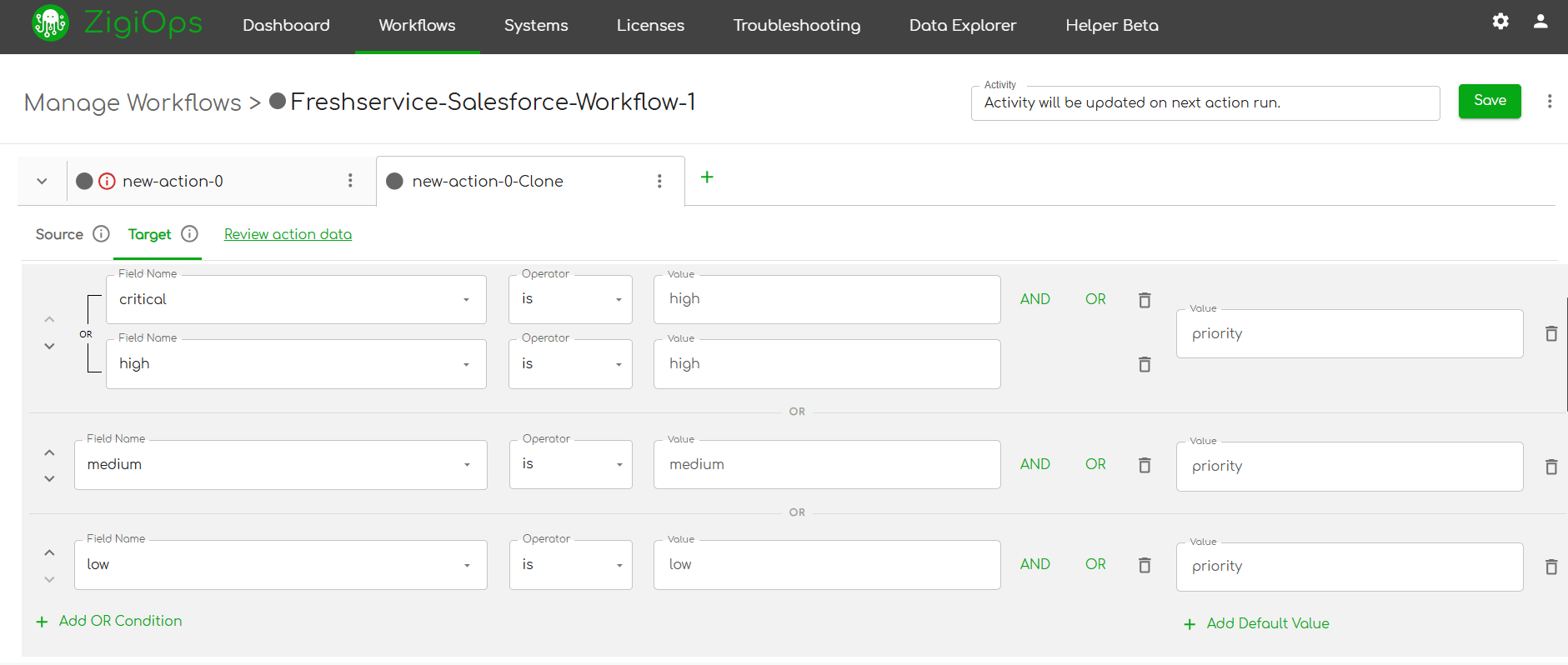
ZigiOps provides a fully visual integration builder. To automate Freshservice Salesforce workflows, administrators select the source system, define the trigger event, map the fields, and set the synchronization rules — all through a point-and-click interface. There is no scripting, no API calls to write, and no JSON to format.
The platform supports complex field transformations, conditional logic, and multi-step workflows. This means you can build sophisticated Freshservice Salesforce workflow automation scenarios — such as "only create a Freshservice ticket if the Salesforce Case priority is High or Critical and the account tier is Enterprise" — without writing a single conditional statement in code.
Real-Time and Scheduled Synchronization
ZigiOps supports both real-time event-driven synchronization and scheduled batch sync, depending on the use case. For high-urgency workflows — such as incident creation from Salesforce Cases — real-time sync ensures zero lag. For lower-urgency data reconciliation tasks, scheduled sync reduces API load while maintaining data accuracy.
This flexibility allows IT teams to optimize their integration architecture based on operational priorities rather than platform constraints.
Bidirectional Data Flow With Conflict Resolution
One of the most technically nuanced aspects of any integration is handling bidirectional data flow without creating update loops or conflicting writes. ZigiOps includes built-in conflict resolution logic that prevents duplicate updates, manages field-level precedence, and ensures that bidirectional sync remains stable even under high-volume conditions.
This makes ZigiOps particularly well-suited for enterprise environments where both Freshservice and Salesforce are actively used by large, concurrent user bases.
Audit Logs, Error Handling, and Monitoring
ZigiOps provides full visibility into integration activity through detailed audit logs and a real-time monitoring dashboard. Every data exchange is logged with timestamps, source records, and transformation details. If an error occurs — such as a failed field mapping or an API timeout — ZigiOps flags it immediately and provides actionable error details.
For IT teams responsible for data integrity and compliance, this level of observability is non-negotiable. It transforms Freshservice Salesforce workflow automation from a black-box process into a fully auditable, governable data pipeline.
"Integration platforms must provide end-to-end visibility into data flows, including error tracking and audit capabilities, to meet enterprise governance requirements."
—
Gartner, Enterprise Integration
Freshservice Salesforce Workflow Automation: The Business Case for IT Leaders
For IT Managers and CTOs evaluating whether to invest in Freshservice Salesforce workflow automation, the ROI calculation is straightforward. Consider the following conservative estimates for a mid-sized IT organization processing 200 cross-platform interactions per week:
Time saved per week from automated ticket creation: If each manual ticket creation takes 5 minutes and 100 tickets per week are created manually, automation saves over 8 hours per week in data entry alone.
Reduction in escalation response time: Automated escalation workflows can reduce the time between a Salesforce trigger and a Freshservice incident creation from hours to seconds — directly improving MTTR (Mean Time to Resolution).
Decrease in duplicate effort: Bidirectional sync eliminates the need for support engineers and customer success managers to update two systems separately, cutting duplicate data entry by up to 100%.
Improvement in customer satisfaction: Proactive SLA breach alerts and real-time ticket status visibility in Salesforce allow customer-facing teams to stay ahead of issues rather than react to them.
These are not hypothetical gains. They are the operational outcomes that organizations consistently achieve when they automate Freshservice Salesforce workflows at scale using a purpose-built integration platform like ZigiOps.
Choosing the Right Integration Approach for Your Environment
Not all integration approaches are created equal. When evaluating how to implement Freshservice Salesforce workflow automation, IT leaders typically consider three options: native connectors, custom API development, and dedicated integration platforms like ZigiOps.
Native Connectors: Limited but Fast
Both Freshservice and Salesforce offer some native integration capabilities through their respective marketplaces. These are typically suitable for simple, unidirectional data pushes. They lack the depth of field mapping, conditional logic, and bidirectional sync that enterprise use cases require. For organizations with complex workflows or high data volumes, native connectors quickly become a bottleneck.
Custom API Development: Powerful but Expensive
Building a custom integration between Freshservice and Salesforce using their respective REST APIs gives maximum flexibility. However, it requires significant developer resources to build, test, and maintain. API changes by either vendor can break integrations silently. For most IT operations teams, the ongoing maintenance burden makes this approach unsustainable.
ZigiOps: Enterprise-Grade Without the Overhead
ZigiOps occupies the ideal middle ground: the depth and flexibility of a custom integration, delivered through a no-code interface that any technical administrator can manage. With pre-built connectors for both Freshservice and Salesforce, enterprise-grade bidirectional sync, and a visual configuration interface, ZigiOps is designed specifically for IT operations teams who need to automate Freshservice Salesforce workflows quickly and reliably.
You can explore the full capabilities of ZigiOps Freshservice integrations and the complete set of ZigiOps Salesforce integrations to understand what is possible for your specific environment.
For a broader view of the integration ecosystem supported by ZigiOps, visit the ZigiOps integrations directory.
Implementation Best Practices for Freshservice Salesforce Workflow Automation
Deploying Freshservice Salesforce workflow automation successfully requires more than just connecting the two platforms. The following best practices ensure that your integration delivers value from day one and scales effectively as your organization grows.
Start With Your Highest-Impact Use Case
Rather than attempting to automate every workflow simultaneously, identify the single integration use case that causes the most friction today. For most teams, this is either bidirectional ticket and case synchronization or automated incident creation from Salesforce triggers. Start there, validate the workflow, and expand incrementally.
Define Field Mapping Standards Before Configuration
Before configuring ZigiOps, document the field mapping between Freshservice and Salesforce. Identify which fields are mandatory, which are optional, and how values should be transformed where field structures differ between platforms. A well-documented field mapping specification reduces configuration time and prevents data quality issues post-deployment.
Use Conditional Logic to Filter Noise
Not every Salesforce Case needs a Freshservice ticket, and not every Freshservice ticket needs to update a Salesforce record. Use ZigiOps's conditional logic capabilities to define precise trigger conditions. This keeps your integration focused, reduces unnecessary API calls, and ensures that both platforms remain clean and uncluttered.
Establish Monitoring and Alert Thresholds
Once your Freshservice Salesforce workflow automation is live, configure ZigiOps monitoring alerts so that your team is notified immediately if the integration encounters errors or falls behind on processing. Proactive monitoring prevents small issues from escalating into significant data discrepancies.
Review and Optimize Quarterly
Integration needs evolve as your organization grows and as both Freshservice and Salesforce are updated with new features. Schedule a quarterly review of your integration configuration to ensure that field mappings remain accurate, new use cases are captured, and deprecated workflows are retired. This keeps your Freshservice Salesforce workflow automation aligned with operational reality.
For guidance on Freshservice platform capabilities and configuration options, refer to the official Freshservice support documentation. For Salesforce integration best practices, the Salesforce Integration Patterns and Practices guide is an authoritative resource.
Freshservice Salesforce Integration Use Cases: A Summary for IT Decision-Makers
To consolidate the key Freshservice Salesforce integration use cases covered in this article, here is a concise reference for IT Managers, system administrators, and CTOs evaluating this integration:
Auto-create Freshservice tickets from Salesforce Cases — Eliminates manual ticket creation, ensures complete context transfer, and reduces ticket lag to zero.
Bidirectional ticket and case status sync — Keeps IT and customer success teams aligned on the same source of truth across both platforms at all times.
Escalate Salesforce opportunities to Freshservice incidents — Protects revenue by ensuring that technical blockers in the sales cycle receive immediate IT attention.
Automate CMDB and asset data synchronization — Reduces manual reconciliation overhead and supports compliance and audit requirements.
Trigger Salesforce account updates from service requests — Keeps CRM records current with service delivery activity without manual intervention.
Push SLA breach alerts to Salesforce account records — Enables proactive customer communication and protects customer retention metrics.
Each of these workflows is available to implement today using ZigiOps — without writing code, without engaging developers, and without the maintenance overhead of custom API integrations. The platform is built specifically to help IT operations teams automate Freshservice Salesforce processes at enterprise scale.
Conclusion: Make Freshservice Salesforce Workflow Automation Your Competitive Advantage
The gap between your ITSM platform and your CRM is not just an inconvenience — it is an operational liability. Every manual handoff, every duplicate data entry, and every delayed escalation represents time, money, and customer trust that your organization cannot afford to lose.
Freshservice Salesforce workflow automation closes this gap permanently. With ZigiOps, you can connect both platforms in days, automate your highest-impact workflows without writing code, and give both IT teams and revenue teams the real-time data visibility they need to work effectively.
The organizations winning on customer experience and operational efficiency are not the ones with the largest IT teams — they are the ones with the most connected, automated workflows. Freshservice Salesforce workflow automation is a foundational investment in that competitive advantage.
Explore what ZigiOps can do for your Freshservice environment through the ZigiOps Freshservice integration page, or see the full range of Salesforce connectivity options on the ZigiOps Salesforce integration page. Your next step toward a fully automated IT operations workflow is one configuration away.