Freshservice to Jira Integration with ZigiOps

The integration of Jira and Freshservice platforms has become increasingly critical for organizations seeking to optimize their IT Service Management (ITSM) and DevOps practices. As companies recognize the synergy between these two powerful disciplines, they are actively pursuing Freshservice integration solutions that enable faster delivery of high-quality software and services. ITSM frameworks provide the essential structure and processes necessary for efficient IT service delivery, while DevOps methodologies emphasize collaboration and automation to accelerate development and deployment cycles. This convergence of ITSM and DevOps is fundamentally reshaping how organizations manage IT operations and deliver value to customers through seamless Jira integration capabilities.
Amidst this digital transformation, the Jira Freshservice integration has emerged as one of the most sought-after solutions in the enterprise software landscape. Freshservice offers comprehensive IT service desk and asset management capabilities, while Jira excels in project management and issue tracking. Both platforms are highly customizable and scalable, making them ideal choices for organizations seeking to streamline IT operations and align with DevOps principles. Moreover, Freshservice and Jira are among the most integrated ITSM and DevOps solutions, enabling seamless collaboration between development and IT teams through robust Freshservice integration mechanisms.
"The convergence of ITSM and DevOps through platforms like Freshservice and Jira represents a fundamental shift in how organizations approach service delivery and software development lifecycle management."
Harvard Business Review on Digital Transformation
This comprehensive integration guide aims to explore how organizations can leverage the combined power of Jira Freshservice connectivity to optimize their ITSM and DevOps practices, streamline workflows, and drive continuous improvement across all operational domains. The strategic implementation of Jira Freshservice solutions enables organizations to break down silos between development and operations teams, creating a unified ecosystem that facilitates rapid response to business needs and customer requirements.
Organizations implementing Jira Freshservice connectivity report significant improvements in operational efficiency, with reduced manual effort, faster incident resolution times, and enhanced collaboration between previously siloed teams. The integration creates a single source of truth that spans both service management and development activities, providing stakeholders with comprehensive visibility into end-to-end service delivery processes. This holistic approach enables data-driven decision making, proactive problem identification, and continuous optimization of both service delivery and development workflows.
Understanding Freshservice Integration Capabilities
Freshservice is a cloud-based IT Service Management (ITSM) solution designed to streamline IT service delivery and asset management processes. It offers a user-friendly interface and a comprehensive set of features to help organizations manage IT operations efficiently while supporting extensive Freshservice integration possibilities with various enterprise tools. The platform excels in providing comprehensive incident management, problem resolution, change management, and asset tracking capabilities that align perfectly with modern ITSM requirements.
The robust architecture of Freshservice enables seamless Freshservice integration with external development tools, making it an ideal choice for organizations implementing DevOps methodologies. By leveraging its extensive API capabilities and pre-built connectors, Freshservice can synchronize data, automate workflows, and maintain consistency across multiple platforms, particularly when implementing Jira Freshservice connectivity strategies.
Freshservice's comprehensive ITSM capabilities extend beyond basic ticketing to encompass advanced features such as automated workflow management, intelligent routing algorithms, and sophisticated reporting dashboards. These capabilities are essential for supporting complex Jira Freshservice integration scenarios where data from multiple sources must be processed, transformed, and synchronized in real-time. The platform's native support for custom fields, business rules, and approval workflows ensures that integrated processes can accommodate unique organizational requirements while maintaining consistency and governance standards.
Key Features of Freshservice for Jira Freshservice Integration:
Freshservice offers a comprehensive suite of features specifically designed to support enterprise-grade Jira Freshservice integration scenarios. These capabilities include advanced ticketing systems that can automatically route issues to appropriate development teams, asset management functionality that provides visibility into IT infrastructure changes, and robust reporting capabilities that enable data-driven decision making across both IT service management and development operations.
The platform's workflow automation engine allows organizations to create sophisticated business rules that can trigger actions in connected systems, ensuring that Freshservice integration scenarios operate efficiently and maintain data consistency. Additionally, Freshservice provides role-based access controls, audit trails, and compliance features that ensure security and governance requirements are met throughout the integration lifecycle.
Advanced incident management capabilities within Freshservice support complex escalation matrices, automated assignment rules, and intelligent prioritization algorithms that enhance the effectiveness of Jira Freshservice integration implementations. The platform's change management module provides comprehensive approval workflows, risk assessment capabilities, and deployment coordination features that align seamlessly with development processes managed in Jira. Furthermore, Freshservice's asset management capabilities offer configuration item tracking, dependency mapping, and impact analysis features that provide valuable context for integrated development and operations activities.
Comprehensive Jira Overview for Freshservice Integration
Jira is a leading project management and issue tracking tool developed by Atlassian. It is widely used by software development teams to plan, track, and manage their projects and tasks efficiently, while offering extensive Jira integration capabilities with ITSM platforms like Freshservice. The platform provides comprehensive agile project management features, including Scrum and Kanban boards, sprint planning, backlog management, and advanced reporting capabilities.
Jira's flexible architecture and extensive customization options make it an ideal choice for organizations seeking to implement Jira Freshservice integration strategies. The platform supports custom fields, workflows, and business rules that can be configured to align with specific organizational requirements, ensuring that integrated processes maintain consistency and efficiency across both development and IT service management domains.
The platform's extensive ecosystem of plugins and add-ons further enhances its capabilities for supporting complex Freshservice integration scenarios. Organizations can leverage specialized plugins for advanced reporting, workflow automation, and data visualization to create comprehensive integration solutions that address unique business requirements. Jira's support for multiple project methodologies, including Agile, Scrum, and Kanban, ensures that integrated workflows can accommodate diverse development approaches while maintaining consistency with IT service management processes.
Key Features of Jira for Jira Freshservice Integration:
Jira provides powerful capabilities that enhance Jira Freshservice integration implementations, including advanced issue tracking that can correlate development tasks with service management activities, comprehensive project management features that enable visibility into development progress, and robust reporting capabilities that provide insights into team performance and project delivery metrics.
The platform's extensive API ecosystem and webhook capabilities facilitate real-time data synchronization with external systems, making it particularly effective for Freshservice integration scenarios. Additionally, Jira's plugin architecture allows organizations to extend functionality and create custom integration points that align with specific business requirements and operational workflows.
Jira's advanced workflow engine supports complex business logic, conditional transitions, and automated actions that are essential for sophisticated Jira Freshservice integration implementations. The platform's custom field capabilities enable organizations to capture and manage data that aligns with both development and IT service management requirements, ensuring comprehensive information tracking across integrated processes. Advanced querying capabilities through JQL (Jira Query Language) provide powerful data filtering and reporting options that enhance the value of integrated data sets.
Why do companies seek to establish Jira Freshservice Integration?
Companies seek to implement Jira Freshservice connectivity to streamline their operations and enhance productivity across development and IT service teams. Jira's robust project management and issue tracking capabilities empower software development teams to plan, track, and deliver projects more efficiently, while Freshservice's comprehensive IT service management features enable organizations to streamline service delivery, automate workflows, and improve IT asset management. By implementing Jira Freshservice integration, companies can centralize their project management and IT service operations, foster collaboration across teams, and ultimately drive better business outcomes through unified Freshservice integration strategies.
The strategic imperative for Jira Freshservice integration stems from the need to eliminate operational silos that often exist between development and IT service teams. When these platforms operate in isolation, organizations frequently experience communication gaps, duplicate data entry, inconsistent reporting, and delayed issue resolution. These challenges directly impact customer satisfaction, team productivity, and operational efficiency, making integration a critical business priority.
"Organizations that successfully integrate their ITSM and development tools see up to 40% improvement in incident resolution times and 25% faster feature delivery cycles."
DevOps Research and Assessment (DORA) 2023 Report
The strategic implementation of Jira integration with Freshservice enables organizations to break down silos between IT operations and development teams, creating a unified ecosystem where information flows seamlessly and decision-making is based on comprehensive, real-time data from both platforms. This integration approach supports modern DevOps practices by enabling continuous feedback loops, automated workflow triggers, and comprehensive visibility into the entire service delivery lifecycle.
Furthermore, Freshservice integration with Jira addresses the growing need for organizations to demonstrate business value through improved metrics and KPIs. By connecting these platforms, organizations can track end-to-end service delivery metrics, from initial service requests through development, testing, deployment, and post-implementation support, providing stakeholders with comprehensive visibility into operational performance and business impact.
Modern organizations also pursue Jira Freshservice integration to support digital transformation initiatives that require tight coordination between IT operations and development activities. The integration enables automated escalation procedures, streamlined change management processes, and enhanced visibility into the relationship between service incidents and development activities. This comprehensive approach supports continuous improvement initiatives, enables proactive problem management, and facilitates data-driven optimization of both service delivery and development processes.
Complex Challenges of the Jira Freshservice Integration Implementation
Implementing Jira Freshservice integration presents several complex challenges that organizations must carefully address to ensure successful deployment and adoption. These challenges span technical, organizational, and operational dimensions, requiring comprehensive planning and strategic approach to overcome effectively.
| Challenge | Description |
|---|---|
| Silos Between IT and Development Teams | Bridging the gap between IT service management and software development, enabling seamless communication and collaboration between teams. |
| Duplication of Effort | Synchronizing data between Freshservice and Jira to eliminate manual data entry and reduce errors, streamlining workflows and allowing teams to focus on delivering value. |
| Lack of Visibility and Accountability | Providing end-to-end visibility into IT service requests, incidents, and development tasks, allowing stakeholders to track progress, monitor performance, and maintain accountability. |
| Inefficient Change Management | Seamlessly managing changes to IT infrastructure and software applications by connecting change management processes with development tasks, enhancing governance and compliance. |
| Limited Insights and Reporting | Consolidating data from Freshservice and Jira for unified reporting and analytics, enabling stakeholders to gain actionable insights, track key metrics, and make data-driven decisions. |
Implementing Jira Freshservice integration requires careful consideration of these challenges to ensure successful deployment and adoption across the organization. Understanding these potential obstacles enables teams to proactively address them during the planning and implementation phases, while developing comprehensive strategies that address both technical and organizational requirements.
Additionally, organizations must consider the ongoing maintenance and evolution of their Freshservice integration implementation, ensuring that the solution can adapt to changing business requirements, technology updates, and organizational growth. This requires establishing governance frameworks, monitoring capabilities, and continuous improvement processes that support long-term success and value realization.
The complexity of Jira integration implementations is further amplified by the need to maintain backward compatibility with existing processes while enabling new integrated workflows. Organizations must carefully balance the desire for comprehensive integration capabilities with the need to minimize disruption to current operations, requiring sophisticated change management strategies and phased implementation approaches.
Comprehensive Benefits of Freshservice Integration with Jira
The strategic implementation of Jira Freshservice integration delivers significant operational and business benefits that extend far beyond simple data synchronization. Organizations that successfully deploy these integration solutions experience transformative improvements in collaboration, efficiency, and service delivery capabilities.
| Benefit | Description |
|---|---|
| Enhanced Collaboration | Facilitates seamless communication and collaboration between IT service management and software development teams, leading to faster issue resolution and improved cross-functional alignment. |
| Streamlined Workflows | Automates data synchronization between Freshservice and Jira, eliminating manual data entry and streamlining workflows, which reduces administrative overhead and increases operational efficiency. |
| Improved Visibility | Provides end-to-end visibility into IT service requests, incidents, and development tasks, enabling stakeholders to track progress, monitor performance, and make informed decisions based on real-time data. |
| Accelerated Delivery | Integrates change management processes with development tasks, enabling organizations to implement changes more quickly and efficiently, reducing time-to-market and enhancing agility. |
| Better Decision Making | Consolidates data from Freshservice and Jira for unified reporting and analytics, enabling stakeholders to gain actionable insights, track key metrics, and make data-driven decisions to drive continuous improvement and innovation. |
The strategic benefits of Jira Freshservice integration extend beyond immediate operational improvements, creating long-term competitive advantages through enhanced organizational agility, improved customer satisfaction, and more efficient resource utilization across IT and development teams. Organizations that successfully implement these integration strategies report significant improvements in key performance indicators, including reduced mean time to resolution, improved first-call resolution rates, and enhanced team productivity metrics.
Furthermore, Freshservice integration with Jira enables organizations to implement continuous improvement processes that leverage data from both platforms to identify optimization opportunities, eliminate bottlenecks, and enhance service delivery capabilities. This data-driven approach to operational excellence supports long-term business growth and competitive differentiation in rapidly evolving market conditions.
The cumulative impact of Jira integration benefits creates a foundation for digital transformation initiatives that require coordinated efforts across IT operations and development teams. Organizations report improved innovation velocity, enhanced ability to respond to market changes, and greater alignment between technical capabilities and business objectives through comprehensive integration strategies.
Strategic Choosing Integration Platform for Your Jira Freshservice Implementation
The Jira Freshservice integration addresses the critical need for seamless collaboration and efficient workflow management within modern enterprises. Freshservice offers robust IT service management capabilities, including incident, problem, and change management, while Jira excels in project management and issue tracking. This powerful combination creates opportunities for unprecedented operational efficiency when properly integrated through the right platform solution.
By implementing Freshservice integration with Jira, organizations can bridge the gap between IT service delivery and software development, enabling teams to work together more effectively and accelerate delivery of high-quality services and products. When choosing the best integration platform for Jira Freshservice connectivity, consider the following critical factors:
The selection of an appropriate integration platform significantly impacts the success of your Jira Freshservice implementation. Key evaluation criteria should include platform scalability, security capabilities, ease of configuration, ongoing maintenance requirements, and total cost of ownership. Additionally, organizations should assess the platform's ability to support complex business logic, handle error scenarios, and provide comprehensive monitoring and reporting capabilities.
"The success of any enterprise integration project depends heavily on the platform's ability to provide both technical capabilities and operational simplicity, enabling teams to focus on business outcomes rather than technical complexities."
Forrester Research on Integration Platforms
By carefully evaluating these factors, organizations can select a reliable and flexible integration platform to seamlessly connect Jira Freshservice systems, optimize workflow processes, and achieve better business outcomes through enhanced collaboration and data visibility. The right platform should also provide extensive documentation, professional support, and a proven track record of successful enterprise deployments.
Critical evaluation criteria for Freshservice integration platforms include support for real-time data synchronization, comprehensive error handling and recovery mechanisms, extensive customization capabilities, and robust security features that meet enterprise governance requirements. Organizations should also consider the platform's ability to support future growth, evolving business requirements, and integration with additional systems beyond the initial Jira integration scope.
Why ZigiOps Excels for Freshservice Integration Projects
A no-code integration platform offers significant advantages for implementing Jira Freshservice connectivity, making it the optimal solution for organizations seeking simplicity, agility, and efficiency in their integration efforts. With a no-code platform like ZigiOps, organizations can achieve seamless Freshservice integration with Jira without the need for complex coding or specialized development skills.
This innovative approach drastically reduces the time and resources required for Jira integration, allowing teams to focus on strategic initiatives rather than technical implementation details. ZigiOps provides a visual, drag-and-drop interface that enables users to configure Jira Freshservice integrations through simple point-and-click actions, democratizing the integration process across organizational boundaries.
ZigiOps provides a visual, intuitive interface that enables users to configure Freshservice integration scenarios through simple point-and-click actions. This intuitive platform empowers business users, IT administrators, and citizen integrators to design, deploy, and manage integrations quickly and effectively, without relying on specialized coding expertise. By eliminating the barriers to integration, ZigiOps democratizes the integration process, enabling cross-functional teams to collaborate more efficiently and accelerate time-to-value for Jira Freshservice projects.
Moreover, ZigiOps offers pre-built templates and connectors specifically tailored for Jira integration with Freshservice, further simplifying the integration process. These templates provide out-of-the-box functionality for common integration scenarios, such as syncing tickets, updating statuses, sharing attachments, and maintaining data consistency between the two platforms. With ZigiOps, organizations can leverage these pre-built assets to rapidly deploy Freshservice integration solutions and start realizing the benefits of connected IT service management and project management workflows.
In addition to its ease of use and flexibility, ZigiOps offers robust security features and enterprise-grade scalability to meet the needs of complex IT environments. Its advanced capabilities include real-time data synchronization, comprehensive error handling, detailed monitoring and logging, and automated failover mechanisms, ensuring reliable and consistent Jira Freshservice integration performance. With ZigiOps, organizations can confidently implement comprehensive Jira integration strategies, streamline their IT and project management processes, and drive greater efficiency and collaboration across teams.
The platform's architecture supports high-volume data processing, complex business logic implementation, and multi-directional data flows, making it suitable for enterprise-scale Jira Freshservice deployments. Additionally, ZigiOps provides comprehensive audit trails, compliance reporting, and security features that meet enterprise governance requirements, ensuring that integration implementations align with organizational policies and regulatory standards.
"No-code integration platforms like ZigiOps are revolutionizing how organizations approach system connectivity, reducing implementation times by up to 80% while maintaining enterprise-grade reliability and security standards."
Gartner Research on Integration Platform Technologies
ZigiOps distinguishes itself through its comprehensive approach to Freshservice integration challenges, providing not only technical capabilities but also strategic guidance and best practices that accelerate successful implementations. The platform's extensive library of pre-configured templates, combined with its flexible customization capabilities, enables organizations to implement sophisticated integration solutions while maintaining operational simplicity and reducing total cost of ownership.
Key Features of the Jira Freshservice Integration with ZigiOps
The Jira Freshservice integration with ZigiOps is designed to streamline communication and data flow between these two critical platforms, enhancing collaboration and efficiency in IT service management and development operations. Here are the comprehensive key features of this powerful Freshservice integration solution:
ZigiOps delivers a comprehensive suite of integration capabilities that address the complex requirements of enterprise Jira Freshservice implementations. The platform provides two-way data synchronization, ensuring that changes made in either system are automatically reflected in the connected platform. This real-time synchronization capability eliminates data inconsistencies and ensures that all stakeholders have access to the most current information.
Advanced field mapping capabilities enable organizations to customize how data is transferred and transformed between Freshservice and Jira systems. This includes support for complex data transformations, conditional logic, and custom field mappings that align with specific business requirements. The platform also provides extensive filtering and routing capabilities that ensure data is processed according to organizational policies and workflow requirements.
ZigiOps offers comprehensive error handling and monitoring capabilities that ensure reliable Freshservice integration performance. The platform provides detailed logging, alerting, and reporting features that enable IT teams to monitor integration health, identify potential issues, and proactively address problems before they impact business operations.
Security features include comprehensive data encryption, secure authentication mechanisms, and detailed audit trails that meet enterprise governance requirements. The platform supports various authentication methods, including OAuth, API tokens, and certificate-based authentication, ensuring secure connectivity between Jira Freshservice systems.
Additional advanced features include automated workflow triggers that initiate actions based on specific events or conditions, comprehensive data validation and transformation capabilities that ensure data quality and consistency, and flexible scheduling options that enable organizations to optimize integration performance and resource utilization. The platform also provides extensive customization options that allow organizations to implement unique business logic and specialized integration requirements while maintaining operational simplicity and reliability.
Most common Freshservice to Atlassian Jira integration use case
In an IT environment where Freshservice handles tickets and Jira manages issues, a two-way integration is crucial for smooth operations. Without such integration, transferring data between the two platforms is manual and error-prone. For instance, when a support agent manually transfers ticket details to Jira, there's a risk of omitting critical information or miscommunication between teams, leading to delays. However, with a two-way integration in place, updates made in Freshservice automatically synchronize with Jira and vice versa, ensuring real-time collaboration, minimizing errors, and accelerating issue resolution.
The best way to resolve the Freshservice to Atlassian Jira integration scenario
In the optimal scenario, leveraging a no-code platform like ZigiOps for integrating Freshservice and Jira brings unparalleled efficiency and simplicity to the process. With ZigiOps, setting up the two-way integration between Freshservice and Jira becomes effortless, requiring minimal technical expertise. Users can quickly configure the integration through intuitive interfaces, eliminating the need for complex coding efforts. By automating the synchronization process, ZigiOps ensures seamless communication between Freshservice tickets and Jira issues, enhancing collaboration, reducing manual errors, and accelerating issue resolution.
Freshservice to Jira integration with ZigiOps no-code platform
Step 1: ZigiOps installation
The initial phase of integrating Freshservice with Atlassian Jira involves the deployment of the ZigiOps platform. ZigiOps provides comprehensive documentation outlining its prerequisites and installation procedures for added clarity. Accessible on both iPaaS (Integration Platform as a Service) and on-premises environments, ZigiOps boasts a user-friendly installation process that only requires a few clicks to set up and initiate.
For on-premises installations, the entire process typically takes no more than five minutes to complete. Notably, ZigiOps is designed as a no-code solution, eliminating the need for additional coding efforts. Furthermore, its integration does not necessitate alterations in other applications. Thanks to its robust security protocols, ZigiOps adheres to strict policies and does not retain any of your information.
Accessing ZigiOps is a swift and straightforward process. The integration platform only necessitates the input of a username and password for login, ensuring a quick and user-friendly authentication experience.
Step 2: Exploring the ZigiOps Dashboard functionalities
ZigiOps smoothly guides users to the primary Dashboard. Here, essential information is readily available, such as the count of current system integrations, active licenses, and the status of connected systems.
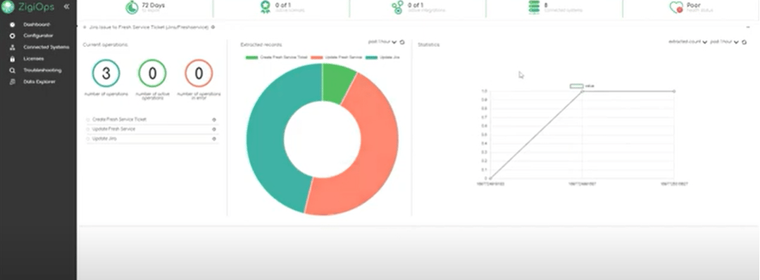
Additionally, it provides data on the number of extracted records over a predefined timeframe, important statistics, and the health status of both systems and the integration platform.
Step 3: ZigiOps Connected Systems Menu
ZigiOps’ Connected Systems Menu allows us to see the systems we’d like to integrate. In our case they’ll be Freshservice and Atlassian Jira. Upon clicking on “Add a new system” the ZigiOps no-code platform will show a list of all the systems available for integration.
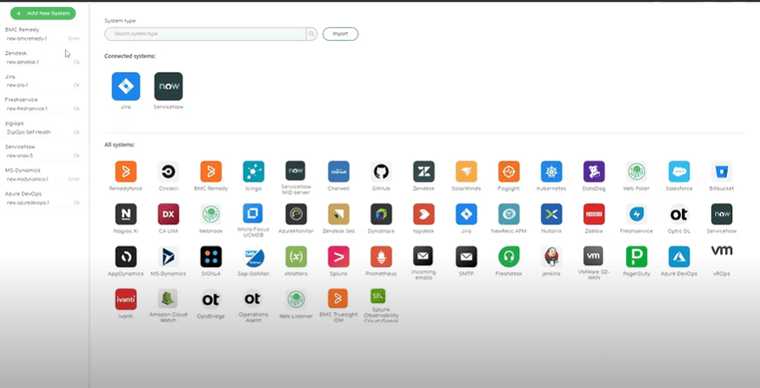
Step 4: Connecting to Jira
Connecting to Atlassian Jira is a quick and straightforward process, requiring just a few clicks and the following details:
- Instance URL
- User
- Password
Additionally, if necessary, we can log in through a proxy.
Step 5: Connecting to Freshservice
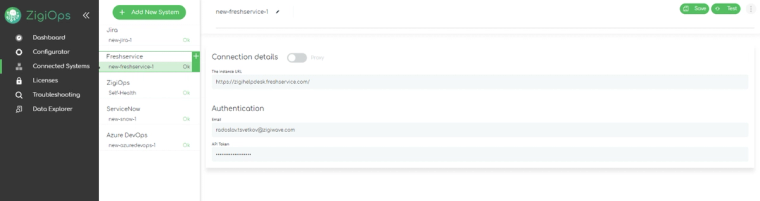
Establishing a successful connecting with Freshservice is a simple task for ZigiOps. The integration platform requires only:
- Valid API token
- Valid email
Once we've established connections with the desired systems for integration, we can proceed by clicking on the "SAVE" and "TEST" options presented by ZigiOps in the upper right corner. This action enables the integration platform to save and test the connections.
Additionally, it initiates the collection of metadata, which will be utilized later for configuring the Freshservice to Jira software integration.
Step 6: ZigiOps Integrations Template gallery
Subsequently, we can proceed with the Freshservice to Atlassian Jira integration by selecting the "Add a new system" option. This feature enables us to select from a variety of pre-defined templates provided by ZigiOps. In instances where specific actions are required, ZigiOps also offers the option to import custom templates tailored to meet the criteria of the integration use case.
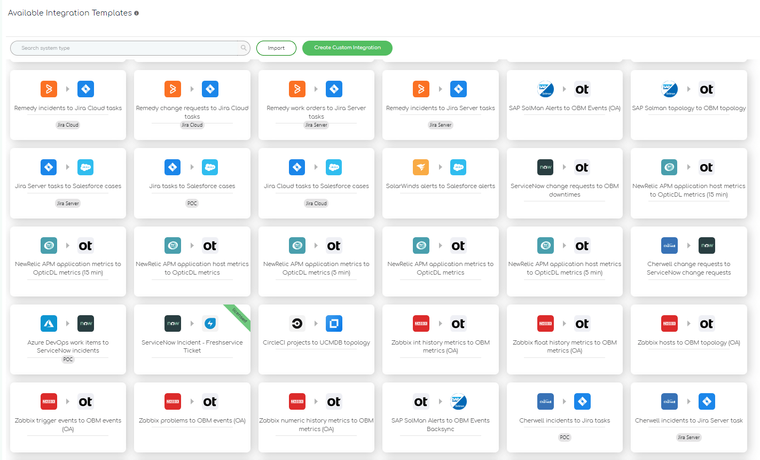
Step 7: Freshservice to Jira Software integration template
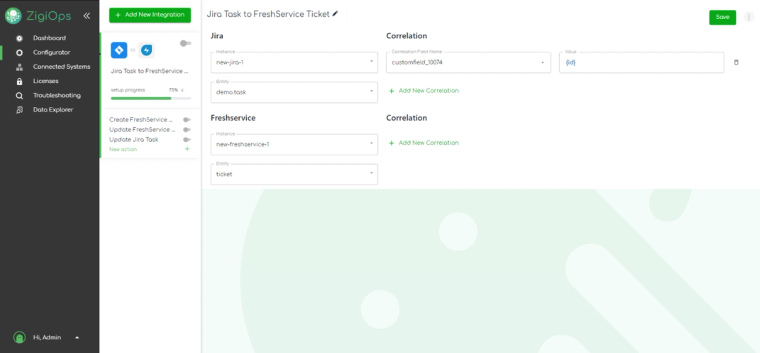
The primary integration section of ZigiOps presents the precise systems we intend to integrate, the types of data slated for transfer and synchronization, as well as the correlation logic that ZigiOps will employ to execute the integration seamlessly.
Step 8: ZigiOps Freshservice to Jira software integration – Action levels
ZigiOps offers users a multitude of actions they can perform, depending on the integration use case and the needs. For the Feshservice to Jira integration, there are 3 Action Levels:
-Create Freshservice ticket
-Update Freshservice ticket
- Update Jira bug
Freshservice to Jira integration – Create Freshservice ticket
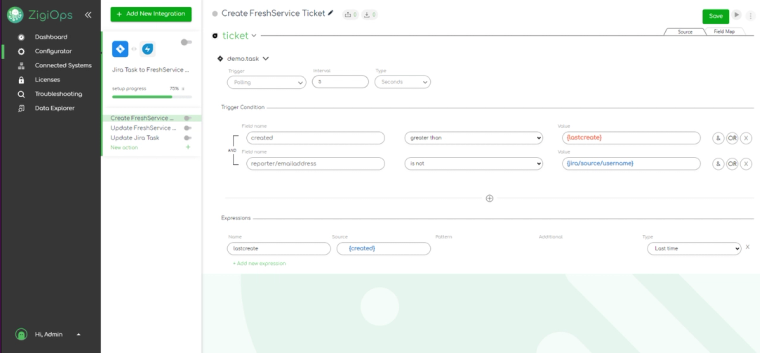
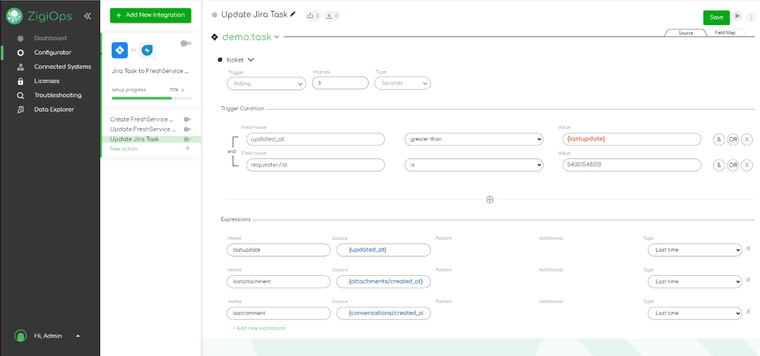
ZigiOps provides flexibility in customizing integrations to align with current requirements. Users can effortlessly select triggers, trigger conditions, and expressions according to their needs.
In achieving a successful integration between Freshservice and Atlassian Jira through ZigiOps, effective trigger conditions play a crucial role. By utilizing polling as a trigger action, ZigiOps actively monitors newly created tickets in Freshservice, offering customization options for scanning intervals—whether in minutes, seconds, or days. Moreover, a key aspect of trigger conditions entails specifying a field name and value, ensuring ZigiOps initiates scans only when the specified criteria are fulfilled.
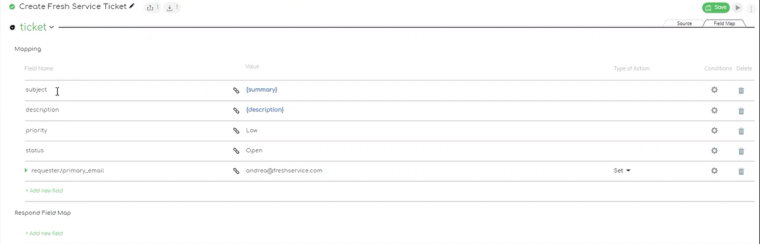
ZigiOps offers advanced field mapping functionality, providing users with heightened control over the precise information details that the connector can retrieve and transfer.
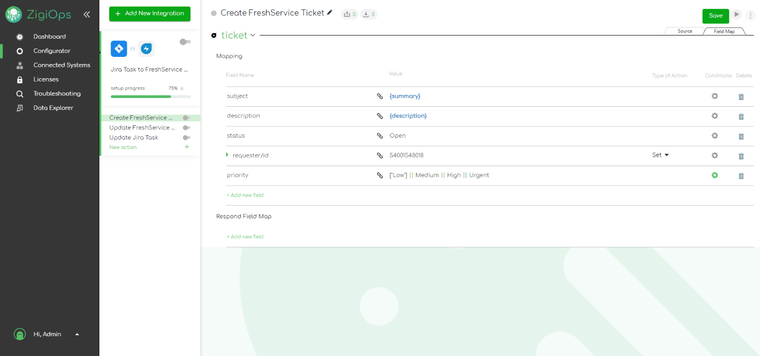
This feature ensures a more customized integration experience, tailored to meet specific needs and requirements.
Update Freshservice tickets
An extensive integration platform like ZigiOps enables users to effortlessly select the specific data they wish to transfer from one system to another throughout the integration process.
ZigiOps allows users to, also, easily update the Freshservice tickets with new information. This ensures that all IT teams are synched on any changes.
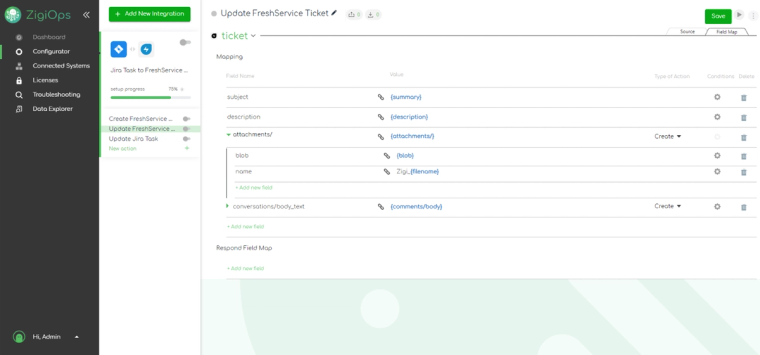
The advanced Field Mapping options provides the opportunity for users to tailor ZigiOps in a way that will allow them to get as much detail as possible.
Update Jira bug
The Jira bug update plays crucial role for the Freshservice to Jira software integration. Its enrichment with information helps the teams operating with the two systems to have a clearer perspective on the accumulated data. As a result, decision making becomes better and easier.
Conclusion
In conclusion, the two-way integration between Freshservice and Jira addresses the needs of companies leveraging these platforms for distinct yet complementary purposes. While Freshservice excels in IT service management, Jira offers robust project management capabilities. The integration between these systems becomes imperative to streamline workflows, enhance collaboration, and ensure seamless data exchange between IT and development teams.
ZigiOps emerges as the optimal solution for this integration, offering advanced functionality, intuitive customization options, and robust support, thereby facilitating efficient collaboration and maximizing the benefits of both platforms for businesses. Book a demo today and excel your integration workflows!
Frequently asked questions
Why do organizations integrate Freshservice and Jira?
Freshservice handles IT service management while Jira handles project and issue tracking; integrating them eliminates silos between IT and development teams, reduces duplicate data entry, and speeds up incident resolution.
What are the main challenges of implementing a Freshservice Jira integration?
Common challenges include bridging silos between IT and development teams, duplicated data entry, limited visibility into service requests and development tasks, and inefficient change management processes.
What action levels does ZigiOps support for the Freshservice Jira integration?
ZigiOps supports three action levels for this integration: creating a Freshservice ticket, updating a Freshservice ticket, and updating a Jira bug, all configurable through trigger conditions and field mapping.