BMC Remedyforce End of Life: What Happens to Your Integrations When You Migrate to Helix?
Remedyforce end-of-life migration guide to BMC Helix via ZigiOps
The clock is ticking for organizations still running BMC Remedyforce. As BMC accelerates its investment in the Helix platform, Remedyforce end of life is no longer a distant concern — it is an immediate operational and strategic priority for IT managers, system administrators, and CTOs who depend on this platform for their service management workflows.
Migrating to a new ITSM platform is never trivial. But the dimension that catches most organizations off guard is not the platform switch itself — it is what happens to every integration, connector, and automated workflow that has been built on top of Remedyforce over the years. This article breaks down exactly what you need to know about Remedyforce end of life, what a Remedyforce replacement strategy looks like in practice, and how to protect your integrations during a Remedyforce migration to BMC Helix.
What Is BMC Remedyforce and Why Is End of Life a Critical Issue?
BMC Remedyforce was a cloud-based IT service management (ITSM) solution built on the Salesforce platform. Designed for mid-market enterprises, it offered incident management, change management, problem management, and service request capabilities in a familiar SaaS environment. For many organizations, Remedyforce became the operational backbone of their IT service desk.
However, BMC has been strategically shifting its portfolio toward BMC Helix — its next-generation, AI-powered ITSM and ITOM platform. This shift has significant implications. As BMC redirects development resources, feature investment, and technical support toward Helix, organizations still on Remedyforce face a shrinking support window, increasing security risk, and a growing functional gap compared to modern ITSM platforms.
Remedyforce end of life means more than losing vendor support. It means your platform will no longer receive security patches, regulatory compliance updates, or new integrations. For organizations in regulated industries — healthcare, finance, government — this is not just an inconvenience. It is a compliance liability.
"Organizations that delay migration from end-of-life platforms face compounding technical debt, security vulnerabilities, and integration fragility that become exponentially more expensive to resolve the longer they wait."
—
Understanding the full scope of Remedyforce end of life — including its impact on your connected systems — is the first step toward a successful transition.
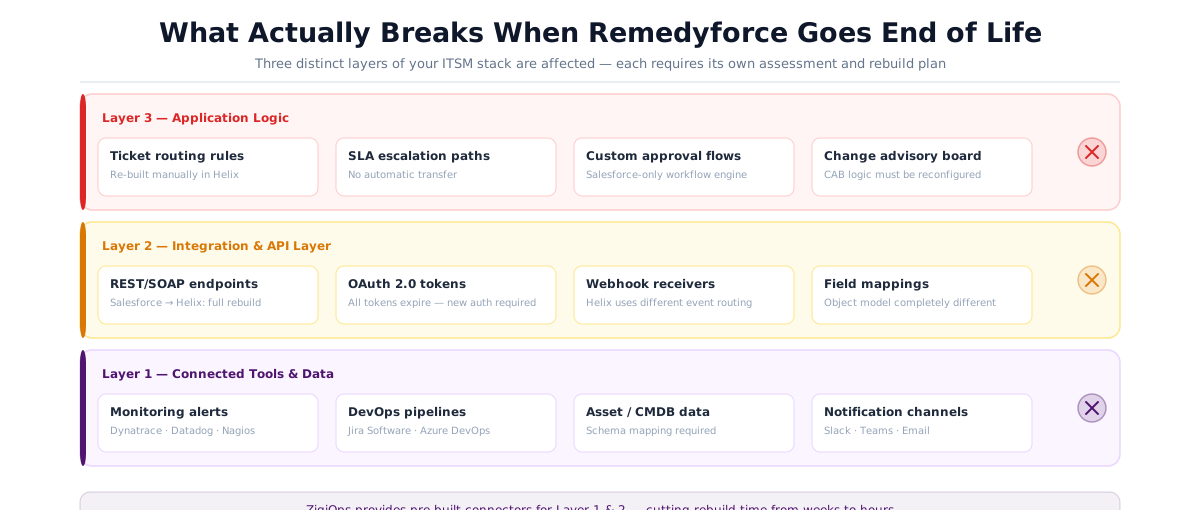
The Hidden Cost of Remedyforce End of Life: Your Integration Ecosystem
Most migration conversations focus on the ITSM platform itself: tickets, workflows, SLAs, and user data. What is systematically underestimated is the integration layer. Over years of operation, a typical Remedyforce deployment accumulates dozens of integrations — some formally built, others cobbled together through custom scripts, middleware, or point-to-point API connections.
These integrations connect Remedyforce to monitoring tools, DevOps pipelines, asset management systems, identity providers, communication platforms, and development tracking tools like Jira. When Remedyforce end of life arrives and you migrate to Helix, none of these integrations automatically transfer. Every single one needs to be assessed, rebuilt, or replaced.
What Types of Integrations Are Typically at Risk?
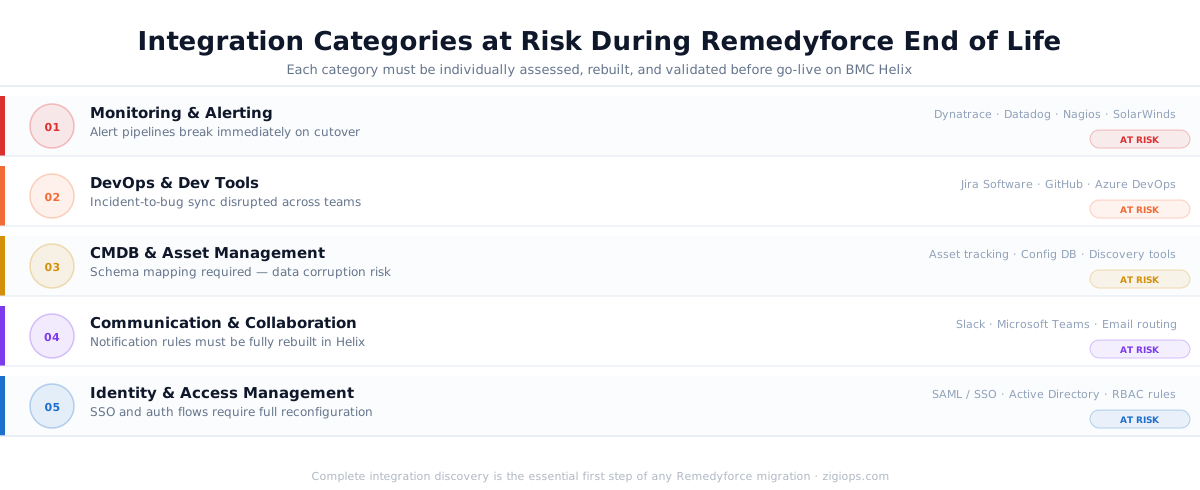
The following integration categories are most commonly disrupted during a Remedyforce replacement project:
Monitoring and Alerting Integrations
Tools like Dynatrace, Datadog, Nagios, and SolarWinds that push alerts into Remedyforce as incidents will need to be reconfigured entirely to connect with Helix ITSM. API endpoints, authentication schemes, and data field mappings all change.
DevOps and Development Integrations
Connections between Remedyforce and platforms like Jira Software, GitHub, or Azure DevOps are among the most business-critical. Teams that rely on synchronized incident-to-bug workflows will experience broken processes the moment Remedyforce goes offline.
CMDB and Asset Management Integrations
If your configuration management database feeds data into Remedyforce or vice versa, the migration requires careful schema mapping to ensure no asset data is lost or corrupted in the move to Helix.
Communication and Collaboration Integrations
Slack, Microsoft Teams, and email routing rules tied to Remedyforce ticket events need to be re-established against Helix's event model and API structure.
Identity and Access Management Integrations
Single Sign-On (SSO) configurations, Active Directory sync rules, and role-based access provisioning workflows must be reconfigured for the Helix environment.
"Integration complexity is consistently cited as the top barrier to successful ITSM platform migrations, with 67% of IT leaders reporting that rebuilding integrations consumed more time and budget than the core platform migration itself."
—
Remedyforce Replacement: Understanding What BMC Helix Offers
Before diving deeper into the integration challenge, it is worth understanding why BMC Helix is the designated Remedyforce replacement — and what that means for your IT operations team.
BMC Helix is a cloud-native, AI-powered ITSM and IT Operations Management (ITOM) platform. Unlike Remedyforce, which was built on the Salesforce platform, Helix runs on BMC's own cloud infrastructure with multi-cloud deployment options. It offers significantly more advanced capabilities across:
AI-Driven Service Management: Helix incorporates machine learning for predictive incident management, automated classification, and intelligent routing — capabilities that go far beyond what Remedyforce offered.
Unified ITSM and ITOM: Helix combines service management with IT operations management in a single platform, providing a holistic view of your infrastructure and service desk that Remedyforce could not match.
Modern API Architecture: Helix is built with REST APIs as a first-class citizen, making integrations more standardized — but this also means your existing Remedyforce integrations, many of which may have relied on Salesforce-specific APIs, will not work without modification.
ITIL 4 Alignment: Helix is designed with ITIL 4 practices baked into the platform, including value stream management, service value chains, and continual improvement workflows.
The functional upgrade from Remedyforce to Helix is substantial. But the technical lift required to move your integration ecosystem is equally substantial. This is where a structured Remedyforce migration strategy becomes non-negotiable.
Key Differences Between Remedyforce and Helix APIs
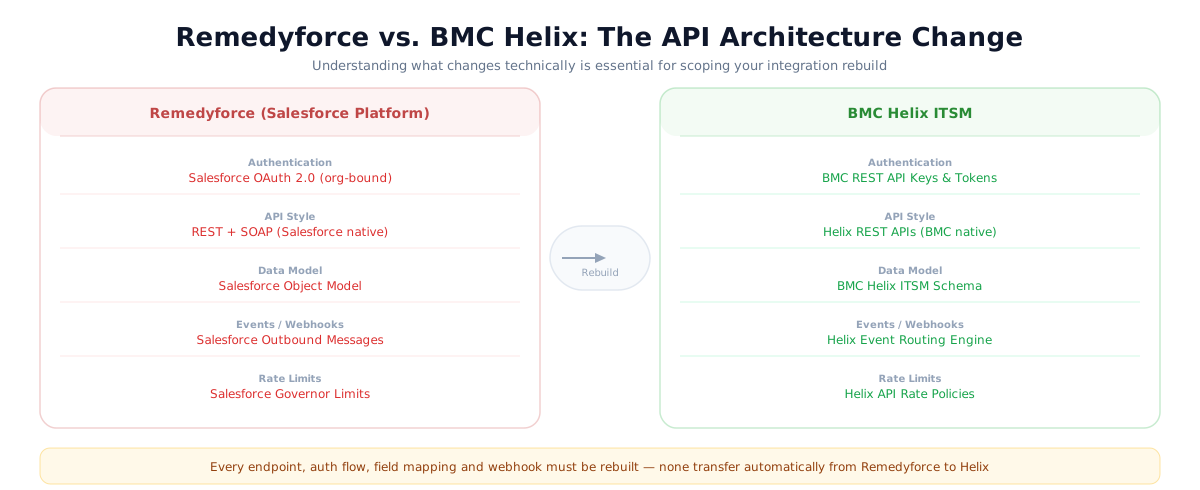
One of the most technically significant changes during a Remedyforce replacement is the API architecture shift. Remedyforce integrations were heavily dependent on Salesforce REST and SOAP APIs, Salesforce object models, and Salesforce authentication (OAuth 2.0 tied to Salesforce orgs).
Helix uses its own REST API infrastructure with BMC-specific authentication, data models, and endpoint structures. This means:
— Every API call your integrations make will need new endpoint URLs
— Authentication tokens and OAuth flows will need to be reconfigured
— Data field names and object schemas in Helix differ from Salesforce's object model
— Webhook configurations will need to be rebuilt against Helix's event system
— Rate limits, pagination behavior, and error handling may differ significantly
For organizations with legacy custom integrations built directly on the Salesforce API layer, this is a ground-up rebuild — not a simple reconfiguration.
Planning Your Remedyforce Migration: A Phased Integration Strategy
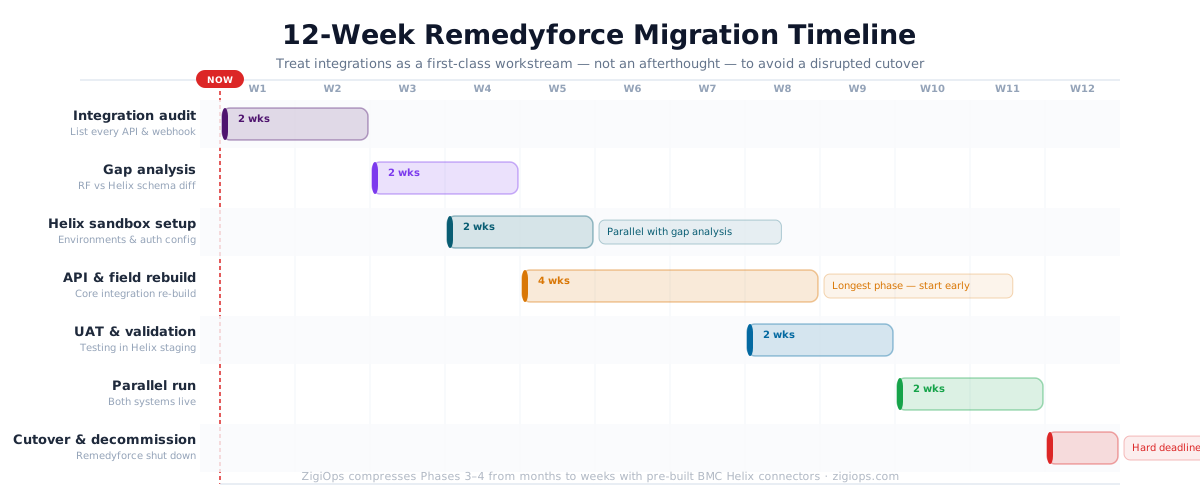
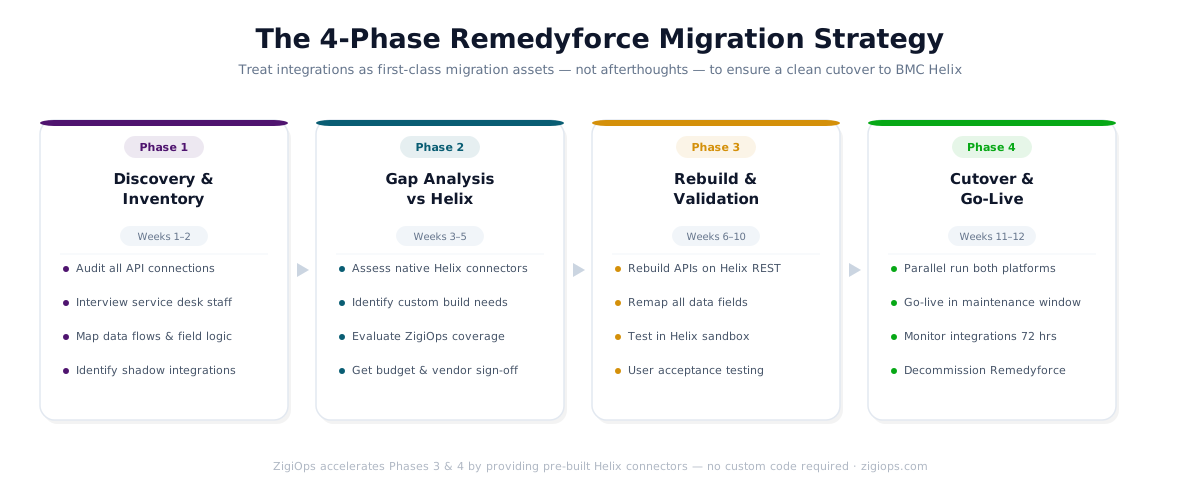
A successful Remedyforce migration to Helix requires treating integrations as first-class migration assets — not afterthoughts. The following phased approach reflects best practices for enterprise ITSM platform migrations.
Phase 1: Integration Discovery and Inventory
Before you can migrate anything, you need a complete map of your current integration landscape. This means documenting every system that sends data to or receives data from Remedyforce, including informal or undocumented connections.
Key activities in this phase include:
— Audit all API connections, middleware configurations, and webhook registrations in Remedyforce
— Interview service desk staff and system administrators to identify shadow integrations
— Review Salesforce AppExchange apps installed in your Remedyforce org that may have integration dependencies
— Document data flows, field mappings, and business logic embedded in each integration
— Prioritize integrations by business criticality and migration risk
This discovery phase is where most organizations uncover integrations they had forgotten about — automations built years ago by team members who have since moved on, or third-party connectors that were set up once and never revisited.
Phase 2: Integration Gap Analysis Against Helix
Once you have a complete inventory, you can assess what native integration capabilities Helix offers versus what needs to be custom-built or sourced from a third-party integration platform. BMC Helix offers a growing ecosystem of native connectors and supports integration through the BMC Helix Integration Service.
However, native connectors will not cover every integration your organization relies on. Custom business logic, non-standard data transformations, and connections to niche or legacy systems will almost always require an integration platform or custom development.
Phase 3: Integration Rebuild and Validation
This is the most resource-intensive phase of the Remedyforce migration. For each integration in your inventory, your team must:
— Rebuild API connections using Helix's REST API and authentication framework
— Remap data fields between source systems and Helix's data model
— Recreate business logic for routing, escalation, and data transformation
— Test bidirectional data flows in a Helix sandbox environment
— Validate SLA triggers, notification rules, and escalation paths work correctly
— Conduct user acceptance testing with service desk staff before go-live
Phase 4: Cutover and Parallel Running
For business-critical integrations, a parallel running period — where both Remedyforce and Helix run simultaneously with integrations active on both — reduces the risk of data loss or operational disruption during cutover. This is particularly important for incident management integrations where missing a single alert can have downstream consequences.
The Jira Integration Problem: A Case Study in Migration Complexity
One of the most common and business-critical integrations in a Remedyforce environment is the connection to Atlassian Jira. Development teams and IT operations teams depend on synchronized workflows between service management tickets and Jira issues to manage incidents, bug escalations, and change requests.
When Remedyforce end of life forces a migration to Helix, this Jira integration must be rebuilt — and if it is not done correctly, the gap between your service desk and your development pipeline creates serious operational blind spots.
According to Atlassian's official integration documentation, connecting Jira Service Management with external ITSM platforms requires careful API configuration, field mapping, and workflow alignment to ensure ticket states remain synchronized across systems.
"Effective integration between development tracking and IT service management platforms is foundational to DevOps maturity. Broken integrations during platform migrations are a leading cause of DevOps pipeline disruption in enterprise organizations."
—
This is precisely where a purpose-built integration platform becomes invaluable during a Remedyforce replacement. Rather than rebuilding your Jira-to-ITSM integration from scratch with custom code, ZigiOps provides a pre-built, no-code integration between BMC Helix and Jira Service Management that can be deployed and configured without writing a single line of code.
The ZigiOps Helix and Jira Service Management integration synchronizes incidents, changes, and service requests bidirectionally between BMC Helix and Jira Service Management — maintaining data consistency, workflow continuity, and audit trails across both platforms. This is one of the most significant integration pain points organizations face during Remedyforce migration, and having a pre-built solution dramatically reduces both time-to-value and migration risk.
Why No-Code Integration Platforms Change the Remedyforce Migration Calculus
Traditionally, rebuilding an integration ecosystem during an ITSM platform migration meant one of two options: expensive custom development or a painful period of manual workarounds while integrations were rebuilt one by one. Both options carry significant cost, risk, and operational disruption.
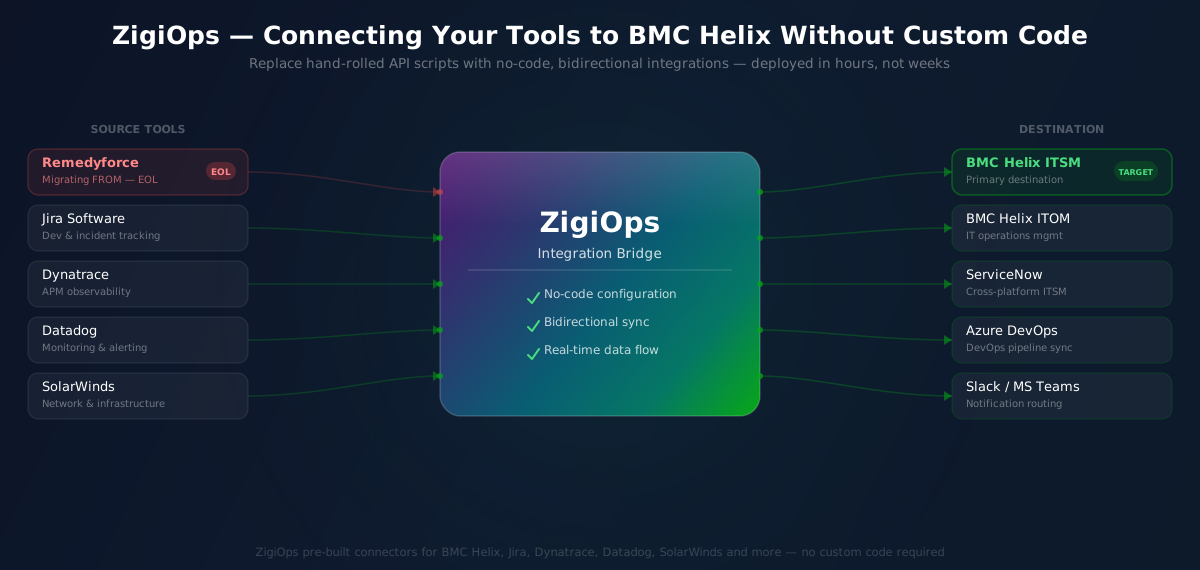
No-code integration platforms like ZigiOps fundamentally change this equation. Instead of writing and maintaining custom API code for every integration, IT teams can configure bidirectional data flows through a visual interface — without developer resources, without ongoing maintenance overhead, and without the fragility of hand-rolled API scripts.
What ZigiOps Brings to Your Remedyforce Replacement
ZigiOps is a no-code, enterprise-grade data integration platform built specifically for IT Operations. During a Remedyforce migration to Helix, ZigiOps provides several critical advantages:
Pre-Built Connectors for Helix and Major IT Tools:
ZigiOps includes pre-built connectors for BMC Helix, Jira, ServiceNow, Dynatrace, Datadog, SolarWinds, PagerDuty, Azure DevOps, and dozens of other IT operations tools. This means integrations that would take weeks to rebuild with custom code can be configured in hours.
No-Code Configuration:
Field mapping, data transformation, filtering logic, and workflow triggers are all configured through ZigiOps' visual interface. IT managers and system administrators can own their integrations without depending on development teams, reducing bottlenecks and accelerating the Remedyforce migration timeline.
Bidirectional, Real-Time Data Sync:
ZigiOps supports bidirectional, real-time synchronization between Helix and connected systems — ensuring that updates on either side of an integration are instantly reflected across the entire ecosystem. This is critical for incident management workflows where data latency can mean missed SLAs.
Full Audit Trails and Data Governance:
Every data exchange through ZigiOps is logged, providing complete visibility into integration activity. This is essential for compliance, post-migration validation, and ongoing operational governance.
On-Premise or Cloud Deployment:
ZigiOps can be deployed on-premise or in the cloud, giving organizations in regulated industries the flexibility to meet data residency and security requirements without compromising integration capability.
For organizations facing Remedyforce end of life, the ability to leverage pre-built Helix integrations from day one — rather than spending months rebuilding a custom integration layer — can be the difference between a smooth migration and a prolonged operational disruption. Explore the full range of available integrations at the ZigiOps integrations catalog.
Remedyforce End of Life: Common Migration Mistakes to Avoid
Organizations that have navigated ITSM platform migrations share a consistent set of lessons learned. Avoiding these common mistakes during your Remedyforce end of life transition can save months of remediation effort and significant unplanned cost.
Mistake 1: Treating Integration Migration as a Post-Go-Live Activity
The most costly mistake in any ITSM platform migration is assuming integrations can be rebuilt after go-live. When your service desk goes live on Helix without its integrations functional, every team that depends on automated incident creation, alert routing, or ticket synchronization loses productivity immediately. Integration rebuilding must run in parallel with platform configuration, not after it.
Mistake 2: Underestimating Shadow Integrations
Many organizations discover during Remedyforce end of life planning that their actual integration count is two or three times higher than their documented count. Shadow integrations — automations built by individual team members outside of formal IT governance — are pervasive. A rigorous discovery process is non-negotiable.
Mistake 3: Migrating Legacy Business Logic Without Review
A Remedyforce replacement is an opportunity to modernize, not just replicate. Migrating every piece of legacy business logic verbatim into Helix often means carrying forward years of workarounds, deprecated processes, and inefficient routing rules. Use the migration as a forcing function to rationalize and simplify your integration logic.
Mistake 4: Skipping Integration Testing in a Sandbox Environment
Testing integrations only in production — or not testing them at all before cutover — is a recipe for post-migration incidents. Every integration should be validated in a Helix sandbox environment that mirrors your production data model before go-live. This is particularly important for CMDB integrations where data corruption can have cascading downstream effects.
Mistake 5: Ignoring the Human Factor
Integrations are not just technical artifacts — they support human workflows. Service desk agents, IT managers, and DevOps engineers all have process dependencies on the integrations that connect their tools. Involve these stakeholders in integration validation testing to catch workflow gaps that purely technical testing will miss.
Remedyforce End of Life Timeline: When Do You Need to Act?
BMC has not published a single, universally communicated Remedyforce end of life date applicable to all customers in the same way some vendors announce platform shutdowns. Instead, BMC has been managing the transition through a combination of reduced investment in Remedyforce, active encouragement of migration to Helix, and customer-specific support conversations.
What is clear from BMC's product strategy is that Remedyforce end of life is not a hypothetical future event — it is an active transition already underway. Organizations should consult directly with their BMC account representatives to obtain their specific support timeline and plan accordingly.
As a general planning framework, organizations should:
— Begin integration discovery and inventory immediately if not already started
— Engage BMC to obtain explicit support and maintenance commitment timelines for their Remedyforce instance
— Evaluate Remedyforce replacement options — Helix being the primary path for existing BMC customers
— Build a Remedyforce migration plan with integration rebuilding as a parallel workstream
— Allow a minimum of 6-12 months for a full integration migration in complex environments
"The average enterprise ITSM platform migration takes 9 to 18 months when integration complexity is factored in. Organizations that begin planning at least 12 months before their target go-live date are three times more likely to deliver on time and within budget."
—
Making the Business Case for a Structured Remedyforce Migration
For CTOs and IT Directors building internal business cases for the Remedyforce migration, the conversation must go beyond platform licensing costs. The total cost of a poorly executed migration — including integration rebuilding, operational disruption, lost productivity, and potential compliance exposure — dwarfs the cost of a structured, tool-assisted migration approach.
Consider the following value drivers when building your business case:
Risk Reduction: Operating on an end-of-life platform exposes your organization to unpatched security vulnerabilities. The cost of a single security incident in most regulated industries exceeds the entire cost of a structured Remedyforce migration.
Operational Continuity: Integration downtime during a poorly managed migration directly impacts incident response times, SLA adherence, and developer productivity. Every hour of integration downtime has a quantifiable business cost.
Future-Proofing: Helix's AI capabilities, unified ITSM/ITOM architecture, and modern API ecosystem position your IT organization for the next decade of operational demands — including AIOps, predictive incident management, and automated remediation.
Integration Platform ROI: Investing in a no-code integration platform like ZigiOps during the migration creates a reusable asset. The same platform that accelerates your Remedyforce migration continues to deliver value as your Helix environment grows and your integration requirements evolve. The ZigiOps Helix and Jira Service Management integration is a direct example of this — a pre-built connector that delivers immediate value and continues to scale with your operation.
Conclusion: Remedyforce End of Life Is an Integration Problem First
Remedyforce end of life is ultimately not just an ITSM platform problem — it is an integration ecosystem problem. The organizations that navigate this transition successfully are the ones that treat their integrations with the same strategic weight as the platform migration itself: inventorying them rigorously, planning their migration in parallel, and leveraging purpose-built tools to accelerate the rebuild.
BMC Helix represents a significant functional upgrade over Remedyforce, and the migration is worth the effort. But arriving on Helix without a functional integration layer is like moving into a new facility without connecting the utilities — the building may be better, but nothing works until the infrastructure is in place.
For organizations looking to accelerate the integration layer of their Remedyforce replacement, ZigiOps provides the fastest, most reliable path from your Remedyforce integration ecosystem to a fully connected Helix environment — without writing code, without months of custom development, and without compromising on data quality or operational continuity.
If your organization is beginning to plan its Remedyforce migration, the integration question should be at the top of your agenda — not at the bottom. The sooner you map your integration landscape and evaluate your options, the smoother your transition to Helix will be.