How to Scale ServiceNow Integrations Across Multiple Instances
A technical guide to field mapping and no-code automation with ZigiOps.
Running one ServiceNow instance is manageable. Running two is doable. Running five or more, across different business units, geographies, or acquired companies, is where things start to get interesting. And not always in the good way. Enterprise IT teams regularly face the challenge of keeping multiple ServiceNow instances synchronized, while at the same time managing integrations to Jira, Azure DevOps, monitoring tools, CRMs, and everything else that modern operations depend on. Every new instance adds another layer of field mapping decisions, maintenance overhead, and potential failure points.
According to Gartner's research on IT Service Management, organizations with fragmented ITSM environments spend up to 30% more time on manual coordination tasks than those with consolidated, automated integration strategies. That time is not a line item anyone wants in their budget.
Why Scaling ServiceNow Integrations Gets Complicated?
A single ServiceNow-to-Jira integration is straightforward to configure. The complexity grows exponentially as soon as multiple instances enter the picture. Here is what typically causes the chaos:
ServiceNow's own documentation acknowledges this, noting that multi-instance strategies require careful planning of data governance and integration touchpoints to remain stable at scale.
How to Set Up ServiceNow Multi-Instance Integrations with ZigiOps
ZigiOps is a standalone, 100% code-free integration platform that connects ServiceNow to other enterprise systems through a guided UI. It operates independently of ServiceNow (no plugin installation required), stores none of the data it transfers, and supports unlimited transactions. Here is how to approach the multi-instance setup systematically.
Step 1: Register Each ServiceNow Instance as a Connected System
Each ServiceNow environment is added separately in ZigiOps as a distinct connected system. Navigate to Connected Systems, select ServiceNow, and configure the following for each instance:
Once saved, ZigiOps tests the connection and pulls available entities and fields automatically, no manual API exploration required.
Step 2: Load or Build Integration Workflows
ZigiOps includes pre-built workflow templates for the most common ServiceNow integration scenarios, including:
For multi-instance deployments, you load the relevant template, select the specific source and target instance from the drop-down menus, and configure from there. Each workflow can be cloned and adapted for additional instance pairs, keeping configuration time minimal.
Step 3: Configure Field Mapping
Field mapping is where precision matters most, especially across instances with different customizations.
In ZigiOps, the field mapping interface uses dynamic variables expressed in curly bracket notation (for example, {short_description} or {priority}). You select the target field from a dropdown list of all available fields in the destination system, and bind it to a source field value. Combinations of multiple fields and static text are also supported.
For multi-instance environments, pay particular attention to the following mapping scenarios:
Priority Mapping Across Instances
ServiceNow calculates priority using the Impact x Urgency matrix. Different instances may use different priority scales or custom values. ZigiOps handles this through conditional mapping: you define what value to send based on what value is received.
Example: If {priority} equals 1 (Critical) in the source instance, send 'Highest' to the Jira target. If {priority} equals 3, send 'Medium'. This ensures business context is preserved rather than sending numeric codes that are meaningless in the destination.
State and Lifecycle Mapping
ServiceNow uses ITIL-defined state machines. Jira uses configurable transitions. Resolving an incident in ServiceNow cannot simply push a 'Resolved' value to a Jira status field; Jira requires the correct transition to be triggered, along with any mandatory fields that transition requires.
ZigiOps handles this by supporting condition-based field delivery. You can configure the integration to send close_code and closed_note fields only when the ServiceNow state equals 6 (Resolved), ensuring Jira transitions complete cleanly without errors or rejected updates.
The reverse path matters equally. When a Jira issue moves to 'Done,' ZigiOps can be configured to map that to ServiceNow state 6, and include the required resolution code automatically, preventing SLA calculation errors or stuck incidents.
Comment and Work Note Filtering
ServiceNow distinguishes between Work Notes (internal) and Additional Comments (customer-visible). Jira does not make this distinction. In regulated environments, syncing internal Work Notes into Jira creates a compliance risk.
ZigiOps addresses this through the Related Records section of the mapping configuration. You specify which comment types to sync (Additional Comments only, for example), and add conditions to exclude updates made by the integration user itself, preventing duplicate comment loops.
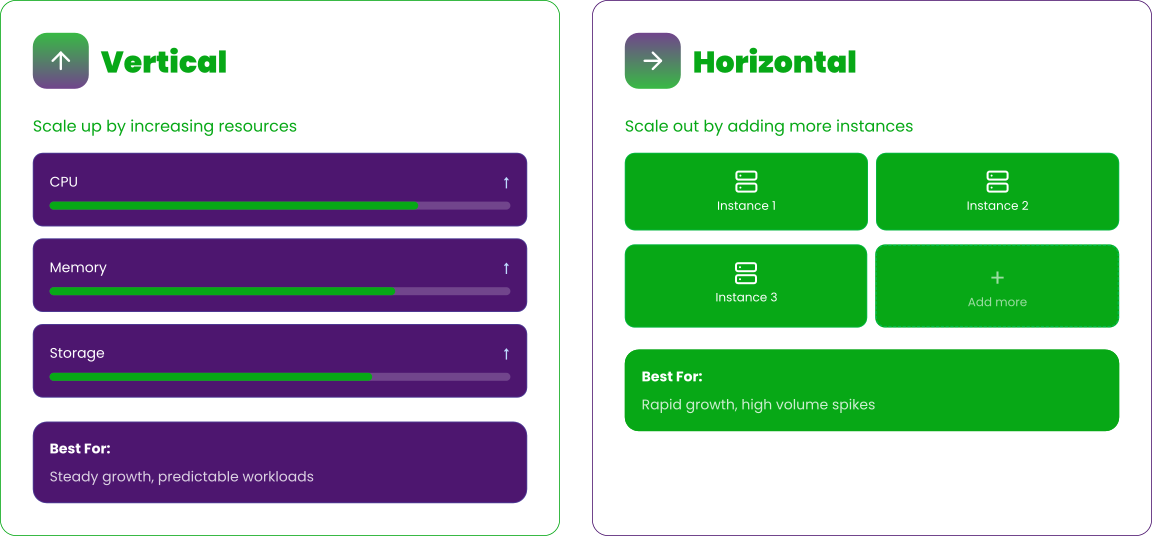
Scaling the Infrastructure: Vertical and Horizontal Options
ZigiOps supports two scaling approaches depending on your data volume and growth trajectory.
Vertical Scaling
Vertical scaling increases the capacity of an existing ZigiOps deployment by adding CPU, memory, or storage to the host server. This is appropriate when integration data volumes are growing but remain within the enterprise deployment range.
Horizontal Scaling
When data volumes exceed 100,000 records per day, ZigiOps supports horizontal scaling by adding additional ZigiOps instances and distributing the workload across them. Each instance handles a defined set of integrations, and the configuration is kept synchronized between instances.
This architecture is well-suited for enterprises with multiple ServiceNow instances in different regions or business units, each generating high transaction volumes independently.
This aligns with what Forrester describes as a 'distributed integration fabric' approach, where integration logic is distributed rather than centralized in a single point of failure.
High Availability: Keeping Integrations Running Through Failures
For production environments, especially those managing critical ITSM workflows, high availability is not optional. ZigiOps provides a primary-backup HA model that ensures integrations continue with minimal downtime in the event of a server failure or planned maintenance.
How ZigiOps High Availability Works
ZigiOps is designed to minimize the state footprint of a running integration. Runtime state is maintained in a small set of files (typically a few kilobytes), rather than large database records. This makes it practical to synchronize state between primary and backup servers and resume exactly where the primary left off.
The HA setup consists of:
High Availability Configuration Steps
Key requirements for HA to function correctly: both servers must use identical hardware and OS configurations, run the same ZigiOps version, and maintain synchronized integration configurations. Active licenses are required on each server independently.
Ongoing Maintenance: Keeping Multi-Instance Integrations Healthy
The integration that works perfectly on day one can drift quietly over months as ServiceNow instances are upgraded and customized. A proactive maintenance approach prevents small mismatches from becoming outages.
Refresh Connected System Schemas
When new fields, projects, or entities are added to a ServiceNow instance after an integration is configured, ZigiOps may not automatically detect them in suggestions. To refresh: navigate to Connected Systems, open the relevant system, and click Save. This restarts the connection process and re-downloads updated field schemas.
Use the Troubleshooting UI Proactively
ZigiOps surfaces configuration errors directly in the UI, pointing to likely root causes. Common issues include:
Running periodic integration tests, especially after ServiceNow upgrades, catches these early. The ZigiOps UI highlights exactly which operation and which field is causing the issue, so resolution is fast.
Export and Version Control Integrations
ZigiOps supports exporting any integration as a file, which serves as a portable backup. For multi-instance deployments, this export-import capability is also useful for deploying a tested integration configuration from a staging environment to production, or replicating a configuration pattern across multiple instance pairs.
Steps to export: navigate to the Configurator page, select the integration, and click Options > Export. The integration downloads as a file. To import: click Import, select the file, choose the target connected systems from the drop-down menus, and save.
Clone Integrations for New Instance Pairs
When adding a new ServiceNow instance to the environment, use the Clone function to duplicate an existing integration. The clone copies all operations, triggers, trigger conditions, expressions, and field mapping. You then update the connected system references to point to the new instance. This approach is significantly faster than building from scratch and ensures consistency across the integration estate.
Security and Compliance Across Instances
Multi-instance ServiceNow environments typically span multiple teams, sometimes multiple countries, and therefore carry elevated compliance requirements. ZigiOps is built with enterprise security as a baseline, not an add-on.Microsoft's enterprise security guidance for integration platforms notes that data-in-transit protection and access control are the two most commonly overlooked risk areas in multi-system integration environments. ZigiOps addresses both by design.
FAQ: Scaling ServiceNow Integrations
Can ZigiOps connect multiple ServiceNow instances simultaneously?
Yes. Each ServiceNow instance is registered as a separate connected system in ZigiOps. You can run multiple integrations in parallel, each connecting different instance pairs or connecting the same ServiceNow instance to different third-party tools.
Does ZigiOps require a ServiceNow plugin or MID Server?
ZigiOps operates as a standalone application and does not require installation of any plugin within ServiceNow. It connects via ServiceNow APIs directly. For environments where direct API access is not available, ZigiOps also supports MID Server-based deployment as an alternative connectivity method.
How does ZigiOps handle integration failures in a high-availability setup?
ZigiOps runtime state files are small and designed to be easily replicated. When a failover occurs, the backup server reads the synchronized runtime files and resumes integration from the last processed point, preventing data gaps. The passive server must always remain stopped while the primary is active.
What happens when a ServiceNow field is updated or removed?
ZigiOps will surface a configuration error in the UI if a referenced field no longer exists. To pick up new or renamed fields, refresh the connected system by opening it in Connected Systems and clicking Save. The platform re-downloads the current schema from the instance.
Real-World Scenario: Global Enterprise with Four ServiceNow Instances
Consider an enterprise operating in the US, UK, Germany, and APAC, each with its own ServiceNow instance, all of which need to exchange incident data with a shared Jira instance used by the global development team.
Without a centralized integration layer, this would require four separate point-to-point integration projects, each with its own maintenance, authentication management, and monitoring. Field mapping variations across the four instances would need to be handled individually.
With ZigiOps, each instance is registered as a connected system. A single workflow template is configured and tested for the US instance, then cloned three times for the UK, Germany, and APAC instances. Minor adjustments (priority value differences, custom field variations) are handled through the conditional mapping layer for each clone. High availability is configured once for the ZigiOps infrastructure and applies across all running integrations.
The result: a standardized, maintainable integration architecture that scales with the organization rather than fighting it.