MSPs Multi-Tenant Cloud Integration: Seamless, SLA-Safe Connectivity
Isolated, compliant integrations per client — zero shared data or SLA risk.
Running integrations for one enterprise client is a project. Running them for 20 clients across AWS, Azure, and GCP is a full-time crisis management exercise.
Every client has their own monitoring stack, their own ITSM instance, and their own escalation rules. Client A runs Dynatrace and routes critical alerts into ServiceNow. Client B uses Splunk Enterprise and expects every alert above a certain severity to land in Jira. Client C has both, plus a custom priority matrix that no sane human would describe as "standard."
The challenge is not just technical configuration. It is architecture. When MSPs attempt to serve all of this through a shared integration layer, two things tend to go wrong:
This article breaks down how MSPs can architect multi-tenant cloud integrations that are truly isolated, scalable, and maintainable, without requiring a developer for every new client onboarding.
Why Shared Integration Tools Break Under Multi-Tenant Pressure
Most integration platforms were designed with a single-organization use case in mind. Drop them into a multi-tenant MSP environment, and the cracks appear quickly
The Shared Configuration Problem
When multiple clients share an integration configuration, field mappings, filters, and routing logic are often co-mingled. Updating the Dynatrace-to-ServiceNow alert severity threshold for Client A might change the same setting globally. MSPs then compensate with workarounds such as prefixing client names in field values, adding conditional logic based on environment tags, or creating separate integration instances manually for each client, which quickly becomes unmanageable.
The Data Isolation Risk
In cloud environments, data in transit between monitoring and ITSM systems often passes through a shared integration layer. If that layer stores data, even temporarily, a misconfiguration can expose one client's alert data to another. For MSPs handling clients in regulated industries (finance, healthcare, government), this is not a theoretical risk. It is a contract-ending event.
The Scalability Ceiling
Adding a new client in a traditional shared integration setup means manually recreating routing logic, redoing field mappings, and testing edge cases. There is no templatization. Every onboarding is a bespoke project. At 10 clients, this is annoying. At 50, it is unsustainable.
Real-world impact: MSP teams running shared integration setups typically spend 30 to 60 percent of their integration maintenance time on cross-tenant troubleshooting rather than new client delivery.
How ZigiOps Solves Multi-Tenant Cloud Integration
ZigiOps is a standalone integration platform, not a plugin embedded inside another tool. This architectural distinction matters enormously in multi-tenant scenarios. Each client environment gets its own isolated Connected Systems configuration, integration templates, field mappings, and conditional logic, all running independently within the same ZigiOps instance.
The result: Client A's Dynatrace problems and ServiceNow incidents never touch Client B's Splunk alerts or Jira projects. Not in processing, not in storage (ZigiOps does not store any transferred data), and not in configuration.
ZigiOps Multi-Tenant Architecture at a Glance
Integration Walkthrough: Client A - Dynatrace to ServiceNow
Client A is an enterprise financial services firm. Their infrastructure is monitored by Dynatrace (SaaS), and all incidents are managed in ServiceNow. As their MSP, you need to ensure that every Dynatrace problem above a defined impact level automatically creates or updates a ServiceNow incident, with no manual triage.
Step 1: Connect Dynatrace as a Source System
In ZigiOps, navigate to Connected Systems > Add New System > Dynatrace and configure:
The Dynatrace webhook payload includes fields such as problem_title, severitylevel, impactlevel, status, and id. ZigiOps receives this payload via its listener and maps it to ServiceNow incident fields.
Step 2: Connect ServiceNow as a Target System
Navigate to Connected Systems > Add New System > ServiceNow and configure the instance URL, integration username, and password. ZigiOps authenticates against the ServiceNow REST API and gains access to incident CRUD operations.
Step 3: Configure the Integration and Field Mapping
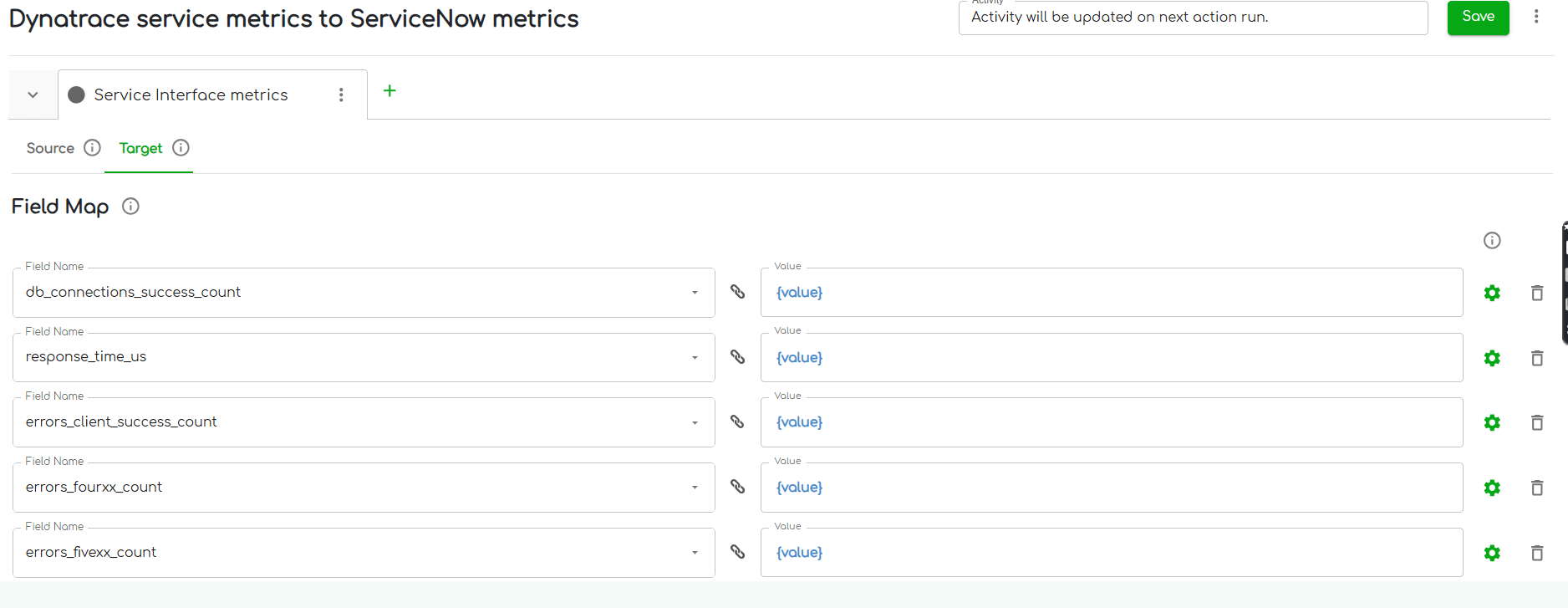
Use the Dynatrace listener problems to ServiceNow incidents template as your starting point. Define the following field mappings:
Conditional mappings are essential here. Dynatrace severity levels (CRITICAL, ERROR, PERFORMANCE, AVAILABILITY) do not map numerically to ServiceNow urgency values. ZigiOps' conditional mapping engine translates these at the field level, so ServiceNow always receives a valid, contextually correct value.
For bidirectional sync, configure a Respond Field Map that writes the ServiceNow incident number back to Dynatrace as a comment. This gives Client A's operations team a direct reference link between the monitoring event and the ITSM ticket, without switching tabs.
Step 4: Apply Client-Specific Filters
Not every Dynatrace problem should create a ServiceNow incident. Configure a filter on the listener trigger to route only problems where impactlevel equals APPLICATION or SERVICES and severitylevel equals CRITICAL or ERROR. Lower-severity infrastructure noise stays in Dynatrace and does not generate ticket volume in ServiceNow.
ZigiOps tip: Filters in ZigiOps are scoped to the individual integration, not to the connected system. You can have two separate Dynatrace integrations pointing to different ServiceNow instances for different clients, each with completely different filter logic.
Integration Walkthrough: Client B - Splunk Enterprise to Jira
Client B is a global logistics company. Their SecOps team uses Splunk Enterprise for log analysis and alerting. Development teams track operational issues in Jira. The MSP's task is to route high-severity Splunk alerts to Jira as issues, with the right priority, project assignment, and without duplicating tickets for recurring alerts.
Step 1: Connect Splunk Enterprise as a Source System
Navigate to Connected Systems > Add New System > Splunk and configure:
ZigiOps connects to Splunk's REST API and can poll for new alerts or receive them via the HTTP Event Collector (HEC) depending on the integration pattern selected.
Step 2: Connect Jira as a Target System
Navigate to Connected Systems > Add New System > Jira and provide the instance URL, integration username, and API key. ZigiOps uses the Jira REST API to create and update issues across any project and issue type that the integration user has access to.
Step 3: Configure the Integration and Field Mapping
The description field deserves special attention. Splunk alert payloads often include raw search results in JSON format. Using ZigiOps expressions, you can format this output before it lands in Jira, extracting specific fields and constructing a human-readable incident summary rather than pasting a JSON blob into the ticket description.
Step 4: Prevent Duplicate Ticket Creation
Recurring Splunk alerts for the same underlying issue can flood Jira with duplicate tickets. ZigiOps addresses this with the Lookup-Create action type, which first checks whether a Jira issue with matching criteria already exists before creating a new one.
Configure the lookup to match on alert name and status is not Done. If a match is found, ZigiOps updates the existing issue instead of creating a duplicate.
Additionally, the Last Time expression in ZigiOps ensures that polling-based integrations only retrieve alerts generated since the last successful sync, preventing the same alert from being processed multiple times across polling intervals.
ZigiOps tip: For Client B's high-volume Splunk environment, ZigiOps imposes no transaction limits. Whether the integration processes 500 or 50,000 alerts per day, the platform scales without additional licensing or throttling.
.png)
Client A vs. Client B: Fully Isolated, Zero Interference
Both integrations run inside the same ZigiOps instance, but they share nothing:
Expert Tips for MSPs Managing Multi-Tenant Integrations
Alt text: MSP engineer reviewing multiple integration dashboards in ZigiOps with different client configurations visible
Caption: ZigiOps gives MSP engineers a single platform view across all client integrations, with independent control over every configuration layer.
1. Start with Templates, Then Customize
ZigiOps ships with pre-built integration templates for common system pairs. When onboarding a new client, load the relevant template and modify field mappings, filters, and conditions to match the client's specific requirements. You are not starting from scratch. You are configuring from a tested baseline, which cuts onboarding time from days to hours.
2. Use Expressions for Data Normalization
Different clients use the same tools differently. One client's Jira priority field may use numeric values (1, 2, 3); another may use text labels (Highest, High, Medium). ZigiOps expressions let you normalize these differences at the integration level without asking either client to change how they use their tools.
3. Leverage the Respond Field Map for Traceability
In regulated environments, audit trails matter. Configure Respond Field Maps to write target system references back to the source system after every action. This creates a bidirectional paper trail, ServiceNow incident numbers appear in Dynatrace problems, and Jira issue keys appear in Splunk alert comments, without any manual cross-referencing.
4. Set Proxy Configuration Per Client If Needed
Some enterprise clients route all outbound API traffic through a corporate proxy. ZigiOps supports per-connected-system proxy settings, meaning Client A's ServiceNow connection can use a proxy while Client B's Jira connection does not. This is configured at the system level, not globally, preserving isolation.
5. Monitor Integration Health Per Client
ZigiOps provides a real-time dashboard showing execution logs, errors, and transaction counts per integration. MSPs can identify when a client's integration is failing (for example, due to an API credential rotation) without that failure affecting visibility into other clients' integration health.
How Can MSPs Run Multi-Tenant Cloud Integrations Without Risking Data Bleed?
The core requirement is an integration platform that supports independent configuration at the tenant level, not just at the connection level. ZigiOps achieves this through three mechanisms: per-tenant Connected System entries with isolated credentials, integration-scoped field mappings and conditional logic, and a zero-data-storage architecture that ensures no client data persists inside the platform itself.
Platforms that function as plugins within existing tools (Jira apps, ServiceNow integrations) are fundamentally limited here because they inherit the security boundary of the host application. ZigiOps operates as a standalone platform, meaning its security perimeter is entirely independent of any single client's toolchain.
Related reading:
Conclusion
Multi-tenant cloud integration for MSPs is not solved by having more integrations. It is solved by having better integration architecture. Each client needs isolated configuration, isolated data handling, and a replicable onboarding process that does not require engineering effort every time.
ZigiOps provides exactly that: a 100% code-free, ISO 27001 certified, standalone integration platform where every client gets their own fully independent integration setup, with no data stored in transit and no transaction limits that would bottleneck high-volume cloud environments.
Whether you are routing Dynatrace problems into ServiceNow for a financial services client or streaming Splunk Enterprise alerts into Jira for a logistics firm, the architecture stays clean and the data stays where it belongs.
Ready to simplify multi-tenant integrations across your client base?
Book a technical demo with the ZigiOps team and see how isolated, scalable client integrations work in practice.