Why Integrations Break Inside Large MSP Environments?
Why sync turns into risk without a data contract
The API handshake worked. Records are flowing between yourFreshservice instance and the client's ServiceNow. The integration is live.Three weeks later, something quietly breaks. A client escalation note lands inthe wrong system. A priority field sends a blank value and an SLA timer startsin the wrong tier. A status update loops until someone notices the API ratelimit spiking. Nobody touched the config. The connection is fine.
The API is not the integration. It is the transport layer.What broke was never defined in the first place: the data contract. The writtenagreement between MSP and client that specifies what fields cross the boundary,in which direction, with what translation rules, and who owns the ground truthfor each one.
This article covers why data contracts are the single mostcommon root cause of MSP integration failures, what a properly defined contractlooks like at the technical level, and how to enforce it through field-levelconfiguration rather than hoping the defaults hold.
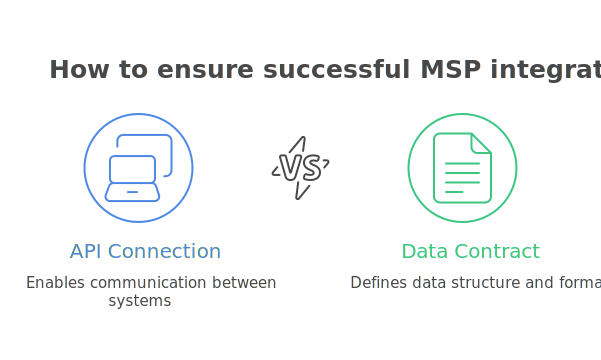
The API Is Not the Integration
Most MSP integrations are scoped wrong from the start. Twosystems are connected, the authentication test passes, and the project ismarked complete. But confirming that data can move between two systems is notthe same as defining what data should move, when, in which direction, and underwhat conditions.
An API connection answers one question: can these systemstalk? The data contract answers the questions that actually determine whetherthe integration is safe and stable:
• Which fields are allowed to crossthe boundary?
• Which direction does each fieldtravel?
• What does 'priority 1' in System Amean in System B's scale?
• Should internal notes ever leavethe MSP environment?
• When a ticket resolves in SystemB, should that resolution write back to System A?
Without answers to these questions written down and enforced at the configuration layer, the integration is a live transport mechanism with no guardrails. It will carry whatever gets near it.
Real Example: A Freshservice-to-ServiceNow incident sync maps the 'Assigned to' fieldbidirectionally. The client's ServiceNow holds internal employee records. TheMSP's Freshservice creates a ticket assigned to a user identity from theclient's directory, which does not exist in the MSP's user store. The ticketsits unrouted. Two hours pass. The client calls to ask why nothing has moved.
What a Data Contract Actually Is
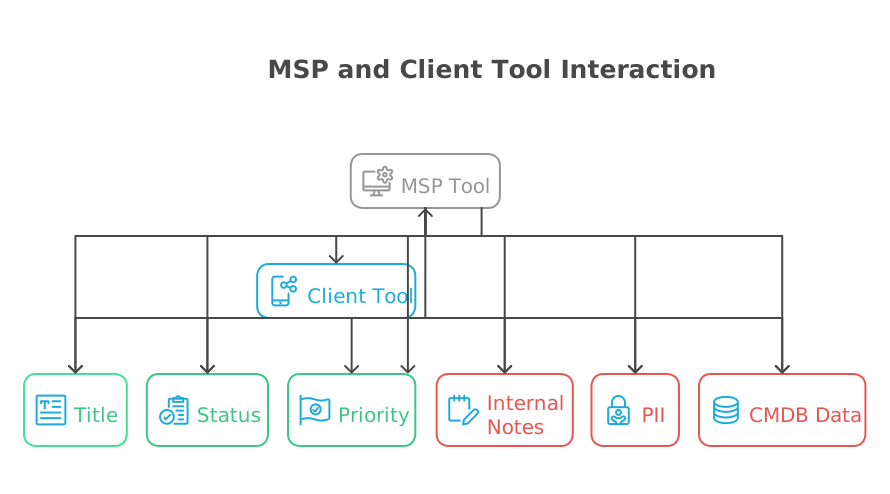
A data contract is a pre-configuration document that answers four questions before a single integration action is built:
• What fields are allowed to cross the boundary? (and in which direction)
• What data must never leave the client environment? (PII, billing records, internal notes, CAB decisions, CMDB topology)
• How are semantically equivalent fields translated? (priority scales, lifecycle states, timestamp formats, identity fields)
• Who owns the ground truth for each field? (i.e., if both sides update a field simultaneously, which value wins?)
This is not a process document. It maps directly to configuration decisions in the integration layer. Each item in the contract corresponds to a specific setting: a trigger condition, a field mapping, a conditional mapping rule, or a respond field map. If the contract is not written, those settings are made by default, and the defaults are almost never correct for MSP environments.
Here is what a practical data contract table looks like for a Freshservice (MSP) to ServiceNow (Client) incident sync:
Tip: This table is the artifact your client's security team needs to review before the integration goes live. It is also the document that prevents the 3 a.m. call asking why an internal escalation note appeared in the client's ITSM.
Five ways 'Sync' Becomes Risk and Rework
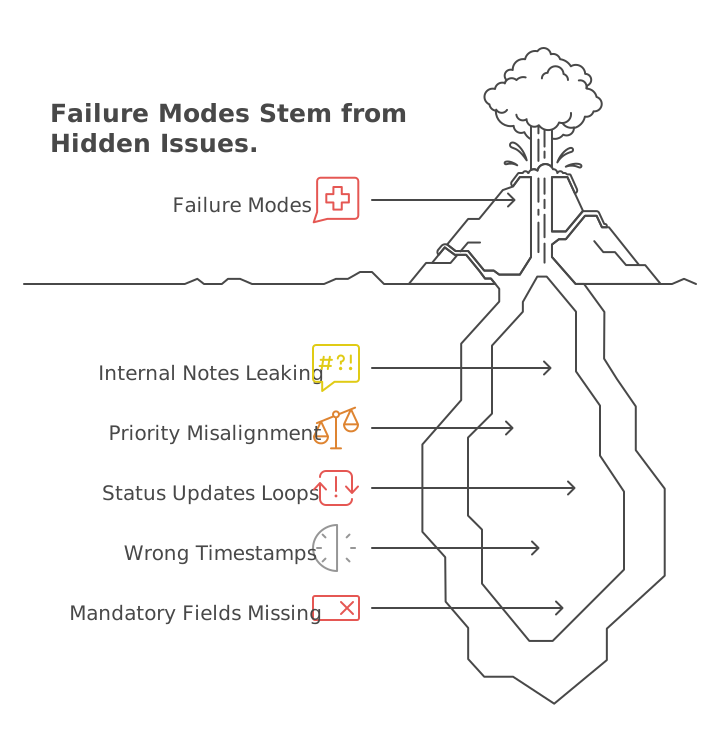
Each of the following failure modes is preventable. Each one is also surprisingly common in MSP environments that skipped the contract step.
1. Internal notes leak across the boundary
An MSP engineer adds a Freshservice work note flagging a billing dispute with the client. Without a source filter explicitly excluding agent-internal notes from the sync scope, that note copies to the client's ServiceNow instance as a comment. It is now visible to the client's entire ITSM team. The MSP has an operational integration and a relationship problem.
The fix is a trigger condition at the source layer: only collect comments where the visibility type is 'public' (or equivalent in the source system's API schema). This is not a field mapping decision. It is a collection decision, defined in the Source tab before mapping begins.
2. Priority scales collide silently
ServiceNow calculates priority from a matrix of Impact and Urgency values. A P1 incident in ServiceNow means Impact = 1 (High) and Urgency= 1 (High). Freshservice uses a flat priority scale: Urgent, High, Medium, Low. A direct field map that sends the numeric value '1' to Freshservice's priority field will be accepted by the API. Freshservice will not throw an error. But'1' is not a valid priority label in Freshservice.
The result is a ticket created with a blank priority field. SLA timers start in the default tier. The incident is effectively invisible to any SLA rule that filters by priority. Nobody gets paged. Nobody knows.
The correct configuration is a conditional mapping that translates semantic meaning: if Impact = 1 AND Urgency = 1, then send 'Urgent'to Freshservice. If Impact = 2 AND Urgency = 2, send 'High'. This is a many-to-one translation, not a field copy.
3. Status updates loop
A status update in Freshservice triggers the integration to update ServiceNow. ServiceNow's update triggers the integration to update Freshservice. Freshservice's update triggers the integration again. The loop runs until the API rate limit caps out or until someone notices that the same ticket has 47 update events logged in the last two minutes.
Two configuration elements prevent this. First: a trigger condition that excludes records where the reporter or last modifier is the integration user. This means ZigiOps will not re-collect records that it itself just updated. Second: a Respond Field Map that writes the target system's record ID back to the source immediately after creation. Future trigger conditions can then check whether that cross-reference field is already populated, and skip the record if it is.
Technical note: ZigiOps' Respond Field Map executes after a successful action completes, writing values from the target system back to the source record. For example: after creating a Jira issue from a ServiceNow incident, ZigiOps writes the Jira issue key (e.g., 'OPS-4521') back to a custom field on the ServiceNow incident. Any future trigger condition can then filter out records where that field is not empty, breaking the loop at the collection layer.
4. Timestamps drive the wrong incremental sync logic
Every polling integration uses a timestamp expression to determine what records to collect on the next run. The default assumption isthat created_date is the correct field. In many cases, it is not.
In ServiceNow, sys_created_on is the creation timestamp of the ITSM record. sys_updated_on is the last modification timestamp.For an update sync -- where you want to pick up records that changed since the last run, not just records created since the last run -- using sys_created_on as the Last Time expression source will miss every update to an existing record. The integration will appear to be running correctly. It will besilently ignoring the majority of its job.
The data contract should specify, per action (create sync vs. update sync), which timestamp field anchors the incremental window. This is nota default. It is a deliberate decision that requires understanding how each source system timestamps its records.
5. Mandatory fields are not conditionally injected
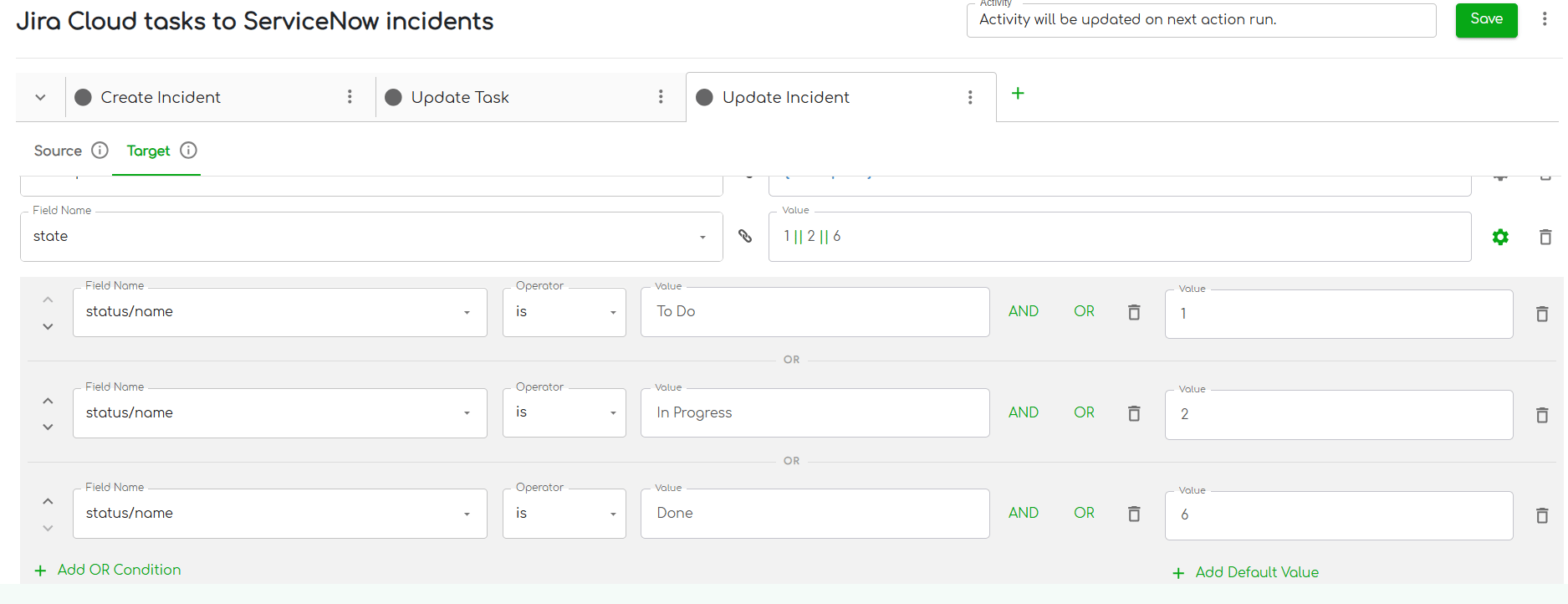
ServiceNow will not resolve an incident without two fields: close_code and close_notes. Jira does not have equivalent mandatory fields on astatus transition to 'Done'. When the Jira issue closes and the integrationattempts to set ServiceNow's state to Resolved (state = 6), ServiceNow rejectsthe update because close_code and close_notes are missing.
The integration throws a validation error. The engineer checks the logs, sees an API error, and assumes there is a connection problem. Theactual issue is that the field mapping does not include the two mandatory fields, and they are not being injected conditionally when the status is'Done'.
The correct configuration adds close_code and close_notes to the field map with a condition: only send these values when the source status equals 'Done'. Both fields can carry hardcoded values if no dynamic mapping isneeded (e.g., close_code = 'Closed/Resolved by Caller', close_notes = 'Closedby Jira'). The condition is what makes this safe: without it, those values would be sent on every status update, which would attempt to force ServiceNow into a resolved state regardless of the actual incident lifecycle.
Building the Data Contract: Field-Level Control in ZigiOps
The data contract is not just a planning document. Every item in it maps to a specific layer of ZigiOps configuration. Here is how each contract element translates into a platform setting.
Source tab filters: control what is collected
Before a record ever reaches the mapping layer, the Source tab determines whether it is collected at all. Trigger conditions here enforce the contract's exclusion rules.
• Exclude records where the reporter or modifier is the integration user (prevents loops)
• Exclude records where the cross-reference field is already populated (prevents re-creation)
• Collect only records where comment type = public (prevents internal note leakage)
• Use Last Time expressions anchored to the correct timestamp field (prevents duplicate or missed records)
Related filters in the Source tab extend this logic to associated records: attachments, linked comments, sub-tasks. These can be filtered independently of the parent record, allowing precise control over what contextual data crosses the boundary alongside the main ticket.
Conditional field mapping: translate semantics, not just values
The Field Map tab is where the contract's translation rules live. Conditional mappings define what value is sent to the target field based on the state of one or more source fields.
ZigiOps evaluates conditions from top to bottom. The first matched condition sends its configured value and stops. If no conditions match, the field is discarded, not sent with an empty or default value. This is important: it means a misconfigured condition fails silently rather than sending incorrect data.
Respond field maps: close the loop and establish the link
A Respond Field Map executes after a successful action and writes a value from the target system back to the source record. This serves two purposes in the context of the data contract.
• It establishes the bidirectional link: the source record now holds the target system's record ID, which futuretrigger conditions use to identify already-managed records.
• It creates an audit trail: the source record shows when the counterpart was created and what its identifier is, without requiring anyone to log into both systems to verify.
Example: After ZigiOps creates a ServiceNow incident from a Freshservice ticket, the Respond Field Map writes the ServiceNow incident number (e.g., INC0045821) back to a custom field on the Freshservice ticket. Future Freshservice trigger conditions check: 'Is this field empty? If not,skip this record.' The loop is structurally impossible.
Field validations: catch contract violations at configuration time
ZigiOps validates field mapping configurations when an integration is saved. It flags: missing mandatory target fields, mappings that reference non-existent source fields, wrong operator types for a given field type, and conditions that reference fields that do not exist in the connected system's schema.
These validations surface contract violations before the integration runs, not after the first batch of records produces errors. ForMSPs building integrations across multiple client environments with slightly different field schemas, this is the difference between catching a misconfiguration in testing and catching it when a client calls.
Making the Contract Repeatable Across Clients
Large MSPs are only partially standardized across their customer base. Some clients run ServiceNow. Others use Jira, Freshdesk, or BMC Remedy. The tools vary. The data contract framework should not.
The key is separating what is fixed from what is parameterized. The fixed layer is the contract structure itself: the exclusion rules, the loop-prevention logic, the conditional mapping patterns, the Respond Field Map configuration. This is built once and reflects how the MSP operates, not how any particular client's ITSM is configured.
The parameterized layer is everything that varies per client: the server URL and authentication credentials, the specific field names used in that client's tool instance, and the priority or status values they have customized in their own workflows.
In ZigiOps, this maps to the difference between the integration template structure and the connected system configuration. AFreshservice-to-ServiceNow incident sync template holds the correct filterlogic, mapping rules, and respond field map structure. When onboarding a newclient, the MSP creates a new connected system entry with the client's serverdetails, then applies the same template. The contract logic is inherited. Only the connection parameters change.
MSP scaling note: ZigiOps supports unlimited transactions with no per-sync fees or record caps. A template built for one client can be replicated across the entire client base without licensing or volume constraints. The contract scales with the MSP.
Why Security Teams Are Now Reviewing Your Data Contracts
In 2025, 77% of MSPs reported increased scrutiny of their security capabilities in RFP and new-business meetings. Third-party involvement in breaches doubled to 30% according to Verizon's DBIR. MSP integrations that cross organizational boundaries are now part of that scrutiny - not because integrations are inherently dangerous, but because poorly defined ones can be.
A data contract is not just an operational document. It is the artifact that a client's security team can review to answer: what data moves between our environment and the MSP's environment, where does it land, how long does it persist, and could our internal records ever be exposed through a misconfiguration?
ZigiOps' architecture supports this directly. Data transferred through the platform is not stored on disk or in a database. Processing happens in memory. No transferred record persists in the integration layer after theaction completes. This means the integration platform itself is not a new data persistence risk. But the contract still needs to define what the field mapping layer is allowed to touch - because a no-storage architecture does not protect against a mapping that copies internal notes to the wrong system in real time.
When a client's security team asks 'what does your integration do with our data?', the data contract is the answer. It is also the document that makes the answer credible, because it maps directly to verifiable configuration settings rather than a verbal assurance.
Build the Contract Before You Build the Integration
The practical sequence is straightforward. Before connectingany two systems, produce a one-page data contract that covers: allowed fieldsand their directionality, fields explicitly excluded from sync, semantictranslation rules for priority and status fields, the correct timestamp fieldfor each incremental sync action, and ground truth ownership for fields updatedby both sides.
Review it with the client's security team before configurationbegins. Then build the integration to enforce it: at the source filter layer,at the conditional mapping layer, and at the respond field map layer. ConfigureZigiOps' field validations to catch deviations at save time. Document theconnected system parameters separately so the contract logic can be replicatedper client without rebuilding.
The API will keep working. The integration will be the partthat holds.
Related Resources: