Jira Service Management to ServiceNow: 14 Real Enterprise Sync Scenarios

Enterprise IT teams rarely operate from a single platform. Development squads live in Jira Service Management. Operations and enterprise service teams run on ServiceNow. When these two platforms don't communicate, tickets fall through the cracks, SLAs are missed, and engineers waste hours on manual status updates. Jira Service Management ServiceNow integration solves this — but only when it's implemented with precision, covering real-world field mapping and two-way data flow.
This guide breaks down 14 proven enterprise sync scenarios, complete with field-mapping templates, so your teams can eliminate silos and deliver seamless ITSM operations. Whether you're an IT Manager standardizing workflows or a CTO evaluating integration architecture, this is the operational reference you need.
"Organizations that rely on disconnected tools, poorly documented workflows, fragmented data, and inconsistent governance will create operational friction that advanced AI technology cannot compensate for."
Why Jira Service Management ServiceNow Integration Is a Strategic Priority
Most enterprises don't choose between Jira Service Management and ServiceNow — they use both. JSM dominates DevOps and agile teams, while ServiceNow anchors enterprise ITSM, CMDB, and ITIL-aligned processes. The challenge is that these platforms were not designed to natively communicate with each other at the depth enterprise workflows demand.
Without a robust Jira Service Management ServiceNow integration, your organization faces duplicate ticket creation, inconsistent status tracking, broken escalation paths, and manual handoffs that introduce human error. Forrester Research consistently identifies fragmented toolchains as a top contributor to inflated IT operational costs and reduced service quality.
The business case is clear: integrated ITSM ecosystems reduce incident resolution time, improve SLA compliance, and free engineers from context-switching between dashboards. Platforms like ZigiOps' Jira Service Management ServiceNow integration make this achievable without writing a single line of custom code.
Core Architecture: How JSM ServiceNow Two-way Sync Works
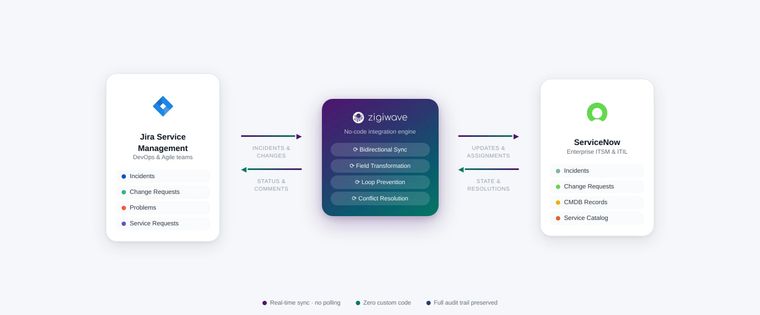
JSM ServiceNow two-way sync means that when a record is created or updated in either platform, those changes are automatically reflected in the other — without manual intervention. This is fundamentally different from one-way data pushes, which still leave gaps in visibility and require someone to manually reconcile discrepancies.
A production-grade two-way integration must handle:
- Conflict resolution — determining which system holds the source of truth when simultaneous updates occur
- Field transformation — converting JSM priority labels (e.g., "High") to ServiceNow priority integers (e.g., "2 - High")
- Loop prevention — ensuring an update from System A doesn't trigger an update loop back into System A
- Conditional filtering — syncing only records that meet defined criteria (e.g., only P1/P2 incidents)
- Attachment and comment propagation — keeping conversation threads and evidence files in sync
ZigiOps handles all of these natively through its visual workflow builder, making enterprise-grade JSM ServiceNow two-way sync accessible to operations teams without integration development expertise. Explore the full capability set on the ZigiOps JSM-ServiceNow integration page.
Jira ServiceNow Field Mapping: The Foundation of Every Integration
Every sync scenario depends on accurate Jira ServiceNow field mapping. Before configuring any workflow, your team must define how fields in JSM correspond to fields in ServiceNow. Mismatched mappings are the number-one cause of integration failures in production environments.
Below is a universal base field-mapping template that applies to most incident and request sync scenarios:
| JSM Field | ServiceNow Field | Transformation Rule | Sync Direction |
|---|---|---|---|
| Summary | Short Description | Direct map (truncate at 160 chars) | Two-way |
| Description | Description | Strip Markdown → Plain text | Two-way |
| Priority (Highest/High/Medium/Low) | Priority (1/2/3/4) | Value lookup table | Two-way |
| Status (In Progress / Done) | State (In Progress / Resolved) | Status-to-State map | Two-way |
| Assignee (Display Name) | Assigned To (sys_id) | Email-to-sys_id lookup | Two-way |
| Reporter | Caller ID | Email-to-sys_id lookup | JSM → ServiceNow |
| Labels / Components | Category / Subcategory | Conditional value map | Two-way |
| Comment | Work Notes / Additional Comments | Source-tagged append | Two-way |
| Attachment | Attachment | Binary transfer | Two-way |
| Custom Field (e.g., Business Impact) | Custom Field (u_business_impact) | Direct or conditional map | Configurable |
This base template is the starting point. Each of the 14 scenarios below refines and extends it for specific operational contexts. For a deeper dive into advanced Jira ServiceNow field mapping logic, review ZigiWave's documented integration use cases.
14 Real Enterprise Sync Scenarios for Jira Service Management ServiceNow Integration
The following scenarios are drawn from real enterprise deployments. Each includes a description, the operational problem it solves, key field-mapping considerations, and sync direction.
Scenario 1: Incident Escalation from JSM to ServiceNow
Problem: Dev teams triage incidents in JSM, but enterprise ITSM governance (SLA tracking, CMDB linking) lives in ServiceNow. High-priority incidents need to exist in both systems simultaneously.
Sync Direction: JSM → ServiceNow (create), then two-way for updates.
Key Field Mappings: Priority, Summary → Short Description, Labels → Category, Assignee → Assignment Group.
Filter Condition: Only sync issues where Priority = Highest or High.
Scenario 2: ServiceNow Incident Creates a JSM Dev Task
Problem: Operations raises an incident in ServiceNow that requires a code fix. The dev team needs a corresponding JSM issue without manually re-entering data.
Sync Direction: ServiceNow → JSM (create), two-way status updates.
Key Field Mappings: Short Description → Summary, CI Name → Component, Assignment Group → Team Label.
Special Logic: Map ServiceNow "Configuration Item" to JSM "Affected Component" using a CMDB lookup.
Scenario 3: Change Request Approval Synchronization
Problem: Change Advisory Boards (CABs) approve changes in ServiceNow. Dev teams implementing those changes track work in JSM. Approval status must propagate automatically.
Sync Direction: ServiceNow → JSM (approval status updates), JSM → ServiceNow (implementation progress).
Key Field Mappings: Approval (Approved/Rejected) → JSM Custom Field (Change Approval Status), Planned Start Date → Due Date.
Scenario 4: Problem Record Linkage for Root Cause Analysis
Problem: ServiceNow problem records drive RCA processes. JSM holds the engineering investigation tasks. Linking these prevents duplicate analysis efforts.
Sync Direction: ServiceNow Problem → JSM Epic (create), two-way comment sync for RCA notes.
Key Field Mappings: Problem Statement → Epic Name, Root Cause → JSM Description (append), Known Error → JSM Label.
Scenario 5: Service Request Fulfillment Across Teams
Problem: End users submit service requests in ServiceNow's portal. Fulfillment tasks are owned by dev/ops teams in JSM. Status must stay aligned across both portals.
Sync Direction: ServiceNow RITM → JSM Story/Task (create), two-way status, JSM Done → ServiceNow Closed.
Key Field Mappings: Requested Item → JSM Summary, Due Date → Due Date, Requested For → Reporter.
Scenario 6: SLA Breach Alert Triggering JSM Escalation
Problem: ServiceNow SLA engine detects a breach. The owning dev team in JSM must be alerted immediately and the issue re-prioritized.
Sync Direction: ServiceNow SLA Breach Event → JSM Priority Update + Comment.
Key Field Mappings: SLA Breach Flag → JSM Priority (set to Highest), Breach Message → JSM Comment (auto-posted).
Scenario 7: CMDB CI Enrichment on JSM Issues
Problem: JSM issues lack infrastructure context. ServiceNow's CMDB holds CI data (server names, environments, owners). Enriching JSM issues with CMDB data improves incident triage speed.
Sync Direction: ServiceNow CMDB → JSM Custom Fields (on incident create/update).
Key Field Mappings: CI Class → Environment Label, Managed By → JSM Stakeholder Field, CI Status → JSM Impact Field.
Scenario 8: Unified Comment and Work Notes Threading
Problem: Communication split across two platforms creates context loss. Engineers in JSM and operators in ServiceNow need to see each other's updates.
Sync Direction: Full two-way comment sync.
Key Field Mappings: JSM Comment → ServiceNow Work Notes (with [JSM] prefix), ServiceNow Additional Comments → JSM Comment (with [SNOW] prefix).
Special Logic: Source-tag prefixes prevent comment duplication loops.
Scenario 9: Multi-Team Incident Coordination (War Room)
Problem: Major incidents (P1) involve both ops teams (ServiceNow) and dev teams (JSM). A parent incident in ServiceNow must coordinate child tasks distributed across JSM projects.
Sync Direction: ServiceNow Major Incident → Multiple JSM Issues (fan-out create), all children report status back.
Key Field Mappings: Incident Number → JSM External Reference, Impact → Priority, Outage Start → Due Date.
Scenario 10: Release and Deployment Tracking
Problem: Releases are planned and governed in ServiceNow (Release Management). Actual deployment tasks live in JSM. Progress visibility is fragmented.
Sync Direction: ServiceNow Release → JSM Epic (create), JSM Sprint completion → ServiceNow Release Phase Status.
Key Field Mappings: Release Name → Epic Name, Target Date → Due Date, Release Manager → JSM Stakeholder.
Scenario 11: Security Vulnerability Incident Bridging
Problem: Security operations log vulnerabilities in ServiceNow. Remediation development work happens in JSM. Bridging these ensures no CVE remediation falls through the cracks.
Sync Direction: ServiceNow Security Incident → JSM Bug (create), two-way resolution status.
Key Field Mappings: CVE ID → JSM Label, CVSS Score → Priority (mapped via threshold rules), Affected CI → Component.
Scenario 12: Onboarding Request Workflow
Problem: HR or facilities submit onboarding requests via ServiceNow. IT provisioning tasks (account creation, equipment) are tracked in JSM. Automation across both eliminates email-based coordination.
Sync Direction: ServiceNow HR Case → JSM Task Bundle (create multiple), completion triggers ServiceNow case resolution.
Key Field Mappings: Employee Name → JSM Summary, Start Date → Due Date, Department → Label/Component.
Scenario 13: Post-Incident Review (PIR) Task Automation
Problem: After ServiceNow incident closure, PIR action items must be created in JSM for engineering teams to execute. Manual creation is slow and often skipped.
Sync Direction: ServiceNow Incident (Resolved) → JSM Tasks (auto-create PIR checklist).
Key Field Mappings: Incident Number → JSM External Reference, Resolution Notes → Task Description, Resolved By → Assignee.
Scenario 14: Cross-Platform Reporting and Audit Sync
Problem: Compliance and audit teams need unified records showing that every ServiceNow incident has a corresponding engineering action logged in JSM. Gaps trigger audit findings.
Sync Direction: Two-way with audit-log field capture.
Key Field Mappings: Created Date, Resolved Date, Assignee History, Status History → mirrored in both systems via custom audit fields.
In their research on vendor consolidation, Gartner emphasizes that data silos and complex custom integrations are the primary roadblocks when organizations try to sun-set legacy systems. The technical debt from old API connections often makes consolidation too risky or expensive for IT leaders.
How ZigiOps Delivers Enterprise-Grade Jira Service Management ServiceNow Integration
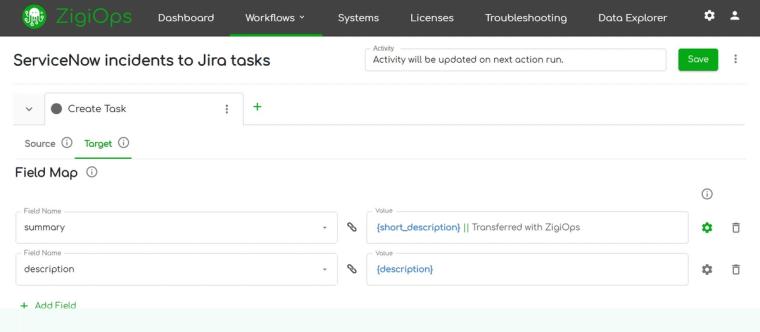
ZigiOps is purpose-built for the complexity of enterprise ITSM integration. Unlike generic iPaaS platforms that treat ITSM as an afterthought, ZigiOps ships with pre-built integration templates for Jira Service Management ServiceNow integration that cover the most common enterprise scenarios out of the box — while remaining fully customizable for edge cases.
Key Platform Capabilities
- No-code visual workflow builder — Configure field mappings, transformation rules, and sync conditions through a drag-and-drop UI
- Real-time and scheduled sync — Choose event-driven triggers or polling intervals based on your SLA requirements
- Advanced filtering — Sync only the records that matter using multi-condition filter logic
- Loop prevention engine — Built-in deduplication prevents circular update cascades
- Full audit trail — Every sync event is logged for compliance and troubleshooting
- On-premise and cloud deployment — Supports hybrid enterprise architectures
- Enterprise security — OAuth 2.0, API key management, and role-based access control
ZigiOps connects to the broader ITSM and DevOps ecosystem. View the full range of Jira Service Management integrations supported by ZigiOps to understand how JSM fits into your wider toolchain strategy.
Deployment Timeline
A typical Jira Service Management ServiceNow integration deployment with ZigiOps follows this pattern:
- Day 1: Connect JSM and ServiceNow instances via API credentials in ZigiOps
- Day 1-2: Select and configure a pre-built integration template matching your primary scenario
- Day 2-3: Customize field mappings, filters, and transformation rules
- Day 3-4: Test in a staging environment with real ticket data
- Day 5: Go live in production with monitoring dashboards active
Compare this to custom API integration development, which typically requires 6-12 weeks of engineering time, ongoing maintenance overhead, and dedicated DevOps resources. Gartner research indicates that integration difficulties are a primary, 48% barrier to cost optimization and that AI-enhanced tools will reduce manual intervention by 60% by 2027.
JSM ServiceNow Two-way Sync: Avoiding Common Enterprise Pitfalls
Even well-designed JSM ServiceNow two-way sync configurations fail in production when these common pitfalls are overlooked. Understanding them before deployment saves significant remediation effort.
Pitfall 1: User Identity Mismatch
JSM uses display names and email addresses. ServiceNow uses sys_id references for user lookups. Without a reliable email-to-sys_id resolution layer, assignee and reporter fields will fail silently. Always build and test your user lookup table before activating any sync.
Pitfall 2: Status Workflow Incompatibility
JSM supports custom workflow statuses (e.g., "Awaiting Customer", "In Review"). ServiceNow has a fixed State field with integer values. You must explicitly map every possible JSM status to a ServiceNow state, including transition states. Unmapped statuses will default to "Open" in ServiceNow, creating false SLA resets.
Pitfall 3: Attachment Size Limits
ServiceNow imposes attachment size limits at the instance level (default 10 MB per file). JSM has different limits. Attempting to sync an oversized attachment will fail the entire sync event unless your integration layer handles the exception gracefully.
Pitfall 4: Rate Limit Exhaustion
Both Atlassian's JSM REST API and ServiceNow's Table API enforce rate limits. High-volume sync scenarios (e.g., bulk ticket imports, war-room fan-out) can hit these limits. Implement exponential backoff and queue management in your integration layer.
Pitfall 5: Missing Required Fields
ServiceNow often has mandatory fields (e.g., Category, Impact, Urgency) that have no equivalent in JSM. If these aren't populated with default values during sync, ServiceNow will reject the record creation. Define default values for all mandatory ServiceNow fields in your mapping configuration.
ITSM.tools confirm that hidden costs and failed integrations often stem from ignoring post-build data complexity, surface-level validation, and unmapped, complex data models. Practitioner-led content emphasizes that ignoring field-level validation and edge cases during implementation leads directly to operational failures in live, complex IT environments.
Selecting the Right Integration Architecture for Your Enterprise
Not every organization needs all 14 scenarios active simultaneously. The right architecture depends on your team structure, ticket volume, and compliance requirements. Use the decision framework below to prioritize your Jira Service Management ServiceNow integration rollout.
| Organization Profile | Recommended Starting Scenarios | Priority Sync Direction | Estimated Ticket Volume |
|---|---|---|---|
| DevOps-led with enterprise ITSM governance | 1, 3, 8, 10 | JSM → ServiceNow primary | 500–2,000/month |
| Enterprise ITSM with embedded dev teams | 2, 5, 7, 9 | ServiceNow → JSM primary | 2,000–10,000/month |
| Security-focused / regulated industry | 11, 14, 6, 4 | Full two-way with audit | Any volume |
| Shared services / enterprise HR-IT | 12, 5, 8, 13 | ServiceNow → JSM primary | 100–500/month |
For organizations managing complex multi-tool ecosystems, ZigiOps supports connections beyond JSM and ServiceNow. Explore the full ZigiOps integration catalog to design a unified IT operations data fabric across your entire toolchain.
Measuring Integration Success: KPIs for Jira Service Management ServiceNow Integration
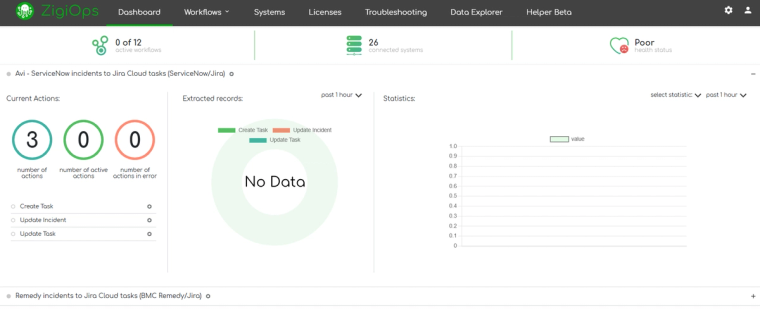
Deploying a Jira Service Management ServiceNow integration is not the end goal — measurable business outcomes are. Define these KPIs before go-live and review them monthly to demonstrate ROI to stakeholders.
- Mean Time to Resolution (MTTR) — Expect a 20-35% reduction within 90 days of full two-way sync activation
- Manual ticket re-entry rate — Should trend toward zero within the first 30 days
- SLA compliance rate — Track before/after integration; breach alerts (Scenario 6) typically drive a 15-25% improvement
- Sync error rate — Target under 1% of all sync events resulting in errors after the first 30-day stabilization period
- Time-to-escalation — Measure how quickly P1 incidents created in JSM appear in ServiceNow; target under 60 seconds
- Engineer hours saved — Calculate manual coordination time eliminated across all integrated teams
According to comprehensive research by MetricNet, there is a direct, linear relationship between First Contact Resolution and cost per ticket. Every 1% improvement in FCR typically maps to a 1% to 1.5% reduction in overall operational support costs. Conversely, when support teams run siloed platforms, ticket reassignments spike, costing organizations roughly 1 hour and 45 minutes of lost productivity per bounce, according to Unthread's Support Performance Benchmarks.
Frequently Asked Questions
Does Jira Service Management ServiceNow integration require coding?
Not with ZigiOps. The platform provides a no-code visual builder that handles field mapping, transformation logic, and sync conditions through configuration. IT operations teams — not developers — can build and maintain these integrations independently.
Does the integration support GDPR requirements?
ZigiOps supports GDPR-aligned data handling through field-level exclusion rules (e.g., excluding PII fields from sync), data residency controls, and full audit logging.
What deployment options are supported?
ZigiOps is available both on-premises and as a cloud (SaaS) deployment — you choose the model that fits your infrastructure and security requirements.
Next Steps: Implement Your Jira Service Management ServiceNow Integration
The 14 scenarios and field-mapping templates in this guide give you the operational blueprint. The remaining variable is execution. ZigiOps removes the technical barriers that traditionally make Jira Service Management ServiceNow integration a months-long engineering project and makes it a days-long configuration task.
Your recommended path forward:
- Identify which of the 14 scenarios match your immediate operational pain points
- Review the ZigiWave Jira - ServiceNow use case documentation for detailed configuration guidance on your target scenarios
- Audit your current field schemas in both JSM and ServiceNow against the base mapping template above
- Map your user directory (email addresses to ServiceNow sys_ids) as a prerequisite
- Start your ZigiOps trial and deploy your first integration template
The cost of inaction — missed SLAs, duplicate tickets, and engineer time lost to manual coordination — is measurable and ongoing. The cost of implementation with a no-code platform is a few days of configuration. That ROI calculation is straightforward.
For a personalized assessment of your integration requirements, explore the ZigiOps Jira Service Management ServiceNow integration page or review the full JSM integration ecosystem ZigiOps supports.
For the full ServiceNow ↔ Jira two-way sync overview, see our integration page.
How does JSM ServiceNow two-way sync handle conflicts when both systems are updated simultaneously?
ZigiOps uses configurable conflict resolution rules. You can designate one system as the source of truth for specific fields, use timestamp-based last-write-wins logic, or apply field-level precedence rules. Most enterprises define ServiceNow as authoritative for SLA and priority fields, and JSM as authoritative for technical description and resolution notes.
Can the integration handle custom fields in both platforms?
Yes. Jira ServiceNow field mapping in ZigiOps supports any custom field in both platforms, including JSM custom field types (text, select, multi-select, date) and ServiceNow custom table fields (u_ prefix fields). Custom field discovery is automated through API introspection.
What happens if one platform is temporarily unavailable?
ZigiOps queues sync events when a target system is unreachable and processes the queue automatically when connectivity is restored. No data is lost, and the audit log records the temporary disruption with timestamps.